

GFWL был популярным игровым онлайн-сервисом, который позволял геймерам со всего мира подключаться и наслаждаться любимыми играми. Однако пользователи жалуются на ошибку загрузки 0x800c0008 в Games for Windows Live.
При этом пользователи не могут загружать и устанавливать свои любимые игры. Это руководство покажет вам, как решить эту проблему и продолжить играть в свои игры.
Что вызывает ошибку загрузки: 0x800c0008?
Ниже приведены некоторые факторы, которые могут вызвать ошибку загрузки: 0x800c0008:
- Помехи от сторонних приложений: одна из основных причин невозможности загрузить этот файл. сообщение об ошибке с кодом 0x800c0008 — это помехи от приложений, запускающих контрпрограммы. Решение состоит в том, чтобы выполнить чистую загрузку и удалить приложения.
- Проблемы с программным обеспечением безопасности. Иногда ваше антивирусное программное обеспечение может блокировать игру, которую вы пытаетесь загрузить, что приводит к появлению этого сообщения об ошибке. Было бы лучше, если бы вы временно отключили антивирус, чтобы решить проблему.
Как исправить ошибку загрузки: 0x800c0008?
1. Переустановите Games for Windows Live в режиме совместимости.
- Нажмите Windows клавишу + R , введите appwiz.cpl и нажмите OK.

- Щелкните правой кнопкой мыши Microsoft Games for Windows Marketplace и Microsoft Games for Windows Live Redistributable и выберите Удалить.
- Перезагрузите компьютер после завершения процесса удаления.
- Теперь найдите Microsoft Games для Windows — LIVE 3.5.95.0 и загрузите законный установщик GFWL.
- Щелкните правой кнопкой мыши программу установки и выберите «Свойства».

- Выберите вкладку «Совместимость» вверху.
- Затем установите флажок «Запустить эту программу в режиме совместимости» и выберите Windows 7 или Windows 8 в раскрывающемся списке.

- Теперь установите флажок « Запустить эту программу от имени администратора» и нажмите «Применить», а затем «ОК».

- Наконец, установите Games for Windows Live, запустите игру GFWL и при необходимости получите свой профиль Gamertag.


Если вы столкнулись с ошибкой загрузки: 0x800c0008, это может быть связано с проблемами совместимости. Кроме того, это может быть связано с тем, что игра установлена неправильно.
Следовательно, вам нужно удалить игру и переустановить ее в режиме совместимости.
2. Установите Games for Windows Live вручную.
- Загрузите установщик игры для Windows Live.
- При нажатии кнопки «Установить» вы должны получить сетевую ошибку, которая приведет вас к папке с именем «Журналы».

- Перейдите в следующее место на жестком диске:
C:UsersnameAppDataLocalMicrosoftGFWLive
- Нажмите «Загрузки».
- Здесь вы должны найти два файла. Нажмите и установите оба из них.
- Было бы лучше, если бы у вас были установлены и работали игры для Windows Live.


Другой жизнеспособный вариант исправить ошибку загрузки: 0x800c0008 на GFWL — установить программное обеспечение вручную. Это устранит потенциальные сбои, мешающие вам загружать игры и играть в них.
3. Запустите Windows 7 или 8 на виртуальной машине для Windows 10.
Программа виртуальной машины для Windows 10 позволит вам запускать несколько операционных систем на одном компьютере, чтобы вы могли установить GFWL и играть в свои игры без каких-либо ошибок.
Вы можете избежать ошибок несовместимости и переключаться между несколькими платформами, выбрав решение виртуальной машины. Таким образом, нет причин запускать другую ОС, используя другие рабочие столы или другие устройства.
Следовательно, вам следует быстро запустить другие версии Windows и исправить эту ошибку с практической помощью лучших доступных виртуальных машин.
4. Временно отключите антивирусное программное обеспечение безопасности.
- Нажмите Windows клавишу, введите вирус и выберите Защита от вирусов и угроз.

- Нажмите «Управление настройками».

- Теперь переключите переключатель для защиты в режиме реального времени назад, чтобы отключить его.
- Наконец, если вы используете сторонний антивирус, щелкните правой кнопкой мыши его значок на панели задач и выберите «Отключить».


В некоторых случаях ошибка загрузки GWFL: 0x800c0008 может быть вызвана вмешательством вашего программного обеспечения безопасности. Это может быть связано с тем, что он ошибочно пометил игру, которую вы пытаетесь загрузить, как угрозу.
В этом случае вы можете временно отключить антивирус, если доверяете игре завершить установку.
5. Выполните чистую загрузку
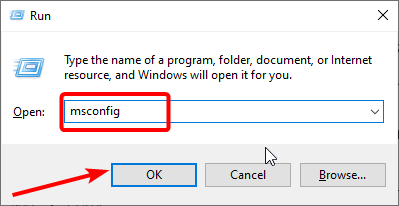
- Нажмите Windows клавишу + R , введите msconfig и нажмите OK.
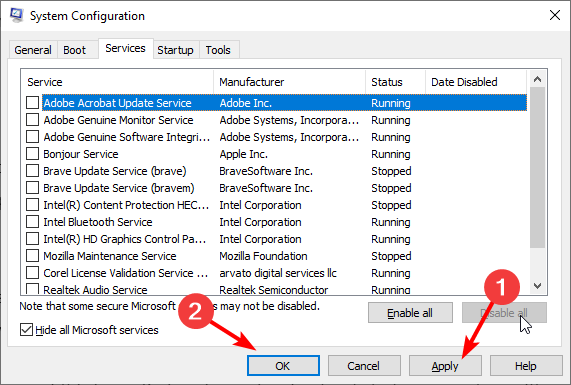
- Выберите вкладку «Службы» вверху, установите флажок «Скрыть все службы Microsoft» и нажмите кнопку «Отключить все».

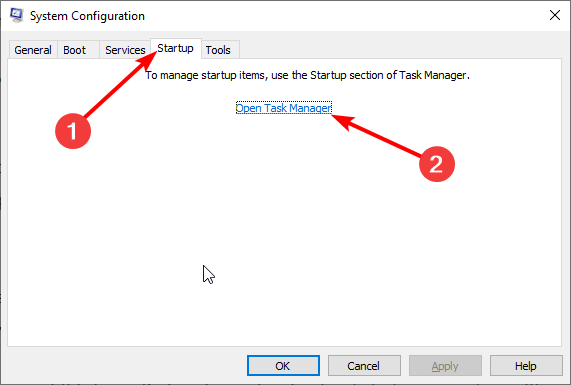
- Теперь перейдите на вкладку «Автозагрузка» вверху и выберите «Открыть диспетчер задач».
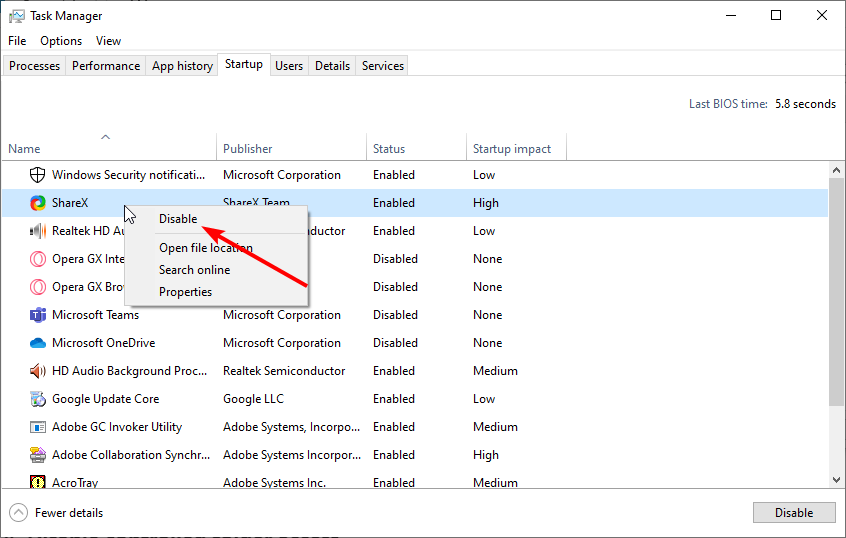
- Щелкните правой кнопкой мыши каждое из приложений и выберите «Отключить».

- Наконец, вернитесь в окно «Конфигурация системы» и нажмите кнопку «Применить», а затем «ОК».


После выполнения чистой загрузки проверьте, сохраняется ли ошибка загрузки 0x800c0008 на GFWL. Если это решит проблему, вам нужно включить отключенные приложения и службы в пакетном режиме, чтобы узнать неисправные.
Там у вас есть все необходимое для исправления ошибки загрузки GFWL: 0x800c0008. Все, что вам нужно сделать сейчас, это внимательно следовать инструкциям в этом руководстве, и ошибка должна исчезнуть в кратчайшие сроки.
Не стесняйтесь сообщить нам о решении, которое помогло вам решить эту проблему, в комментариях ниже.
Easy yet effective ways to get back to playing your favorite games
by Loredana Harsana
Loredana is a passionate writer with a keen interest in PC software and technology. She started off writing about mobile phones back when Samsung Galaxy S II was… read more
Updated on March 14, 2023
Reviewed by
Alex Serban

After moving away from the corporate work-style, Alex has found rewards in a lifestyle of constant analysis, team coordination and pestering his colleagues. Holding an MCSA Windows Server… read more
- If you are dealing with the download error: 0x800c0008 on Game for Windows Live, it might be because of your antivirus.
- You can solve this problem quickly and effectively by running the installer in compatibility mode.
- Another excellent fix to this issue is to perform a clean boot.
XINSTALL BY CLICKING THE DOWNLOAD FILE
This software will repair common computer errors, protect you from file loss, malware, hardware failure and optimize your PC for maximum performance. Fix PC issues and remove viruses now in 3 easy steps:
- Download Restoro PC Repair Tool that comes with Patented Technologies (patent available here).
- Click Start Scan to find Windows issues that could be causing PC problems.
- Click Repair All to fix issues affecting your computer’s security and performance
- Restoro has been downloaded by 0 readers this month.
GFWL was a popular online gaming service that allowed gamers worldwide to connect and enjoy their favorite games. However, users complain of a download error 0x800c0008 on Games for Windows Live.
With this, users are unable to download and install their favorite titles. This guide will show you how to fix this issue and continue playing your games.
What causes download error: 0x800c0008?
Below are some of the factors that can cause the download error: 0x800c0008:
- Interference from third-party apps: One of the leading causes of the failed to download this file. error code 0x800c0008 error message is interference from apps running counter-programs. The solution is to perform a clean boot and uninstall the apps.
- Issues with security software: Sometimes, your antivirus software might block the game you are trying to download, leading to this error message. It would be best if you disabled your antivirus temporarily to solve the problem.
How can I fix the download error: 0x800c0008?
1. Reinstall Games for Windows Live in compatibility mode
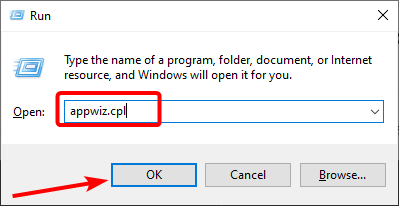
- Press the Windows key + R, type appwiz.cpl, and click OK.
- Right-click Microsoft Games for Windows Marketplace and Microsoft Games for Windows Live Redistributable and select Uninstall.
- Restart your computer after the uninstall process is finished.
- Now, search for Microsoft Games for Windows – LIVE 3.5.95.0 and download the legit GFWL installer.
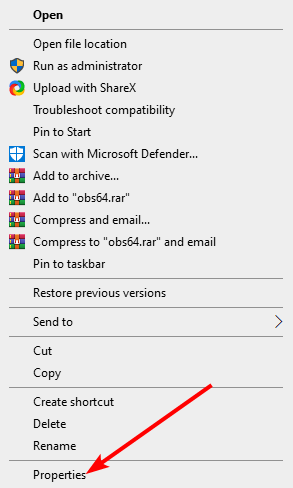
- Right-click on the installer and choose Properties.
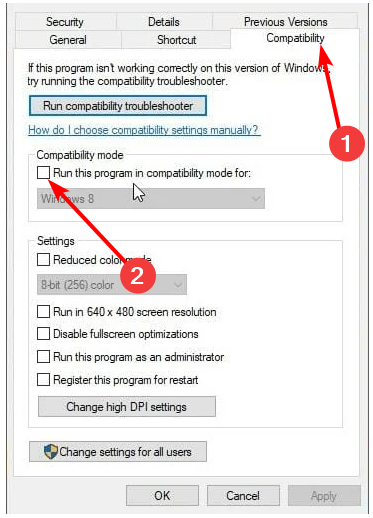
- Select the Compatibility tab at the top.
- Next, check the box next to Run this program in compatibility mode and select Windows 7 or Windows 8 from the dropdown.
- Now, check the box next to Run this program as an administrator and click Apply, followed by OK.
- Finally, install Games for Windows Live, run your GFWL game, and retrieve your Gamertag profile if necessary.
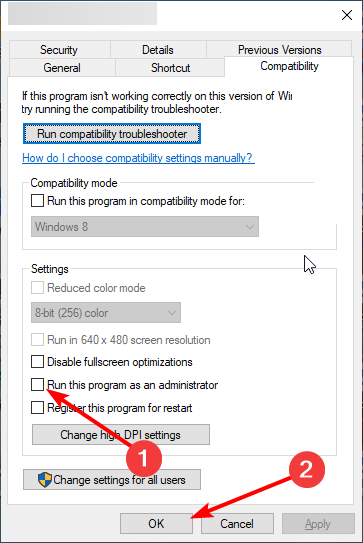
If you are facing the download error: 0x800c0008, it might be because of compatibility issues. Also, it might be because the game is not installed correctly.
Hence, you need to uninstall the game and reinstall it in compatibility mode.
2. Install Games for Windows Live manually
- Download the Game for Windows Live installer.
- When clicking install, you should get a network error that takes you to a folder called Logs.
- Navigate to the following location on your hard drive:
C:UsersnameAppDataLocalMicrosoftGFWLive - Click on Downloads.
- Here you should find two files. Click and install both of them.
- It would be best if you now had Games for Windows Live installed and working.
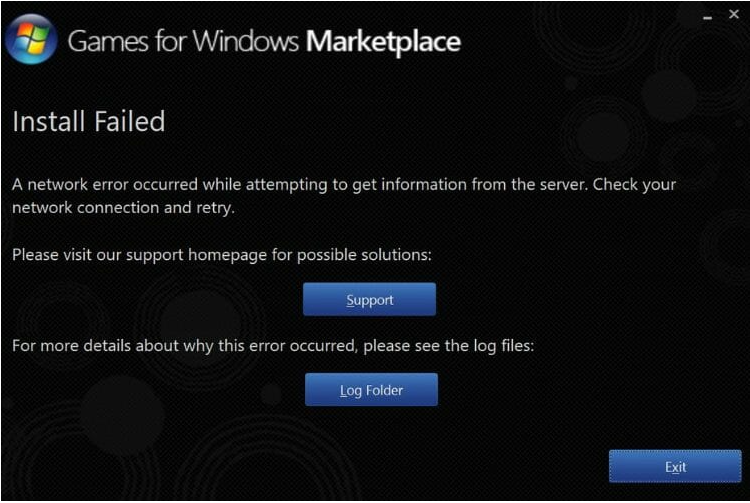
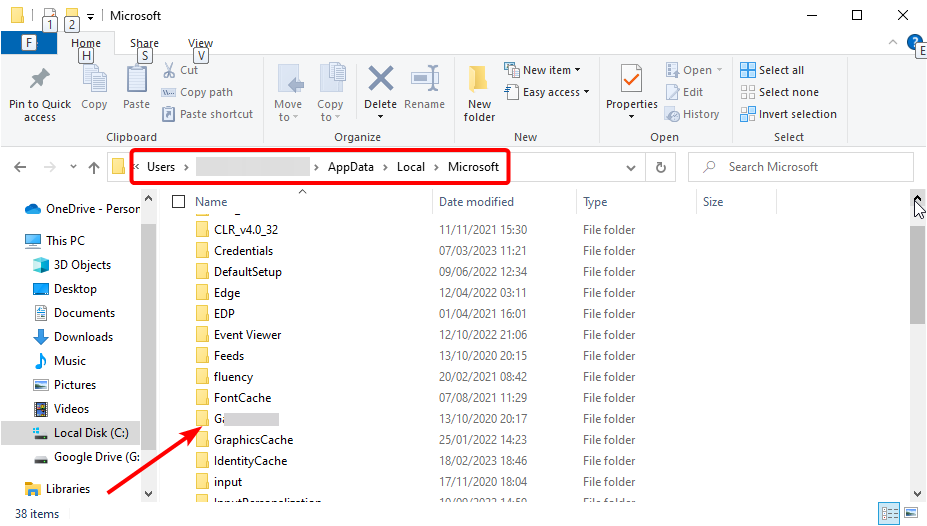
Another viable option to fix the download error: 0x800c0008 on GFWL is to install the software manually. This will clear the potential glitches stopping you from downloading and playing games.
3. Run Windows 7 or 8 in a VM for Windows 10
A virtual machine program for Windows 10 will allow you to run multiple operating systems on the same computer so that you can install GFWL and play your games without any errors.
Some PC issues are hard to tackle, especially when it comes to corrupted repositories or missing Windows files. If you are having troubles fixing an error, your system may be partially broken.
We recommend installing Restoro, a tool that will scan your machine and identify what the fault is.
Click here to download and start repairing.
You can avoid incompatibility errors and switch between multiple platforms by choosing a virtual machine solution. So there is no reason to run another OS using different desktops or other devices.
Hence, you should quickly run other Windows versions and fix this error with practical help from the best virtual machines available.
- Fix: Games for Windows Live install failed/not working
- Fix: Phone Link App Notifications Not Working
- Fix: Explorer.exe not Starting on Windows Startup
- Fix: 0x80030001 Error When Copying Files
4. Temporarily disable the antivirus security software
- Press the Windows key, type virus, and select Virus & threat protection.
- Click the Manage settings option.
- Now, toggle the switch for Real-time protection backward to disable it.
- Finally, if you use a third-party antivirus, right-click its icon on the taskbar and select Disable.
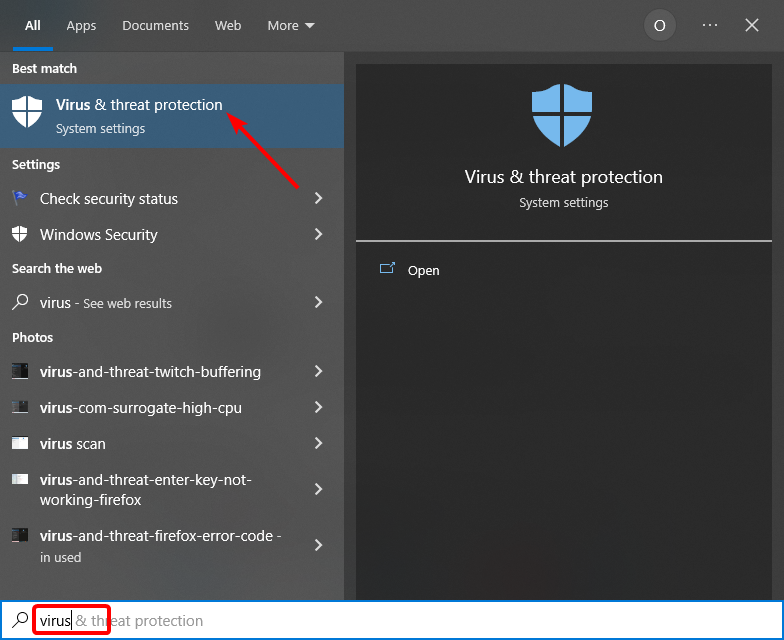
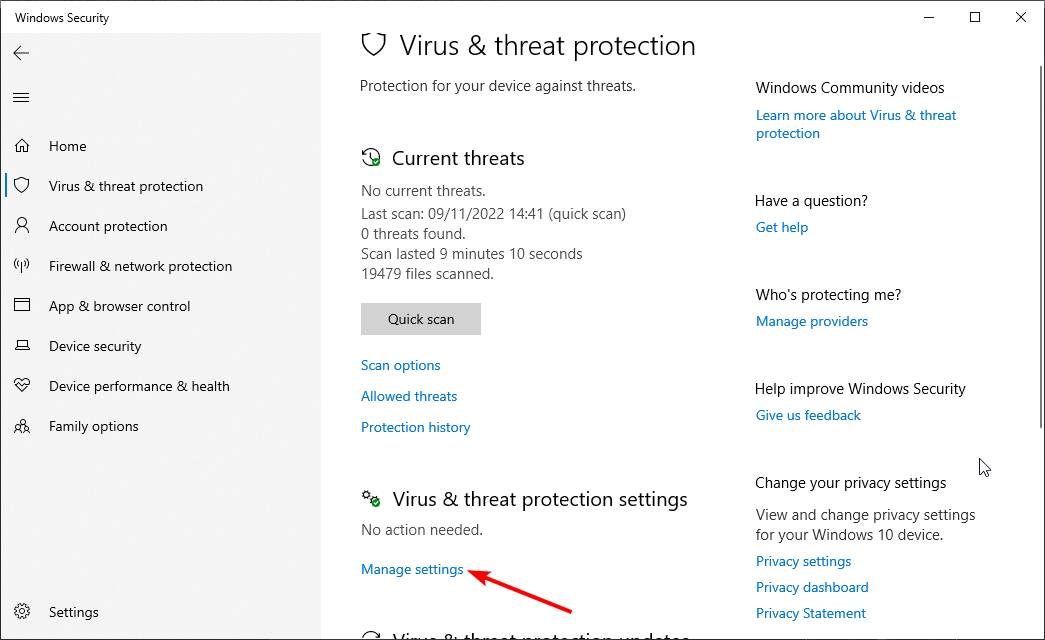
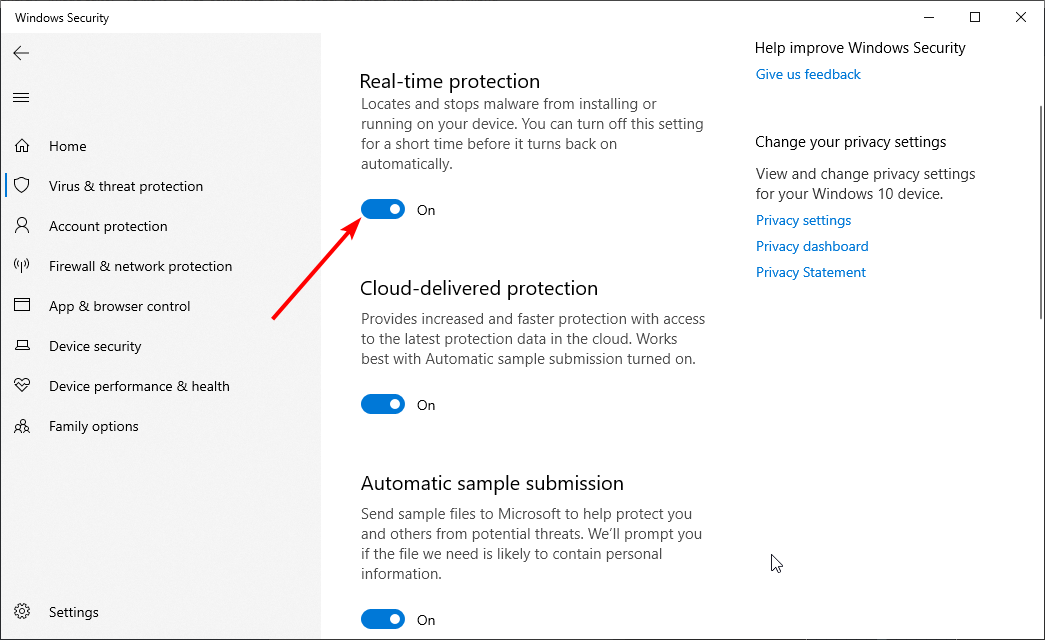
In some cases, the GWFL download error: 0x800c0008 can be caused by interference from your security software. This might be because it wrongly flagged the game you are trying to download as a threat.
In this case, you can disable your antivirus temporarily if you trust the game to complete the installation.
5. Perform a clean boot
- Press the Windows key + R, type msconfig, and click OK.
- Select the Services tab at the top, check the Hide all Microsoft services, and click the Disable all button.
- Now, click the Startup tab at the top and select Open Task Manager.
- Right-click each of the apps there and select Disable.
- Finally, go back to the System Configuration window and click the Apply button, followed by OK.
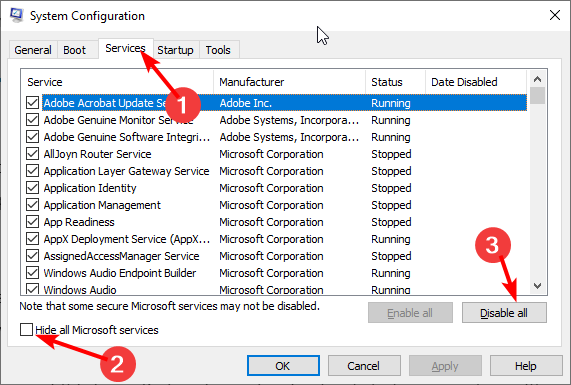
After performing a clean boot, check if the download error 0x800c0008 on GFWL remains. Should this solve the problem, you need to enable the disabled apps and services in batches to know the faulty ones.
There you have everything needed to fix the GFWL download error: 0x800c0008. All you need to do now is to follow the instructions in this guide carefully, and the error should disappear in no time.
If the Games for Windows Marketplace installation failed on your PC, check our detailed guide to fix it.
Feel free to let us know the solution that helped you fix this issue in the comments below.

- Remove From My Forums
-
Question
-
Problem: Error 0x800c0008 by downloading RSS feed in Outlook 2016, no downloading of pictures in Oulook Email (tries connecting for information on server without result) and in the same time a slow Internet Explorer 11 in downloading from Internet in Windows
7 Ultimate 64What done:
1. Run CCleaner for app’s and registry
2. Run Malwarebytes for malware
3. Run Security Essentials for virus
4. Roll back to an very earlier restore point
5. Remove and add RSS feed
6. Remove and add Email account in Outlook.com
7. Office repair Office 2016
8. New profile in Outlook 2016
9. Firewall off
10. Sync RSS feeds to CFL in Outlook 2016 on/off
11. Repair of .OST files with scanpst.exeTill now without result !!!
Same problem with no answer:
http://answers.microsoft.com/en-us/msoffice/forum/msoffice_outlook-mso_winother/some-rss-feeds-just-dont-work/58faee6f-b5c2-413e-b070-819df90c7835
Col Writer
-
Edited by
Monday, November 28, 2016 8:39 PM
-
Edited by
3 минуты назад, RetroSysAdmin сказал:
vipnet_csp_x64_win10.msiфайл с цифровой подписью как бы
а так да — не причём. Как Путин.
«Виноват компьютер» (c) бабка с почты РФ
Тут дело в том, что ресурс, на котором лежит дистрибутив находится в налоговой, какие там настройки никто не знает. Вы же осознаете, что запрос на загрузку из браузера и из установщика разный и ресурс может по разному на него реагировать. В любом случае первая точка входа у Вас поддержка налоговой, они уже эскалируют производителю, если сами не разберутся.
Я бы лично рекомендовал проверить настройки антивируса, возможно он в таком методе вызова загрузки видит какую-то опасность и блокирует или просто глюк. Антивирус есть? Какой?
Содержание
- FIX: Download error 0x800c0008 on Games for Windows Live
- How can I fix error 0x800c0008 on Games for Windows Live?
- 1. Reinstall Games for Windows Live in compatibility mode
- 2. Install Games for Windows Live manually
- 3. Run Windows 7 or 8 in a VM for Windows 10
- VMware Workstation 16
- 4. Temporarily d isable the antivirus security software
- 5. Perform a clean boot
- Решение проблемы: ошибка инициализации Games for WINDOWS – LIVE
- Устраняем ошибку – «ошибка инициализации Games for WINDOWS – LIVE
- Что делать еспри установки games for windows live выдает ошибку 0x800c0008
- Fable III
FIX: Download error 0x800c0008 on Games for Windows Live


Games for Windows Live was a popular online gaming service that allowed gamers from all over the world to connect and enjoy their favorite games.
And even though GFWL has been discontinued, the service itself remained operational, leaving users still able to access previously purchased content through the client profile.
If you are playing a title that requires you to use GFWL but are unable to download and install it, keep reading our article.
How can I fix error 0x800c0008 on Games for Windows Live?
1. Reinstall Games for Windows Live in compatibility mode
You can also use a dedicated software that will help you with the uninstall process, and additionally remove any files and Windows registry entries left behind.
The below choice lets you see all installed applications on your PC in one single pane. From there, you can easily search the program you want to uninstall by using the search bar at the top.
This helpful software features include a Forced Uninstall option to remove remnants of already uninstalled programs, optimization tools, and free professional technical support.
2. Install Games for Windows Live manually

3. Run Windows 7 or 8 in a VM for Windows 10
A virtual machine program for Windows 10 will allow you to run multiple operating systems on the same computer so that you’ll be able to install GFWL and play your games without any error.
Simply download VMware Workstation 16, which gives you the possibility to install multiple VMs on the same host, in order to deploy Windows 10, 8, 7, or XP from the same computer.
This nifty software supports DirectX 10.1 and OpenGL 3.3 to provide a fluid and sensitive experience so that when you’re running 3D applications, you’ll get the most high-performance graphics.

VMware Workstation 16
Try out VMware to easily avoid getting the 0x800c0008 download error on Games for Windows Live.
4. Temporarily d isable the antivirus security software
5. Perform a clean boot

By following these steps carefully, you should be able to resolve the download error 0x800c0008 on GFWL. If you have any questions or suggestions regarding the subject, tell us in the comments section below.
Restoro has been downloaded by 0 readers this month.
Источник
Хочется отметить то, что данная онлайн служба зачастую доставляет больше проблем, чем удобств, так как в играх ранее, сохранения можно было благополучно скопировать из папки с игрой куда-либо в другое место, чтоб при необходимости – вернуть их и продолжить играть. Теперь же это сделать не совсем просто, особенно тем, у кого копия игры не лицензионная, либо просто забыли логин и пароль от этой онлайн службы games for windows live. Мало того, так еще ошибка при инициализации games for windows live не позволит даже зайти в саму игру, что явно потреплет ваши нервы.
Устраняем ошибку – «ошибка инициализации Games for WINDOWS – LIVE
2. Установить программу (или же переустановить ее).
4. Затем заполняем должным образом анкету регистрации (НО! При выборе страны, не выбирайте Россию, так как у данного сервиса до сих пор неизвестные проблемы – выберите, например, США в это списке).
5. После прохождения регистрации запустите программу games for windows live и введите данные, которые вы указали при регистрации.
6. Запустите игру, нажав после заставки клавишу Home.
7. В появившемся меню games for windows live нажмите создать «Вход»
Если данная инструкция не помогла, и вы являетесь владельцем не лицензионной копии игры, то рекомендую достать другой дистрибутив игры, а то это вам не дом 2 онлайн смотреть! Так как, например, в сети блуждает поломанный дистрибутив игры Section 8, которая ни смотря, ни на что, выдает ошибку инициализации Games for WINDOWS – LIVE.
Источник
Что делать еспри установки games for windows live выдает ошибку 0x800c0008


Fable III


Вот и у меня такая же проблема, ДЛС есть а установить не могу, т.к. GFWL никак не хочет запускаться. «Ошибка входа. Неудается войти. Повторите попытку позже.Код 80131509»
Вот и у меня такая же проблема, ДЛС есть а установить не могу, т.к. GFWL никак не хочет запускаться. «Ошибка входа. Неудается войти. Повторите попытку позже.Код 80131509»
он не может создать защищенное соединение порты как то надо настраивать
он не может создать защищенное соединение порты как то надо настраивать
Теперь хотелось бы узнать как?))
Теперь хотелось бы узнать как?))
ну мне самому интересно хотя как вариант скорей всего это у них не подключает порт я свои смотрел все включены че только не пробовал
Я после того как открыл порты, он у меня точно такую же ошибку выдал.
И на сайте майкрософт в форуме было такое вот предложение
в редакторе реестра изменить значения веток:
HKEY_LOCAL_MACHINE System CurrentControlSet Control SecurityProviders Schannel DisableRenegoOnClient
HKEY_LOCAL_MACHINE System CurrentControlSet Control SecurityProviders Schannel DisableRenegoOnServer
Все заработало! Удачи, надеюсь тебе тоже поможет.
Источник