
I
На сайте с 29.07.2015
Offline
2
Здравствуйте. Хочу просканировать один из своих сайтов (remontturbin.com.ua) программами Xenu и Screaming Frog. Но при запуске сканера, SF сразу выдает error 503, а Xenu — temporarily overloaded..
Хотя сайт при этом открывается. Подскажите где копать, раньше сканировал нормально. Предполагаю, что с .htaccess что-то не так… Хотя, не сканируется и совершенно свежий сайт, в котором SEO ещё и «не пахло» — http://tenti-karkasi.com.ua/, а также точно также отвечает сайт, который давно не трогался, но seo проводилось в свое время и сканировался нормально — http://uzh-turbo.com.ua/ . Буду очень признателен за помощь.
P.S. Единственное, что наводит на мысль — у этих сайтов один хостер, ukraine.com.ua, за несколько лет проблем не возникало. Стоит ли доставать техподдержку и каким образом аргументировать, ведь сайт работает!! Спасибо.
- eTarget 2011:Панельная дискуссия «Стратегия и планирование рекламной кампании в интернете»
- eTarget 2011: Круглый стол «Реклама в онлайн-видео»
- Могут ли «плохие» входящие ссылки привести к ухудшению ранжирования?

[Удален]
29 июля 2015, 15:45
#1
itconsult:
Здравствуйте. Хочу просканировать один из своих сайтов (remontturbin.com.ua) программами Xenu и Screaming Frog. Но при запуске сканера, SF сразу выдает error 503, а Xenu — temporarily overloaded..
Хотя сайт при этом открывается. Подскажите где копать, раньше сканировал нормально. Предполагаю, что с .htaccess что-то не так… Хотя, не сканируется и совершенно свежий сайт, в котором SEO ещё и «не пахло» — http://tenti-karkasi.com.ua/, а также точно также отвечает сайт, который давно не трогался, но seo проводилось в свое время и сканировался нормально — http://uzh-turbo.com.ua/ . Буду очень признателен за помощь.
P.S. Единственное, что наводит на мысль — у этих сайтов один хостер, ukraine.com.ua, за несколько лет проблем не возникало. Стоит ли доставать техподдержку и каким образом аргументировать, ведь сайт работает!! Спасибо.
А если в robots.txt убрать Disallow: / что-нибудь меняется?
I
На сайте с 29.07.2015
Offline
2
Topvisor:
А если в robots.txt убрать Disallow: / что-нибудь меняется?
Дык, нет в robots Disallow корня… Во что есть, если ещё не посмотрели:
User-agent: *
Disallow: /administrator/
Disallow: /bin/
Disallow: /cli/
Disallow: /includes/
Disallow: /installation/
Disallow: /language/
Disallow: /layouts/
Disallow: /libraries/
Disallow: /logs/
Disallow: /modules/
Disallow: /tmp/
Host: remontturbin.com.ua
Sitemap: http://remontturbin.com.ua/sitemap.xml
S
На сайте с 05.01.2013
Offline
40
В броузере вы в один поток смотрите, а проги в сколько потоков жрут? Может хостинг слабенький?
[Удален]
29 июля 2015, 16:45
#4
itconsult:
Дык, нет в robots Disallow корня… Во что есть, если ещё не посмотрели:
User-agent: *
Disallow: /administrator/
Disallow: /bin/
Disallow: /cli/
Disallow: /includes/
Disallow: /installation/
Disallow: /language/
Disallow: /layouts/
Disallow: /libraries/
Disallow: /logs/
Disallow: /modules/
Disallow: /tmp/
Host: remontturbin.com.ua
Sitemap: http://remontturbin.com.ua/sitemap.xml
Скрин не делал, но корень был в Disallow
+ какие-то комментарии в самом начале.
Вот сейчас вы это всё почистили. Всё равно 503 софт показывает?
DV
На сайте с 01.05.2010
Offline
644
Скорее всего в nginx настроено limit_conn_zone, и поделом, чтобы не DDoS’или.
SI
На сайте с 03.12.2007
Offline
130
itconsult:
… Хотя, не сканируется и совершенно свежий сайт, в котором SEO ещё и «не пахло» — http://tenti-karkasi.com.ua/
$ curl http://tenti-karkasi.com.ua/robots.txt
# If the Joomla site is installed within a folder such as at
# e.g. www.example.com/joomla/ the robots.txt file MUST be
# moved to the site root at e.g. www.example.com/robots.txt
# AND the joomla folder name MUST be prefixed to the disallowed
# path, e.g. the Disallow rule for the /administrator/ folder
# MUST be changed to read Disallow: /joomla/administrator/
#
# For more information about the robots.txt standard, see:
# http://www.robotstxt.org/orig.html
#
# For syntax checking, see:
# http://www.sxw.org.uk/computing/robots/check.html
User-agent: *
Disallow: /
Disallow: /administrator/
Disallow: /cache/
Disallow: /cli/
Disallow: /components/
Disallow: /images/
Disallow: /includes/
Disallow: /installation/
Disallow: /language/
Disallow: /libraries/
Disallow: /logs/
Disallow: /media/
Disallow: /modules/
Disallow: /plugins/
Disallow: /templates/
Disallow: /tmp/
-= Онлайн сервисы =-
[Удален]
29 июля 2015, 17:52
#7
Тот самый robots.txt c запретом корня.
I
На сайте с 29.07.2015
Offline
2
seogearbox:
В броузере вы в один поток смотрите, а проги в сколько потоков жрут?…
Проги жрать не успевают, так как сразу после старта выдают эрор. В настройках пробовал потоки уменьшать до 1-го, та же беда..
seogearbox:
…Может хостинг слабенький?
хостинг ukraine.com.ua, сижу на нём более пяти лет, постоянно радует своим развитием, ранее проблем не было. В панели управления хостингом — MySQL -> Медленные запросы — Медленные запросы не обнаружены. Там же нагрузка на web сервер, цитирую:
Запросы на сайт
Оранжевая линия отображает количество запросов статической информации, такой как картинки, видео, JavaScript, Flash и.т.д. Синяя — количество запросов для получения динамической информации, которая формируется скриптами PHP, Perl, Python. В большинстве случаев синяя линия отображает количество просмотренных страниц на вашем сайте. Обработкой статической информации занимается очень быстрый сервер nginx. Динамические страницы формируются с помощью сервер Apache, который умеет вызывать интерпретаторы языков программирования PHP, Perl и других. В статистику по нагрузке попадают только те запросы, которые проходят через сервер Apache. Если количество запросов на Apache составляет более 50% от количества запросов на nginx, то это говорит о возможных проблемах с сайтом. Такими проблемами могут быть: CMS, которые статическую информацию формируют через скрипты, слишком большая посещаемость вашего сайта роботами или же неправильные настройки виртуального хоста.
View Screen Capture» />
Скрины вроде не страшные )
[Удален]
29 июля 2015, 18:41
#9
itconsult:
Проги жрать не успевают, так как сразу после старта выдают эрор. В настройках пробовал потоки уменьшать до 1-го, та же беда..
хостинг ukraine.com.ua, сижу на нём более пяти лет, постоянно радует своим развитием, ранее проблем не было. В панели управления хостингом — MySQL -> Медленные запросы — Медленные запросы не обнаружены. Там же нагрузка на web сервер, цитирую:
View Screen Capture» />
Скрины вроде не страшные )
Роботс кривой, хостинг не при чем 
Уберите Disalow: / и взлетит сразу.
На этот раз скрин: http://ipic.su/img/img7/fs/image.1438195156.jpg
I
На сайте с 29.07.2015
Offline
2
Topvisor:
Скрин не делал, но корень был в Disallow
+ какие-то комментарии в самом начале.
ничё не чистил на изначално проблемном сайте — remontturbin.com.ua
robots как был так и остался.
Topvisor:
Вот сейчас вы это всё почистили. Всё равно 503 софт показывает?
503, проверил — так как решения пока нет.
———- Добавлено 29.07.2015 в 20:49 ———-
ребята, читаем вместе моё сообщение
Хочу просканировать один из своих сайтов (remontturbin.com.ua) программами Xenu и Screaming Frog. Но при запуске сканера, SF сразу выдает error 503, а Xenu — temporarily overloaded..
Все остальные сайты как дополнение к решению.
Сайт http://tenti-karkasi.com.ua намеренно закрыт от индексации, так как сайт молодой, слеплен на скорую руку и не уникальный.
Смотрите robots сайта remontturbin.com.ua !!!! там нет Disallow корня!!!
———- Добавлено 29.07.2015 в 20:52 ———-
DenisVS:
Скорее всего в nginx настроено limit_conn_zone, и поделом, чтобы не DDoS’или.
А как это определить? Беседа по душам с хостером?
HTTP Status Codes Crawling With The Screaming Frog SEO Spider
If the Screaming Frog SEO Spider only crawls one page, or does not crawl as expected, the ‘Status’ and ‘Status Code’ are the first things to check to help identify what the issue is.
A status is a part of Hypertext Transfer Protocol (HTTP), found in the server response header, it is made up of a numerical status code and an equivalent text status.
When a URL is entered into the SEO Spider and a crawl is initiated, the numerical status of the URL from the response header is shown in the ‘status code’ column, while the text equivalent is shown in the ‘status’ column within the default ‘Internal’ tab view e.g.

The most common status codes you are likely to encounter when a site cannot be crawled and the steps to troubleshoot these, can be found below:
Status Code – Status
0 – Blocked By Robots.txt
0 – DNS Lookup Failed
0 – Connection Timeout
0 – Connection Refused
0 – Connection Error / 0 – No Response
200 – OK
301 – Moved Permanently / 302 – Moved Temporarily
400 – Bad Request / 403 – Forbidden / 406 – Status Not Acceptable
404 – Page Not Found / 410 – Removed
429 – Too Many Requests
500 – Internal Server Error / 502 – Bad Gateway / 503 – Service Unavailable
0 – Blocked by robots.txt
Any ‘0’ status code in the Spider indicates the lack of a HTTP response from the server. The status provides a clue to exactly why no status was returned.
In this case this shows the robots.txt of the site is blocking the SEO Spider’s user agent from accessing the requested URL. Hence, the actual HTTP response is not seen due to the disallow directive.

Things to check: What is being disallowed in the sites robots.txt? (Add /robots.txt on subdomain of the URL crawled).
Things to try: Set the SEO Spider to ignore robots.txt (Configuration > Robots.txt > Settings > Ignore Robots.txt) or use the custom robots.txt configuration to allow crawling.
Reason: The SEO Spider obeys disallow robots.txt directives by default.
0 – DNS Lookup Failed
The website is not being found at all, often because the site does not exist, or your internet connection is not reachable.

Things to check: The domain is being entered correctly.
Things to check: The site can be seen in your browser.
Reason: If you can’t view the site in a browser, you could be experiencing PC / Network connectivity issues. If you can view the site, then something (likely an antivirus or firewall) is blocking the Spider from connecting to the internet and an exception must be set up for it.
0 – Connection Timeout
A connection timeout occurs when the SEO Spider struggles to receive an HTTP response from the server in a set amount of time (20 seconds by default).

Things to check: Can you view the site in a browser, does it load slowly?
Things to try: If the site is slow try increasing the response timeout and lowering speed of the crawl.
Reason: This gives the SEO Spider more time to receive information and puts less strain on the server.
Things to check: Can other sites be crawled? (bbc.co.uk and screamingfrog.co.uk are good control tests).
Things to try: Setting up exceptions for the SEO Spider in firewall / antivirus software (please consult your IT team).
Reason: If this issue occurs for every site, then it is likely an issue local to you or your PC / network.
Things to check: Is the proxy enabled (Configuration > System > Proxy).
Things to try: If enabled, disable the proxy.
Reason: If not set up correctly then this might mean the SEO Spider is not sending or receiving requests properly.
0 – Connection Refused
A ‘Connection Refused’ is returned when the SEO Spider’s connection attempt has been refused at some point between the local machine and website.

Things to check: Can you crawl other sites? (bbc.co.uk and screamingfrog.co.uk are good control tests).
Things to check: Setting up exceptions for the SEO Spider in firewall/antivirus software (please consult your IT team).
Reason: If this issue occurs for every site, then it is likely an issue local to you or your PC / network.
Things to check: Can you view the page in the browser or does it return a similar error?
Things to try: If the page can be viewed set Chrome as the user agent (Configuration > User-Agent). A Googlebot user-agent is also worth testing, although it is not unusual for sites to block a spoofed Googlebot.
Reason: The server is refusing the SEO Spider’s request of the page (possibly as protection/security against unknown user-agents).
0 – Connection Error / 0 – No Response
The SEO Spider is having trouble making connections or receiving responses.

Things to check: Proxy Settings (Configuration > System > Proxy).
Things to try: If enabled, disable the proxy.
Reason: If not set up correctly then this might mean the SEO Spider is not sending/receiving requests properly.
Things to check: Can you view the page in the browser or does it return a similar error?
Reason: If there are issues with the network or site, the browser would likely have a similar issue.
200 – OK
There was no issue receiving a response from the server, so the problem must be with the content that was returned.

Things to check: Does the requested page have meta robots ‘nofollow’ directive on the page / in the HTTP header or do all the links on the page have rel=’nofollow’ attributes?
Things to try: Set the configuration to follow Internal/External Nofollow (Configuration > Spider).
Reason: By default the SEO Spider obeys ‘nofollow’ directives.
Things to check: Are links JavaScript? (View page in browser with JavaScript disabled)
Things to try: Enable JavaScript Rendering (Configuration > Spider >Rendering > JavaScript). For more details on JavaScript crawling, please see our JavaScript Crawling Guide.
Reason: By default the SEO Spider will only crawl <a href=””>, <img src=””> and <link rel=”canonical”> links in HTML source code, it does not read the DOM. If available, the SEO Spider will use Google’s deprecated AJAX crawling scheme, which essentially means crawling an HTML snapshot of the rendered JavaScript page, instead of the JavaScript version of the page.
Things to check: ‘Limits’ tab of ‘Configuration > Spider’ particularly ‘Limit Search Depth’ and ‘Limit Search Total’.
Reason: If these are set to check 0 or 1 respectively, then the SEO Spider is being instructed to only crawl a single URL.
Things to check: Does the site require cookies? (View page in browser with cookies disabled).
Things to try: Configuration > Spider > Advanced Tab > Allow Cookies.
Reason: A separate message or page may be served to the SEO Spider if cookies are disabled, that does not hyperlink to other pages on the site.
Things to try: Change the user agent to Googlebot (Configuration > User-Agent).
Reason: The site/server may be set up to serve the HTML to search bots without the necessity of accepting Cookies.
Things to check: What is specified in the ‘Content’ Column?
Things to try: If this is blank, enable JavaScript Rendering (Configuration > Spider >Rendering > JavaScript) and retry the crawl.
Reason: If no content type is specified in the HTTP header the SEO Spider does not know if the URL is an image, PDF, HTML pages etc. so cannot crawl it to determine if there are any further links. This can be bypassed with rendering mode as the SEO Spider checks to see if a <meta http-equiv> is specified in the <head> of the document when enabled.
Things to check: Is there an age gate?
Things to try: Change the user agent to Googlebot (Configuration > User-Agent).
Reason: The site/server may be set up to serve the HTML to search bots without requiring an age to be entered.
301- Moved Permanently / 302 – Moved Temporarily
This means the requested URL has moved and been redirected to a different location.

Things to check: What is the redirect destination? (Check the outlinks of the returned URL).
Things to try: If this is the same as the starting URL, follow the steps described in our why do URLs redirect to themselves FAQ.
Reason: The redirect is in a loop where the SEO Spider never gets to a crawlable HTML page. If this is due to a cookie being dropped, this can be bypassed by following the steps in the FAQ linked above.
Things to check: External Tab.
Things to try: Configuration > Spider > Crawl All Subdomains.
Reason: The SEO Spider treats different subdomains as external and will not crawl them by default. If you are trying to crawl a subdomain that redirects to a different subdomain, it will be reported in the external tab.
Things to check: Does the site require cookies? (View the page in a browser with cookies disabled).
Things to try: Configuration > Spider > Advanced Tab > Allow Cookies.
Reason: The SEO Spider is being redirected to a URL where a cookie is dropped, but it does not accept cookies.
400 – Bad Request / 403 – Forbidden / 406 – Status Not Acceptable
The server cannot or will not process the request / is denying the SEO Spider’s request to view the requested URL.

Things to check: Can you view the page in a browser or does it return a similar error?
Things to try: If the page can be viewed set Chrome as the user agent (Configuration > User-Agent). A Googlebot user-agent is also worth testing, although it is not unusual for sites to block a spoofed Googlebot.
Reason: The site is denying the SEO Spider’s request of the page (possibly as protection/security against unknown user agents).
404 – Page Not Found / 410 – Removed
The server is indicating that the page has been removed.

Things to check: Does the requested URL load a normal page in the browser?
Things to try: Is the status code the same in other tools (Websniffer, Rexswain, browser plugins etc.).
Reason: If the status code is reported incorrectly for every tool, the site/server may be configured incorrectly serving the error response code, despite the page existing.
Things to try: If the page can be viewed set Chrome as the user agent (Configuration > User-Agent). A Googlebot user-agent is also worth testing, although it is not unusual for sites to block a spoofed Googlebot.
Reason: Site is serving the server error to the SEO Spider (possibly as protection/security against unknown user agents).
429 – Too Many Requests
To many requests have been made of the server in a set period of time.
Things to check: Can you view your site in the browser or does this show a similar error message?
Things to try: Lowering the crawl speed and/or testing a Chrome user agent.
Reason: The server is not allowing any more requests as too many have been made in a short period of time. Lowering the rate of requests or trying a user agent this limit may not apply to can help.
500 / 502 / 503 – Internal Server Error
The server is saying that it has a problem.

Things to check: Can you view your site in the browser or is it down?
Things to try: If the page can be viewed set Chrome as the user agent (Configuration > User-Agent). A Googlebot user-agent is also worth testing, although it is not unusual for sites to block a spoofed Googlebot.
Reason: Site is serving the server error to the SEO Spider (possibly as protection/security against unknown user agents).
It is possible for more than one of these issues to be present on the same page, for example, a JavaScript page could also have a meta ‘nofollow’ tag.
There are also many more response codes than this, but in our own experience, these are encountered infrequently, if at all. Many of these are likely to also be resolved by following the same steps as other similar response codes described above.
More details on response codes can be found at https://en.wikipedia.org/wiki/List_of_HTTP_status_codes
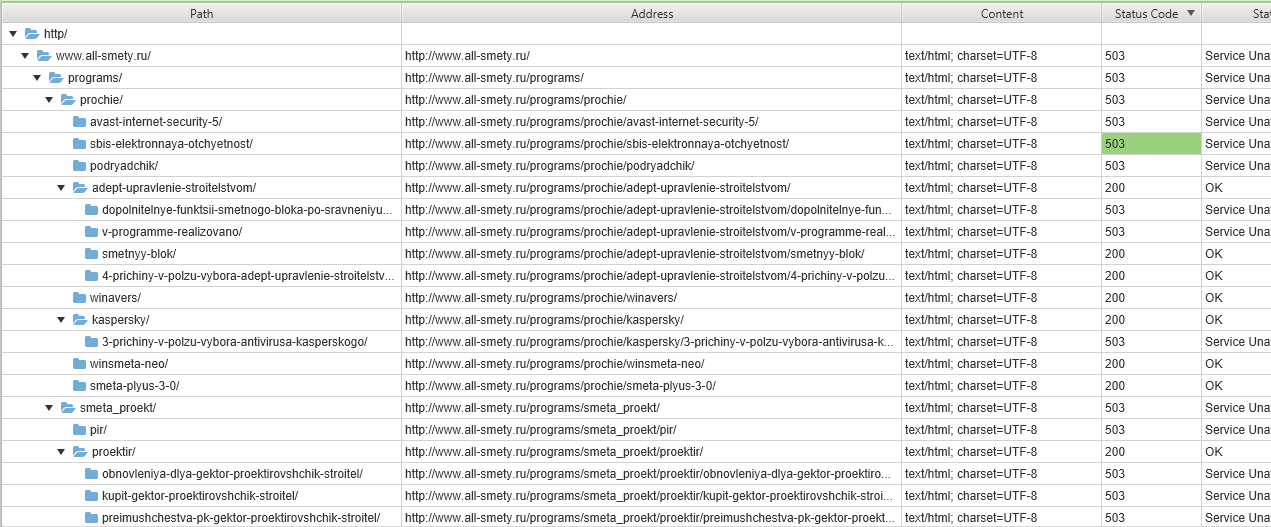
Есть сайт www.all-smety.ru на нём стоит авторизация через HTTP, поисковики и программы аудита типа Xenu и Screaming frog выдают ошибку 503, при том что страницы доступны. Может кто сталкивался с подобным ?
Сайт стоит на битриксе, в разделе аналитики переходы с поисковиков не учитываются, в вебмастере яндекса всё ок с этим.
-
Вопрос заданболее трёх лет назад
-
401 просмотр
HTTPS response status codes are hidden away from a person’s view, handled by a web browser and server, but they provide a wealth of information to developers and SEO teams. If you’re using an HTTP status checker or want to learn more about these codes, we’re going to cover them in great detail.
But before we begin, it’s crucial that you understand what these status codes are and why they’re essential.
What are HTTP status codes?
Whenever you type a URL in your browser or go to a page through a search engine, an HTTP status code is returned. The code is sent from the server to the browser, but you won’t see these codes unless there is some issue with a website or its server.
There’s a good chance that you’ve seen a 4XX status code when a page didn’t exist or something that looked like this:
Sometimes, the page will be all white with the words:
- Forbidden
- Page Not Found
These codes, 403 and 404 respectively, tell your browser that there’s an issue with the request you’ve sent.
What is the status code returned from the server to your browser?
Unless it’s your job to check statuses or develop a site, your main concern is that the page loads – period. However, since these responses are a good indicator of what’s happening behind the scenes on your site, it’s important to be able to view the response a page returns.
Where can I see the HTTP status code?
An HTTP status code checker is the easiest method because it’s a user-friendly way to see the status of a page. However, you can also see the code in your browser in some cases. For example:
- Google Chrome: Enter developer mode on a page by pressing Option + ⌘ + J (on macOS), or Shift + CTRL + J(on Windows/Linux) and you’ll see the status of the page and elements that exist.
- Firefox: Navigate to Tools > Browser Tools > Web Developer Tools and then click on the Network tab to see the status of a page and its elements.
Now that you know where to find these codes, what do they actually mean? It depends. There are a lot of codes to go through.
HTTP response status codes
Response codes can mean anything, from an HTTP status timeout to the request being successful. Codes are broken down into five main categories:
Informational responses (100–199)
- 100 Continue: A response that tells the client to continue or ignore the request.
- 101 Switching Protocols: A response to an Upgrade header and provides information relating to the protocol the server is switching to.
- 103 Early Hints: Used with the Link header. The 103 code allows the preloading of some resources while the response is pending.
Successful responses (200–299)
Below is the list of all SEO important 2xx status codes:
- 200 OK: Indicates that the request was a success.
- 201 Created: Commonly sent after a POST or PUT request to indicate that the request was successful and a new resource is being loaded.
- 202 Accepted: A response that the request was received, but no action has been taken yet. Typically, this response is given when the server is waiting for another server or process.
- 203 Non-authoritative Information: Sent when the metadata doesn’t match the origin server.
- 204 No Content: The server has no content to send back.
- 205 Reset Content: Reset the document from the request origin.
- 206 Partial Content: Sent when the Range header is requesting a partial resource.
- 207 Multi-Status: A set of multiple status codes for multiple resource requests.
Redirection messages (300–399)
- 300 Multiple Choice: Sent when a request has numerous response options.
- 301 Moved Permanently: The URL requested has moved, and a new URL is sent.
- 302 Found: Indicates that the URL requested has changed temporarily.
- 303 See Other: Sent to alert the client to seek the resource at a different URL.
- 304 Not Modified: Sent to clients when using cached resources to tell the client that the resource has not been modified since the last cached version.
- 307 Temporary Redirect: Follows the same rules as the 302-response code, but the user agent cannot change the HTTP method used.
- 308 Multiple Choice: Follows the same rules as a 301-status code, but the HTTP method cannot be changed.
Client error responses (400–499)
Here is the list of all SEO important 4xx response codes below:
- 400 Bad Request: An invalid syntax was sent to the server.
- 401 Unauthorized: The client has not authorized itself and must do so to receive a response.
- 403 Forbidden: The client does not have access to the file.
- 404 Not Found: The resource was not found by the server.
- 405 Method Not Allowed: The client sent an unsupported request method for the respective resource.
- 406 Not Acceptable: The client sent a request that doesn’t conform to the content in the request.
- 407 Proxy Authentication Required: The request must be resent by a proxy.
- 408 Request Timeout: The server wants to shut the connection down because it’s unused.
- 409 Conflict: The current state of the server is in conflict with the request sent.
- 410 Gone: A request for a resource that has been permanently deleted.
- 411 Length Required: The Content-Length sent in the header field was not defined and rejected the request.
- 412 Precondition Failed: Preconditions in the headers do not meet the server requirements.
- 413 Payload Too Large: The requested entity exceeds server limits.
- 414 URI Too Long: The client sent a URL request that the server refuses to interpret.
- 415 Unsupported Media Type: The client requested a media format that the server doesn’t support.
- 416 Range Not Satisfiable: The Range field does not satisfy server requirements.
- 417 Exception Failed: The Except header’s data cannot meet server requirements.
- 421 Misdirected Request: The server is unable to respond to the request.
- 422 Unprocessable Entity: Semantic errors are stopping the request processing.
- 423 Locked: The resource requested is locked.
- 424 Failed Dependency: A dependency request failed.
- 425 Too Early: The server refuses to fulfill the request because it may be repeated.
- 426 Upgrade Required: The server may approve the request if an upgrade to the client protocol is made.
- 428 Precondition Required: A request failed to meet the preconditions, and the request must be conditional.
- 429 Too Many Requests: A response indicating rate limiting due to excessive requests by the user.
- 431 Request Header Fields Too Large: The header fields sent by the client are too large to process and must be sent back with smaller header fields.
- 451 Unavailable for Legal Reasons: The resource is inaccessible due to legal reasons, such as government censorship.
Server error responses (500–599)
Below is the list of all 5xx status codes to know for SEO:
- 500 Internal Server Error: Server doesn’t know how to handle the client request.
- 501 Not Implemented: The server does not support the request.
- 502 Bad Gateway: An invalid response was sent to the server.
- 503 Service Unavailable: The server cannot handle the request.
- 504 Gateway Timeout: The server cannot receive a response fast enough when acting as a getaway.
- 505 HTTP Version Not Supported: The server does not support the HTML version requested.
- 506 Variant Also Negotiates: An internal configuration issue exists.
- 507 Insufficient Storage: The server cannot store and fulfill the request.
- 508 Loop Detected: Infinite loop is stopping the request from being successful.
- 510 Not Extended: Extensions to the original request are required to fulfill the request.
- 511 Network Authentication Required: The client must be authenticated to gain network access.
Why HTTP Status Codes and Errors Matter for Search Engine Optimization (SEO)
Google’s John Mueller has a lot of interesting advice (view below) where he discusses 404 errors specifically. Mueller states that if a site has 30% or 40% 404 errors, it’s totally fine. He mentions churn sites, such as classified ads, specifically.
However, while acceptable, this is truly dependent on the site and what value these pages offer.
For example, if you have removed pages that are of no SEO value, Google will not penalize you, according to what Mueller said in the video.
That’s a good thing.
With that said, let’s assume that you just migrated your site and now 20% of the pages are showing 404 errors. You’ll lose SEO value in the process. After a migration, you should check page status for all pages and work to restore pages that you want to keep on your site for SEO value or redirect them to corresponding pages.
Running a mass HTTP status checker on your site periodically is good practice and can help you correct any issues that naturally pop up during a site’s evolution.
The main issues that we see pop up with errors are:
- 4xx codes – Issues with pages disappearing exist because they’ll be deindexed by Google, so you lose SEO value and traffic.
- 301 and 302s – 3xx redirects aren’t bad, but it’s too easy to have a 301 redirect in place of a 302 or vice versa.
- 5xx status – The 5xx ranges are present with server errors and issues, such as an HTTP status code timeout, although some 4xx responses can also be timeout issues.
Thankfully, you don’t have to worry about a 1XX or 2XX response impacting your site’s SEO.
A status code checker helps you identify issues as they arise and make changes quickly to improve usability and rankings in some cases. You have a lot of options for monitoring and checking page status.
Monitoring HTTP Status Code Responses
What is the status code returned from the server to your browser? Unless an error is sent to your browser and displayed on the screen, you won’t know what code is sent to you. Instead, you should use an HTTP status code checker to monitor response codes.
You can sift through your site’s log files to search for a specific 4XX status code or 5XX status code, but it’s incredibly time-consuming.
If your site is an enterprise, a status code checker is the only feasible way to monitor status codes. Thankfully, monitoring status codes is possible with the right tools, such as:
Screaming Frog
Screaming Frog has a built-in crawler that will find broken links and server errors on your site. Running this HTTP status checker periodically and then exporting the list of errors is one way to monitor your site’s status.
Google Search Console
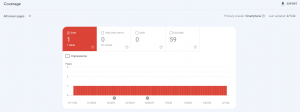
Google’s Search Console is something that you should use to find errors on your site. When you navigate to the “Coverage” tab, you’ll find pages where Google found issues on your site. While this isn’t the best URL status checker, it gives you a quick glimpse at what problems the search giant has when crawling your site.
Mazeless
We might be a little biased, but our HTTPS status checker is what we recommend you use for tracking your status codes. Our checker is part of our larger tool, but it provides a fast and easy way to monitor HTTP status timeout, 1XX status code, 2XX status code, 3XX status code, 3xx redirection and of course, 4XX and 5XX codes, too.
Click here to register for your free trial.
Browser compatibility
Certain browsers accept only some HTTP Response Status Codes. Here is a list of browsers and the codes they accept:
1XX Status Codes and Browser Compatibility
| 100 | |
| Chrome | Y |
| Chrome Android | Y |
| Edge | 12+ |
| Firefox | Y |
| Firefox Android | Y |
| Internet Explorer | Y |
| Opera | Y |
| Opera Android | Y |
| Safari | Y |
| Safari iOS | Y |
| Samsung Internet | Y |
| WebView Android | Y |
2XX Status Codes and Browser Compatibility
| 200 | 201 | 204 | 206 | |
| Chrome | Y | Y | Y | Y |
| Chrome Android | Y | Y | Y | Y |
| Edge | 12+ | 12+ | 12+ | 12+ |
| Firefox | Y | Y | Y | Y |
| Firefox Android | Y | Y | Y | Y |
| Internet Explorer | Y | Y | Y | Y |
| Opera | Y | Y | Y | Y |
| Opera Android | Y | Y | Y | Y |
| Safari | Y | Y | Y | Y |
| Safari iOS | Y | Y | Y | Y |
| Samsung Internet | Y | Y | Y | Y |
| WebView Android | Y | Y | Y | Y |
3XX Status Codes and Browser Compatibility
| 301 | 302 | 303 | 304 | 307 | 308 | |
| Chrome | Y | Y | Y | Y | Y | 36 |
| Chrome Android | Y | Y | Y | Y | Y | 36 |
| Edge | 12+ | 12+ | 12+ | 12+ | 12+ | 12 |
| Firefox | Y | Y | Y | Y | Y | 14 |
| Firefox Android | Y | Y | Y | Y | Y | 14 |
| Internet Explorer | Y | Y | Y | Y | Y | 11 |
| Opera | Y | Y | Y | Y | Y | 24 |
| Opera Android | Y | Y | Y | Y | Y | 24 |
| Safari | Y | Y | Y | Y | Y | 7 |
| Safari iOS | Y | Y | Y | Y | Y | 7 |
| Samsung Internet | Y | Y | Y | Y | Y | 3 |
| WebView Android | Y | Y | Y | Y | Y | 37 |
4XX Status Codes and Browser Compatibility
| 401 | 403 | 404 | 406 | 407 | 409 | 410 | 412 | 416 | 418 | 425 | 451 | |
| Chrome | Y | Y | Y | Y | Y | Y | Y | Y | Y | Y | – | Y |
| Chrome Android | Y | Y | Y | Y | Y | Y | Y | Y | Y | Y | – | Y |
| Edge | 12+ | 12+ | 12+ | 12+ | 12+ | 12+ | 12+ | 12+ | 12+ | 12+ | – | 12+ |
| Firefox | Y | Y | Y | Y | Y | Y | Y | Y | Y | Y | 58 | Y |
| Firefox Android | Y | Y | Y | Y | Y | Y | Y | Y | Y | Y | 58 | Y |
| Internet Explorer | Y | Y | Y | Y | Y | Y | Y | Y | Y | Y | – | Y |
| Opera | Y | Y | Y | Y | Y | Y | Y | Y | Y | Y | – | Y |
| Opera Android | Y | Y | Y | Y | Y | Y | Y | Y | Y | Y | – | Y |
| Safari | Y | Y | Y | Y | Y | Y | Y | Y | Y | Y | – | Y |
| Safari iOS | Y | Y | Y | Y | Y | Y | Y | Y | Y | Y | – | Y |
| Samsung Internet | Y | Y | Y | Y | Y | Y | Y | Y | Y | Y | – | Y |
| WebView Android | Y | Y | Y | Y | Y | Y | Y | Y | Y | Y | – | Y |
5XX Status Codes and Browser Compatibility
| 500 | 501 | 502 | 503 | 504 | |
| Chrome | Y | Y | Y | Y | Y |
| Chrome Android | Y | Y | Y | Y | Y |
| Edge | 12+ | 12+ | 12+ | 12+ | 12+ |
| Firefox | Y | Y | Y | Y | Y |
| Firefox Android | Y | Y | Y | Y | Y |
| Internet Explorer | Y | Y | Y | Y | Y |
| Opera | Y | Y | Y | Y | Y |
| Opera Android | Y | Y | Y | Y | Y |
| Safari | Y | Y | Y | Y | Y |
| Safari iOS | Y | Y | Y | Y | Y |
| Samsung Internet | Y | Y | Y | Y | Y |
| WebView Android | Y | Y | Y | Y | Y |
Protocols
The Internet protocols that allow HTTP requests to work include:
- Application Layer Protocols: The application layer deals with process-to-process communication and consists of numerous protocols, including but not limited to: HTTP/S, FTP, POP, DNS, XMPP, SSH and more.
- Transport Layer Protocols: The transport layer is used for connection-oriented transmissions and includes TCP, SCTP, UDP and others.
- Internet Layer Protocols: The Internet layer is a series of methods, protocols and specifications used to send network packets across the Internet. IPv6 and IPv6 are two core protocols used in the Internet layer.
- Link Layer Protocols: The lowest layer in the Internet protocol is the link layer. This layer “talks to” physical and logical network components using tunnels, NDP, PPP, MAC or other protocols.
Recap
HTTP response status codes indicate the health of your server, help you find issues with pages, folders or files on your site and allow you to correct them. Once you understand the codes and have an HTTP status checker in place, you’ll be better prepared to fix issues with your site that can lead to:
- Lost organic traffic
- Poor usability
- Drop in revenue
Identifying and correcting issues is vital to the success of any website.
Очень часто я сталкивалась с тем, что несмотря на наличие огромного количества статей и пособий по использованию Screaming Frog SEO Spider, все равно остается очень много вопросов по парсингу этим инструментом.
Поэтому я решила написать короткую инструкцию, рассказывающую как пользоваться данной программой. И, как и раньше, я не буду рассказывать голую теорию. Сразу поясню, это не полный и раскрытый обзор инструмента. В этой статье будет описано только самое базовое и основное. Также в конце будет небольшой подарочек от меня.

Инструкция по использованию Скримин Фрог
Итак, чтобы начать проводить анализ по Screaming Frog, нам необходимо зайти в него и добавить туда сайт.
Для этого:
- Открываем Screaming Frog SEO Spider;
- Вставляем ссылку сайта и нажимаем «Start».
Инструмент условно делится на 3 поля. У каждого из них своя задача:
- Первое поле показывает вид ошибки и их количество (например, что у нас на сайте присутствует 29 страниц с битыми ссылками);
- Второе поле отражает, с какими именно ссылками связана выбранная в первом поле ошибка (то есть в первом поле указано, что есть 29 страниц с битыми ссылками. А в поле 2 перечислены эти 29 ссылок);
- Поле три показывает всю необходимую информацию о ссылке из второго поля (например, тип ссылки, входящие, исходящие ссылки, мета-теги, тексты, статус-код и так далее).

После того как мы разбили на условных три поля наш экран, пора приступать к выявлению ошибок, на которые указывает SF (Screaming Frog). Я подробно рассмотрю все три поля на одном примере, который разобью на 3 шага, и дальше их надо будет применять каждый раз.
ШАГ 1: ОПРЕДЕЛЕНИЕ ОШИБКИ
Приведу пример на одном пункте. И аналогично его можно будет применять на другие.
Ищем в первом поле блок «External». В нем нас интересует строка «HTML». Данная строка показывает количество ресурсов (сторонних сайтов), на которые ссылается наш сайт и тем самым отдает свой вес. Исходящие ссылки необходимо удалять или закрывать (не бездумно. Есть ситуации, когда этого делать не стоит). В случае скрина, мы видим, что на сайте есть 9 исходящих ссылок.

ШАГ 2: ПОИСК МЕСТА ОШИБКИ
Итак, мы нашли, что у нас 9 исходящих ссылок. Теперь нам нужно определить что это за ссылки. Для этого нажимаем на саму строку «HTML» и начинаем смотреть во второе поле. По изображению видим, что у нас 9 ссылок:
- Первая и с пятой по восьмую ссылки ведут на js-файлы;
- Вторая и третья — это ссылки социальных сетей;
- Четвертая ссылка — Google Tag Manager;
- Девятая — ссылка на WordPress.

ШАГ 3: СБОР ИНФОРМАЦИИ
В поле 2 видим 9 ссылок, которые есть на нашем сайте. Чтобы подробнее понять, где именно они находятся, нажимаем в поле два на каждую из них по очереди. В поле 3 появляется информация о данной ссылке. Нажимаем вкладку «Inlinks». В данной вкладке можно увидеть список страниц, на которых находится данная ссылка. После обнаружения нужно перейти на эти страницы и закрыть ссылку nofollow или удалить ее.

Какие ошибки смотреть в Скриминг Фрог СЕО Спайдер?
Теперь вы знаете как находить ошибки и их расположение. Осталось узнать какие ошибки в принципе выявлять на сайте с помощью Screaming Frog:
- Исходящие ссылки (External -> HTML). Это ссылки на сторонние ресурсы с нашего сайта. Их стоит закрывать, чтобы наш сайт не передавал вес.
- Код ответа страницы (Response Codes -> Redirection (3xx) / Client Error (4xx) / Server Error (5xx)). Redirection показывает ссылки на вашем сайте на страницы, которые ведут на другие страницы. Client Error показывает страницы, которые отсутствуют, но на вашем сайте есть на них ссылки или не настроены редиректы. Server Error показывает страницы, которые выдают ошибки из-за загрузки сервера.
- Ошибки с мета-тегом title (Page Title -> Missing / Duplicate / Below 30 Characters / Sample as H1 / Multiple). Missing — страницы, на которых отсутствует мета-тег Title. Duplicate — страницы, на которых мета-тег Title дублируется. Below 30 Characters — мета-теги, которые содержат меньше 30 символов. Sample as H1 — мета-теги, дублирующие h1. Multiple — несколько мета-тегов title на одной странице.
- Ошибки с мета-тегом description (Meta Description -> Missing / Duplicate / Below 70 Characters / Multiple). Missing — страницы, на которых отсутствует мета-тег Description. Duplicate — страницы, на которых мета-тег Description дублируется. Below 70 Characters — мета-теги, которые содержат меньше 70 символов. Multiple — несколько мета-тегов description на одной странице.
- Мета-тег keywords (Meta Keywords -> Duplicate / Multiple). Наличие данного мета-тега уже давно не несет никакой пользы для продвижения. Мало того, по ним конкуренты могут собрать ваше СЯ. Поэтому я просто советую его удалять. Для этого во всех полях, кроме Missing, должны стоять нули.
- Заголовок H1 (H1 -> Missing / Duplicate / Multiple). Missing — страницы, на которых данный заголовок отсутствует. Duplicate — страницы, на которых заголовок H1 дублируется. Multiple — несколько заголовков H1 на одной странице.
- Изображения (Images -> Over 100 KB / Missing Alt Text). Over 100 KB — изображения, вес которых превышает 100 КВ. Missing Alt Text — изображения, на которых отсутствует атрибут alt.
- Канонические страницы (Canonicals -> Contains Canonical / Self Referencing / Canonicalised / Missing / Multiple). Contains Canonical — все страницы, содержащие атрибут canonical. Self Referencing — станицы, на которых canonical ведет на них же. Canonicalised — все страницы с canonical, кроме Self Referencing. Missing — страницы, на которых атрибут canonical отсутствует. Multiple — несколько атрибутов canonical на одной странице.
Конечно, это далеко не все, что можно и нужно смотреть при работе со Скримин Фрогом. Но это база, которая, надеюсь, разложит по полочкам основы использования программы.
Оригинал статьи взят с сайта Елена Ларк