
Пишу 2D платформер, дошел до того, что нужно сделать оружие. Пишу скрипт, написал все как нужно, однако unity выдает, что Camera не содержит определения для «main»(camera does not contain a definition for «main»).
Что делать? Помогите.
Вот скрипт:
using UnityEngine;
using System.Collections;

public class FireScript2D : MonoBehaviour
{

    public float speed = 10; // скорость пули
    public Rigidbody2D bullet; // префаб нашей пули
    public Transform gunPoint; // точка рождения
    public float fireRate = 1; // скорострельность
    public bool facingRight = true; // направление на старте сцены, вправо?

    public Transform zRotate; // объект для вращения по оси Z

    // ограничение вращения
    public float minAngle = -40;
    public float maxAngle = 40;

    private float curTimeout, angle;
    private int invert;
    private Vector3 mouse;

    void Start()
    {
        if (!facingRight) invert = -1; else invert = 1;
    }

    void SetRotation()
    {
        Vector3 mousePosMain = Input.mousePosition;
        mousePosMain.z = Camera.main.transform.position.z;
        mouse = Camera.main.ScreenToWorldPoint(mousePosMain);
        Vector3 lookPos = mouse - transform.position;
        angle = Mathf.Atan2(lookPos.y, lookPos.x * invert) * Mathf.Rad2Deg;
        angle = Mathf.Clamp(angle, minAngle, maxAngle);
        zRotate.rotation = Quaternion.AngleAxis(angle, Vector3.forward);
    }

    void Update()
    {
        if (Input.GetMouseButton(0))
        {
            Fire();
        }
        else
        {
            curTimeout = 1000;
        }

        if (zRotate) SetRotation();

        if (angle == maxAngle && mouse.x < zRotate.position.x && facingRight) Flip();
        else if (angle == maxAngle && mouse.x > zRotate.position.x && !facingRight) Flip();
    }

    void Flip() // отражение по горизонтали
    {
        facingRight = !facingRight;
        Vector3 theScale = transform.localScale;
        theScale.x *= -1;
        invert *= -1;
        transform.localScale = theScale;
    }

    void Fire()
    {
        curTimeout += Time.deltaTime;
        if (curTimeout > fireRate)
        {
            curTimeout = 0;
            Vector3 direction = gunPoint.position - transform.position;
            Rigidbody2D clone = Instantiate(bullet, gunPoint.position, Quaternion.identity) as Rigidbody2D;
            clone.velocity = transform.TransformDirection(direction.normalized * speed);
            clone.transform.right = direction.normalized;
        }
    }
}
Заранее спасибо.
There is a free sample of C# code to move an object to a mouse click position in Unity 3D as shown below:
public GameObject cube;
Vector3 targetPosition;

void Start () {

    targetPosition = transform.position;
}
void Update(){

    if (Input.GetMouseButtonDown(0)){
        Ray ray = Camera.main.ScreenPointToRay(Input.mousePosition);
        RaycastHit hit;

        if (Physics.Raycast(ray, out hit)){
            targetPosition = hit.point;
            cube.transform.position = targetPosition;
        }
    }
}
==============
The problem is that at run time, Unity generates an error at the line:
Ray ray = Camera.main.ScreenPointToRay(Input.mousePosition);
The error message is: NullReferenceException: Object reference not set to an instance of an object…
Per someone’s suggestion, I have just put some debug statements in the sample code above, and found that «Camera.main» is NULL. So, that is the main reason the Unity generates the error message above. 
Please note that I only have 1 camera for the whole game project.
Here is the captured image of my «Main Camera» that is already enabled and tagged as «Main Camera» automatically by Unity. But, that does not fix the problem either.

FINAL UPDATE:
I have just found out that the stackoverflow user «Programmer» already posted an excellent answer at:
Raycast returns null
This answer fixed my issue when I use his code «GameObject.Find(«NameOfCameraGameObject»).GetComponent();«
So, I agree that my question above is kind of duplicated. However, when I asked if I should delete my question, the user «Programmer» suggested that I may keep this question open as it may still be useful for someone else to view in the future. (Again, I already post the link to the correct answer by user «Programmer» above).
My conclusion: it is strange that even though Unity automatically enables the tag «MainCamera», the code still thinks that «Camera.Main» is null. Therefore, I have to use the code written by the user «Programmer» to fix the issue.
Big thanks to the user «Programmer» and other great stackoverflow users for helping me with this question.
Пишу 2D платформер, дошел до того, что нужно сделать оружие. Пишу скрипт, написал все как нужно, однако unity выдает, что Camera не содержит определения для «main»(camera does not contain a definition for «main»).
Что делать? Помогите.
Вот скрипт:
using UnityEngine;
using System.Collections;

public class FireScript2D : MonoBehaviour
{

    public float speed = 10; // скорость пули
    public Rigidbody2D bullet; // префаб нашей пули
    public Transform gunPoint; // точка рождения
    public float fireRate = 1; // скорострельность
    public bool facingRight = true; // направление на старте сцены, вправо?

    public Transform zRotate; // объект для вращения по оси Z

    // ограничение вращения
    public float minAngle = -40;
    public float maxAngle = 40;

    private float curTimeout, angle;
    private int invert;
    private Vector3 mouse;

    void Start()
    {
        if (!facingRight) invert = -1; else invert = 1;
    }

    void SetRotation()
    {
        Vector3 mousePosMain = Input.mousePosition;
        mousePosMain.z = Camera.main.transform.position.z;
        mouse = Camera.main.ScreenToWorldPoint(mousePosMain);
        Vector3 lookPos = mouse - transform.position;
        angle = Mathf.Atan2(lookPos.y, lookPos.x * invert) * Mathf.Rad2Deg;
        angle = Mathf.Clamp(angle, minAngle, maxAngle);
        zRotate.rotation = Quaternion.AngleAxis(angle, Vector3.forward);
    }

    void Update()
    {
        if (Input.GetMouseButton(0))
        {
            Fire();
        }
        else
        {
            curTimeout = 1000;
        }

        if (zRotate) SetRotation();

        if (angle == maxAngle && mouse.x < zRotate.position.x && facingRight) Flip();
        else if (angle == maxAngle && mouse.x > zRotate.position.x && !facingRight) Flip();
    }

    void Flip() // отражение по горизонтали
    {
        facingRight = !facingRight;
        Vector3 theScale = transform.localScale;
        theScale.x *= -1;
        invert *= -1;
        transform.localScale = theScale;
    }

    void Fire()
    {
        curTimeout += Time.deltaTime;
        if (curTimeout > fireRate)
        {
            curTimeout = 0;
            Vector3 direction = gunPoint.position - transform.position;
            Rigidbody2D clone = Instantiate(bullet, gunPoint.position, Quaternion.identity) as Rigidbody2D;
            clone.velocity = transform.TransformDirection(direction.normalized * speed);
            clone.transform.right = direction.normalized;
        }
    }
}
Заранее спасибо.
I’m trying to get the x position of the main camera in visual studio but whenever I try Camera.main it throws the error » ‘Camera’ does not contain a definition for ‘main’» any idea why this is? It recognizes the Camera class, but doesn’t give any main method.
asked Jul 6, 2020 at 17:17

7
To Access the Camera you need to get the GameObject Camera. That means you need to make it as Menyus wrote with a tag or try to find it.
Here some options for you:
//Simple
[SerializeField] private Camera camera;

// Best Way to "Find" via Code but you need to set a Tag in the Editor
private Camera camera;
void Start()
{
    camera = GameObject.FindGameObjectWithTag("MainCamera").GetComponent<Camera>();
}

//or also a possible way but you could get not the wanted Camera if you use more than one.
private Camera camera;
void Start()
{
    camera = GameObject.FindObjectOfType<Camera>();
}
answered Jul 8, 2020 at 1:05

C# Compiler Error
CS0117 – ‘type’ does not contain a definition for ‘identifier’
Reason for the Error
This error can be seen when you are trying to reference an identifier that does not exist for that type. An example of this when you are trying to access a member using base. where the identifier doesnot exist in the base class.
For example, the below C# code snippet results with the CS0117 error because the the identifier Field1 is accesses using base.Field1 but it doesnot exist in the base class “Class1”.
namespace DeveloperPublishNamespace
{
    public class Class1
    {

    }
    public class Class2 : Class1
    {
        public Class2()
        {
            base.Field1 = 1;
        }
    }
    public class DeveloperPublish
    {
        public static void Main()
        {

        }
    }
}
Error CS0117 ‘Class1’ does not contain a definition for ‘Field1’ ConsoleApp1 C:UsersSenthilsourcereposConsoleApp1ConsoleApp1Program.cs 11 Active
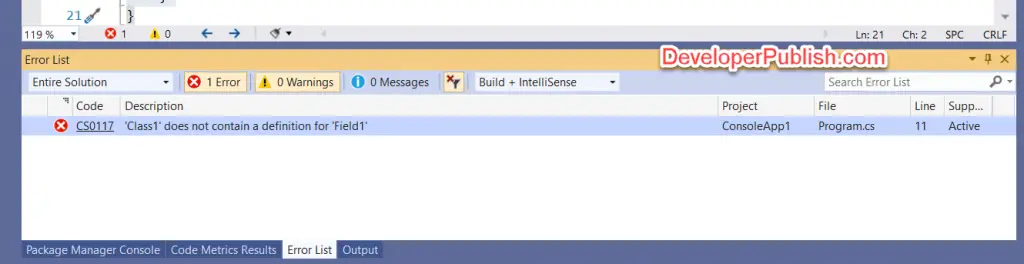
Solution
To fix the error code CS0117, remove the references that you are trying to make which is not defined in the base class.
Write a 2D platformer, got to the point that you need to make a weapon. Write the script, wrote everything as it should, however, unity gives that Camera does not contain a definition for «main»(camera does not contain a definition for «main»).
What to do? Help.
Here is the script:
using UnityEngine;
using System.Collections;

public class FireScript2D : MonoBehaviour
{

 public float speed = 10; // bullet speed
 public Rigidbody2D bullet; // prefab of our bullets
 public Transform gunPoint; // point of birth
 public float fireRate = 1; // rate of fire
 public bool facingRight = true; // direction at the start of the scene, right?

 public Transform zRotate; // object to rotate on the Z axis

 // limit rotation
 public float minAngle = -40;
 public float maxAngle = 40;

 private float curTimeout, angle;
 private int invert;
 private Vector3 mouse;

 void Start()
{
 if (!facingRight) invert = -1; else invert = 1;
}

 void SetRotation()
{
 MousePosMain Vector3 = Input.mousePosition;
 mousePosMain.z = Camera.main.transform.position.z;
 mouse = Camera.main.ScreenToWorldPoint(mousePosMain);
 Vector3 lookPos = mouse - transform.position;
 angle = Mathf.Atan2(lookPos.y, lookPos.x * invert) * Mathf.Rad2Deg;
 angle = Mathf.Clamp(angle, minAngle, maxAngle);
 zRotate.rotation = Quaternion.AngleAxis(angle, Vector3.forward);
}

 void Update()
{
 if (Input.GetMouseButton(0))
{
Fire();
}
else
{
 curTimeout = 1000;
}

 if (zRotate) SetRotation();

 if (angle == maxAngle && mouse.x < zRotate.position.x && facingRight) Flip();
 else if (angle == maxAngle && mouse.x > zRotate.position.x && !facingRight) Flip();
}

 void Flip() // flip horizontally
{
 facingRight = !facingRight;
 Vector3 theScale = transform.localScale;
 theScale.x *= -1;
 invert *= -1;
 transform.localScale = theScale;
}

 void Fire()
{
 curTimeout += Time.deltaTime;
 if (curTimeout > fireRate)
{
 curTimeout = 0;
 Vector3 direction = gunPoint.position - transform.position;
 Rigidbody2D clone = Instantiate(bullet, gunPoint.position, Quaternion.identity) as Rigidbody2D;
 clone.velocity = transform.TransformDirection(direction.normalized * speed);
 clone.transform.right = direction.normalized;
}
}
}
Thanks in advance.
Hello,
I will explain what I have done to obtain 6 errors with a new project as I plan to make a little multiplayer game.
Let’s go step by step
1- I create a new project in Unity 2019.2.19f1 (64-bit)
2- I imported Playmaker v1.9.0.p19
3- I imported Playmaker Ecosystem
4- I Imported PUN2 from the Asset Store tab inside Unity
Everything is alright and then :
5- I import «Play Maker Pun2» from the ecosystem.
Now I have the following 6 errors :
AssetsPlayMaker PUN 2ScriptsUtilsPlayMakerPhotonLUT.cs(84,22): error CS0117: ‘ClientState’ does not contain a definition for ‘ConnectedToGameServer’
AssetsPlayMaker PUN 2ScriptsUtilsPlayMakerPhotonLUT.cs(85,22): error CS0117: ‘ClientState’ does not contain a definition for ‘ConnectedToMasterServer’
AssetsPlayMaker PUN 2ScriptsUtilsPlayMakerPhotonLUT.cs(87,22): error CS0117: ‘ClientState’ does not contain a definition for ‘ConnectingToGameServer’
AssetsPlayMaker PUN 2ScriptsUtilsPlayMakerPhotonLUT.cs(89,22): error CS0117: ‘ClientState’ does not contain a definition for ‘ConnectingToMasterServer’
AssetsPlayMaker PUN 2ScriptsUtilsPlayMakerPhotonLUT.cs(92,22): error CS0117: ‘ClientState’ does not contain a definition for ‘DisconnectingFromGameServer’
AssetsPlayMaker PUN 2ScriptsUtilsPlayMakerPhotonLUT.cs(93,22): error CS0117: ‘ClientState’ does not contain a definition for ‘DisconnectingFromMasterServer’
As I know nothing about coding I cannot understand if I have done something wrong.
If anyone could help me it would be greatly appreciated ^^
If I remember correctly I have tried with this 3 Unity versions and I have a set of errors for each one.
Unity 2019.2.19f1 (64-bit)
Unity 2019.1.0f2 (64-bit)
Unity 2018.3.11f1 (64-bit)
Bye,
NewTo
Welcome to the Treehouse Community
The Treehouse Community is a meeting place for developers, designers, and programmers of all backgrounds and skill levels to get support. Collaborate here on code errors or bugs that you need feedback on, or asking for an extra set of eyes on your latest project. Join thousands of Treehouse students and alumni in the community today. (Note: Only Treehouse students can comment or ask questions, but non-students are welcome to browse our conversations.)
Looking to learn something new?
Treehouse offers a seven day free trial for new students. Get access to thousands of hours of content and a supportive community. Start your free trial today.
Getting the following error when typing trying to run code.
Game.cs(13,19): error CS0117: System.Console' does not contain a definition forWriteline’
/usr/lib/mono/4.5/mscorlib.dll (Location of the symbol related to previous error)
Map.cs(17,22): error CS1061: Type TreehouseDefence.Point' does not contain a definition forx’ and no extension method x' of typeTreehouseDefence.Point’ could be found. Are you missing an assembly reference?
Code is as follows:
(Game.cs)
using System;

namespace TreehouseDefence
{
    class Game
    {
        public static void Main()
        {
            Map map = new Map(8, 5);

          Point point = new Point (4, 2);
          bool isOnMap = map.OnMap (point);
          Console.Writeline(isOnMap);

          point = new Point (8, 5);
          isOnMap = map.OnMap (point);
          Console.WriteLine (isOnMap);
        }
    }
}
(map.cs)
namespace TreehouseDefence
{
  class Map
  {

    public readonly int Width;
    public readonly int Height;

    public Map(int width, int height)
    {
        Width = width;
        Height = height;
    }

    public bool OnMap(Point point)
    {
        return point.x >= 0 && point.X < width &&
               point.Y >=0 && point.Y < Height;

    }
  }

}
3 Answers

seal-mask
STAFF
Hi there! It’s correct. There is no Writeline in the System class. There is, however, a WriteLine in that class. Remember, capitalization matters here.
Hope this helps! 
edited for additional information
If you’re still receiving an error about Point, we will need to see your code in Point.cs.
Jack Stone July 5, 2017 2:32pm
Still having the same error with the x point
namespace TreehouseDefence
{

  class Point {

    public readonly int X;
    public readonly int Y;

      public Point (int x, int y)
      {

          X = x;
          Y = y;

      }

  }

}
Jack Stone July 5, 2017 3:00pm
You’re a star.
Thank you very much.
|
Frachetes 4 / 1 / 3 Регистрация: 07.02.2020 Сообщений: 93 |
||||
|
1 |
||||
|
07.02.2020, 17:19. Показов 9858. Ответов 6 Метки нет (Все метки)
Вот код:
Суть то понятна, но проблема в том что мне пишет что Camera не содержит определения Подскажите пожалуйста страдающему >_< Вот скрин:
0 |


|
3213 / 1699 / 964 Регистрация: 26.10.2018 Сообщений: 4,894 |
|
|
07.02.2020, 17:25 |
2 |
|
Ну ты кросовчик просто, создал другой класс с именем Camera и хочешь туда обратиться…
0 |
|
Frachetes 4 / 1 / 3 Регистрация: 07.02.2020 Сообщений: 93 |
||||
|
07.02.2020, 17:27 [ТС] |
3 |
|||
|
Это я показал кусок кода… весь код то вот такой…
0 |
|
1max1 3213 / 1699 / 964 Регистрация: 26.10.2018 Сообщений: 4,894 |
||||
|
07.02.2020, 17:42 |
4 |
|||
|
И? Это сути не меняет.
1 |
|
4 / 1 / 3 Регистрация: 07.02.2020 Сообщений: 93 |
|
|
07.02.2020, 17:47 [ТС] |
5 |
|
Да, вроде заработало, а ты не подскажешь почему так? В чем причина, я понять совершенно не могу…
0 |
|
3213 / 1699 / 964 Регистрация: 26.10.2018 Сообщений: 4,894 |
|
|
07.02.2020, 17:49 |
6 |
|
Божи, ну первое мое сообщение прочитай внимательно)
1 |
|
4 / 1 / 3 Регистрация: 07.02.2020 Сообщений: 93 |
|
|
07.02.2020, 17:52 [ТС] |
7 |
|
Это потому что у меня есть еще скрипт с названием Camera. Я понял спасибо большое!
0 |
Camera.main, does not contain a definition for main? I have a Camera tagged MainCamera already..