
The fuser film needs replacing
Was this post helpful?
thumb_up
thumb_down

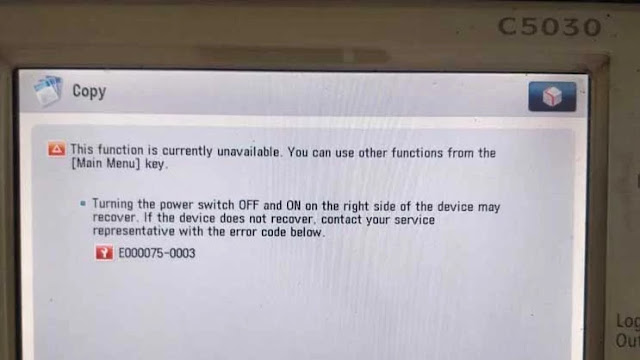
The E075 error code refers to the ITB belt shifting front to rear of the machine and can not compensate. There are two causes that will make this happen.
a) The machine that is not level
b) Uneven thickness of the ITB belt from front to rear.
To resolve this issue, first observe the ITB Position value of displacement in service mode under Copier > Display > Misc > ITB-POS. The range is between -300 to 450. If the value is very close to the high end or low end, perform the following:
a) Check to make sure that the machine is level.
b) After leveling the machine, run Copier > Function > MISC-P > ITB-INT in service mode
c) Check Copier > Display > MISC > ITB-POS again to make sure the value is approximately within the mid range
d) If the value in step c is not within mid range, remove the ITB belt and reverse it from front to rear and repeat the prior steps again.
0 of 1 found this helpful
thumb_up
thumb_down
The following instructions describe how to reset E00075 for a Canon IR advance C5035, C5045, C5251, C5245, C5250, copier machine. We are sharing a few methods to fix the error, so check them one by one until it gets solved…….
 |
| How to clear E000075 error Code Canon IR advance C5045, C5251 |
These instructions describe the error code E075 solution for a Canon ImageRunner copier machine. The following instructions describe how to reset E00075 for a Canon IR advance C5035, C5045, C5251, C5245, C5250, copier machine. We are sharing a few methods to fix the error, so check them one by one until it gets solved.
Meaning of the Error Code:
The E075 error code refers to the ITB belt shifting front to the rear of the machine and cannot compensate. Two causes will make this happen. Fast is the machine that is not level. Secant is the uneven thickness of the ITB belt from front to rear.
Maintenance sign means that the copier needs to be well serviced or something has to be replaced like Consumables such as drum, blade, fuser rollers, and developer, etc. If you are sure that you replaced the correct parts or the machine doesn’t need to replace any part, then you can continue to clear the sign.
How to fix E075 Error Code:
To resolve this issue, first, observe the ITB Position value of displacement in service mode under Copier > Display > Misc. > ITB-POS. The range is between -300 to 450. If the value is very close to the high end or low end, perform the following:
- Check to make sure that the machine is level.
- After levelling the machine, run Copier > Function > MISC-P > ITB-INT in service mode.
- Check Copier > Display > MISC > ITB-POS again to make sure the value is approximately within the mid-range.
- If the value in step c is not within mid-range, remove the ITB belt and reverse it from front to rear and repeat the prior steps again.
If you find your parts, then replace the parts and error still remains, after automatically reset the error code. If the error is still showing even after the above solutions, then you have no choice other than calling Canon service technician.
I hope this was helpful, don’t forget to share it via any of the share buttons on this page are highly welcomed as well.
 Dislikes: 0
-
12-11-2013
#1
Greeting,
I am not a trained tech on the Canon C5051 but we have one on which we frequently get an E0075 0003 error. From the error code, it is my understanding that the transfer belt is walking to it’s full displacement and then sending a E0075 0003 error and the machine stopped, thereby avoiding damaging the belt. After the belt is manually «walked» back into postion, all is well for a little while and then it occurs again.I had a tech in the past tell me that this can occur if the machine is not on the level. So, my questions are 1) is this correct 2) does the machine have a built in method in which a tech can adjust the machine to level, or does one have to have a physical level and adjust the feet.
Since I am not a tech, I cannot get any information out of Canon and we are midstream changing to a new service people so our old tech is gone. I really want to know if I should keep barking at them about checking the level on the machine, or if I am totally out of line to suggest that they adjust it. Thanks for your insight.
Last edited by Nobilis; 12-11-2013 at 03:25 PM.
Reason: spelling
-
12-11-2013
#2

Trusted Tech
50+ Posts
- Rep Power
- 21
Re: E0075 0003
I’m not familiar with that particular problem but I do know that as a rule all copiers should be fairly close to level. A very effective and yet simple way to test this is to put a steel bearing in the middle of the copy glass surface, this is the place where you lay a piece of paper that will be copied. If the bearing stays where you’ve placed it, then the copier is level. I’ve used glass marbles as well, but they will not be as precise as a single steel ball bearing, none the less for this test it’s probably fine.
Ron
-
12-12-2013
#3
Re: E0075 0003
December 1, 2011
Product : imageRUNNER ADVANCE C5030 / C5035 / C5045 / C5051
Title : E075 — 0003
Problem : The machine displayed an error code of E075 with a sub code of 0003. This indicates an error in full displacement of the ITB to the rear side.
Solution : Behind the ITB motor there is a silver bracket with two silver screws. This bracket affects the tracking of the belt. Remove the ITB motor. Loosen the two screws on the bracket and adjust the bracket 1mm at a time until the belt stops tracking off. The location of the bracket and the screws are shown below.
Canon USA, Inc. Engineering Services & Solutions Division
**Knowledge is time consuming, exhausting and costly for a trained Tech.**
-
12-12-2013
#4
Re: E0075 0003
August 24, 2010
Product : imageRUNNER ADVANCE C5030 / C5035 / C5045 / C5051
Title : E075 error code on the imageRUNNER ADVANCE C5051 Series
Problem : E075 error code on the imageRUNNER ADVANCE C5051 Series
Solution : The E075 error code refers to the ITB belt shifting front to rear of the machine and can not compensate. There are two causes that will make this happen. a) The machine that is not level b) Uneven thickness of the ITB belt from front to rear.
To resolve this issue, first observe the ITB Position value of displacement in service mode under Copier > Display > Misc > ITB-POS. The range is between -300 to +450. If the value is very close to the high end or low end, perform the following:
a) Check to make sure that the machine is level. b) After leveling the machine, run Copier > Function > MISC-P > ITB-INT in service mode c) Check Copier > Display > MISC > ITB-POS again to make sure the value is approximately within the mid range d) If the value in step c is not within mid range, remove the ITB belt and reverse it from front to rear and repeat the prior steps again.
Canon USA, Inc. Engineering Services & Solutions Division
**Knowledge is time consuming, exhausting and costly for a trained Tech.**
-
12-12-2013
#5
Re: E0075 0003
May 04, 2011
Product : imageRUNNER ADVANCE C5030 / C5035 / C5045 / C5051
Title : E075-0000 Error Code
Error : E075-0000 Error Code
Workaround : If you have a E075-0000 code, check the Secondary Inner Roller (FC8-4402-000) and the Secondary Transfer bushing Holder (FL3-1109-000). Check to see if the roller shaft ends are worn down. This could be either on the front or rear side. If the shaft or bushing holders are worn, this could cause the belt to shift either towards the front or back of the ITB assembly causing a E075 error code.
Canon USA, Inc. Engineering Services & Solutions Division
**Knowledge is time consuming, exhausting and costly for a trained Tech.**
-
12-12-2013
#6
Re: E0075 0003
Originally Posted by Ron314
I’m not familiar with that particular problem but I do know that as a rule all copiers should be fairly close to level. A very effective and yet simple way to test this is to put a steel bearing in the middle of the copy glass surface, this is the place where you lay a piece of paper that will be copied. If the bearing stays where you’ve placed it, then the copier is level. I’ve used glass marbles as well, but they will not be as precise as a single steel ball bearing, none the less for this test it’s probably fine.
Ron
Ron, I ran your test with a glass ball that I had on hand and it accelerated forward off the machine. I relayed this to the repair techs to ask that they make sure to level the machine for us in such a way that we won’t inadvertently shift it.
-
12-12-2013
#7
Re: E0075 0003
Originally Posted by teckat
August 24, 2010
Product : imageRUNNER ADVANCE C5030 / C5035 / C5045 / C5051
Title : E075 error code on the imageRUNNER ADVANCE C5051 Series
Problem : E075 error code on the imageRUNNER ADVANCE C5051 Series
Solution : The E075 error code refers to the ITB belt shifting front to rear of the machine and can not compensate. There are two causes that will make this happen. a) The machine that is not level b) Uneven thickness of the ITB belt from front to rear.
To resolve this issue, first observe the ITB Position value of displacement in service mode under Copier > Display > Misc > ITB-POS. The range is between -300 to +450. If the value is very close to the high end or low end, perform the following:
a) Check to make sure that the machine is level. b) After leveling the machine, run Copier > Function > MISC-P > ITB-INT in service mode c) Check Copier > Display > MISC > ITB-POS again to make sure the value is approximately within the mid range d) If the value in step c is not within mid range, remove the ITB belt and reverse it from front to rear and repeat the prior steps again.
Canon USA, Inc. Engineering Services & Solutions Division
Thanks for the information Teckat. I looked at the codes and the machine was within the displacement range. So, I decided to relay to the Techs about the machine not being on the level and trust that they will take that into account when they come out to service the unit. I appreciate the pointers from everyone on this so I can speak a bit more intelligently with our reps.
-
12-12-2013
#8
Re: E0075 0003
Originally Posted by Nobilis
Thanks for the information Teckat. I looked at the codes and the machine was within the displacement range. So, I decided to relay to the Techs about the machine not being on the level and trust that they will take that into account when they come out to service the unit. I appreciate the pointers from everyone on this so I can speak a bit more intelligently with our reps.
—————————
your welcome
there are installation procedures that need to be followed on all Canon Printers, sadly not all techs are trained on the products they service—-
the Function below is in the install procedure check for IRADC5051ITB.JPGCOPIER > FUNCTION > MISC-P ITB-INIT
Initial adjustment of ITB Steering
Level.1 =Details To make initial adjustment of reference position for the ITB Steering at initial installation or replacement of the ITB-related service parts.
Use cases — -At installation
—When replacing the ITB-related service parts
Adj/set/operate method = Select the item, and then press OK key.
Caution = Be sure to close all covers before execution.
Display/adj/set range In processing: ACTIVE, At normal termination: OK, At abnormal termination: NG
Required time Approx. 1 minute
———————————————————————————————————————-
Related service mode/ COPIER> DISPLAY> MISC> ITB-POS
Display of ITB steering reference position
Level.1 Details To display the steering reference position of ITB.
Use case = At initial installation (after execution of COPIER> FUNCTION>MISC-P> ITB-INIT)
Adj/set/operate method = N/A (display only)
Display/adj/set range -580 to 580
Unit = 1 pulse
Appropriate target value -300 to 450
Related service mode COPIER> FUNCTION> MISC-P> ITB-INIT
see attached pdf
**Knowledge is time consuming, exhausting and costly for a trained Tech.**
-
12-12-2013
#9
Technician
- Rep Power
- 28
Re: E0075 0003
[QUOTE=teckat;393590]—————————
your welcome
there are installation procedures that need to be followed on all Canon Printers, sadly not all techs are trained on the products they service—-
the Function below is in the install procedure check for IRADC5051ITB.JPGCOPIER > FUNCTION > MISC-P ITB-INIT
Initial adjustment of ITB Steering
Level.1 =Details To make initial adjustment of reference position for the ITB Steering at initial installation or replacement of the ITB-related service parts.
Use cases — -At installation
—When replacing the ITB-related service parts
Adj/set/operate method = Select the item, and then press OK key.
Caution = Be sure to close all covers before execution.
Display/adj/set range In processing: ACTIVE, At normal termination: OK, At abnormal termination: NG
Required time Approx. 1 minute
———————————————————————————————————————-
Related service mode/ COPIER> DISPLAY> MISC> ITB-POS
Display of ITB steering reference position
Level.1 Details To display the steering reference position of ITB.
Use case = At initial installation (after execution of COPIER> FUNCTION>MISC-P> ITB-INIT)
Adj/set/operate method = N/A (display only)
Display/adj/set range -580 to 580
Unit = 1 pulse
Appropriate target value -300 to 450
Related service mode COPIER> FUNCTION> MISC-P> ITB-INIT
see attached pdf
Hi
my problem
iRAC5235i changed ITB unit for new one ,after ITB init received E 075-003.Counter 102:25000.any idea?
-
12-12-2013
#10
Re: E0075 0003
Is printer level ?
What is reading on display ?**Knowledge is time consuming, exhausting and costly for a trained Tech.**


 Originally Posted by Ron314
 ITB.JPG
Bookmarks
Bookmarks
Posting Permissions

- You may not post new threads
- You may not post replies
- You may not post attachments
- You may not edit your posts
- BB code is On
- Smilies are On
- [IMG] code is On
- [VIDEO] code is On
- HTML code is Off
Forum Rules
В статье дается краткое описание и расшифровка возможных предупреждений и аварийных сигналов в частотном преобразователе младшей серии VEDA VFD VF 51.
Система самодиагностики преобразователя частоты серии VEDA VFD VF-51 постоянно контролирует состояние питания на входе, состояние выходных сигналов, характеристики двигателя, а также другие рабочие параметры системы. Предупреждение или аварийный сигнал не обязательно означают, что проблема связана с самим преобразователем частоты. Во многих случаях они могут оповещать о сбое, связанном с входным напряжением, нагрузкой или температурой двигателя, внешними сигналами или с другими параметрами, контролируемыми внутренней логикой преобразователя частоты.
Таблица 1. Описание кодов ошибок ПЧ VEDA VFD VF-51
| № |
Код аварии (ошибки, неисправности, Error) и краткое описание |
| 1 | E.SC1 (1) Сбой системы во время разгона |
|---|---|
| 2 | E.SC2 (2) Сбой системы во время торможения |
| 3 | E.SC3 (3) Сбой системы при постоянной скорости |
| 4 | E.SC4 (4) Сбой системы при простое |
| 5 | Е.ОС1 (5) Перегрузка по току при разгоне |
| 6 | Е.ОС2 (6) Перегрузка по току во время торможения |
| 7 | Е.ОС3 (7) Перегрузка по току при постоянной скорости |
| 8 | Е.ОС4 (8) Программная перегрузка по току VF-51 |
| 9 | E. OU1 (9) Перегрузка по напряжению во время разгона |
| 10 | E. OU2 (10) Перегрузка по напряжению во время торможения |
| 11 | E. OU3 (11) Перегрузка по напряжению при постоянной скорости |
| 12 | E.LU (13) Пониженное напряжение |
| 13 | E.OL1 (14) Перегрузка электродвигателя |
| 14 | E.OL2 (15) Перегрузка 1 преобразователя частоты |
| 15 | E.OL3 (16) Перегрузка 2 преобразователя частоты |
| 16 | E.OL4 (17) Перегрузка 3 преобразователя частоты |
| 17 | E.ILF (18) Обрыв фазы на входе преобразователя частоты |
| 18 | E.OLF (19) Обрыв фаз на выходе преобразователя частоты |
| 19 | E.OLF1 (20) Обрыв фазы U |
| 20 | E.OLF2 (21) Обрыв фазы V |
| 21 | E.OLF3 (22) Обрыв фазы W |
| 22 | E.OH1 (30) Перегрев модуля выпрямителя |
| 23 | E.OH2 (31) Перегрев модуля IGBT |
| 24 | E.OH3 (32) Перегрев электродвигателя |
| 25 | E.EF (33) Внешняя ошибка |
| 26 | E.CE (34) Ошибка связи по Modbus |
|---|---|
| 27 | E.HAL1 (35) Смещение ноля фазы U |
| 28 | E.HAL2 (36) Смещение ноля фазы V |
| 29 | E.HAL3 (38) Смещение ноля фазы W |
| 30 | E.HAL (37) Ошибка обнаружения трехфазного тока (сумма токов не равна 0) |
| 31 | E.SGxx (40) Короткое замыкание на землю |
| 32 | E.FSG (41) Короткое замыкание вентилятора |
| 33 | E.PID (42) Обрыв обратной связи ПИД-регулятора |
| 34 | E.COP (43) Ошибка копирования параметров |
| 35 | E.PG01 (44) Ошибка настройки параметров энкодера |
| 36 | E.PG02 (44) Ошибка Z канала энкодера |
| 37 | E.PG03 (44) Ошибка проверки вращения энкодера |
| 38 | E.PG04 (44) Ошибка подключения энкодера |
| 39 | E.PG05 (44) Ошибка ABZ каналов энкодера |
| 40 | E.PG06 (44) Ошибка подключения энкодера шпинделя |
| 41 | E.PG07 (44) Ошибка Z канала энкодера шпинделя |
| 42 | E.PG08 (44) Логическая ошибка Z канала энкодера |
| 43 | E.PG09 (44) Логическая ошибка Z канала энкодера шпинделя |
| 44 | E.PG10 (44) Прерывание импульса Z канала энкодера |
| 45 | E.BRU (50) Ошибка тормозного модуля |
| 46 | E.Texx (52) Превышение выходного тока при автоподстройке |
| 47 | E.IAE1 (71) Ошибка автоподстройки двигателя 1 |
| 48 | E.IAE2 (72) Ошибка автоподстройки двигателя 2 |
| 49 | E.IAE3 (73) Ошибка автоподстройки двигателя 3 |
| 50 | E.PST1 (74) Ошибка автоподстройки синхронного двигателя 1 |
| 51 | E.PST2 (75) Ошибка автоподстройки синхронного двигателя 2 |
| 52 | E.PST3 (76) Ошибка автоподстройки синхронного двигателя 3 |
| 53 | E.DEF (77) Превышение отклонения по скорости |
| 54 | E.SPD (78) Ошибка превышения по скорости |
| 55 | E.LD1 (79) Защита нагрузки 1 |
| 56 | E.LD2 (80) Защита нагрузки 2 |
| 57 | E.CPU (81) Превышение времени ожидания процессора |
| 58 | E.LOC (85) Программное обеспечение |
| 59 | E.EEP (86) Ошибка хранилища параметров |
| 60 | E.BUS1 (91) Карта расширения А отключена |
| 61 | E.BUS2 (92) Карта расширения Б отключена |
| 62 | E.BUS3 (93) Ошибка карты расширения CAN |
| 63 | E.BUS4 (94) Ошибка карты расширения |
| 64 | E.BUS5 (95) Ошибка карты расширения |
| 65 | E.BUS6 (96) Отключение карты расширения |
| 66 | E.CP1 (97) Ошибка компаратора 1 |
| 67 | E.CP2 (98) Ошибка компаратора 2 |
| 68 | E.DAT (99) Ошибка установки параметра |
| 69 | E.FA1 (110) Откказ внешнего расширения 1 |
| 70 | E.FA2 (111) Откказ внешнего расширения 2 |
| 71 | E.FA3 (112) Откказ внешнего расширения 3 |
| 72 | E.FA4 (113) Откказ внешнего расширения 4 |
| 73 | E.FA5 (114) Откказ внешнего расширения 5 |
| 74 | E.FA6 (115) Откказ внешнего расширения 6 |
| 75 | E.FA7 (116) Откказ внешнего расширения 7 |
| 76 | E.FA8 (117) Откказ внешнего расширения 8 |
Аварийный сигнал (существенная неисправность) выводится в случае отключения преобразователя частоты по срабатыванию системы защиты. Двигатель останавливается выбегом. Система управления преобразователем частоты продолжает работать и контролирует состояние цепей управления преобразователя частоты. После того, как причина ошибки будет устранена, код ошибки можно сбросить и преобразователь частоты снова будет готов к работе. Информация о каждом аварийном событии сохраняется в журнале ошибок.
Таблица 2. Коды предупреждения (раннего оповещения) ПЧ VEDA VFD VF-51
| № |
Коды предупреждений ( оповещений, Warning, Alarm) и наименование |
| 1 | A.LU1 (128) Пониженное напряжение во время отключения |
|---|---|
| 2 | A.OU (129) Перенапряжение при отключении |
| 3 | A.ILF (130) Обрыв фазы на входе преобразователя частоты |
| 4 | A.PID (131) Обрыв обратной связи ПИД-регулятора |
| 5 | A.EEP (132) Предупреждение об ошибке в чтении и записи параметров |
| 6 | A.DEF (133) Превышение в отклонении скорости вращения |
| 7 | A.SPD (134) Неверная скорость вращения |
| 8 | A.GPS1 (135) Блокировка GPS |
| 9 | A.GPS2 (136) Обрыв GPS |
| 10 | A.CE (137) Ошибки в работе ModBus |
| 11 | A.LD1 (138) Защита нагрузки 1 |
| 12 | A.LD2 (139) Защита нагрузки 2 |
| 13 | A.BUS (140) Потеря соединения с картой расширения |
| 14 | A.OH1 (141) Перегрев модуля |
| 15 | A.OH3 (142) Перегрев электродвигателя |
| 16 | A.RUN1 (143) Конфликт команд запуска |
| 17 | A.RUN2 (158) Защита от толчкового запуска |
| 18 | A.RUN3 (159) Защита от перезапуска |
| 19 | A.PA2 (144) Потеря соединения с панелью управления |
| 20 | A.COP (145) Ошибка в копировании параметров |
| 21 | A.CP1 (146) Предупреждение о выходном значении компаратора 1 |
| 22 | A.CP2 (147) Предупреждение о выходном значении компаратора 2 |
| 23 | A.FA1 (150) Предупреждение внешнего расширения 1 |
| 24 | A.FA2 (151) Предупреждение внешнего расширения 2 |
| 25 | A.FA3 (152) Предупреждение внешнего расширения 3 |
| 26 | A.FA4 (153) Предупреждение внешнего расширения 4 |
| 27 | A.FA5 (154) Предупреждение внешнего расширения 5 |
| 28 | A.FA6 (155) Предупреждение внешнего расширения 6 |
Предупреждение (несущественная неисправность) выводится при возникновении ненормальных условий работы, вследствие чего преобразователь частоты может выдать сигнал предупреждения. Предупреждение не влияет на работоспособность преобразователя частоты: двигатель продолжает работу, если запущен или его можно запустить, если он остановлен. Предупреждение сбрасывается автоматически при устранении причины.
-
Главная
-
Dennis The Fat Kid
-
Canon IR ADV C50xx / 52 xx Error Code E000075 0003 ITB Belt Askew- How to solve, how to reposition
Просмотров: 17 241
Если вам понравилось бесплатно смотреть видео canon ir adv c50xx / 52 xx error code e000075 0003 itb belt askew- how to solve, how to reposition онлайн которое загрузил Dennis The Fat Kid 16 сентября 2021 длительностью 00 ч 04 мин 34 сек в хорошем качестве, то расскажите об этом видео своим друзьям, ведь его посмотрели 17 241 раз.
Copyright ©
Epicube.su
Смотрите видео на портале epicube.su совершенно бесплатно и без регистрации. Наша видеотека каждый день обновляется лучшими роликами со всего мира!

admin@epicube.su Наша почта для ваших пожеланий и связи с нами.