
Есть проблемы при перепрошивке полетного контроллера? В большинстве случаев это проблемы с драйверами ПК, и сегодняшнее руководство может помочь вам.
Оригинал: Solution to flight controller driver issues when flashing firmware
Ошибки при перепрошивке ПК
При прошивке полетных контроллеров в Windows можно получить сообщение об ошибке:
Failed to open serial port
Последовательный порт исчезает и появляется снова при отключении и повторном подключении контроллера.
Или вы можете получить сообщение типа:
No response from bootloader, programming failed
Если вы можете подключиться к полетному контроллеру в Betaflight GUI, но просто не можете обновить прошивку, то это руководство поможет решить проблему
Если вы не можете подключиться к ПК в Betaflight GUI, тогда попробуйте вот этот фикс, перед обновлением прошивки.
Исправляем проблемы с драйверами при помощи ImpulseRC Driver Tool
Подключаем контроллер к компьютеру USB кабелем.
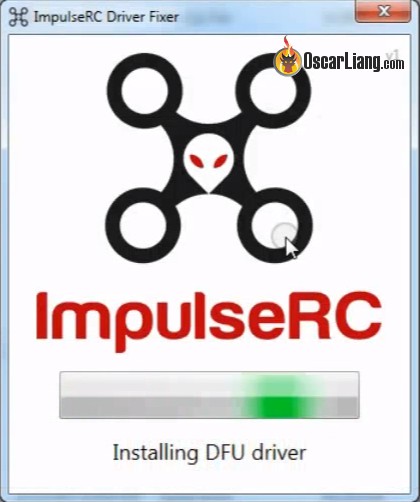
Скачиваем и запускаем ImpulseRC Driver Fixer Tool (это стороннее приложение, так что проверьте его антивирусником).
Программа автоматически найдет ПК и установит необходимый драйвер.
После окончания процедуры запускаем Betaflight GUI и видим «DFU» рядом с кнопкой «Connect» (вместо COM порта).

Теперь вы сможете нормально прошить ПК.
После перепрошивки в выпадающем списке появится обычный последовательный порт. Всё, можно работать и прошивать ПК как обычно, без проблем.
FAQ
У меня не получается прошить ПК, я уже всё попробовал, вместо COM порта я вижу DFU, но прошить не получается, появляется сообщение об ошибке:
Read protection not active. USB device successfully closed
Перед прошивкой попробуйте убрать галочку «Full chip erase», после прошивки сможете удалить все настройки в консоли (CLI), для этого наберите «default» (без кавычек).
Обновлено: 03.06.2023
Опции темы
В dfu mode полетник включили? Зажали кнопку/замкнули перемычку boot. подключили USB.
Попробуйте поискать на том же тытрубе, там по видео проще будет разобраться, что куда жать и что как делать.
По видео всё и делал
[QUOTE=al_petrovi4;7663569]Здравствуйте! Подскажите пжлст,в бетафлайте не могу разобраться в начале. Прошивку скачал,нажимаю flash firmware,а оно мне-failed to open serial port. Драйвера качнулся вроде правильно. Спасибо за понимание,я зелен в этом.
С последним драйвером zadig произошла проблема,у меня в установочном окне отличается параметры от тех,что в примере на оф сайте.
Мне помогло это.
скажите, влияет ли на чтонибудь baud rate для gps приёмника? если у меня ловит допустим, на 9, забить?
влияет только на скорость обмена данными, и как следствие на получение актуальных координат полетным контроллером. На высоких скоростях полета реальное положение модели будет «улетать» далеко от передаваемых координат, и соответственно если GPS используется на самолете без компаса, то при смене курса будет тупить стрелочка направления «домой». В случае крушения модели — на ДВР будут зафиксированы координаты которые успел транслировать аппарат пока был «на связи» и если эти данные «запоздавшие» то поиски модели немного усложнятся.
9 спутников — говорит о том что у вас чип не самый свежий, и ловит только одну систему GPS, а нашу Глонасс, и европейскую Галилео не ловит. Вроде бы точность от этого сильно не должна страдать, так как достаточно 6 спутников для уверенного 3Д позиционирования.
Из моего оптыта такие модули дают точность в пределах метра-полутора. Но в облачность им сложнее поймать большее количество спутников чем многосистемным модулям.
влияет только на скорость обмена данными, и как следствие на получение актуальных координат полетным контроллером. На высоких скоростях полета реальное положение модели будет «улетать» далеко от передаваемых координат, и соответственно если GPS используется на самолете без компаса, то при смене курса будет тупить стрелочка направления «домой». В случае крушения модели — на ДВР будут зафиксированы координаты которые успел транслировать аппарат пока был «на связи» и если эти данные «запоздавшие» то поиски модели немного усложнятся.
9 спутников — говорит о том что у вас чип не самый свежий, и ловит только одну систему GPS, а нашу Глонасс, и европейскую Галилео не ловит. Вроде бы точность от этого сильно не должна страдать, так как достаточно 6 спутников для уверенного 3Д позиционирования.
Из моего оптыта такие модули дают точность в пределах метра-полутора. Но в облачность им сложнее поймать большее количество спутников чем многосистемным модулям.
bn180. какое то говно. в уцентре вроде как можно и глонасс и галилео добавить, но толку нет. купил матек, посомтрим
Essential utilities, firmware and models for use with ImpulseRC products.
ImpulseOSD Software Download
Windows — Full featured, drag and drop screen designer, configuration of all settings.
Mac — Simple tool for backup/restore and firmware update.
Driver Fixer
Apex Frame Accessory 3D Printable Files
STL files for the injection moulded pieces as well as various antenna mounts, plus a DXF file for a HD camera mount base, are available for free download under the Creative Commons license.
Micro Apex Frame Accessory 3D Printable Files
STL files for the injection moulded pieces as well as antenna mounts, plus a DXF file for a HD camera mount base, are available for free download under the Creative Commons license.
Helix / Mercury Video Transmitter
Since the custom VTX/OSD firmware changes certain defaults you must use this version of the MWOSD GUI to configure!
Australian firmware locked to legal frequencies and 25mW output power. If you ordered your Helix in Australia you already have this flashed.
Fully unlocked international firmware, gives all supported channels and selectable 25/200/500mW output power . If you ordered your Helix from outside of Australia you already have this flashed.
Reverb 3D Printable GoPro Couch Mount
These files are provided solely for personal use. The design remains the property of Brain3D and most not be offered for sale as a printed part.
Since the latest updates of Windows — no matter whether W7 or W10 — there is no way to get into the bootloaders of any Betaflight or Butterflight based FC (JB4, Heliospring, CLRacing F4 or Betaflight F4). I tried it on several samples of each type. No re-installing nor manual driver fixing, nor any de- and re-installation solved the problem nor did any hack. No Zadig works and no ImpulseRC Driver Fixer! Nothing
I am completely fed up with that crap, that costed me thousands of $ and i’ll check out KISS or abandon the hobby. I cannot get rid of the impression that these people have forgotten what serious development work means! Tons of jerk and nerd features but no will to solve any basic issues lasting for quite a long time despite that they have been informed by numerous people about these facts for quite a while now. And there are hundreds of similar threads and posts throughout the forum world ith th sam contends
If they go on like that they have to re-learn what it means to work for their living and not only crooking hobby enthusiast for their money by YouTube hypes.
This is a nightmare and I have never seen anything that compares to that in a life long IT career!
Since the latest updates of Windows — no matter whether W7 or W10 — there is no way to get into the bootloaders of any Betaflight or Butterflight based FC (JB4, Heliospring, CLRacing F4 or Betaflight F4). I tried it on several samples of each type. No re-installing nor manual driver fixing, nor any de- and re-installation solved the problem nor did any hack. No Zadig works and no ImpulseRC Driver Fixer! Nothing
I’m sick of that maddening crap also. Windows 10 or 7, no DFU connect. I have a Mac also, that has always connected without any issues to any flight controller in DFU. The Windows 10 laptop connects to flight controllers and I didn’t have to install any drivers.
Maybe you could use a friend’s Mac to flash firmware and then your Windows rig to set it up.
Yeah. Same problem here with my CLRacing F4 FC.
I just can’t enter DFU mode anymore (and flash to newer version of Betaflight).
After I use «BL» CLI command in Betaflight or use the physical bootloader button on FC, it doesn’t show «DFU» in port selection in BF configurator anymore. Only «Manual Selection», thats it.
ImpulseRC_Driver_Fixer doesn’t seem to help anymore (before, running the driver fixer usually helped to resolve these issues). It gets stuck in Searching for flight controller.
After trying to enter bootloader mode, it takes about 10 seconds and then windows 10 displays an error message «USB device not recognized» and it shows «Unknown USB device (Device Descriptor Request Failed)» under Device Manager.
Other than that, I can connect it to Betaflight and configure my quad without issues. Just can’t flash the firmware.
I tried with Flip32 F4 (Airbot F4) flight controller and the first time I tried to enter bootloader it failed, but after running ImpulseRC_Driver_Fixer, I was able to connect into the DFU mode just fine.
So I guess the problem is not related to Windows 10 and it’s updates or drivers, after all.
There must be something wrong with my CLRacing F4 quad setup :/
I cannot guarantee it but it seems that i have found a solution at least for the W7:
As FrSky Receivers are using UART1 and UART2 AND Helio/Butter uses the same port for DFU mode you have to unplug or desolder the power connection for the receiver . If you connect the USB it powers up the FrSky as well and everything goes beserk (on Helio you can solder it to the 5V rail to avoid this in the future).
Connect the FC to your computer and wait . wait . wait (it can last several minutes to install the HELIOSPRING driver). Disconnect and re-connect. And wait . wait . wait .
Then connect via Butterfliht Configurator. Once connected, go into CLI enter ‘bl’ and ENTER . Manually configure Baud Rate to 115200 and uncheck all other options, Wait a little bit.
Then try to flash. Maybe you have to do the above more than once by turning on and off options until you see ‘DFU’ in the connection widget
I no f****. way ever use Zadig or impulserc driver fixer . If you have used it you have to re-install everything from scratch. Be sure that you clean your Windwows OS completely of all already used drivers, then clean the registry (and your whole system if you have a cleaner software) and re-start it up freshly.
Does also work for CL Racing F4 and JB F4
As per Cephi58 w7 solution, i have a r xsr, after few attempts and reading that comment. i unplugged reciever and impulseRC driver worked perfect
As per Cephi58 w7 solution, i have a r xsr, after few attempts and reading that comment. i unplugged reciever and impulseRC driver worked perfect
I finally took my Rooster apart and de-soldered the XSR receiver 5V power wire. And sure enough, I got the FC into DFU mode and was able to flash the new Betaflight version.
It can be a PITA because I need to de-solder that wire everytime I want to upgrade the firmware, but meh. It’s not something you do everyday, so I can live with that.
PS:
For some reason I wasn’t able to get to DFU mode with the physical BOOT button on FC and I had to use the Betaflight CLI command ‘BL’ It’s much easier to use the ‘BL’ command anyway, so I don’t really care about that.
Thanks for the tip guys Cephi58 and ChronicFPV!
The majik incantation that worked for me is listed below, maybe it will help someone else out.
FC: CL Racing Mini F4.
Problem:
— Won’t go into DFU on latest win 10 pro.
— Impulse RC driver fixer reporting error as per thread subject .
Solution:
— Step 1. Install Zadig 2.3 driver. This got me into DFU, but read/write protection was active, �F configurator 10.3.1 was able to disable and I could flash �F 3.5.0-RC1.
— Step 2. After flashing, com port was not getting recognised. Re-running Impulse RC driver installed new serial driver and I could connect via com port again and configure.
I’ve just had two very late nights trying to upgrade two quads from old firmware’s and configurator’s.
One was running CleanFlight the other was BetaFlight and both over a year old FW and Config.
Both new configurators instantly kicked me into CLI mode saying I need to upgrade.
So I exited and went to Firmware Flasher, once there I used ImpulseRC Fixer to get into DFU mode which
it does fine «even though I often get errors» (usually 99) I see the Bootloader FC lights come ON.
You need to have your PC Device Manager open then you can quickly check if anything «is» actually changing
in the Universal Serial Bus devices, other wise you are just guessing.
Devices will show up as in DFU or Bootloader.
Anyway the older Configs saw a DFU device, I loaded the .hex files but no-matter what I tried the thing
wouldn’t flash the chip, even though it reported 256KB available etc.
The newer Configs didn’t even detect the DFU device, or if they did it wouldn’t flash just as above.
I also had Zadig open also so could see the drivers being changed. But nothing was working.
I even tried three USB cables (I have been caught by dodgy cables before) and eventually I swapped
PC’s but was still having no luck.
Then BINGO ! !, one of them started to flash the FC Chip, and I really don’t know why, it was just a fluke ??
So the next night I spent trying to get the other quad flashed, I wasn’t going to let it beat me
But nothing was working.
As a last resort I tried STMicroelectronics, DfuSe Demo. This is a two part process where you firstly need
to generate a .dfu file (using DfuFileMgr.exe) from the appropriate FC .hex file. Chose Action generate then
use the [ S19 or Hex. ] button, you’ll work it out. Select the .hex, generate / save the .dfu
Once that’s done use DfuSe Demo.exe When I first tried it I got No DFU devices available.
So I also used, D/L, STM- Virtual comport driver, install the driver, now I had a device in the list up top.
Otherwise try ImpulseRC Fixer.exe to enter DFU mode.
Use [Choose] to select your newly created .dfu file, a confirmation bar should appear, then hit [Upgrade]
You may get a warning saying «it’s flying blind» and can’t verify if the correct file is selected, just hit Yes.
Warning: Make sure you really have selected the correct file you made or it’s on your head if wrong.
The progress bar should do stuff. Congratulations Unplug the FC and now try BF or Cf config again.
Over in GitHub there were recent posts about No DFU, etc and they shut them down quickly.
Maybe those guys need to have another look Betaflight config because it seems it’s not an isolated
incident as seen above.
BTW I was using two WIN7 machines, one 32bit and one 64bit system.
I know the above steps are a bit involved, not too hard though, better than having a useless FC.
And ignore the ImpulseRC fixer warnings, use Device Manager list, USB mount / dismount sounds
from the PC or the Boot LEDs on your Flight Controller to see if you did actually enter Boot / DFU mode.
Hope this may help some.
Since the latest updates of Windows — no matter whether W7 or W10 — there is no way to get into the bootloaders of any Betaflight or Butterflight based FC (JB4, Heliospring, CLRacing F4 or Betaflight F4). I tried it on several samples of each type. No re-installing nor manual driver fixing, nor any de- and re-installation solved the problem nor did any hack. No Zadig works and no ImpulseRC Driver Fixer! Nothing
I am completely fed up with that crap, that costed me thousands of $ and i’ll check out KISS or abandon the hobby. I cannot get rid of the impression that these people have forgotten what serious development work means! Tons of jerk and nerd features but no will to solve any basic issues lasting for quite a long time despite that they have been informed by numerous people about these facts for quite a while now. And there are hundreds of similar threads and posts throughout the forum world ith th sam contends
If they go on like that they have to re-learn what it means to work for their living and not only crooking hobby enthusiast for their money by YouTube hypes.
This is a nightmare and I have never seen anything that compares to that in a life long IT career!
Originally Posted by Cephi58 (Post 39931983)
Since the latest updates of Windows — no matter whether W7 or W10 — there is no way to get into the bootloaders of any Betaflight or Butterflight based FC (JB4, Heliospring, CLRacing F4 or Betaflight F4). I tried it on several samples of each type. No re-installing nor manual driver fixing, nor any de- and re-installation solved the problem nor did any hack. No Zadig works and no ImpulseRC Driver Fixer! Nothing
I’m sick of that maddening crap also. Windows 10 or 7, no DFU connect. I have a Mac also, that has always connected without any issues to any flight controller in DFU. The Windows 10 laptop connects to flight controllers and I didn’t have to install any drivers.
Maybe you could use a friend’s Mac to flash firmware and then your Windows rig to set it up.
Yeah. Same problem here with my CLRacing F4 FC.
I just can’t enter DFU mode anymore (and flash to newer version of Betaflight).
After I use «BL» CLI command in Betaflight or use the physical bootloader button on FC, it doesn’t show «DFU» in port selection in BF configurator anymore. Only «Manual Selection», thats it.
ImpulseRC_Driver_Fixer doesn’t seem to help anymore (before, running the driver fixer usually helped to resolve these issues). It gets stuck in Searching for flight controller.
After trying to enter bootloader mode, it takes about 10 seconds and then windows 10 displays an error message «USB device not recognized» and it shows «Unknown USB device (Device Descriptor Request Failed)» under Device Manager.
Other than that, I can connect it to Betaflight and configure my quad without issues. Just can’t flash the firmware.
I tried with Flip32 F4 (Airbot F4) flight controller and the first time I tried to enter bootloader it failed, but after running ImpulseRC_Driver_Fixer, I was able to connect into the DFU mode just fine.
So I guess the problem is not related to Windows 10 and it’s updates or drivers, after all.
There must be something wrong with my CLRacing F4 quad setup :/
I cannot guarantee it but it seems that i have found a solution at least for the W7:
As FrSky Receivers are using UART1 and UART2 AND Helio/Butter uses the same port for DFU mode you have to unplug or desolder the power connection for the receiver . If you connect the USB it powers up the FrSky as well and everything goes beserk (on Helio you can solder it to the 5V rail to avoid this in the future).
Connect the FC to your computer and wait . wait . wait (it can last several minutes to install the HELIOSPRING driver). Disconnect and re-connect. And wait . wait . wait .
Then connect via Butterfliht Configurator. Once connected, go into CLI enter ‘bl’ and ENTER . Manually configure Baud Rate to 115200 and uncheck all other options, Wait a little bit.
Then try to flash. Maybe you have to do the above more than once by turning on and off options until you see ‘DFU’ in the connection widget
I no f****. way ever use Zadig or impulserc driver fixer . If you have used it you have to re-install everything from scratch. Be sure that you clean your Windwows OS completely of all already used drivers, then clean the registry (and your whole system if you have a cleaner software) and re-start it up freshly.
Does also work for CL Racing F4 and JB F4
As per Cephi58 w7 solution, i have a r xsr, after few attempts and reading that comment. i unplugged reciever and impulseRC driver worked perfect
Originally Posted by ChronicFPV (Post 39966493)
As per Cephi58 w7 solution, i have a r xsr, after few attempts and reading that comment. i unplugged reciever and impulseRC driver worked perfect
I finally took my Rooster apart and de-soldered the XSR receiver 5V power wire. And sure enough, I got the FC into DFU mode and was able to flash the new Betaflight version.
It can be a PITA because I need to de-solder that wire everytime I want to upgrade the firmware, but meh. It’s not something you do everyday, so I can live with that. 
PS:
For some reason I wasn’t able to get to DFU mode with the physical BOOT button on FC and I had to use the Betaflight CLI command ‘BL’ :confused: It’s much easier to use the ‘BL’ command anyway, so I don’t really care about that.
Thanks for the tip guys Cephi58 and ChronicFPV!
The majik incantation that worked for me is listed below, maybe it will help someone else out.
FC: CL Racing Mini F4.
Problem:
— Won’t go into DFU on latest win 10 pro.
— Impulse RC driver fixer reporting error as per thread subject .
Solution:
— Step 1. Install Zadig 2.3 driver. This got me into DFU, but read/write protection was active, �F configurator 10.3.1 was able to disable and I could flash �F 3.5.0-RC1.
— Step 2. After flashing, com port was not getting recognised. Re-running Impulse RC driver installed new serial driver and I could connect via com port again and configure.
I’ve just had two very late nights trying to upgrade two quads from old firmware’s and configurator’s.
One was running CleanFlight the other was BetaFlight and both over a year old FW and Config.
Both new configurators instantly kicked me into CLI mode saying I need to upgrade.
So I exited and went to Firmware Flasher, once there I used ImpulseRC Fixer to get into DFU mode which
it does fine «even though I often get errors» (usually 99) I see the Bootloader FC lights come ON.
You need to have your PC Device Manager open then you can quickly check if anything «is» actually changing
in the Universal Serial Bus devices, other wise you are just guessing.
Devices will show up as in DFU or Bootloader.
Anyway the older Configs saw a DFU device, I loaded the .hex files but no-matter what I tried the thing
wouldn’t flash the chip, even though it reported 256KB available etc.
The newer Configs didn’t even detect the DFU device, or if they did it wouldn’t flash just as above.
I also had Zadig open also so could see the drivers being changed. But nothing was working.
I even tried three USB cables (I have been caught by dodgy cables before) and eventually I swapped
PC’s but was still having no luck.
Then BINGO ! !, one of them started to flash the FC Chip, and I really don’t know why, it was just a fluke ??
So the next night I spent trying to get the other quad flashed, I wasn’t going to let it beat me :p
But nothing was working.
As a last resort I tried STMicroelectronics, DfuSe Demo. This is a two part process where you firstly need
to generate a .dfu file (using DfuFileMgr.exe) from the appropriate FC .hex file. Chose Action generate then
use the [ S19 or Hex. ] button, you’ll work it out. Select the .hex, generate / save the .dfu
Once that’s done use DfuSe Demo.exe When I first tried it I got No DFU devices available.
So I also used, D/L, STM- Virtual comport driver, install the driver, now I had a device in the list up top.
Otherwise try ImpulseRC Fixer.exe to enter DFU mode.
Use [Choose] to select your newly created .dfu file, a confirmation bar should appear, then hit [Upgrade]
You may get a warning saying «it’s flying blind» and can’t verify if the correct file is selected, just hit Yes.
Warning: Make sure you really have selected the correct file you made or it’s on your head if wrong.
The progress bar should do stuff. Congratulations  Unplug the FC and now try BF or Cf config again.
Over in GitHub there were recent posts about No DFU, etc and they shut them down quickly.
Maybe those guys need to have another look Betaflight config because it seems it’s not an isolated
incident as seen above.
BTW I was using two WIN7 machines, one 32bit and one 64bit system.
I know the above steps are a bit involved, not too hard though, better than having a useless FC.
And ignore the ImpulseRC fixer warnings, use Device Manager list, USB mount / dismount sounds
from the PC or the Boot LEDs on your Flight Controller to see if you did actually enter Boot / DFU mode.
Hope this may help some.
Easy and different solution in my case.
In Betaflight I was unable to enter DFU mode to flash the flight controller. In the past, the solution has always been to use ImpulseRC Driver Fixer but that resulted in the «Unexpected number of devices detected» error.
After trying many things, the solution was to:
1 — Disconnect the usb from the computer
2 — Open Betaflight
3 — Hold down the «Boot» button while plugging in the usb to the computer. The only LED was thhe blue LED indicating the board had power.
4 — I then ran ImpulseRC Driver Fixer that succeeded in putting Betaflight in DFU mode for a successful flashing of the board.
Читайте также:
- Survarium ошибка сценария что делать
- Ошибка при доступе или попытке внесения изменений в системный реестр сталкер
- Divinity original sin как поменять внешность
- Call of warhammer beginning of the end times как установить
- Замена jester в гта 5
Essential utilities, firmware and models for use with ImpulseRC products.
ImpulseOSD Software Download
Windows — Full featured, drag and drop screen designer, configuration of all settings.
Mac — Simple tool for backup/restore and firmware update.
Full documentation will be maintained as a Wiki on Github — https://github.com/ImpulseRC/OSD
Driver Fixer
ImpulseRC Driver Fixer
This application will attempt to install the correct serial port and DFU drivers for using STM32 F3, F4 and F7 based flight controllers on Windows. If you have trouble running the Driver Fixer you may need to install the Microsoft .NET Framework v4.5
Apex Frame Accessory 3D Printable Files
STL files for the injection moulded pieces as well as various antenna mounts, plus a DXF file for a HD camera mount base, are available for free download under the Creative Commons license.
Download from the ImpulseRC Thingiverse Page
Micro Apex Frame Accessory 3D Printable Files
STL files for the injection moulded pieces as well as antenna mounts, plus a DXF file for a HD camera mount base, are available for free download under the Creative Commons license.
Download from the ImpulseRC Thingiverse Page
Helix / Mercury Video Transmitter
Custom MWOSD GUI
Since the custom VTX/OSD firmware changes certain defaults you must use this version of the MWOSD GUI to configure!
AU Firmware
Australian firmware locked to legal frequencies and 25mW output power. If you ordered your Helix in Australia you already have this flashed.
International Firmware
Fully unlocked international firmware, gives all supported channels and selectable 25/200/500mW output power . If you ordered your Helix from outside of Australia you already have this flashed.
Reverb 3D Printable GoPro Couch Mount
30 Degree Couch
40 Degree Couch
These files are provided solely for personal use. The design remains the property of Brain3D and most not be offered for sale as a printed part.
ImpulseRC Popular Frames
I’ve just had two very late nights trying to upgrade two quads from old firmware’s and configurator’s.
One was running CleanFlight the other was BetaFlight and both over a year old FW and Config.
Both new configurators instantly kicked me into CLI mode saying I need to upgrade.
So I exited and went to Firmware Flasher, once there I used ImpulseRC Fixer to get into DFU mode which
it does fine «even though I often get errors» (usually 99) I see the Bootloader FC lights come ON.
You need to have your PC Device Manager open then you can quickly check if anything «is» actually changing
in the Universal Serial Bus devices, other wise you are just guessing.
Devices will show up as in DFU or Bootloader.
Anyway the older Configs saw a DFU device, I loaded the .hex files but no-matter what I tried the thing
wouldn’t flash the chip, even though it reported 256KB available etc.
The newer Configs didn’t even detect the DFU device, or if they did it wouldn’t flash just as above.
I also had Zadig open also so could see the drivers being changed. But nothing was working.
I even tried three USB cables (I have been caught by dodgy cables before) and eventually I swapped
PC’s but was still having no luck.
Then BINGO ! !, one of them started to flash the FC Chip, and I really don’t know why, it was just a fluke ??
So the next night I spent trying to get the other quad flashed, I wasn’t going to let it beat me 
But nothing was working.
As a last resort I tried STMicroelectronics, DfuSe Demo. This is a two part process where you firstly need
to generate a .dfu file (using DfuFileMgr.exe) from the appropriate FC .hex file. Chose Action generate then
use the [ S19 or Hex…] button, you’ll work it out. Select the .hex, generate / save the .dfu
Once that’s done use DfuSe Demo.exe When I first tried it I got No DFU devices available.
So I also used, D/L, STM- Virtual comport driver, install the driver, now I had a device in the list up top.
Otherwise try ImpulseRC Fixer.exe to enter DFU mode.
Use [Choose] to select your newly created .dfu file, a confirmation bar should appear, then hit [Upgrade]
You may get a warning saying «it’s flying blind» and can’t verify if the correct file is selected, just hit Yes.
Warning: Make sure you really have selected the correct file you made or it’s on your head if wrong.
The progress bar should do stuff. Congratulations  Unplug the FC and now try BF or Cf config again.
Over in GitHub there were recent posts about No DFU, etc and they shut them down quickly.
Maybe those guys need to have another look Betaflight config because it seems it’s not an isolated
incident as seen above.
BTW I was using two WIN7 machines, one 32bit and one 64bit system.
I know the above steps are a bit involved, not too hard though, better than having a useless FC.
And ignore the ImpulseRC fixer warnings, use Device Manager list, USB mount / dismount sounds
from the PC or the Boot LEDs on your Flight Controller to see if you did actually enter Boot / DFU mode.
Hope this may help some.
Иногда при использовании Impulserc driver fixer возникает ошибка 99, которая мешает корректно работать с программой. Эта проблема может быть связана с неправильным восприятием драйверов или некорректным их установкой. Чтобы исправить эту ошибку, нужно иметь определенные знания и умения в работе с компьютером. В данной статье мы рассмотрим полное руководство по устранению ошибки 99 Impulserc driver fixer.
Мы предоставим пошаговую инструкцию по решению данной проблемы. Узнаете, каким образом производить проверку типа установки драйверов, а также как переустановить драйвера, если что-то пошло не так. Мы также предоставим вам список необходимых программ и утилит, которые помогут вам решить проблему в кратчайшие сроки.
Не стоит паниковать при возникновении ошибки 99 Impulserc driver fixer, так как это довольно распространенная ситуация, которая может быть легко исправлена. С нашей помощью вы сможете успешно решить данную проблему и продолжить эффективно работать с Impulserc driver fixer.
Содержание
- Ошибка 99 Impulserc driver fixer: что это и как ее исправить?
- Как определить проблему с Impulserc driver fixer
- 1. Проверьте правильность подключения устройств
- 2. Проверьте необходимость драйверов
- 3. Попробуйте использовать другую версию программы
- 4. Обратитесь к специалисту
- Как решить проблему ошибки 99 Impulserc driver fixer
- Как избежать ошибки 99 Impulserc driver fixer в будущем
- Вопрос-ответ
- Что такое ошибка 99 Impulserc driver fixer?
- Какие могут быть причины ошибки 99 Impulserc driver fixer?
- Как исправить ошибку 99 Impulserc driver fixer?
- Как выбрать правильный драйвер для Impulserc flight controller?
- Можно ли предотвратить появление ошибки 99 Impulserc driver fixer?
Ошибка 99 Impulserc driver fixer: что это и как ее исправить?
Ошибка 99 Impulserc driver fixer является распространенной проблемой у пользователей операционной системы Windows. Эта ошибка связана с проблемами драйверов и может проявляться различными способами.
В основном, ошибка 99 Impulserc driver fixer возникает при использовании устаревших или несовместимых драйверов. Она может приводить к снижению производительности компьютера, вылетам программ или даже к полному «зависанию» системы.
Исправление ошибки 99 Impulserc driver fixer может быть достигнуто различными способами, в том числе переустановкой драйверов, обновлением системных файлов или настройками реестра. Однако, прежде чем предпринимать какие-либо действия, рекомендуется обратиться к специалисту за дополнительной помощью.
- Причины возникновения ошибки 99 Impulserc driver fixer:
- Установка устаревших или несовместимых драйверов
- Нарушение целостности системных файлов
- Неправильные настройки реестра
- Наличие вредоносного ПО
- Как исправить ошибку 99 Impulserc driver fixer:
- Обновление драйверов
- Восстановление целостности системных файлов
- Настройка реестра
- Удаление вредоносного ПО
Как определить проблему с Impulserc driver fixer
Impulserc driver fixer — это программа, которая позволяет исправлять проблемы с драйверами USB на компьютере. Но иногда бывает, что эта программа не работает должным образом. Как же определить, в чем проблема?
1. Проверьте правильность подключения устройств
Прежде чем воспользоваться Impulserc driver fixer, убедитесь, что все устройства правильно подключены к компьютеру. Это могут быть как USB-устройства, так и дроны, которые используют данную программу.
2. Проверьте необходимость драйверов
Если устройство не подключается к компьютеру, возможно, в нем просто нет необходимых драйверов. Проверьте, какие драйверы нужны для работы этого устройства, и установите их.
3. Попробуйте использовать другую версию программы
Если Impulserc driver fixer не работает, попробуйте загрузить более новую или более старую версию этой программы. В некоторых случаях это может помочь.
4. Обратитесь к специалисту
Если вы не можете определить, в чем проблема с Impulserc driver fixer самостоятельно, обратитесь к специалисту. Он проанализирует вашу проблему и поможет найти ее решение.
Как решить проблему ошибки 99 Impulserc driver fixer
Ошибка 99 Impulserc driver fixer может возникать из-за некорректно установленного драйвера или проблемы с соединением между вашим компьютером и Impulserc driver fixer.
Чтобы решить эту проблему, вам необходимо сначала проверить состояние вашего драйвера и убедиться, что он установлен правильно на вашем компьютере.
Для этого необходимо перейти в устройства и принтеры, выбрать свой компьютер, затем свойства и далее перейти в диспетчер устройств. Там можно проверить состояние Вашего драйвера.
Если драйвер работает правильно, возможно проблема в соединении. Проверьте провода и перезагрузите устройства.
Если это не решает проблему, Вам необходимо обратиться к поддержке Impulserc driver fixer.
Как избежать ошибки 99 Impulserc driver fixer в будущем
Для того, чтобы избежать ошибки 99 Impulserc driver fixer в будущем, необходимо следовать нескольким рекомендациям. В первую очередь, необходимо установить последнюю версию драйвера Impulserc. Это позволит избежать ошибок, которые могут возникать при использовании более старых версий.
Во-вторых, необходимо следить за обновлениями программного обеспечения вашего компьютера. Часто обновления содержат исправления ошибок и улучшения работы драйверов.
Также, стоит проверять наличие вирусов на вашем компьютере. Некоторые вредоносные программы могут повлиять на работу драйверов и вызвать ошибки. Рекомендуется использовать антивирусное программное обеспечение и регулярно обновлять его базы данных.
Наконец, стоит помнить, что использование неофициальных версий драйверов может привести к неожиданным ошибкам. Рекомендуется использовать только официальные версии драйверов, предоставленные производителем Impulserc.
Вопрос-ответ
Что такое ошибка 99 Impulserc driver fixer?
Ошибка 99 Impulserc driver fixer возникает при попытке установки драйвера для Impulserc flight controller и свидетельствует о том, что система не может определить правильный драйвер для устройства.
Какие могут быть причины ошибки 99 Impulserc driver fixer?
Ошибка 99 Impulserc driver fixer может быть вызвана неправильной установкой драйверов, несовместимостью драйверов с вашей операционной системой или устройством, а также неисправностью самого устройства.
Как исправить ошибку 99 Impulserc driver fixer?
Для исправления ошибки 99 Impulserc driver fixer необходимо удалить существующие драйверы для устройства и установить правильный драйвер. Это можно сделать с помощью специальных утилит, таких как Driver Booster или Driver Easy.
Как выбрать правильный драйвер для Impulserc flight controller?
Для выбора правильного драйвера для Impulserc flight controller необходимо знать модель устройства и операционную систему, на которой он будет использоваться. Драйвер можно найти на сайте производителя устройства.
Можно ли предотвратить появление ошибки 99 Impulserc driver fixer?
Да, для предотвращения появления ошибки 99 Impulserc driver fixer необходимо следить за обновлением драйверов и устанавливать только те, которые совместимы с вашей операционной системой и устройством.