
Описание возможных ошибок в поле «code» интерфейса «ResponseWithCode»:
|
http code |
code |
Описание |
|---|---|---|
|
200 |
0 |
Успешный запрос |
|
400 |
40001 |
Параметры запроса неверны — не заполнены обязательные параметры/неверный формат параметров |
|
400 |
40003 |
Приложение не найдено |
|
400 |
40004 |
Статус приложения «inactive» |
|
400 |
40005 |
Продукт не найден |
|
400 |
40006 |
Статус продукта «inactive» |
|
400 |
40007 |
Недопустимый тип продукта. Поддерживаемые типы: «consumable», «non-consumable», «subscription» |
|
400 |
40008 |
Покупка с таким «order_id» уже существует |
|
400 |
40009 |
У текущего клиента найдена покупка этого продукта со статусом «invoice_created». Необходимо предложить клиенту оплатить/отменить покупку |
|
400 |
40010 |
Для типа продукта «consumable». У текущего клиента найдена покупка этого продукта со статусом «paid». Сначала требуется подтвердить потребление покупки на устройстве, а затем можно отправлять следующий запрос на покупку этого продукта |
|
400 |
40011 |
Для типа продукта «non-consumable». У текущего клиента найдена покупка этого продукта со статусом «pre_confirmed»/«confirmed». Такой продукт уже приобретён. Более одного раза продукт не продаётся |
|
400 |
40012 |
Для типа продукта «subscription». У текущего клиента найдена покупка этого продукта со статусом «pre_confirmed»/«confirmed». Такой продукт уже приобретён. Более одного раза продукт не продаётся |
|
400 |
40013 |
Для типа продукта «subscription». При обращении в сервис подписок за списком продуктов «GET/products» («serviceId», «user_id») данные не были получены |
|
400 |
40014 |
Обязательный атрибут(-ы) не пришел в запросе |
|
400 |
40015 |
Не удалось изменить статус при обновлении покупки (переход запрещён) |
|
400 |
40016 |
При покупке подписки непотребляемого продукта указано значение quantity > 1 |
|
400 |
40017 |
Продукт удалён, новые покупки не доступны |
|
400 |
40018 |
Нельзя потреблять продукт с типом «тип продукта» |
|
401 |
40101 |
Невалидный токен |
|
401 |
40102 |
Время жизни токена истекло |
|
403 |
40301 |
Доступ к запрашиваемому ресурсу запрещён (неавторизованно) |
|
403 |
40302 |
Для текущего токена текущий вызов не авторизован (метод запрещён) |
|
403 |
40303 |
Идентификатор приложения в запросе и токен не совпадают |
|
403 |
40305 |
Неверный тип токена |
|
404 |
40401 |
Не найдено |
|
408 |
40801 |
Истекло время ожидания уведомления, указанное в запросе |
|
500 |
50*** |
Внутренняя ошибка платежного сервиса |
Обновлено 7 февраля 2023 г.
Повреждение, отсутствие или удаление файлов RM40102.OUT может привести к ошибкам MSDN Disc 2537.1. Основной способ решить эти проблемы вручную — заменить файл OUT новой копией. В качестве последней меры мы рекомендуем использовать очиститель реестра для исправления всех недопустимых RM40102.OUT, расширений файлов OUT и других ссылок на пути к файлам, по причине которых может возникать сообщение об ошибке.
Мы подготовили для вас несколько версий файлов RM40102.OUT, которые походят для %%os%% и нескольких выпусков Windows. Данные файлы можно посмотреть и скачать ниже. Для скачивания доступны не все версии RM40102.OUT, однако вы можете запросить необходимых файл, нажав на кнопку Request (Запрос) ниже. Если вы не нашли необходимую вам версию файла в нашей базе, представленной ниже, мы рекомендуем обратиться непосредственно к Microsoft.
После успешного размещения файла в соответствующем месте на жёстком диске подобных проблем, связанных с RM40102.OUT, больше возникать не должно. Настоятельно рекомендуем выполнить быструю проверку. Проверьте, результат замены файла, запустив MSDN Disc 2537.1 и убедившись, что сообщение об ошибке больше не выводится.
| RM40102.OUT Описание файла | |
|---|---|
| File: | OUT |
| Категория: | MSDN Library |
| Новейшие программы: | MSDN Disc 2537.1 |
| Вер: | December 2003 |
| Автор: | Microsoft |
| Имя: | RM40102.OUT |
| Байт: | 12 |
| SHA-1: | 30aefda18c7fd5a77cbd59660b0d86bec3e87688 |
| MD5: | aa424d7c99cd6b1100e6b60e370bdbf9 |
| CRC32: | adb72991 |
Продукт Solvusoft
Загрузка
WinThruster 2023 — Сканировать ваш компьютер на наличие ошибок реестра в RM40102.OUT
Windows
11/10/8/7/Vista/XP
Установить необязательные продукты — WinThruster (Solvusoft) | Лицензия | Политика защиты личных сведений | Условия | Удаление
OUT
RM40102.OUT
Идентификатор статьи: 387377
RM40102.OUT
| Filename | Контрольная сумма MD5 | KB | Загрузить | |||||||||||||||
|---|---|---|---|---|---|---|---|---|---|---|---|---|---|---|---|---|---|---|
| + RM40102.OUT | aa424d7c99cd6b1100e6b60e370bdbf9 | 12.00 B | ||||||||||||||||
|
||||||||||||||||||
| + RM40102.OUT | aa424d7c99cd6b1100e6b60e370bdbf9 | 12.00 B | ||||||||||||||||
|
||||||||||||||||||
| + RM40102.OUT | aa424d7c99cd6b1100e6b60e370bdbf9 | 12.00 B | ||||||||||||||||
|
||||||||||||||||||
| + RM40102.OUT | aa424d7c99cd6b1100e6b60e370bdbf9 | 12.00 B | ||||||||||||||||
|
||||||||||||||||||
| + RM40102.OUT | aa424d7c99cd6b1100e6b60e370bdbf9 | 12.00 B | ||||||||||||||||
|
||||||||||||||||||
| + RM40102.OUT | aa424d7c99cd6b1100e6b60e370bdbf9 | 12.00 B | ||||||||||||||||
|
||||||||||||||||||
| + RM40102.OUT | aa424d7c99cd6b1100e6b60e370bdbf9 | 12.00 B | ||||||||||||||||
|
Классические проблемы RM40102.OUT
Распространенные проблемы, связанные с MSDN Disc 2537.1s, возникающие с RM40102.OUT:
- «Ошибка: RM40102.OUT. «
- «RM40102.OUT отсутствует или перемещен. «
- «Файл не найден: RM40102.OUT»
- «Не удалось загрузить файл RM40102.OUT. «
- «Не удалось зарегистрироваться: RM40102.OUT. «
- «Ошибка времени выполнения MSDN Disc 2537.1: RM40102.OUT»
- «Ошибка загрузки: RM40102.OUT. «
Обычно ошибки RM40102.OUT с MSDN Disc 2537.1 возникают во время запуска или завершения работы, в то время как приложения, связанные с RM40102.OUT, выполняются, или редко во время последовательности обновления ОС. Запись при возникновении ошибок RM40102.OUT имеет первостепенное значение для поиска причины проблем MSDN Disc 2537.1 и сообщения о них в Microsoft за помощью.
Корень проблем RM40102.OUT
Заражение вредоносными программами, недопустимые записи реестра MSDN Disc 2537.1 или отсутствующие или поврежденные файлы RM40102.OUT могут создать эти ошибки RM40102.OUT.
Более конкретно, данные ошибки RM40102.OUT могут быть вызваны следующими причинами:
- Недопустимый раздел реестра RM40102.OUT (или поврежденный).
- Вирус или вредоносное ПО, которые повредили файл RM40102.OUT или связанные с MSDN Disc 2537.1 программные файлы.
- Вредоносное удаление (или ошибка) RM40102.OUT другим приложением (не MSDN Disc 2537.1).
- Другая программа находится в конфликте с MSDN Disc 2537.1 и его общими файлами ссылок.
- Поврежденная загрузка или неполная установка программного обеспечения MSDN Disc 2537.1.
Rancher Server Setup
- Rancher version: v2.7.0
- Installation option (Docker install/Helm Chart): Helm Chart
- If Helm Chart, Kubernetes Cluster and version (RKE1, RKE2, k3s, EKS, etc): 1.24.8+k3s1
- Proxy/Cert Details: no proxy, letsencrypt
Information about the Cluster
- Kubernetes version: 1.24.8
- Cluster Type (Local/Downstream): local (harvester v1.1.1)
User Information
- What is the role of the user logged in? Admin
Describe the bug
When creating a cluster with
- 2x control-plane + etcd
- 1x etcd + worker
- 2x worker
The cluster doesn’t connect back to rancher, because cattle-cluster-agent was crashlooping on the control-plane + etcd node. Also, all the pods in kube-system were pending. This was caused by:
Taints:             node-role.kubernetes.io/etcd:NoExecute
                    node-role.kubernetes.io/control-plane:NoSchedule
To Reproduce
Working with a Threadripper 3970X (32 core, 64 threads, 64GB RAM, 2x 1TB SSD storage)
Harvester and rancher setup:
- Install harvester
- Add an untagged vlan network called «lan»
- Make the ubuntu-22.04-minimal-cloudimg-amd64 image available
- Create a VM (2 cpu, 8GB ram, 10GB storage, with «lan» network and ubuntu image)
- install k3s 1.24.8+k3s1 with k3sup,
- add cert-manager
- add rancher, following the documentation
- use letsencrypt for the url rancher.mydomain.com (provide your own domain)
- Create a VM (1 cpu, 1GB ram, 10GB storage, with «lan» network and ubuntu image)
- install haproxy
- configure http and https traffic for rancher.mydomain.com to go to the rancher VM’s lan IP
- (optional) configure http and https traffic for harvester.mydomain.com to go to the harvester node’s lan IP
- configure all other traffic to go to the future cluster’s lan IP (IP can be added later, once known)
- Configure router to route 443 and 80 traffic to the haproxy VM’s lan IP
- (if needed) remove the Challenge for rancher.mydomain.com if it failed (since we setup the haproxy after rancher). The Challenge will be automatically recreated and should succeed now
- Add the harvester node to rancher in Virtualization management and set the cluster-registration-url in harvester as specified by rancher
K8S cluster setup:
- go to Rancher Cluster management and click Create
- Toggle to RKE2/k3s and select harvester
- Create 3 pools:
- 2x control-plane + etcd (4cpu, 4GB ram, 40GB storage, with «lan» network and ubuntu image)
- 1x etcd + worker (4cpu, 4GB ram, 40GB storage, with «lan» network and ubuntu image)
- 2x worker (4cpu, 4GB ram, 10GB storage, with «lan» network and ubuntu image)
- specify k8s version: 1.24.8+k3s1
- specify control plane concurrency of 1 with drain nodes and worker concurrency of 2 with drain nodes
- Click create
Result
The cluster never becomes active and the node that is causing the issues is the first control-plane. As described above: The cluster doesn’t connect back to rancher, because cattle-cluster-agent was crashlooping on the control-plane + etcd node. Also, all the pods in kube-system were pending. This was caused by:
Taints:             node-role.kubernetes.io/etcd:NoExecute
                    node-role.kubernetes.io/control-plane:NoSchedule
Expected Result
The cluster gets created and becomes active (the first time I tried this, this actually worked, but due to circumstances I had to recreate the cluster)
Screenshots


kubectl describe on cattle-cluster-agent:
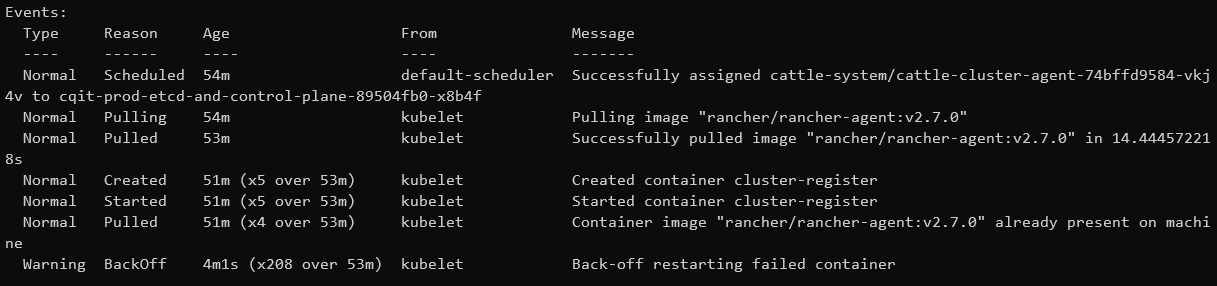
kubectl describe on CoreDNS, Metrics server and local-path-provisioner:

kubectl describe on traefik related pods:

Additional context
After manually removing the taints in that first control-plane node, the cluster succesfully initializes and becomes active. The second control-plane still has the taint when this happens.
Я пытаюсь сделать запрос ConferenceCallout в службе Sinch, но у меня возникают проблемы с подписью. Я вставляю код:
<?php //JSon Object $conferencia['method']="conferenceCallout"; $participante['cli']="46000000000"; $destination['type']="username"; $destination['endpoint']="roke1"; $participante['destination']=$destination; $participante['domain']="mxp"; $participante['custom']="customData"; $participante['locale']="en-US"; $participante['greeting']="Welcome to my conference"; $participante['conferenceId']="conferencia_de_prueba"; $participante["enableDice"]=false; $conferencia['conferenceCallout']=$participante; $data=json_encode($conferencia); $md5_body = base64_encode ( MD5 ( utf8_encode ( json_encode($conferencia) ) ) ); $applicationKey="XXXXXX-xXXX-XXXX-XXXX-XXXXXXXX"; $applicationSecret="XXXXXXXXXXXXXXXX=="; $timestamp = new DateTime('NOW'); $StringToSign ="POST ".$md5_body." application/json x-timestamp:".$timestamp->format(DateTime::ISO8601)." /v1/callouts"; $utf8encode=utf8_encode($StringToSign); $hash= hash_hmac("sha256",$applicationSecret,$utf8encode); $base64=base64_encode($hash); $Signature =$base64; $Autorization = "Application"." ".$applicationKey.":".$Signature; $ch = curl_init('https://callingapi.sinch.com/v1/callouts'); curl_setopt($ch, CURLOPT_CUSTOMREQUEST, "POST"); curl_setopt($ch, CURLOPT_POSTFIELDS,$data); curl_setopt($ch, CURLOPT_RETURNTRANSFER, true); curl_setopt($ch, CURLOPT_HTTPHEADER, array( 'Content-Type: application/json', 'Authorization:' . $Autorization, 'X-Timestamp: ' . $timestamp->format(DateTime::ISO8601), 'Content-Length: ' . strlen($data)) ); $result = curl_exec($ch); echo $result; ?> Но я получаю код ошибки 40102, который равен 40102 – Недопустимая подпись.
Может кто-нибудь мне помочь? Что я делаю неправильно?
С наилучшими пожеланиями.
Я отправляю код, который работает для меня.
$phone ="+460000000" //Put the destination number here $key = "XXXXXX"; $secret = "XXXXXX"; $message = $first_name . ', thanks you for signing in. We will text you when we're ready for you'; $phone = $phone_number; $body = json_encode(array('From' => $rented_number, 'Message'=>$message, )); $timestamp = date("c"); $path = "/v1/sms".$phone; $content_type = "application/json"; $canonicalized_headers = "x-timestamp:" . $timestamp; $content_md5 = base64_encode( md5( utf8_encode($body), true )); $string_to_sign = "POSTn". $content_md5."n". $content_type."n". $canonicalized_headers."n". $path; $signature = base64_encode(hash_hmac("sha256", utf8_encode($string_to_sign), base64_decode($secret), true)); $authorization = "Application " . $key . ":" . $signature; $service_url = 'https://messagingapi.sinch.com'.$path; $curl = curl_init($service_url); curl_setopt($curl, CURLOPT_HTTPHEADER, array( 'content-type: '.$content_type, 'x-timestamp:' . $timestamp, 'authorization:' . $authorization )); curl_setopt($curl, CURLOPT_RETURNTRANSFER, true); curl_setopt($curl, CURLOPT_POST, true); curl_setopt($curl, CURLOPT_POSTFIELDS, $body); curl_setopt($curl, CURLOPT_SSL_VERIFYPEER, false); $curl_response = curl_exec($curl); // @todo: checking response / working with results curl_close($curl);
Спасибо drew010 на вашу помощь, было потрясающе !!
Из их документации API я смог создать этот код, который генерирует подпись, которая соответствует тому, что у них есть. Вы должны иметь возможность изменить его, чтобы заставить его работать с вашим кодом.
<?php $applicationKey = '5F5C418A0F914BBC8234A9BF5EDDAD97'; $applicationSecret = 'JViE5vDor0Sw3WllZka15Q=='; $ts = '2014-06-04T13:41:58Z'; $resource = '/v1/sms/+46700000000'; $timestamp = new DateTime($ts); $body = [ 'message' => 'Hello world', ]; $message = json_encode($body); $md5 = base64_encode(md5($message, true)); $timestamp = $ts; $stringToSign = "POSTn" . $md5 . "n" . "application/jsonn" . 'x-timestamp:' . $timestamp . "n" . $resource; $signature = base64_encode( hash_hmac('sha256', $stringToSign, base64_decode($applicationSecret), true ) ); echo $md5 . "n" . $signature . "n"; // jANzQ+rgAHyf1MWQFSwvYw== // qDXMwzfaxCRS849c/2R0hg0nphgdHciTo7OdM6MsdnM=
The FRM-40102: Record must be entered or deleted first happen when you try to edit a record and leave blank a required field and without saving it or deleting it, you try to move on to next record or database block. Better you first cancel the operation if you dont want to complete the transaction.
Oracle Form’s error information
Cause: You pressed [Next Record] or [Down] in a context where it is meaningless. Either:
1. The last record in a block is the current record.
2. The block is empty.
3. You are in a new record in the middle of the block created by pressing [Insert Record].
Action: No action is necessary.
Level: 5
Trigger: ON-ERROR
An Oracle Apex Consultant, Oracle ACE, and founder of foxinfotech.org and orclqa.com a question and answer forum for developers.