
BNAME.RU » Код ошибки HTTP 526 Invalid SSL Certificate Cloudflare
Ошибка 526: недействительный сертификат SSL
Ошибка 526 возникает, когда выполняются эти два условия:
Cloudflare не может проверить сертификат SSL на вашем исходном веб-сервере, и
Полный SSL (строгий) SSL устанавливается на вкладке «Обзор» вашего приложения Cloudflare SSL / TLS.
Как устранить ошибку 526 Invalid SSL Certificate?
Для потенциального быстрого исправления установите для SSL значение «Полный» вместо «Полный (строгий)» на вкладке «Обзор» приложения Cloudflare SSL / TLS для домена.
Попросите администратора сервера или поставщика услуг хостинга проверить сертификаты SSL исходного веб-сервера и убедиться, что:
- Сертификат не просрочен
- Сертификат не отозван
- Сертификат подписан центром сертификации (не самоподписанный)
- Запрошенное или целевое доменное имя и имя хоста указаны в общем имени сертификата или альтернативном имени субъекта.
- Ваш исходный веб-сервер принимает соединения через порт SSL порт 443
- Временно приостановите Cloudflare и посетите https://www.sslshopper.com/ssl-checker.html#hostname=www.example.com (замените www.example.com своим именем хоста и доменом), чтобы убедиться, что с исходным SSL нет проблем. сертификат:
Если исходный сервер использует самозаверяющий сертификат, настройте домен на использование полного SSL вместо полного SSL (строгого). См. Рекомендуемые настройки SSL для вашего происхождения.
В этой статье речь пойдёт о том, что представляет из себя Ошибка 526 Invalid SSL certificate. Но прежде важно сказать, что для контроля онлайн статуса сайта, оценки доступности сайта существуют специальные сервисы. Одним из таких сервисов является сервис BAILRY – бесплатная регулярная (периодическая) проверка сайта на доступность. Есть в этом сервисе и платная подписка – для постоянного контроля доступности сайта.
Ошибка 526 возникает, когда выполняются эти два условия:
- Cloudflare не может проверить сертификат SSL на веб-сервере
- Полный SSL (Строгий) SSL установлен на вкладке Обзор вашего приложения Cloudflare SSL / TLS
Рекомендации по исправлению ошибки 526 Invalid SSL certificate
Для возможного быстрого исправления установите SSL на Full вместо Full (strict) на вкладке Overview вашего приложения Cloudflare SSL / TLS для домена.
Попросите вашего администратора сервера или хостинг-провайдера проверить SSL-сертификаты веб-сервера и убедиться, что:
- Сертификат не истек
- Сертификат не отозван
- Сертификат подписывается Certificate Authority (not self-signed)
- Запрашиваемое или целевое доменное имя и имя хоста находятся в общем имени сертификата или альтернативном имени субъекта
- Ваш веб-сервер принимает подключения через порт SSL порт 443
- Временно приостановите Cloudflare и перейдите на страницу https://www.sslshopper.com/ssl-checker.html#hostname=www.example.com (замените www.example.com на ваше имя хоста и домен), чтобы убедиться, что с исходным SSL не существует проблем
Если сервер использует самозаверяющий сертификат, настройте домен для использования Full SSL вместо Full SSL (Strict).
Напоследок важно отметить то, что доверие клиентов и пользователей к вашему сайту, а также позиция в поисковых системах напрямую зависят от доступности вашего ресурса (сайта) в любой момент времени. А контролировать эту доступность вы сможете при помощи сервиса BAILRY – уникального программного продукта не имеющего аналогов на рынке. Чтобы быть в курсе подключите бесплатную регулярную (периодическую) проверку сайта на доступность уже сегодня!
BNAME.RU » Код ошибки HTTP 526 Invalid SSL Certificate Cloudflare
Ошибка 526: недействительный сертификат SSL
Ошибка 526 возникает, когда выполняются эти два условия:
Cloudflare не может проверить сертификат SSL на вашем исходном веб-сервере, и
Полный SSL (строгий) SSL устанавливается на вкладке «Обзор» вашего приложения Cloudflare SSL / TLS.
Как устранить ошибку 526 Invalid SSL Certificate?
Для потенциального быстрого исправления установите для SSL значение «Полный» вместо «Полный (строгий)» на вкладке «Обзор» приложения Cloudflare SSL / TLS для домена.
Попросите администратора сервера или поставщика услуг хостинга проверить сертификаты SSL исходного веб-сервера и убедиться, что:
- Сертификат не просрочен
- Сертификат не отозван
- Сертификат подписан центром сертификации (не самоподписанный)
- Запрошенное или целевое доменное имя и имя хоста указаны в общем имени сертификата или альтернативном имени субъекта.
- Ваш исходный веб-сервер принимает соединения через порт SSL порт 443
- Временно приостановите Cloudflare и посетите https://www.sslshopper.com/ssl-checker.html#hostname=www.example.com (замените www.example.com своим именем хоста и доменом), чтобы убедиться, что с исходным SSL нет проблем. сертификат:
Если исходный сервер использует самозаверяющий сертификат, настройте домен на использование полного SSL вместо полного SSL (строгого). См. Рекомендуемые настройки SSL для вашего происхождения.
Поставить оценку ( рейтинг )
Категория: Технологии
Просмотров: 1515
Обновлено: 17.12.2021 04:03
Продолжаем обсуждать и правильно настраивать HTTPS (SSL). На некоторых хостингах, например на FirstVDS бесплатные SSL сертификаты Let’s Encrypt могут внезапно перестать работать вообще или каждые 3 месяца автоматически не продлеваются … и т.д. Как вариант решения проблем с плохим хостингом ➡ это воспользоваться бесплатными SSL сертификатами на проекте CloudFlare.
Но и здесь нужно быть внимательным ⇨ не всё всегда идёт хорошо. Заходим в панель управления CloudFlare, в раздел SSL/TLS, чтобы включить HTTPS на сайте (на вашем домене). (Предполагается, что домен вы уже перенесли и настроили.) И выбираем один из чекбоксов: 
Off (not secure) ☑ No encryption applied ➡ SSL отключен и не работает
Flexible ☑ Encrypts traffic between the browser and Cloudflare ➡ SSL между пользователем и CloudFlare. Иногда только такой вариант и работает.
Full ☑ Encrypts end-to-end, using a self signed certificate on the server ➡ SSL между пользователем и CloudFlare + до сервера. Это Наиболее распространённый вариант настройки.
Full (strict) ☑ Encrypts end-to-end, but requires a trusted CA or Cloudflare Origin CA certificate on the server ➡ SSL между пользователем и CloudFlare + до сервера, на котором должен быть установлен действующий сертификат, например CA CloudFlare Origin
И ниже ещё одна настройка SSL/TLS Recommender
Каждая из указанных настроек может создавать те или иные проблемы на сайте.
Почему на сайте перестал работать https (SSL) ?
Решение
Ошибка Error 526 Invalid SSL certificate появляется, если у вас включены:
SSL/TLS Recommender
или
Full (strict)
1 Что делать?
Просто берём и отключаем эти опции и смотрим результат. Он обычно сразу проявляется, без задержки.
И в завершение ⇔ письмо от CloudFlar с рекомендациями по включению SSL/TLS Recommender

О нашем проекте
Проект Joom-la-la предназначен для начинающих пользователей Системы управления сайтами Joomla; программистов, администраторов. Мы хотим поделиться с вами своими наработками и примерами.
Это один из сотен сайтов, сделанных нами в рамках бренда Petrovich Group. Надеемся быть вам полезными и ждём ваших комментариев
Петрович
Контактная информация
Владивосток, Россия
+ 7 423 2 *** ***
888 (@) jom-la-la.ru
petrovichgroup.ru
****
Новые публикации
Обнаружена ошибка. U…
При попытке сохранить файл configuration появляется сообщение: 0 — Обнаружена ошибка. Unable to load…
После обновления до…
После обновления Joomla до 3.6 в разделе Менеджер расширений — установить появляется Предупреж…
Серия Fatal ошибок в…
В достаточно хороших шаблонах Vina Bonnie, Vina Fashion, IncomeUp, Vina Bagshop есть проблема — они…
[Решено] Ошибка при…
Иногда, при сохранении различного контента ( материала, портфолио), в админке, возникает ошибк…
© Joom-la-la.ru . При любом использовании материалов ссылка на Joom-la-la.ru обязательна.
Все права защищены.
Дима

- Регистрация
- 9 Янв 2019
- Сообщения
- 8
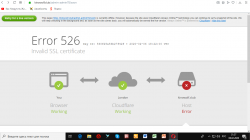
Ошибка 526 .. Что делать при этой ошибке,или как правильно её исправить??
Вложения
-

69.9 KB
Просмотры: 6
Alisa

- Регистрация
- 15 Дек 2017
- Сообщения
- 5,067
Ошибка 526 .. Что делать при этой ошибке,или как правильно её исправить??
Ошибка сертификата. Заходите в панель CloudFlare и там смотрите информацию об ошибке SSL. Активен он или нет и стоит ли Flexible.
Дима
- Регистрация
- 9 Янв 2019
- Сообщения
- 8
Да с полного перешёл на гибкий (Flexible) и всё сразу заработало..Спасибо!
Cloudflare error 526 triggers when Cloudflare is unable to validate server’s SSL/TLS certificate. It normally happens with Full SSL(Strict) mode in the Cloudflare.
As a part of our Server Management Services, we help our customers to fix similar Cloudflare related errors regularly.
Let us today discuss the possible causes and fixes for this error.
What is Cloudflare error 526?
While we use Cloudflare, it involves two SSL/TLS certificates. One is provided by Cloudflare and the other by the origin server. The First certificate shown in the browser while visiting the website is the Cloudflare one. Origin server’s certificate protects data exchanges between the server and Cloudflare.
The Full (strict) mode SSL option ensures a secure connection between both the visitor – Cloudflare domain and Cloudflare – origin web server connections.
Thus if any of it fail to establish a secure connection, it triggers the 526 error as shown below.

Let us now look at the possible reasons for this error.
What are the causes of Cloudflare error 526?
As we discussed earlier, the error 526 triggers when either the certificate provided by Cloudflare or by the origin server fails to establish a secure connection. This generally happens when:
* Cloudflare cannot validate the SSL certificate at your origin web server
* Full SSL (Strict) SSL is set in the Cloudflare SSL/TLS app.
Let us now look at the steps to fix this error.
How to fix Cloudflare error 526?
 Full (strict) mode is the most common reason for the 526 error. A quick fix to solve it would be to change the SSL mode to Full instead of Full (strict) from the Overview tab of Cloudflare SSL/TLS section for the particular domain.
If the issue persists even after changing the SSL mode to Full, then it would be more likely related to the origin web server’s SSL certificates. We need to verify that:
1. The certificate is not expired
2. The certificate is not revoked
3. The certificate is signed by a Certificate Authority such as GlobalSign, Verisign, GeoTrust, Comodo, etc, and is not a self-signed SSL certificate.
4. The requested domain name and hostname are in the certificate’s Common Name or Subject Alternative Name.
5. Origin web server accepts connections over port SSL port 443
6. Temporarily pause Cloudflare and cross-check the certificate with any SSL verification sites like  https://www.sslshopper.com to verify that no issues exist with the origin SSL certificate.
If the origin server is using an expired, revoked or self -signed certificate, the next step to fix this error would be to install a proper SSL certificate signed by a Certificate Authority.
Likewise, it is important to have the requested domain name and hostname in the certificate’s Common Name or Subject Alternative Name. If we have added a CNAME for the hostname on Cloudflare, the Common Name or SAN may also match the CNAME target.
Cloudflare can also issue origin certificates to you on request if you don’t want to pay for or acquire one from a third-party. The 526 error should disappear after the installation of a valid certificate on the origin server and the server it accept secure (HTTPS) connections.
[Need any further assistance in fixing Cloudflare errors? – We’re available 24*7]
Conclusion
In short, Cloudflare error 526 occurs when Cloudflare is unable to validate the server’s SSL/TLS certificate. Today, we saw how our Support Engineers fix this error.
PREVENT YOUR SERVER FROM CRASHING!
Never again lose customers to poor server speed! Let us help you.
Our server experts will monitor & maintain your server 24/7 so that it remains lightning fast and secure.
GET STARTED
var google_conversion_label = «owonCMyG5nEQ0aD71QM»;
#web #dns #ssl-certificate #cloudflare
#web #dns #ssl-сертификат #cloudflare
Вопрос:
Я перенес хостинг своего веб-сайта на Inmotion с Bluehost, но домен в настоящее время находится на Bluehost (на нем был Cloudflare на Bluehost). Теперь я переместил его на хостинг Inmotion и создаю учетную запись Cloudflare, чтобы настроить ее на своем веб-сайте. Я настроил Cloudflare и изменил DNS домена на Cloudflare DNS, но теперь, когда я запускаю Cloudflare с моей панели Cloudflare, на моем веб-сайте отображается ОШИБКА 526. Я много раз обращался в службу поддержки Inmotion и Bluehost, и они сказали мне, что я должен связаться с командой Cloudflare, потому что проблема связана с Cloudflare, и мне там никто не ответил.
Для получения дополнительной информации я использовал все способы, которые были найдены в сообществе Cloudflare или в Google, но не смог решить эту проблему. Пожалуйста, помогите мне.
Комментарии:
1. Вот хороший источник информации для диагностики основной причины этой ошибки: Совет сообщества — исправление ошибки 526: недействительные сертификаты SSL
Ответ №1:
Ошибка Cloudflare 526 срабатывает, когда Cloudflare не может проверить сертификат SSL / TLS сервера. Обычно это происходит в режиме полного SSL (строгого) в Cloudflare.
Какой режим вы используете в cloudflare? Полный (строгий) режим? Если да, посмотрите его:
Full (strict) mode is the most common reason for the 526 error. A quick fix to solve it would be to change the SSL mode to Full instead of Full (strict) from the Overview tab of Cloudflare SSL/TLS section for the particular domain.
If the issue persists even after changing the SSL mode to Full, then it would be more likely related to the origin web server’s SSL certificates. We need to verify that:
1. The certificate is not expired
2. The certificate is not revoked
3. The certificate is signed by a Certificate Authority such as GlobalSign, Verisign, GeoTrust, Comodo, etc, and is not a self-signed SSL certificate.
4. The requested domain name and hostname are in the certificate’s Common Name or Subject Alternative Name.
5. Origin web server accepts connections over port SSL port 443
6. Temporarily pause Cloudflare and cross-check the certificate with any SSL verification sites like https://www.sslshopper.com to verify that no issues exist with the origin SSL certificate.
If the origin server is using an expired, revoked or self -signed certificate, the next step to fix this error would be to install a proper SSL certificate signed by a Certificate Authority.
Likewise, it is important to have the requested domain name and hostname in the certificate’s Common Name or Subject Alternative Name. If we have added a CNAME for the hostname on Cloudflare, the Common Name or SAN may also match the CNAME target.
Cloudflare can also issue origin certificates to you on request if you don’t want to pay for or acquire one from a third-party. The 526 error should disappear after the installation of a valid certificate on the origin server and the server it accept secure (HTTPS) connections.
Если вы хотите изменить другой режим:
На панели CloudFlare Domain -> SSL/TLS -> Overview -> Pick the mode ). Когда вы выбираете режим, отображается, как будет работать шифрование.
Если вы используете порт 80 / tcp в конечной точке, вам необходимо использовать гибкий режим (шифрует трафик между браузером и Cloudflare).
Но если вы используете порт 443 / tcp в конечной точке, вам необходимо использовать полный режим (шифрует сквозной, используя самозаверяющий сертификат на сервере). Для полного режима доступно использование самозаверяющих SSL-сертификатов на вашем виртуальном хосте.
Cloudflare Error 526
Cloudflare Error 526: Invalid SSL certificate indicates that your SSL setting in the Cloudflare SSL/TLS app is set to Full SSL (Strict) for that website but Cloudflare is unable to successfully validate the SSL certificate on your origin website / web server.

As you can see from the tip next to the Full (strict) setting, in order for this setting to work as intended, the website needs to have a valid and active SSL certificate from a trusted CA.
Troubleshooting Cloudflare Error 526
Possible solutions to remove this error are applicable on a case-to-case basis:
If you do not have a SSL certificate on your website, then get a SSL certificate issued from a trusted CA and set it up on your website hosting.
If your website’s SSL certificate has expired, then get a SSL certificate issued from a trusted CA for your website’s domain/sub-domain and replace the old one in your website hosting.
If you are using a CNAME to another hostname in Cloudflare DNS, then ensure that the website has a SSL certificate issued from a trusted CA for your website’s CNAME hostname and the target hostname i.e. you cannot use a CNAME target that does not already have https enabled on it.
Are you facing the Cloudflare error 526? Select a certificate for your website here.
Introduction
Error 526 is an HTTPS error that happens when the website cannot establish a secure connection, indicating a failed or incomplete SSL handshake. It shows that the SSL certificate on the origin server is invalid, expired, self-signed, not configured correctly, or the certificate was issued by an untrusted Certificate Authority (CA).
In this article, you will learn how to fix the 526 Invalid SSL certificate error.
What Is Error 526?
Error 526 is an SSL certificate error that occurs when Cloudflare cannot verify the SSL certificate presented by the origin server. In case the SSL certificate is invalid, web browsers display a warning message that the website is vulnerable to attacks.
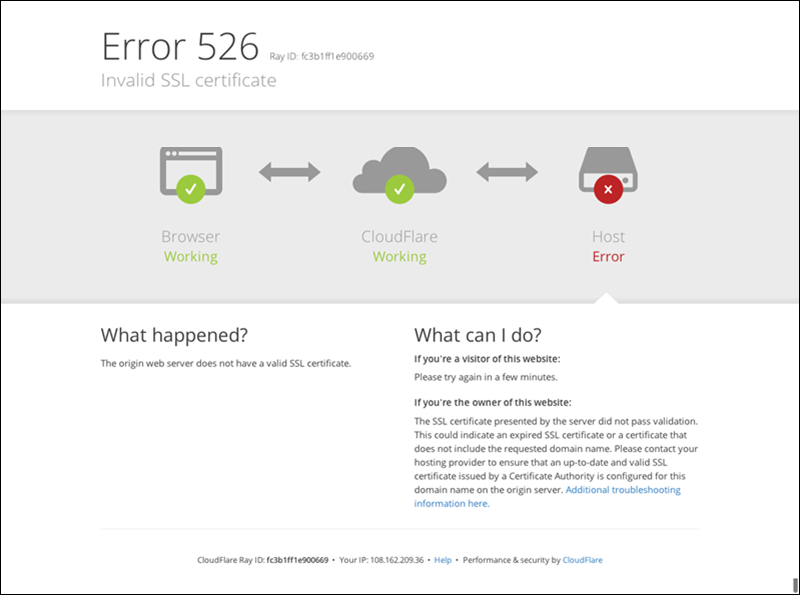
The 526 HTTP response status code is an unofficial server error specific to Cloudflare.
What Causes Error 526 Invalid SSL Certificate?
Error 526 occurs when the origin server’s SSL certificate fails to establish a secure connection. Common causes of the 526 Cloudflare error are:
- Full (strict) SSL mode on Cloudflare. The Full (strict) mode of Cloudflare’s SSL/TLS encryption may cause the 526 error. Moreover, the Full (Strict) mode does not allow unsecured data exchange between Cloudflare servers and the origin server.
- Incorrect SSL certificate installation. If the SSL certificate is not installed correctly, the visitor’s browser fails to recognize it, resulting in error 526.
- SSL certificate not issued by a trusted CA. If the SSL certificate is not issued by a trusted CA, the visitor’s browser does not recognize it as a valid certificate.
- Expired SSL certificate. SSL certificates have a validity period. Once it expires, the certificate becomes invalid.
- Self-signed SSL certificate. Self-signed SSL certificates are not issued by a trusted CA and are not trusted by browsers by default.
- Domain name mismatch. If the SSL certificate domain name does not match the website’s domain name, the visitor’s browser does not recognize it as valid.
- SSL/TLS protocol mismatch. If the SSL/TLS protocol used by the website does not match the protocol supported by the visitor’s browser, the site visitor gets the 526 invalid certificate error.
Depending on the root cause of the issue, there are half a dozen ways to fix Cloudflare’s error 526. The following sections outline how to identify what’s causing the issue and how to fix it.
Method 1: Switch SSL Mode from Full (strict) to Full
Cloudflare offers four SSL modes: Off, Flexible, Full, and Full (Strict). In Full (strict) mode, Cloudflare requires a valid SSL certificate on the origin server. It also verifies the certificate’s hostname against the hostname the browser connects to. In case of any mismatch, Cloudflare returns HTTP status 526 to the browser.
The first thing to do is change the SSL mode from Full (strict) to Full. The Full mode requires an SSL certificate on the origin server, but it does not perform hostname verification.
Follow the steps below to change Cloudflare’s SSL mode from Full (strict) to Full:
1. Log in to your Cloudflare account.
2. Select the domain to change the SSL mode.
3. Navigate to the SSL/TLS tab.

4. Under the Overview tab, look for the Encryption settings.
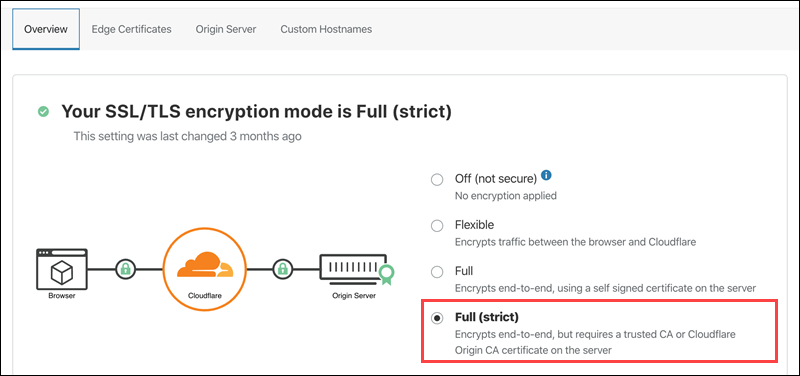
5. If the Full (strict) mode is selected, change it to Full.
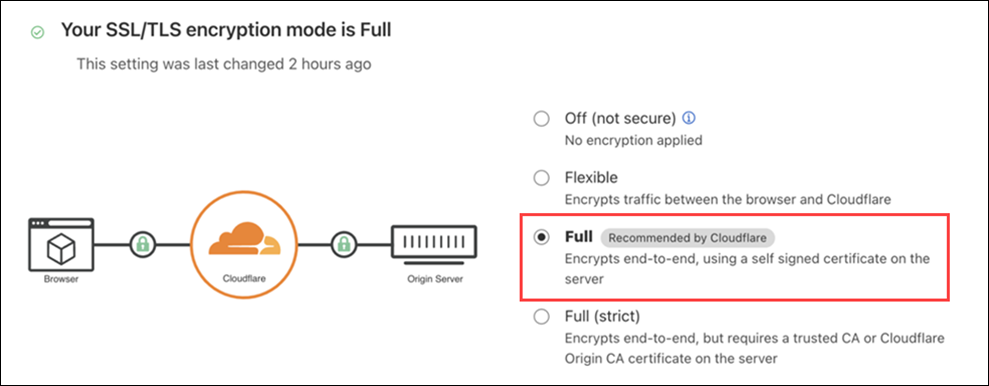
After switching the SSL mode to Full, wait a few minutes and try accessing the website again. If the error persists, try the other methods listed below.
Method 2: Check the SSL Certificate
When an SSL certificate is not installed correctly, it results in a 526 error. Check the SSL certificate installation status by logging into your web hosting account or server. Depending on the hosting provider and the type of hosting plan, access the account following one of these methods:
- Access the account using a web-based control panel like cPanel, DirectAdmin, Webmin, or Plesk.
- Use a remote desktop application like PuTTY, Remote Desktop Connection (for Windows), or VNC Viewer to connect to the server if you have a VPS or dedicated server.
Once logged in, take the following steps to verify the SSL certificate:
1. Locate the SSL/TLS settings in the web hosting control panel or server configuration settings. Look for an option that says SSL/TLS or Security. For instance, cPanel SSL/TLS settings look like this:
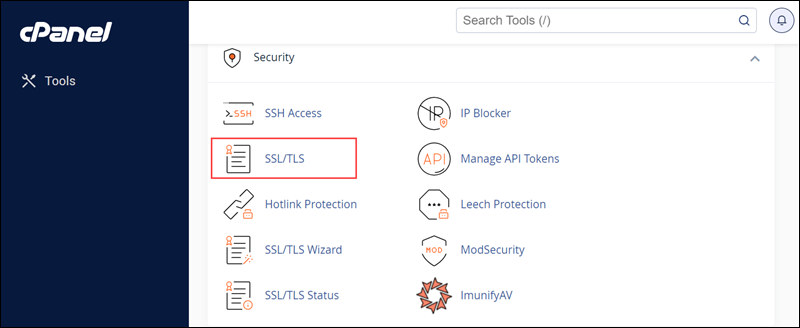
2. If the installation status is incomplete or shows errors, reinstall the certificate. The steps vary depending on the provider, but the certificate installation options are often in the same SSL/TLS panel.
Method 3: Check for a Domain Name Mismatch
A possible cause of the Cloudflare 526 error is an SSL certificate that was issued for the wrong or misspelled domain name. Log into your web hosting account or server and check the domain name associated with the SSL certificate.
1. Locate the SSL/TLS settings.
2. Check the domain name on the SSL certificate by looking for an option that displays the SSL certificate’s information.
3. Verify that the domain name on the certificate matches the website’s domain name.
Note: Steps vary depending on the hosting provider.
4. If the domain name is incorrect, contact the SSL certificate provider to fix it.
Method 4: Use a Trusted SSL Certificate
Purchase SSL certificates issued by a trusted Certificate Authority (CA) to ensure most visitors’ browsers recognize the origin server’s certificate.
Note: Using an SSL certificate from a trusted CA prevents errors and assures users that the website is authentic and safe. On the other hand, SSL certificates from untrusted CAs cause issues and are a warning sign to site visitors to leave the page immediately.
Check the list of trusted Certificate Authorities in your local browser’s settings or preferences. For example, in Chrome:
1. Open the Customize and Control Google Chrome drop-down and select Settings > Privacy and security.
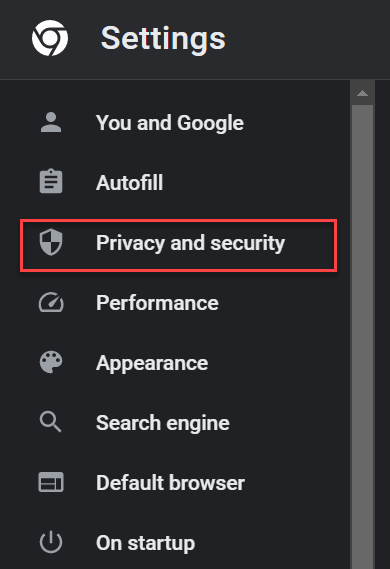
2. Click Security.
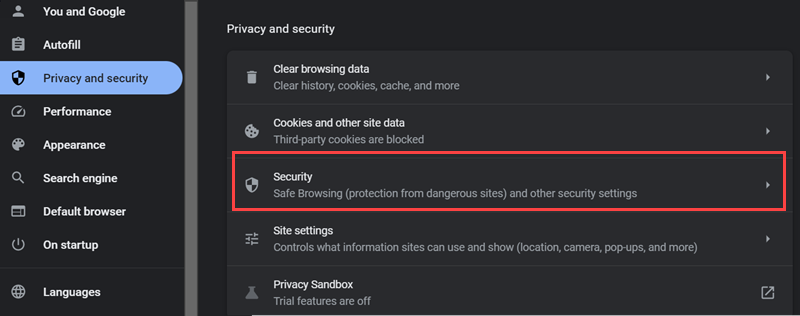
3. Scroll down and click Manage device certificates under the Advanced section:
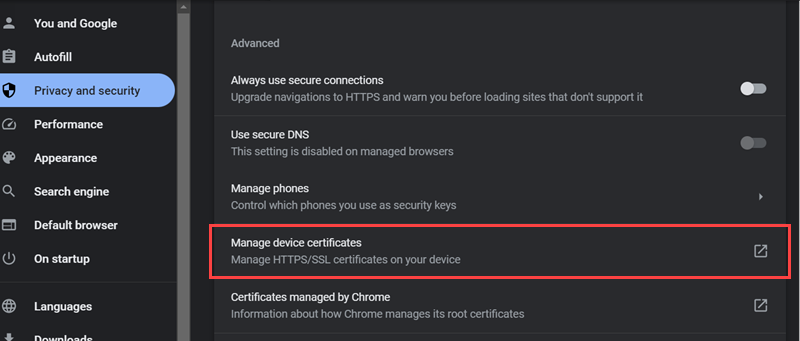
If the certificate is on the list, it is trusted by the CA. The process is similar for other browsers.
Another way to check whether the origin server has a certificate from a trusted CA is by using the curl command. For instance, run curl -v on phoenixnap.com:
curl -v https://www.phoenixnap.com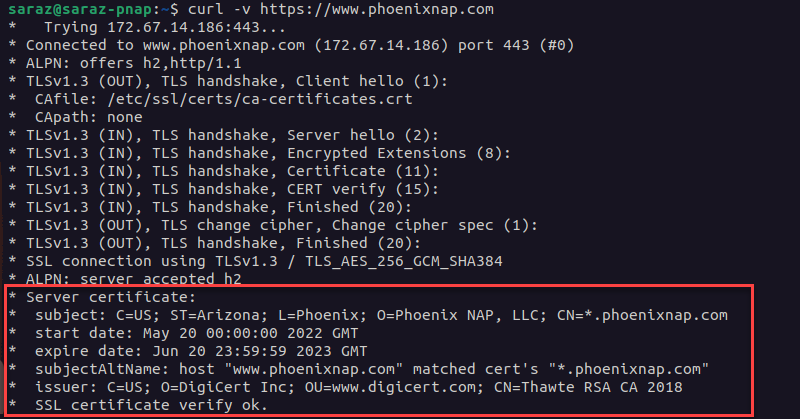
This command prints SSL certificate details at the bottom, such as the expiration date, domain name, and issuer. The output ends with the note: SSL certificate verify ok.
Alternatively, use curl -I:
curl -I https://www.phoenixnap.com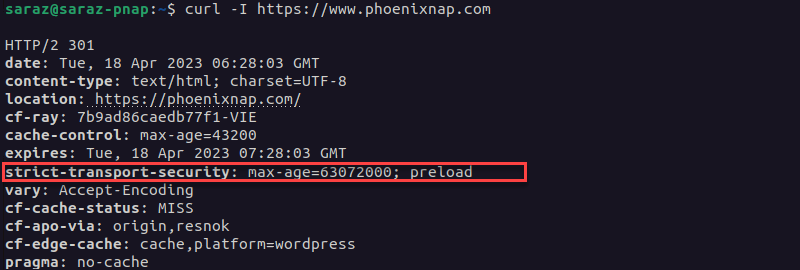
The output is extensive, and no error warnings indicate that it is a self-signed certificate. Moreover, the Strict-Transport-Security header indicates that the website uses HTTPS with HSTS (HTTP Strict Transport Security). This header only works on a server that uses a valid SSL certificate issued by a trusted CA.
However, when curl -v is used to check a domain with an untrusted certificate, the commands print error messages. For example:
curl -v https://untrusted-cert-example.com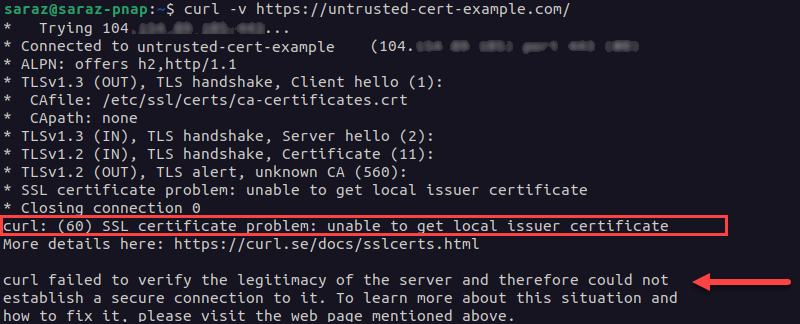
When the origins server’s certificate is not trusted, curl -v prints a warning message along with other data. The output states the specific reason the certificate is not trusted. In this example, the error message states that the SSL certificate problem exists because curl is unable to get the local issuer certificate. The certificate is considered invalid and leads to error 526.
The curl -I command gives a similar output for the same domain:
curl -I https://untrusted-cert-example.com
Note: Both curl -v and curl -I print the SSL certificate details useful for dealing with a 526 error. The difference is that curl -v provides more verbose output explaining the error, while curl -I only displays the error code without additional details.
If your domain’s SSL certificate was no issued by a trusted CA, follow the steps below to fix the issue:
1. Purchase an SSL certificate from a trusted CA, via a reputable web hosting provider or third-party vendor. While more expensive, these certificates provide greater security and are recognized by all major browsers.
2. Install the certificate on the website.
3. Reuse the curl -v command to verify the certificate is trusted.
Method 5: Renew SSL Certificate if Expired
A 526 error on the website sometimes indicates that the SSL certificate has expired. To check whether that is the case, run curl. For instance, verify whether the following website has an expired certificate with curl -I (curl -v also works):
curl -I https://expired-cert-example.com
If the output shows that the certificate has expired:
1. Renew the SSL certificate based on the instructions on the certificate provider’s website.
2. Install the certificate on the website. The specific steps to do this vary depending on the hosting provider and server setup.
3. Run curl -I or curl -v to verify the renewed SSL certificate is installed correctly.
Note: Some hosting providers offer automatic renewal and installation of SSL certificates.
Method 6: Avoid Self-Signed SSL Certificates
Most web browsers do not trust self-signed SSL certificates. A self-signed SSL certificate is signed by the same entity that issued it instead of being signed by a trusted third-party Certificate Authority (CA).
When a visitor tries to access a website with a self-signed certificate, the browser shows a warning message indicating that the website is not secure.
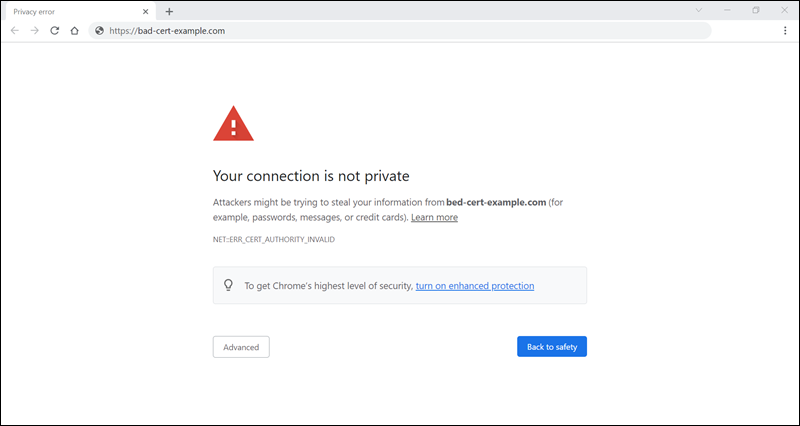
Certain browsers even prevent visitors from accessing the website altogether. In certain cases, self-signed certificates cause SSL handshake errors and other SSL-related issues, which leads to Cloudflare’s error 526.
To check whether the origin server uses a self-signed certificate, run curl with the -v argument:
curl -v https://www.bad-cert-example.com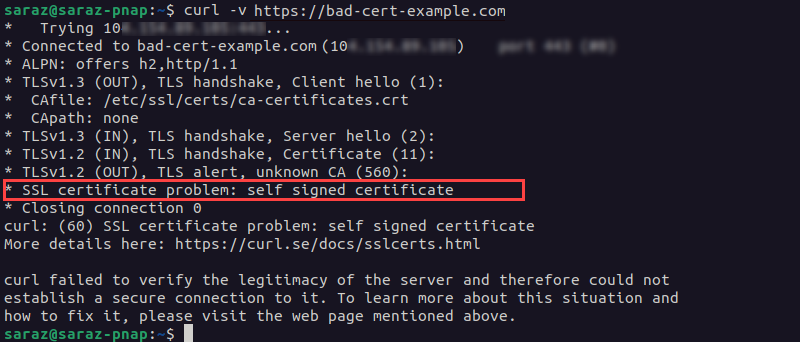
The output prints a message indicating that the certificate is self-signed. Alternatively, run curl -I to get the error message without the details:
curl -I https://www.bad-cert-example.com
To resolve the issue, the site owner must obtain and install an SSL certificate from a trusted CA.
3. Use curl -v to verify the certificate is trusted.
Method 7: Check SSL/TLS Protocol
When a visitor tries to access a website, the browser and the website’s server communicate using a specific SSL/TLS protocol. However, if the SSL/TLS protocol used by the website does not match the protocol supported by the visitor’s browser, error 526 occurs.
To check the SSL/TLS protocol used by the website and ensure it matches the protocol supported by the visitor’s browser, follow these steps:
1. Log in to your web hosting account or server.
2. Navigate to the SSL/TLS settings section. The location of this section depends on the hosting provider and the type of hosting plan.
3. Check the SSL/TLS protocol used by the website.
4. Check the protocol supported by the visitor’s browser. For example, look up the protocol supported by a particular browser online or by review the browser documentation.
5. If the protocols do not match, update the SSL/TLS protocol to one supported by the visitor’s browser.
Save the changes and verify if error 526 has been resolved by recessing the website.
Conclusion
After reading this article, you now know how to fix Cloudflare’s error 526. If you are experiencing other issues with Cloudflare, check our articles on how to fix various Cloudflare errors.