
Few things are as frustrating as seeing an error message appear on your DSLR digital camera’s LCD or electronic viewfinder. However, before you get too frustrated, take a deep breath. The nice thing about error messages is that they give you clues to the problems your camera might be experiencing, which is better than no error message at all.
The eight common errors listed here include tips for diagnosing and fixing problems with your Nikon DSLR camera.
ERR Error Message
If you see «ERR» on your LCD or electronic viewfinder, you likely have experienced one of three problems.
- The shutter button may not have depressed properly. Make sure the button is seated properly and pressed fully.
- The camera could not capture the image using your manual exposure settings. Change the settings or using automatic settings.
- The Nikon camera may have experienced a start-up error. Remove the battery and memory card for at least 15 minutes and turn on the camera again.
F— Error Message
Most of the time, this error message is limited to Nikon DSLR cameras because it’s related to a lens error. Specifically, the F— error message indicates that the lens and camera are not communicating. Check the lens to ensure it’s locked into place.
If you cannot make this particular lens work, try a different lens to see whether the F— error message continues. You’ll then know whether the problem is with the original lens or the camera.
FEE Error Message
The FEE error message on a Nikon DSLR camera indicates that the camera cannot shoot the photo at the aperture you selected. Turn the manual aperture ring to the highest number, which should fix the error message. You may need to allow the camera to automatically choose the aperture to shoot the photo at the proper exposure.
‘Information’ Icon Error Message
If you see an «i» in a circle, it indicates one of three likely errors.
- The battery may be exhausted. Charge it.
- The memory card may be full or locked. Look for a small toggle switch on the side of the card and flip it to the unlocked position to fix the problem.
- The camera may have detected that one of the subjects of the photo blinked as the photo was shot, allowing you to shoot the photo again.
No Memory Card Error Message
If you have a memory card installed in the camera, the No Memory Card Error message can have a few different causes.
- Make sure the type of memory card is compatible with your Nikon camera.
- The card may be full, meaning you’ll need to download the photos on it to your computer.
- The memory card could be malfunctioning or may have been formatted with a different camera. If this is the case, you may need to reformat the memory card with this camera. Keep in mind that formatting a memory card erases all data stored on it.
Record Movie Error Message
The Cannot Record Movie error message usually means that your Nikon DSLR cannot pass the data to the memory card fast enough to record it. This is almost always a problem with the memory card; you’ll need a memory card with a faster write speed. This error message also could refer to a problem with the camera, but try a different memory card first.
Shutter Release Error Message
A Shutter Release Error message with your Nikon DSLR camera indicates a jammed shutter release. Check the shutter button for any foreign objects or any sticky grime that could be jamming the shutter button. Clean the button and try again.
This Image Cannot Be Deleted Error Message
The image you are trying to delete has been protected by the software in the camera. You’ll need to remove the protection label from the image before you can delete it.
Further Troubleshooting
Different models of Nikon cameras may provide a different set of error messages than shown here. If you see Nikon camera error messages that aren’t listed here, check with your Nikon camera user guide for a list of other error messages specific to your camera model.
After reading through these tips, if you still cannot solve the problem indicated by the Nikon camera error message, you may need to take the camera to a repair center. Look for a trustworthy camera repair center when trying to decide where to take your camera.
Thanks for letting us know!
Get the Latest Tech News Delivered Every Day
Subscribe
- Article ID 000004783
- Date Published 07/10/2016
- Date Last Updated 17/11/2017
Коды ошибок фотокамеры For и Cd/Err
При установке карты памяти в цифровую зеркальную фотокамеру фотокамера проверяет карту памяти на совместимость и пригодность к использованию. Если проверка прошла успешно, на панели управления отобразится число оставшихся снимков. В случае обнаружения проблем могут отобразиться коды ошибок ‘For’ или ‘Cd/Err’.
Код ошибки For
Если на панели управления мигает код ошибки For (Форматировать карту), это означает, что фотокамера обнаружила правильную схему разбиения диска, но не может прочитать первый сектор карты памяти. Для решения этой проблемы отформатируйте карту памяти, как показано ниже, или выключите фотокамеру и вставьте новую карту памяти.
Код ошибки Cd/Err (Cha error на более старых фотокамерах)
Если на панели управления фотокамеры отображается код ошибки Cd/Err error (Ошибка карты памяти), это означает, что фотокамера обнаружила неправильную схему разбиения диска, или что фотокамера неисправна.
Прежде чем форматировать карту памяти, необходимо произвести следующие действия.
- Чтобы убедиться, что вы используете рекомендованную карту памяти, нажмите на ссылку и перейдите к списку рекомендованных карт.
- Если вы уже пользовались картой, сделайте резервные копии имеющихся на ней данных, которые вы хотите сохранить.
Как отформатировать карту памяти
- Чтобы отформатировать карту памяти, установленную в фотокамере, перейдите в Menu («Меню») > Setup Menu («Меню настройки») > Format memory card («Форматировать карту памяти») >, выберите гнездо, карту в котором необходимо отформатировать (если их несколько), а затем выберите OK.
- Не выключайте фотокамеру и не извлекайте из нее батарею или карту памяти до завершения форматирования.
- Форматирование занимает несколько секунд. По его завершении появится соответствующее сообщение.
Если это не помогло устранить проблему, возможно, карта неисправна или повреждена. Попробуйте использовать другую карту памяти.
Если вам требуется дополнительная помощь в форматировании карты, обратитесь к продавцу или в службу поддержки клиентов.
Previously viewed answers
Skip to Contact
Немногие вещи так же расстраивают, как появление сообщения об ошибке на ЖК-дисплее цифровой камеры DSLR или в электронном видоискателе. Однако, прежде чем вы будете слишком расстроены, сделайте глубокий вдох. Преимущество сообщения об ошибке заключается в том, что ваша камера дает вам подсказки относительно проблемы, которая лучше, чем отсутствие сообщения об ошибке — и никаких подсказок — вообще.
Восемь приведенных здесь советов помогут вам устранить неполадки в сообщениях об ошибках камеры Nikon DSLR.
Сообщение об ошибке ERR
Если вы видите «ERR» на вашем ЖК-дисплее или в электронном видоискателе, вероятно, у вас возникла одна из трех проблем. Во-первых, кнопка спуска затвора может быть неправильно нажата. Во-вторых, камера не смогла захватить изображение с помощью настроек ручной экспозиции; попробуйте изменить настройки или использовать автоматические настройки. В-третьих, камера Nikon, возможно, испытала ошибку при запуске. Извлеките аккумулятор и карту памяти не менее 15 минут и снова включите камеру.
F— Сообщение об ошибке
В большинстве случаев это сообщение об ошибке ограничено камерами Nikon DSLR, потому что это связано с ошибкой объектива. В частности, сообщение об ошибке F— указывает, что объектив и камера не сообщаются. Проверьте объектив, чтобы он зафиксировался на месте. Если вы не можете сделать этот конкретный объектив, попробуйте другой объектив, чтобы увидеть, продолжает ли сообщение F— ошибка. Затем вы узнаете, связана ли проблема с оригинальным объективом или камерой.
Сообщение об ошибке FEE
Сообщение об ошибке FEE на фотокамере Nikon DSLR указывает, что камера не может снимать фотографию с выбранной диафрагмы. Поверните кольцо ручной диафрагмы до наивысшего числа, которое должно исправить сообщение об ошибке. Вам может потребоваться, чтобы камера автоматически выбирала диафрагму для съемки фотографии при правильной экспозиции.
Сообщение об ошибке «Информация»
Если вы видите «i» в круге, это сообщение об ошибке, указывающее одну из трех вероятных ошибок. Во-первых, батарея может быть разряжена; попробуйте зарядить его. Во-вторых, карта памяти может быть заполнена или заблокирована. Найдите небольшой тумблер на боковой стороне карты и переверните его в «разблокированное» положение, чтобы устранить проблему. В-третьих, камера, возможно, обнаружила, что один из объектов фотографии моргнул, когда фотография была снята, что позволяет снова снимать фотографию.
Нет сообщения об ошибке карты памяти
Если у вас установлена карта памяти, сообщение об ошибке «Нет карты памяти» может иметь несколько разных причин. Во-первых, убедитесь, что тип карты памяти совместим с вашей камерой Nikon. Во-вторых, карта может быть полной, то есть вам нужно будет загрузить фотографии на компьютер. В-третьих, карта памяти может быть неисправна или, возможно, была отформатирована с помощью другой камеры. Если это так, вам может потребоваться переформатировать карту памяти с помощью этой камеры. Имейте в виду, что форматирование карты памяти стирает все данные, хранящиеся на ней.
Запись видеоролика
Сообщение об ошибке «Невозможно записать видео» обычно означает, что ваша Nikon DSLR не может передать данные на карту памяти достаточно быстро, чтобы записать ее. Это почти всегда проблема с картой памяти; вам понадобится карта памяти с более быстрой скоростью записи. Это сообщение об ошибке также может касаться проблемы с камерой, но сначала попробуйте другую карту памяти.
Сообщение об ошибке спуска затвора
Сообщение об ошибке спуска затвора с вашей фотокамерой Nikon DSLR указывает на застрявшую затвор. Проверьте кнопку спуска затвора для любых посторонних предметов или любой липкой грязи, которая может заклинить кнопку спуска затвора. Очистите кнопку и повторите попытку.
Сообщение об ошибке «Изображение не может быть удалено»
Изображение, которое вы пытаетесь удалить, было защищено программным обеспечением в камере. Прежде чем удалять его, вам нужно удалить метку защиты.
Просто помните, что различные модели камер Nikon могут предоставлять различные сообщения об ошибках, чем показано здесь. Если вы видите сообщения об ошибках камеры Nikon, которые здесь не указаны, обратитесь к руководству пользователя камеры Nikon для получения списка других сообщений об ошибках, характерных для вашей модели камеры.
После прочтения этих советов, если вы все еще не можете решить проблему, указанную в сообщении об ошибке камеры Nikon, вам может потребоваться снять камеру в центр ремонта. Ищите надежный центр ремонта камеры, пытаясь решить, где взять камеру.
Не ошибается лишь тот, кто ничего не делает. Это
выражение справедливо и для техники. Чем больше и чаще используют камеру, тем
быстрее она выдаст ошибку. Одни ошибки не требуют большого внимания, другие же
сообщают о неисправности. И, конечно, очень здорово, когда производитель создал
классификацию таких сообщений. Так поступили в Canon. А вот с фотоаппаратами бренда Nikonвсе
не так просто.
Наши инженеры собрали 8 самых распространенных ошибок
и дали несколько советов о том, что же с ними делать.
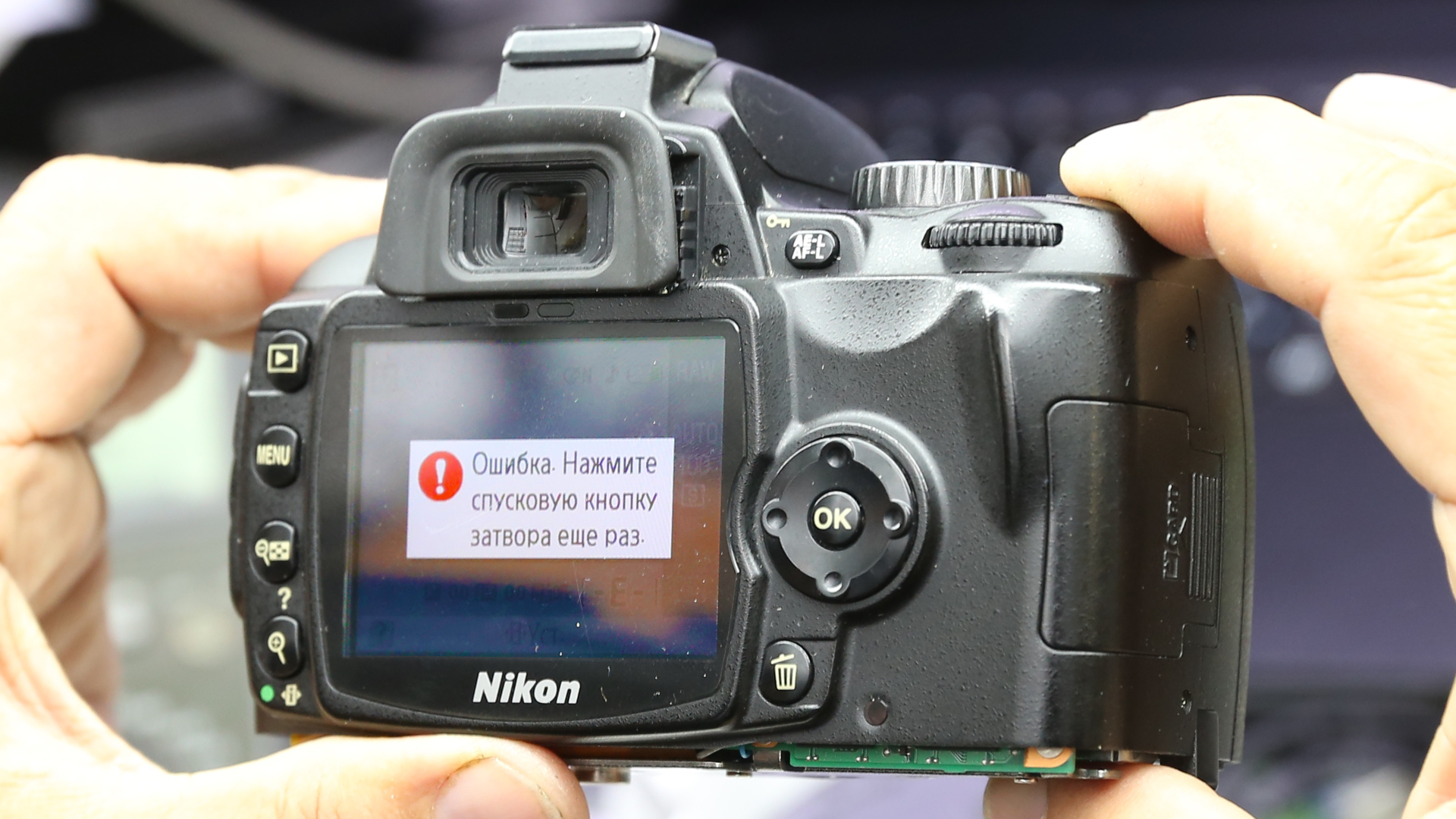
Ошибка ERR
У этой надписи на дисплее вашей камеры Никон может
быть три причины.
Во-первых, стоит проверить кнопку спуска затвора.
Возможно, она неправильно установлена или неверно сработала. Также есть
вероятность, что пользователь не зажал ее до конца.
Во-вторых, камере не удалось зафиксировать кадр в
мануальном режиме. В таком случае, можно поменять настройки экспозиции или
перейти на автоматический режим.
В-третьих, ошибка могла случиться при запуске. Для
того чтобы исправить положение, достаньте аккумулятор и карту памяти, подождите
15 минут и включите устройство.
Ошибка -E-
Если вы увидели такой
символ, значит нужно проверить положение карты памяти. Возможно, она
неправильно установлена.
Ошибка F—
С таким сообщением чаще всего сталкиваются владельцы
зеркалок Nikon. Дело в том, что ошибка указывает на проблемы с объективом. А
именно на отсутствие связи между оптикой и тушкой.
Если вы видите эту надпись на экране камеры, первым
делом нужно проверить, насколько хорошо зафиксирован объектив. Лучше отключить
и подключить его заново. Если это не помогло, попробуйте подключить другую
линзу. Так вы поймете, где же кроется проблема (в самой камере или в объективе).
Каким бы ни был ответ, скорее всего вам придется
обратиться в сервисный центр по ремонту Никон.
Кроме того, эта ошибка может означать, что объектив
попросту не совместим с камерой.
Ошибка FEE
Эта аббревиатура означает, что настройки диафрагмы,
выбранные вами, не позволяют фотоаппарату сделать снимок. В таком случае нужно
повернуть кольцо диафрагмы до максимального значения, это поможет решить проблему.
Если же не выйдет, воспользуйтесь автоматическими настройками диафрагмы.
Ошибка «i» в круге
У этой ошибки также несколько причин:
- Аккумулятор разряжен. Необходима
подзарядка. - Заблокирована или заполнена карта памяти.
В таком случае нужно проверить положение рычажка на карте. - Фотоаппарат сообщает вам, что объект
съемки моргнул в процессе.
Сообщение «Нет карты памяти»
Казалось бы, все просто, нужно вставить карту. Однако
такое сообщение может появиться, даже если накопитель на месте. Это случается,
если:
- Карта не совместима с камерой.
- Накопитель заполнен.
- Карта памяти неисправна или
отформатирована на другом фотоаппарате.
В последнем случае устранить проблему можно с помощью
форматирования карты на вашей камере. Если же не сработало, покупайте новую.
Сообщение «Невозможна запись видео»
Эта надпись говорит о том, что у камеры не получается
быстро отправлять информацию на накопитель. Зачастую дело в самой карте, это
значит вам нужен более скоростной вид. Кроме того, проблема может быть и в
самой камере. Но для начала стоит испытать другую карту.
Ошибка спуска затвора
Вероятно, заклинила кнопка спуска затвора. Проверьте,
может быть в нее попала грязь или посторонний предмет.
Сообщение «Это изображение не может быть удалено»
Фотографию, которую вы хотите удалить, защищает
программное обеспечение камеры. Поэтому перед тем, как удалить файл, снимите с
него защитную метку.
Конечно, это не все ошибки, которые могут случиться с
камерами Никон. Некоторые зависят от модели, поэтому их значение можно найти в
инструкции. Если же наши советы и рекомендации из мануала не сработали,
обращайтесь в сервисный центр Фотоблик. Мы поможем.
Поделиться с друзьями
How to fix 12 Common Nikon DSLR Error Codes?
Updated on July 24, 2021
Min Reading 11 Min
Summary: Are you unable to use your Nikon camera due to errors like ERR, FEE, F, F0, For, E, etc.? Learn how to fix 12 most common Nikon errors and how to recover photos and videos from camera lost due to these errors.


Table of Content:
Nikon users often face various kinds of errors that pop up on their camera display panel. The common ERR, FEE, For, E, etc. freeze camera to the extent that even turning it off and on doesn’t help. The situation is annoying as these errors don’t let you use your camera further and may lead to loss of photos and videos from the camera SD card.
Whether it is Nikon D70, D80, D90, D750, D3500, D7200 or any other model, the error could be due to multiple reasons such as non-CPU lens, improper SD card, dust, etc.
Read on to know how to fix 12 such common Nikon errors, and how to recover deleted or corrupt Nikon photos & videos from Nikon cameras.
12 Most Common Nikon Camera Error Codes & Solutions
1. ‘Err’ error message

Figure 1: Nikon ‘Err’ message in D750
‘Err’ message on Nikon D750, D80, D810, D90, etc., points toward internal camera issues. The error could be because of faulty lens, dirt, incompatible SD card, inappropriate camera exposure settings. It may also occur when you turn-on the camera and immediately start recording at high shutter speed, which more often than not, disables or crashes your Nikon DSLR.
Solution: You can do the following to fix Nikon ‘Err’ camera error:
2. ‘FEE’ error message

Figure 2: FEE error message on Nikon DSLR
The ‘FEE’ error on Nikon DSLR appears when the camera lens is not attached properly; has incorrect aperture setting; or you’re using non-CPU lens such as the NIKKOR AF or NIKKOR P lenses.
Solution: To fix ‘FEE’ error in Nikon, you may try the following:
Figure 3: Highest aperture marked in orange in camera
Figure 4: EE servo coupling on Nikon lens Figure 5: F-min switch on Nikon camera
If either of the two is broken, the lens issue could be due to this. Contact the authorized service centre for return or service.
3. ‘F’ error message

Figure 6: F error on Nikon camera screen
If you see ‘F’ error message on your Nikon D7000, D7100, D850 or other camera, this can indicate a lens issue. Either the camera lens is not connected properly or the non-CPU lens is attached.
Solution: Remove and reattach the camera lens ensuring that it fixes properly. It’s recommended to use a CPU lens, such as NIKKOR lenses type D, E and G. However, if you have old non-CPU lens, select the exposure mode A (aperture-priority auto) or M (manual) on the camera.
If the problem continues, try a different lens.
4. Triangle with F0 error

Figure 7: Nikon error triangle with F0
A triangle with ‘f0’ is typically reported in Nikon D700, D300, and D200 using G-series lenses. It is also one of the case where the lens is not attached to the camera properly because of dirt or alignment issue.
Solution: Turn-off the camera. Remove and reattach the lens so that it attaches properly to the camera. Also, clean the connection points between the lens and camera using a microfiber cloth.
5. ‘For’ error code
Nikon D7200, D500, D80, D90, D70 and others often show ‘For’ error code in the camera’s control panel. It is a format card error, which means your DSLR is unable to read the first sector of the SD Card.
Solution: To fix the ‘For’ error in Nikon devices, you may do the following:
6. ‘Cd/Err’/’Cha’ error code
Figure 8: Nikon D80 Cha error
‘Cd/Err’ or ‘Cha’ is old Nikon D40, D70, D80 error issue. When you see ‘Cd’ or ‘Cha’ error in the control panel of the camera, it indicates memory card problem. Either your camera doesn’t recognize the SD card or it has detected an invalid partition. ‘Cha’ error is commonly reported after users copy or delete photos from the Nikon SD card and reuse it without formatting.
Solution : You can do the following to fix ‘Cd or ‘Cha’ error:
7. Information icon error in Nikon
If you see an ‘i’ in a circle on your camera display, it is the information error icon. The error appears because of camera battery or SD card issue. Nikon battery may be drained out or your camera SD card is unable to store photos and videos.
Solution:
8. Nikon Error (-E-)
The (-E-) message on Nikon display screen is a memory card error. Either SD card is not inserted in camera or the camera is unable to read the card.
Solution: Do the following to fix the Nikon error:
9. Nikon ‘This card cannot be used/read’ error
‘This card cannot be used’ or ‘this card cannot be read’ error message on Nikon camera means your SD card is either incompatible with the camera, damaged, corrupt or not inserted properly.
Solution: Do the following to fix Nikon memory card error:
You can also apply the same troubleshooting methods in case of ‘No memory card error’ message on Nikon screen.
10. Nikon error ‘Recording interrupted. Please wait.’

Figure 9: Nikon Recording interrupted error
You turn on the camera and start recording. But after few seconds receive the message, ‘Recording interrupted please wait’. This may be followed by camera freeze or ERR card error, after you turn-off and turn-on your Nikon DSLR.
The record movie error, ‘Recording interrupted. Please wait’ is commonly reported in Nikon D750, D3100, D3300 and other D-series models. It occurs when the camera can’t save the recording data to the SD card. This usually happens when the memory card is of lower Class, which has slow read/ write speed. Most of the other video recording error messages in Nikon camera are due to slow SD card.
Solution: Get a memory card that has faster write speed. It is recommended to use Class 10 SD cards such as Extreme SanDisk SDXC UHS-I Card or Lexar Professional 633X UHS-I etc.
11. Press shutter release button

Figure 10: Nikon Shutter Release error
Nikon ‘Press Shutter Release button’ error appears when your camera’s shutter is jammed due to dust particles.
Solution: Turn off the camera and clean the Shutter button.
12. Nikon error code r18, r19, r02 etc.

Figure 11: Nikon r12 error
Nikon camera display stuck with letter ‘r’ and a number like r13, r12, r04, etc., when you half press the shutter button is often mistaken as an error. However, it’s simply a notification from your camera about the number of more shots your buffer memory can hold under the current camera settings. When the buffer shots are full, you won’t be able to shoot temporarily till the images are processed. Post processing, buffer space is again available and recording automatically continues. So no need to worry if you receive r12, r02, r20 and so on message on Nikon camera.
Before formatting camera card, backup your photos and videos. If the SD card is not accessible due to any error or other logical issue, use a Nikon SD card recovery software that retrieves lost photos and videos.
Also read:
How to fix corrupt SD card on Mac
Steps to format the Nikon SD card in camera :
If you are trying to fix any Nikon DSLR error using formatting, but the problem doesn’t resolve, it means the SD card is damaged. Get the new SDXC or SDHC camera card.
How to recover photos & video lost after fixing Nikon error?
Step-by-step: How to recover from Nikon photos and videos
Note: Don’t use the camera SD card, until the lost files are recovered to avoid overwriting of data.
How to Repair Photos & Videos Corrupted due to errors in Nikon DSLR?
There are instances reported that after fixing an error code in Nikon DSLR, the saved videos and photos are corrupted.
You can use Nikon photo repair software – Stellar Repair for Photo to fix corrupt JPEG, and RAW (NEF and NRW) image files.
While the best tool to repair corrupt video is Stellar Repair for Video that supports Nikon H.264/ H.265 MP4, MOV, and AVI files.
These software are compatible with Nikon memory cards including Class 10 UHS-I SanDisk, Transcend, Lexar Professional and others.
Recommended: You may be interested in Stellar Photo Recovery Premium — a unique software that not only recovers Nikon’s deleted photos and videos but also repairs those (photos +videos) that get corrupt.
You can avoid the above errors on Nikon Camera! Here are the tips.
Wrapping Up
Nikon camera error troubleshooting is helpful. However, if you are not able to fix the error, contact the authorized Nikon Service Centre near you.
In order to recover photos & videos lost due to camera error, use Nikon Recovery software – Stellar Photo Recovery. It’s best to try the free demo version to preview the recoverable Nikon camera files.
11 Nikon Error Codes and Their Quick & Easy Fixes
Well, in most of my earlier posts I have written several memory card errors and their fixes. In this blog, I am going to discuss few Nikon error solutions that will surely help you to fix Nikon error codes effectively.
I have found in many communities and forum websites, that people using Nikon DSLR digital cameras are getting “Nikon error messages”.
This Nikon camera error message is creating havoc to the users. Below you can see the real user’s example.
Let us take a users example:
I’m not sure what is going on, but my D90 is showing “err” on the top display. I’ve removed the battery and turned the camera on and off a few times and no change. I have removed the lens and remounted and still not change.
Does anyone have an idea of what else I should check?Thank you
Source:https://www. photographytalk. com/forum/nikon-camera-forum-nikon-cameras-lenses-and-accessories/224570-nikon-d90-error-message-on-top-display
Almost all modern Nikon DSLR cameras such as Nikon D90, D80, D60, D40x, D40, D5000, D3000, D200, D300, D300s, D3, D3s and D3x display different kind of Nikon error codes. This can be really problematic – particularly if you are a photographer and you have no idea on how to fix Nikon Camera error message.
Well, you do not need to get worried about it as I have listed some of the Nikon Camera error codes and their fixes in the next section of this blog that you can do it by yourself.
Troubleshooting Nikon Error Codes/Messages
1. Blinking “Err” Message

Blinking Err is one of the most occurring error messages that you might see on the Nikon camera – because it occurs due to several numbers of problems.
The most common reasons are the dust particles that lie between the lens and camera, so you have to simply clean the area carefully and check again.
Another reason could be due to the camera startup problem. In this case, you can turn OFF the camera and remove the battery out of the camera and then re-insert it back and check again.
If you are still seeing the same Nikon error message – then try another lens on the camera in order to identify which part of the camera is faulty. If another lens is working fine, then it is clear that the problem is still in the contacts on the lens creating the issue. In such a situation you can visit the Nikon Service Centre.
2. Blinking “fEE” Message

Blinking “fEE” error message gets displayed only when you are using lenses with an aperture ring. It generally occurs with older lenses and the fEE error message appears if the ring isn’t set to minimum aperture size.
To fix this, simply turn it back to this point – highlighted in orange color. If you are able to lock the aperture ring into its place, then you must do it – it will stop you from thumping it out of the alignment again.
3. Triangle With The letter “F”
Most of the time, this F Error message is limited to Nikon DLSR cameras. This particular error message appears when the camera is not able to communicate with the lens.
To fix F– error message, clean the contacts on the rear of the lens with the help of microfiber cloth and make sure that the lens is locked into its place.
If the problem still persists, then try different lenses to identify whether the problem is in the lens or camera. If you are not able to fix it by yourself, then you can take your camera to the service center.
4. Continuous (-E-) Message/No Memory Card Error message
Continuous (-E-) Message means that there is no memory card installed in the camera. But, if you are getting this error message even when you have inserted a memory card in the camera – then your camera is not able to read the card properly.
In order to fix no memory card error or continuous (-E-) message, turn off the camera and remove the card and clean it (particularly the metal parts that make the connection with the camera). Now insert the card and turn ON the camera and see if this fixes the problem.
Second, make sure that the card type you are using is compatible with your Nikon camera.
Third, ensure that the card is not full – if it is full of photos/videos and there is no space then transfer the photos and videos from the card to PC and delete them from the card.
If you are still facing the same error message, then you must format your memory card. You can either format the card within the camera or on the PC.
Note: Formatting memory card will erase all photos and videos from the card, hence, it is recommended that you must first back up all data of the card to PC and then format it.
5. Blinking “CHA/CHR” Message
Blinking “CHA/CHR” error message means that there is a problem with the memory card. It commonly occurs when you have copied the images from the card.
However, it can be easily fixed by formatting the card within the camera. But if in case the problem is not solved and you are still having the issue, then it is possible that you have a problem with the contacts. Clean the contacts and check the problem is solved or not – if not then send it to the Nikon service center.
6. “f–” or “f0” Error Message

The “f–” or “f0” Nikon d70 error codes messages occur when the lens is not placed into its place properly.
To troubleshoot Nikon error codes – simply unmount and remount the lens and make sure that it gets placed into its proper place. If you are using the older lens then you may get the error message again because it is possible that older lens may not have electronic contacts, hence, it can’t communicate with the camera.
7. Stuck On R-Number
This is particularly not the error message, but several numbers of photographers reported that their Nikon camera has stuck on r-number, not allowing them to shoot photos even when the shutter is fully pressed. The r-number could be anything like r36 or any other number. What it actually means – well, it shows that you can take a remaining number of a photo on the buffer and it appears when you half-press the shutter.
But, why your camera is not able to take a photo even when the shutter is completely pressed? Well, there could be several reasons for this problem.
By default, your camera is set to focus on an image before taking the photos, so when you are taking photos in a very dark room or environment and your camera is not able to get proper focus then you will the r-number until it gets stuck to something.
Another reason behind the occurrence of this Nikon error codes is that your camera has been set to self-timer and hence the r-number will get displayed until the timer is complete.
8. “Information” Icon Error Message
There could be 3 reasons for a Nikon camera “information” icon error message (you will see “I” in a circle).
9. Cannot Record Movie Error Message
Cannot record movie error message occurs when your Nikon DSLR camera is not able to transfer the data to the memory card as quickly to record it.
This Nikon r99 error commonly occurs due to memory card – hence, you will require card that has faster read and write process speed. However, this problem can also refer to the camera – but you must first try different memory cards.
10. Shutter Release Error Message
If your Nikon DSLR camera shutter release is jammed then you get shutter release error message.
To fix Nikon d7100 error codes, you must check the shutter button. If there is any object or any other sticky grime that might be jamming the shutter button then, clean the button and try again.
11. This Image Cannot Be Deleted Error Message
An image cannot be deleted error message mostly occurs when the image you are trying to delete is protected through the software in the camera.
To fix Nikon d7200 error codes issue – you have to first remove the protection from the image and then you can delete it.
Recover Data From Nikon DSLR Camera Using Nikon Cemara Recovery Tool
You can repair ‘Nikon error codes’ by following the aforementioned solutions. But there is also a huge possibility to lose media files from Nikon camera card while fixing the Nikon d50 error codes. So, in such circumstances, how do you recover data after fixing Nikon d610 error codes?
Below you can find the solution for Nikon camera data recover!
It is one of the powerful software that will help you to recover corrupted, inaccessible, lost, deleted or formatted files such as photos, videos and audio files from the card devices.


* Free version of the program only scans and previews recoverable objects.
Steps To Recover Deleted Data From Nikon Camera Memory Card
Step 1: Select Desired Location
Firstly, select the drive, external media or volume from which you want to recover deleted media files. After selecting, click on ‘Scan‘.

Step 2: Preview Recovered Media Files
Next, you can preview the recoverable media files after the scanning process is completed.

Step 3: Recover Media Files
Lastly, you can select the images, audio, video files you want to restore and click on ‘Recover‘ option to save them at the location you want.

Final Verdict
I hope by reading the above fixes, you are able to resolve Nikon d80 error codes displayed by the Nikon DSLR camera.
But do remember that different model of Nikon camera display different sets of Nikon error codes that are listed above. In case while fixing Nikon d7000 error codes, if you find that the data gets deleted, then you can try the Nikon DSLR Camera Recovery Tool to get them back.
If the above fixes do not help you to solve the issue, then you can carry your Nikon camera to Nikon Service Centre.
Best of luck for troubleshooting Nikon DSLR camera error codes messages!
Alex is an expert technical writer with 7+ years of experience. His in-depth knowledge about data recovery and fascination to explore new DIY tools & technologies have helped many. Alex has a great interest in photography and loves to share photography tips and tricks with others.
Источники:
https://www. stellarinfo. com/article/nikon-dslr-error-code-messages-and-fixes. php
https://www. rescuedigitalmedia. com/troubleshooting-nikon-dslr-error-messages