
Все современные копировальные аппараты, мфу и принтеры Kyocera имеют возможность диагностировать все узлы устройства в режиме запуска и во время работы аппарата. По этому, если во время включения или во время работы произошел сбой, то техника Kyocera сможет сообщить о наличии ошибки.
В большинстве случаев у аппаратов Kyocera код ошибки отображается на дисплее, в остальных случаях тип ошибки зависит от последовательности и количества миганий индикаторов.
Если Ваш копировальный аппарат, МФУ или принтер Kyocera выдал на дисплее некий код, то узнать причину, описание возникновения ошибки, а так же в каком узле аппарата стоит искать проблему, Вы можете в этом разделе выбрав интересующую модель из списка.
Но диагностика не решит проблему сбоя аппарата, для этого лучше обратиться к профессиональным и опытным сервисным специалистам компании Kyomart! Позвоните нам по телефону
8 (343) 288-23-45 или отправьте запрос на электронную почту: sales@kyomart.ru , и мы обязательно свяжемся с Вами в кратчайшие сроки.
| Код ошибки | Описание ошибки | Причина ошибки |
|---|---|---|
| 0100 | Backup memory device error | Defective flash memory. Defective control PWB. Defective flash memory. Defective control PWB. |
| 0120 | MAC address data error | Defective flash memory. |
| 0130 | Backup memory read/write error | Defective flash memory. Defective control PWB |
| 0140 | Backup memory data error | Defective flash memory. Defective control PWB. |
| 0150 | Control PWB EEPROM error Detecting control PWB EEPROM (U17) communication error. |
Improper installation control PWB EEPROM (U17). Defective control PWB. |
| 0160 | Backup memory data error (engine PWB) | Defective EEPROM.PWB. Defective engine PWB. |
| 0170 | Billing counting error A checksum error is detected in the main and engine backup memories for the billing counters. |
Data damage of EEPROM. Defective PWB. EEPROM. |
| 0190 | Backup memory device error (engine PWB) | Defective engine PWB. |
| 0800 | Image processing error JAM010x is detected twice. |
Defective main PWB.B. |
| 0840 | Faults of RTC The time is judged to go back based on the comparison of the RTC time and the current time or five years or more have passed. |
The battery is disconnected from the main PWB. Defective main PWB. |
| 1010 | Lift motor error (60/50/45 ppm model only) After cassette 1 is inserted, lift sensor does not turn on within 10 s. This error is detected four times successively. |
Defective bottom plate elevation mechanism in the cassette. Defective connector cable or poor contact in the connector. Defective drive transmission system of the lift motor. Defective lift motor. Defective engine PWB. |
| 1020 | PF lift motor 1 error (paper feeder) After cassette 2 is inserted, PF lift sensor 1 does not turn on. This error is detected four times successively. |
Defective bottom plate elevation mechanism in the cassette. Defective connector cable or poor contact in the connector. Defective drive transmission system of the PF lift motor. Defective PF lift motor. Defective PF main PWB. |
| 1030 | PF lift motor 2 error (paper feeder) After cassette 3 is inserted, PF lift sensor 2 does not turn on. This error is detected four times successively. |
Defective bottom plate elevation mechanism in the cassette. Defective connector cable or poor contact in the connector. Defective drive transmission system of the PF lift motor. Defective PF lift motor. Defective PF main PWB. |
| 1040 | PF lift motor 3 error (paper feeder) After cassette 4 is inserted, PF lift sensor 3 does not turn on. This error is detected four times successively. |
Defective bottom plate elevation mechanism in the cassette. Defective connector cable or poor contact in the connector. Defective drive transmission system of the PF lift motor. Defective PF lift motor. Defective PF main PWB. |
| 1050 | PF lift motor 4 error (paper feeder) After cassette 5 is inserted, PF lift sensor 4 does not turn on. This error is detected four times successively |
Defective bottom plate elevation mechanism in the cassette. Defective connector cable or poor contact in the connector. Defective drive transmission system of the PF lift motor. Defective PF lift motor. Defective PF main PWB. |
| 1140 | BPF lift motor upward error (Bulk paper feeder) BPF lift maximum sensor does not turn on. The lock signal of the motor is detected continuously three times. |
Defective connector cable or poor contact in the connector. Defective drive transmission system of the motor. Defective BPF lift motor. Defective BPF main PWB. |
| 1150 | BPF lift motor downward error (Bulk paper feeder) BPF lift minimum sensor does not turn on. The lock signal of the motor is detected continuously three times. |
Defective connector cable or poor contact in the connector. Defective drive transmission system of the motor. Defective BPF lift motor. Defective BPF main PWB. |
| 1800 | Paper feeder 1 communication error A communication error is detected 10 times in succession. |
Improper installation paper feeder. Defective connector cable or poor contact in the connector. Defective engine PWB. Defective PF main PWB. |
| 1810 | Paper feeder 2 communication error A communication error is detected 10 times in succession. |
Improper installation paper feeder. Defective connector cable or poor contact in the connector. Defective PF main PWB. |
| 1820 | Paper feeder 3 communication error A communication error is detected 10 times in succession. |
Improper installation paper feeder. Defective connector cable or poor contact in the connector. Defective PF main PWB. |
| 1830 | Paper feeder 4 communication error A communication error is detected 10 times in succession. |
Improper installation paper feeder. Defective connector cable or poor contact in the connector. Defective PF main PWB. |
| 1900 | Paper feeder 1/BPF paper feeder EEPROM error When writing the data, the write data and the read data is not in agreement. |
Defective PF main PWB. Device damage of EEPROM. |
| 1910 | Paper feeder 2 EEPROM error When writing the data, the write data and the read data is not in agreement. |
Defective PF main PWB. Device damage of EEPROM. |
| 1920 | Paper feeder 3 EEPROM error When writing the data, the write data and the read data is not in agreement. |
Defective PF main PWB. Device damage of EEPROM. |
| 1930 | Paper feeder 4 EEPROM error When writing the data, the write data and the read data is not in agreement. |
Defective PF main PWB. Device damage of EEPROM. |
| 2000 | Main motor drive error The main motor is not stabilized within 2 s after driving starts. |
Defective connector cable or poor contact in the connector. Defective drive transmission system of the main motor. Defective main motor. Defective engine PWB. |
| 2010 | Main motor steady-state error Stable OFF is detected for 2 s continuously after main motor stabilized. |
Defective connector cable or poor contact in the connector. Defective drive transmission system of the main motor. Defective main motor. Defective engine PWB. |
| 2200 | Drum motor drive error (60/50/45 ppm model only) The drum motor is not stabilized within 2 s after driving starts. |
Defective connector cable or poor contact in the connector. Defective drive transmission system of the main motor. Defective main motor. Defective engine PWB. |
| 2210 | Drum motor steady-state error (60/50/45 ppm model only) Stable OFF is detected for 2 s continuously after drum motor stabilized. |
Defective connector cable or poor contact in the connector. Defective drive transmission system of the main motor. Defective main motor. Defective engine PWB. |
| 2330 | Fuser pressure release motor error (Over-current) (60/50/45 ppm model only) The over-current detection signal of the motor is detected continuously twenty times. |
Defective connector cable or poor contact in the connector. Defective drive transmission system of the fuser pressure release motor. Defective fuser pressure release motor. Defective PWB. |
| 2340 | Fuser pressure release motor error (Timeout) (60/50/45 ppm model only) The position detection sensor is not detected continuously for 30 s. |
Defective connector cable or poor contact in the connector. Defective drive transmission system of the fuser pressure release motor. Defective fuser pressure release motor. Defective PWB. |
| 2600 | PF drive motor 1 error (paper feeder 1) When the PF drive motor is driven, error signal is detected continuously for 2 s. |
Defective connector cable or poor contact in the connector. Defective drive transmission system of the PF drive motor. Defective PF drive motor. Defective PF main PWB. |
| 2610 | PF drive motor 2 error (paper feeder 2) When the PF drive motor is driven, error signal is detected continuously for 2 s. |
Defective connector cable or poor contact in the connector. Defective drive transmission system of the PF drive motor. Defective PF drive motor. Defective PF main PWB. |
| 2620 | PF drive motor 3 error (paper feeder 3) When the PF drive motor is driven, error signal is detected continuously for 2 s. |
Defective harness between PF paper feed motor and PF main PWB (YC4), or improper connector insertion. Defective PF paper feed motor drive transmission system. Defective PF main motor. Defective control PWB. |
| 2630 | PF drive motor 4 error (paper feeder 4) When the PF drive motor is driven, error signal is detected continuously for 2 s. |
Defective harness between PF paper feed motor and PF main PWB (YC4), or improper connector insertion. Defective PF paper feed motor drive transmission system. Defective PF main motor. Defective control PWB. |
| 4000 | Polygon motor (laser scanner unit) error The polygon motor ready input is not given for 6 s during the polygon motor is ON. |
Defective harness between polygon motor and control PWB (YC10), or improper connector insertion. Defective laser scanner unit. Defective control PWB. |
| 4200 | BD steady-state error When the value of Register BDSET is 1 after setting Register BDSET as one and passing by BD1 cycle. |
Defective connector cable or poor contact in the connector. Defective PD PWB. Defective engine PWB. |
| 5100 | Chager current error When the current value measured at the time of potential adjustment is less than 20 iA. When the current values in the chager voltage 500V constitute not less than 85% of target current values. |
Defective connector cable or poor contact in the connector. Defective high voltage PWB. Defective engine PWB. |
| 6000 | Broken fuser heater wire (60/50/45 ppm model) The detection temperature of fuser thermistor 2 is 100 °C/ 212°F or less after the fuser heater lamp has been turned on continuously for 30 s. (40 ppm model) The detection temperature of fuser thermistor 1 is 100 °C/ 212°F or less after the fuser heater lamp has been turned on continuously for 30 s. |
Defective connector cable or poor contact in the connector. Deformed connector pin. Defective triac. Fuser thermostat triggered. Broken fuser heater wire. Defective engine PWB. |
| 6020 | Abnormally high fuser thermistor 2 temperature (60/50/45 ppm model only) The detection temperature of fuser thermistor 2 is higher than 235°C/455°F. In a heater-off state, the detection temperature of fuser thermistor 2 is higher than 195°C/383°F after the detection temperature of fuser thermistor 2 was 155°C/311°F or less. |
Deformed connector pin. Defective triac. Shorted fuser thermistor. Defective engine PWB. |
| 6030 | Broken fuser thermistor 2 wire (60/50/45 ppm model only) A/D value of the fuser thermistor 2 exceeds 1019 bit continuously for 4 s during warming up. |
Defective connector cable or poor contact in the connector. Deformed connector pin. Defective triac. Defective fuser thermistor. Defective engine PWB. |
| 6120 | Abnormally high fuser thermistor 1 temperature (60/50/45 ppm model) The detection temperature of fuser thermistor 1 is higher than 245°C/473°F. In a heater-off state, the detection temperature of fuser thermistor 1 is higher than 195°C/383°F after the detection temperature of fuser thermistor 1 was 155°C/311°F or less. (40 ppm model) |
Deformed connector pin. Defective triac. Shorted fuser thermistor. Defective engine PWB. |
| 6130 | Broken fuser thermistor 1 wire A/D value of the fuser thermistor 1 exceeds 1019 bit continuously for 4 s during warming up. |
Defective connector cable or poor contact in the connector. Deformed connector pin. Defective triac.or pin. Defective fuser thermistor. Defective engine PWB. |
| 6400 | Zero-cross signal error While fuser heater control is performed, the zero-cross signal is not input within 2 s. |
Defective connector cable or poor contact in the connector. Defective power source PWB or engine PWB. |
| 7000 | Toner motor error During driving the toner motor, an over-current detection signal is detected at intervals of 10 ms as for 300 accumulation. |
Defective connector cable or poor contact in the connector. Defective toner motor. Defective engine PWB. |
| 7100 | Toner sensor error Sensor output value of 930 or more continuously for 5 s. |
Defective connector cable or poor contact in the connector. Defective toner sensor. Defective engine PWB. |
| 7400 | Developer unit non-installing error Sensor output value of 31 or less continuously for 5 s.r. |
Defective connector cable or poor contact in the connector. Defective toner sensor. Defective engine PWB. |
| 7410 | Drum unit type mismatch error The drum PWB EEPROM does not communicate normally. Absence of the drum unit is detected. |
Defective connector cable or poor contact in the connector. Defective toner sensor. Defective engine PWB. |
| 7800 | Broken external thermistor wire The average of thermistor output value of 1016 or more continuously for 160 ms. The average of thermistor output value of 930 or more continuously for 5 s.? |
Defective connector cable or poor contact in the connector. Defective temperature sensor. |
| 7810 | Short-circuited external thermistor wire The average of thermistor output value of 31 or less continuously for 5 s. |
Defective connector cable or poor contact in the connector. Defective temperature sensor. |
| 7900 | Drum unit EEPROM error No response is issued from the device in reading/writing for 5 ms or more and this problem is repeated five times successively. Mismatch of reading data from two locations occurs eight times successively. Mismatch between writing data and reading data occurs eight times successively. |
Defective connector cable or poor contact in the connector. Defective drum unit. |
| F000 | Main PWB — operation PWB communication error | Defective connector cable or poor contact in the connector. Defective main PWB. Defective operation PWB |
| F010 | Main PWB checksum error | Defective main PWB. |
| F020 | Main PWB RAM checksum error | Defective main memory (RAM) in main PWB Defective expended memory (DIMM) |
| F040 | Main PWB — print engine communication error | Defective main PWB. Defective engine PWB. |
| F050 | Print engine ROM checksum error | Defective engine PWB |
Модератор: vetal

 Andreyak777 » Пт дек 11, 2015 8:05 pm
То, что другие люди говорят обо мне, никак не характеризует меня. Зато отлично характеризует их.
-

Andreyak777
- Избран тонером
-



-
-
К Samsung 4300 подойдёт картридж от Samsung 4200?
zapravkacity в форуме Картриджи, их заправка и дефекты.
- 4
- 5060
Andreyak777

Вт фев 12, 2013 8:57 am
-
К Samsung 4300 подойдёт картридж от Samsung 4200?
-
-
Samsung 4200 ошибка «Открыта крышка»
lildze в форуме Принтеры, МФУ, факсы, копиры формата A4
- 14
- 5817
lildze
Пт фев 22, 2019 5:35 am
-
Samsung 4200 ошибка «Открыта крышка»
-
-
ip4500 ошибка 6А00 «AP position error»
vodkin в форуме Принтеры струйные
- 3
- 4642
vodkin
Пн мар 19, 2012 5:22 am
-
ip4500 ошибка 6А00 «AP position error»
-
-
Samsung CLX-3175 во время запуска пишет «Image error Resset»
mr_sasha в форуме Принтеры, МФУ, факсы, копиры формата A4
- 9
- 5473
maisterko
Пн дек 14, 2015 4:19 pm
-
Samsung CLX-3175 во время запуска пишет «Image error Resset»
-
-
Самс 4100-4200-4300 стучит линейкой сканера
Vialeksej в форуме Принтеры, МФУ, факсы, копиры формата A4
- 5
- 11108
Дормидонт_Генрихович
Ср янв 27, 2021 9:13 am
-
Самс 4100-4200-4300 стучит линейкой сканера

Вернуться в Принтеры, МФУ, факсы, копиры формата A4
Кто сейчас на форуме
Сейчас этот форум просматривают: нет зарегистрированных пользователей и гости: 114
Все современные копировальные аппараты, мфу и принтеры Kyocera имеют возможность диагностировать все узлы устройства в режиме запуска и во время работы аппарата. По этому, если во время включения или во время работы произошел сбой, то техника Kyocera сможет сообщить о наличии ошибки.
В большинстве случаев у аппаратов Kyocera код ошибки отображается на дисплее, в остальных случаях тип ошибки зависит от последовательности и количества миганий индикаторов.
Если Ваш копировальный аппарат, МФУ или принтер Kyocera выдал на дисплее некий код, то узнать причину, описание возникновения ошибки, а так же в каком узле аппарата стоит искать проблему, Вы можете в этом разделе выбрав интересующую модель из списка.
Но диагностика не решит проблему сбоя аппарата, для этого лучше обратиться к профессиональным и опытным сервисным специалистам компании Kyomart! Позвоните нам по телефону
8 (343) 288-23-45 или отправьте запрос на электронную почту: sales@kyomart.ru , и мы обязательно свяжемся с Вами в кратчайшие сроки.
| Код ошибки | Описание ошибки | Причина ошибки |
|---|---|---|
| 0100 | Backup memory device error | Defective flash memory. Defective control PWB. Defective flash memory. Defective control PWB. |
| 0120 | MAC address data error | Defective flash memory. |
| 0130 | Backup memory read/write error | Defective flash memory. Defective control PWB |
| 0140 | Backup memory data error | Defective flash memory. Defective control PWB. |
| 0150 | Control PWB EEPROM error Detecting control PWB EEPROM (U17) communication error. |
Improper installation control PWB EEPROM (U17). Defective control PWB. |
| 0160 | Backup memory data error (engine PWB) | Defective EEPROM.PWB. Defective engine PWB. |
| 0170 | Billing counting error A checksum error is detected in the main and engine backup memories for the billing counters. |
Data damage of EEPROM. Defective PWB. EEPROM. |
| 0190 | Backup memory device error (engine PWB) | Defective engine PWB. |
| 0800 | Image processing error JAM010x is detected twice. |
Defective main PWB.B. |
| 0840 | Faults of RTC The time is judged to go back based on the comparison of the RTC time and the current time or five years or more have passed. |
The battery is disconnected from the main PWB. Defective main PWB. |
| 1010 | Lift motor error (60/50/45 ppm model only) After cassette 1 is inserted, lift sensor does not turn on within 10 s. This error is detected four times successively. |
Defective bottom plate elevation mechanism in the cassette. Defective connector cable or poor contact in the connector. Defective drive transmission system of the lift motor. Defective lift motor. Defective engine PWB. |
| 1020 | PF lift motor 1 error (paper feeder) After cassette 2 is inserted, PF lift sensor 1 does not turn on. This error is detected four times successively. |
Defective bottom plate elevation mechanism in the cassette. Defective connector cable or poor contact in the connector. Defective drive transmission system of the PF lift motor. Defective PF lift motor. Defective PF main PWB. |
| 1030 | PF lift motor 2 error (paper feeder) After cassette 3 is inserted, PF lift sensor 2 does not turn on. This error is detected four times successively. |
Defective bottom plate elevation mechanism in the cassette. Defective connector cable or poor contact in the connector. Defective drive transmission system of the PF lift motor. Defective PF lift motor. Defective PF main PWB. |
| 1040 | PF lift motor 3 error (paper feeder) After cassette 4 is inserted, PF lift sensor 3 does not turn on. This error is detected four times successively. |
Defective bottom plate elevation mechanism in the cassette. Defective connector cable or poor contact in the connector. Defective drive transmission system of the PF lift motor. Defective PF lift motor. Defective PF main PWB. |
| 1050 | PF lift motor 4 error (paper feeder) After cassette 5 is inserted, PF lift sensor 4 does not turn on. This error is detected four times successively |
Defective bottom plate elevation mechanism in the cassette. Defective connector cable or poor contact in the connector. Defective drive transmission system of the PF lift motor. Defective PF lift motor. Defective PF main PWB. |
| 1140 | BPF lift motor upward error (Bulk paper feeder) BPF lift maximum sensor does not turn on. The lock signal of the motor is detected continuously three times. |
Defective connector cable or poor contact in the connector. Defective drive transmission system of the motor. Defective BPF lift motor. Defective BPF main PWB. |
| 1150 | BPF lift motor downward error (Bulk paper feeder) BPF lift minimum sensor does not turn on. The lock signal of the motor is detected continuously three times. |
Defective connector cable or poor contact in the connector. Defective drive transmission system of the motor. Defective BPF lift motor. Defective BPF main PWB. |
| 1800 | Paper feeder 1 communication error A communication error is detected 10 times in succession. |
Improper installation paper feeder. Defective connector cable or poor contact in the connector. Defective engine PWB. Defective PF main PWB. |
| 1810 | Paper feeder 2 communication error A communication error is detected 10 times in succession. |
Improper installation paper feeder. Defective connector cable or poor contact in the connector. Defective PF main PWB. |
| 1820 | Paper feeder 3 communication error A communication error is detected 10 times in succession. |
Improper installation paper feeder. Defective connector cable or poor contact in the connector. Defective PF main PWB. |
| 1830 | Paper feeder 4 communication error A communication error is detected 10 times in succession. |
Improper installation paper feeder. Defective connector cable or poor contact in the connector. Defective PF main PWB. |
| 1900 | Paper feeder 1/BPF paper feeder EEPROM error When writing the data, the write data and the read data is not in agreement. |
Defective PF main PWB. Device damage of EEPROM. |
| 1910 | Paper feeder 2 EEPROM error When writing the data, the write data and the read data is not in agreement. |
Defective PF main PWB. Device damage of EEPROM. |
| 1920 | Paper feeder 3 EEPROM error When writing the data, the write data and the read data is not in agreement. |
Defective PF main PWB. Device damage of EEPROM. |
| 1930 | Paper feeder 4 EEPROM error When writing the data, the write data and the read data is not in agreement. |
Defective PF main PWB. Device damage of EEPROM. |
| 2000 | Main motor drive error The main motor is not stabilized within 2 s after driving starts. |
Defective connector cable or poor contact in the connector. Defective drive transmission system of the main motor. Defective main motor. Defective engine PWB. |
| 2010 | Main motor steady-state error Stable OFF is detected for 2 s continuously after main motor stabilized. |
Defective connector cable or poor contact in the connector. Defective drive transmission system of the main motor. Defective main motor. Defective engine PWB. |
| 2200 | Drum motor drive error (60/50/45 ppm model only) The drum motor is not stabilized within 2 s after driving starts. |
Defective connector cable or poor contact in the connector. Defective drive transmission system of the main motor. Defective main motor. Defective engine PWB. |
| 2210 | Drum motor steady-state error (60/50/45 ppm model only) Stable OFF is detected for 2 s continuously after drum motor stabilized. |
Defective connector cable or poor contact in the connector. Defective drive transmission system of the main motor. Defective main motor. Defective engine PWB. |
| 2330 | Fuser pressure release motor error (Over-current) (60/50/45 ppm model only) The over-current detection signal of the motor is detected continuously twenty times. |
Defective connector cable or poor contact in the connector. Defective drive transmission system of the fuser pressure release motor. Defective fuser pressure release motor. Defective PWB. |
| 2340 | Fuser pressure release motor error (Timeout) (60/50/45 ppm model only) The position detection sensor is not detected continuously for 30 s. |
Defective connector cable or poor contact in the connector. Defective drive transmission system of the fuser pressure release motor. Defective fuser pressure release motor. Defective PWB. |
| 2600 | PF drive motor 1 error (paper feeder 1) When the PF drive motor is driven, error signal is detected continuously for 2 s. |
Defective connector cable or poor contact in the connector. Defective drive transmission system of the PF drive motor. Defective PF drive motor. Defective PF main PWB. |
| 2610 | PF drive motor 2 error (paper feeder 2) When the PF drive motor is driven, error signal is detected continuously for 2 s. |
Defective connector cable or poor contact in the connector. Defective drive transmission system of the PF drive motor. Defective PF drive motor. Defective PF main PWB. |
| 2620 | PF drive motor 3 error (paper feeder 3) When the PF drive motor is driven, error signal is detected continuously for 2 s. |
Defective harness between PF paper feed motor and PF main PWB (YC4), or improper connector insertion. Defective PF paper feed motor drive transmission system. Defective PF main motor. Defective control PWB. |
| 2630 | PF drive motor 4 error (paper feeder 4) When the PF drive motor is driven, error signal is detected continuously for 2 s. |
Defective harness between PF paper feed motor and PF main PWB (YC4), or improper connector insertion. Defective PF paper feed motor drive transmission system. Defective PF main motor. Defective control PWB. |
| 4000 | Polygon motor (laser scanner unit) error The polygon motor ready input is not given for 6 s during the polygon motor is ON. |
Defective harness between polygon motor and control PWB (YC10), or improper connector insertion. Defective laser scanner unit. Defective control PWB. |
| 4200 | BD steady-state error When the value of Register BDSET is 1 after setting Register BDSET as one and passing by BD1 cycle. |
Defective connector cable or poor contact in the connector. Defective PD PWB. Defective engine PWB. |
| 5100 | Chager current error When the current value measured at the time of potential adjustment is less than 20 iA. When the current values in the chager voltage 500V constitute not less than 85% of target current values. |
Defective connector cable or poor contact in the connector. Defective high voltage PWB. Defective engine PWB. |
| 6000 | Broken fuser heater wire (60/50/45 ppm model) The detection temperature of fuser thermistor 2 is 100 °C/ 212°F or less after the fuser heater lamp has been turned on continuously for 30 s. (40 ppm model) The detection temperature of fuser thermistor 1 is 100 °C/ 212°F or less after the fuser heater lamp has been turned on continuously for 30 s. |
Defective connector cable or poor contact in the connector. Deformed connector pin. Defective triac. Fuser thermostat triggered. Broken fuser heater wire. Defective engine PWB. |
| 6020 | Abnormally high fuser thermistor 2 temperature (60/50/45 ppm model only) The detection temperature of fuser thermistor 2 is higher than 235°C/455°F. In a heater-off state, the detection temperature of fuser thermistor 2 is higher than 195°C/383°F after the detection temperature of fuser thermistor 2 was 155°C/311°F or less. |
Deformed connector pin. Defective triac. Shorted fuser thermistor. Defective engine PWB. |
| 6030 | Broken fuser thermistor 2 wire (60/50/45 ppm model only) A/D value of the fuser thermistor 2 exceeds 1019 bit continuously for 4 s during warming up. |
Defective connector cable or poor contact in the connector. Deformed connector pin. Defective triac. Defective fuser thermistor. Defective engine PWB. |
| 6120 | Abnormally high fuser thermistor 1 temperature (60/50/45 ppm model) The detection temperature of fuser thermistor 1 is higher than 245°C/473°F. In a heater-off state, the detection temperature of fuser thermistor 1 is higher than 195°C/383°F after the detection temperature of fuser thermistor 1 was 155°C/311°F or less. (40 ppm model) |
Deformed connector pin. Defective triac. Shorted fuser thermistor. Defective engine PWB. |
| 6130 | Broken fuser thermistor 1 wire A/D value of the fuser thermistor 1 exceeds 1019 bit continuously for 4 s during warming up. |
Defective connector cable or poor contact in the connector. Deformed connector pin. Defective triac.or pin. Defective fuser thermistor. Defective engine PWB. |
| 6400 | Zero-cross signal error While fuser heater control is performed, the zero-cross signal is not input within 2 s. |
Defective connector cable or poor contact in the connector. Defective power source PWB or engine PWB. |
| 7000 | Toner motor error During driving the toner motor, an over-current detection signal is detected at intervals of 10 ms as for 300 accumulation. |
Defective connector cable or poor contact in the connector. Defective toner motor. Defective engine PWB. |
| 7100 | Toner sensor error Sensor output value of 930 or more continuously for 5 s. |
Defective connector cable or poor contact in the connector. Defective toner sensor. Defective engine PWB. |
| 7400 | Developer unit non-installing error Sensor output value of 31 or less continuously for 5 s.r. |
Defective connector cable or poor contact in the connector. Defective toner sensor. Defective engine PWB. |
| 7410 | Drum unit type mismatch error The drum PWB EEPROM does not communicate normally. Absence of the drum unit is detected. |
Defective connector cable or poor contact in the connector. Defective toner sensor. Defective engine PWB. |
| 7800 | Broken external thermistor wire The average of thermistor output value of 1016 or more continuously for 160 ms. The average of thermistor output value of 930 or more continuously for 5 s.? |
Defective connector cable or poor contact in the connector. Defective temperature sensor. |
| 7810 | Short-circuited external thermistor wire The average of thermistor output value of 31 or less continuously for 5 s. |
Defective connector cable or poor contact in the connector. Defective temperature sensor. |
| 7900 | Drum unit EEPROM error No response is issued from the device in reading/writing for 5 ms or more and this problem is repeated five times successively. Mismatch of reading data from two locations occurs eight times successively. Mismatch between writing data and reading data occurs eight times successively. |
Defective connector cable or poor contact in the connector. Defective drum unit. |
| F000 | Main PWB — operation PWB communication error | Defective connector cable or poor contact in the connector. Defective main PWB. Defective operation PWB |
| F010 | Main PWB checksum error | Defective main PWB. |
| F020 | Main PWB RAM checksum error | Defective main memory (RAM) in main PWB Defective expended memory (DIMM) |
| F040 | Main PWB — print engine communication error | Defective main PWB. Defective engine PWB. |
| F050 | Print engine ROM checksum error | Defective engine PWB |
Содержание
- Ошибка 6120 – Kyocera M3145dn
- Ремонт МФУ Kyocera Ecosys M3145dn
- Разборка узла термозакрепления FK-3300
- Замена тефлонового вала на МФУ Kyocera Ecosys M3145dn
МФУ Kyocera M3145dn клиент принёс на ремонт с жалобой на чёрные полосы вдоль отпечатка. Во время диагностики устройство Kyocera отказалось выходить в готовность и на информационном дисплее высветилась ошибка:
- «Сбой аппарата. Вызовите сервисный персонал. С6120»

Ошибка C6120 связана с неисправностью термистора в узле термозакрепления, но в моём случае помимо термистора неисправен и тефлоновый вал. Далее Вы поймёте почему требуется замена тефлонового вала на ремонтируемом МФУ Kyocera M3145dn.
Kyocera Ecosys M3145dn является надёжным устройством в своём классе и в большинстве случаев поломки случаются по вине пользователя. По моим предположениям и данный случай не исключение.
Ошибка 6120 – Kyocera M3145dn
В ходе диагностики МФУ Kyocera Ecosys M3145dn, при первом же включении выпала ошибка 6120. Простое выключение и включение аппарата результатов не принесли. Судя по мануалу, данная ошибка говорит о проблеме с термистором в печке. Следовательно, чтобы поставить точный диагноз и вылечить устройство, потребуется частичная разборка. Примерный курс куда «копать» в принципе понятен благодаря информации из мануала, который легко найти в свободном доступе.
План ремонта:
- Демонтаж узла термозакрепления (печки);
- Полная разборка узла термозакрепления (печки);
- Осмотр термистора и других частей термоузла;
- Восстановление или замена повреждённых частей узла;
- Сборка и проверка устройства Kyocera M3145dn.
Ремонт МФУ Kyocera Ecosys M3145dn


Разборка узла термозакрепления FK-3300


Замена тефлонового вала на МФУ Kyocera Ecosys M3145dn
Аппарат Kyocera M3145dn имеет узел термозакрепления FK-3300. Закрепление изображения происходит благодаря нагреву тефлонового вала. Со временем тефлоновое покрытие стирается и данную деталь приходится менять.
Заказать тефлоновый вал для МФУ Kyocera Ecosys M3145dn можете по ссылке:
- Тефлоновый вал для Kyocera Ecosys M3145dn, P3260dn, M3645dn, M3655idn, P3055dn, M3860idn, P3045dn CET7814

Теперь когда узел термозакрепления полностью разобран, можно легко невооружённым глазом найти повреждённые элементы печки. В данном случае выявлены следующие неисправности:
- Износ тефлонового вала — замена;
- Нагар на одном из термисторов — восстановление.
Причиной возникновения проблем с некачественной печатью, а в итоге и вовсе блокировка печати (ошибка 6120), является неисправность вала нагрева (тефлона) и термистора.

Вывод можно заключить следующий:
- Царапина на тефлоновом валу образовалась в результате попадания постороннего предмета внутрь тракта прохождения бумаги. Износ выглядит иначе, а здесь явно механическое повреждение. Из-за повреждения тефлонового покрытия на валу начал подсыпать не запёкшийся тонер. Следовательно, нагар на термисторе вызван повреждением тефлонового вала, отсюда и ошибка 6120 на МФУ Kyocera M3145dn.
Перед тем как очистить термистор от нагоревшего тонера, обязательно прозвоните тестером оба элемента. Термисторы, а их установлено два, разного форм-фактора и не взаимозаменяемы. Заказать новые можно по ссылкам:
- Термистор № 1;
- Термистор № 2.


Перед тем как установить новый тефлоновый вал, нужно почистить термистор от нагара. Чистим аккуратно, ватной палочкой смоченной в растворителе или ацетоне.

Чтобы тефлоновый вал сел на своё посадочное место без «танцев с бубном», подготовим корпус печки. Для этого нужно зафиксировать пальцы отделения в верхнем положении. Использовать для фиксации будем ватные палочки.


При восстановлении узла термозакрепления FK-3300 устанавливайте только качественные запасные части. Заказать тефлоновый вал хорошего качества по доступной цене Вы можете по ссылке выше. В данном случае я буду устанавливать тефлоновый вал с донора, так как клиент согласился на замену только б/у вала.


Далее собираем узел термозакрепления Kyocera M3145dn в обратной последовательности. Соединяем 2 половины узла и крепим 4 винтами, по 2 с каждого торца печки.

После полной сборки термоузла (печки) также в обратном порядке устанавливаем узел в устройство:
- Подсоединяем разъёмы термисторов;
- Фиксируем двумя винтами, не забыв слева надеть крышку;
- Устанавливаем защитную крышку закрывающую провода питания термоэлемента;
- Монтируем заднюю дверцу;
- Ставим пластиковые части корпуса на своё место.


На этом ремонт по замене тефлонового вала на МФУ Kyocera M3145dn окончен, пожалуйста пишите свои комментарии ниже!
2JZ/2JX/2JV/2H7-1
Code
C6010
Abnormally high fuser thermistor
temperature
The fuser Abnormally high signal is
detected for 60 s or more.
C6020
Abnormally high fuser thermistor 1
temperature
The fuser temperature exceeds 240
°
464
F for 1 s.
C6030
Fuser thermistor 1 break error
During warming up, fuser thermistor 1
does not detect temperature rise of 1
°
1.8
F for 10 s.
When the difference of temperature of
fuser thermistor 1 and 2 becomes 100
°
°
C/212
F or more.
C6040
Fuser heater error
Fuser thermistor 1 detects temperature
change of 20
ms 100 times or more since the power is
turned on.
C6050
Abnormally low fuser thermistor 1
temperature
During printing, the temperature at the
heat roller lower than 100
detected continuously for 1 s.
C6100
Fuser heater 2 break
Fuser thermistor 2 detected less than
°
°
100
C/212
Fuser thermistor 2 deduced less than
°
°
150
C/302
Fuser thermistor 2 deduced less than
°
°
100
C/212
C6120
Abnormally high fuser thermistor 2
temperature
The fuser temperature exceeds 190
°
374
F for 1 s.
1-4-44
Contents
°
C/
°
°
C/36
F or more for 160
°
°
C/212
F is
F for 120 s during driving.
F for 300 s during driving.
F for 5 s during driving.
°
C/
Causes
Defective PWB.
Installation defec-
tiveness on fuser
thermistor 1.
Defective PWB.
Defective fuser
heater 1.
°
C/
Installation defec-
tiveness on fuser
thermistor 1.
Defective PWB.
Defective fuser
heater 1.
Installation defec-
tiveness on fuser
thermistor 1.
Defective PWB.
Defective fuser
heater 1.
Defective PWB.
Defective fuser
heater 2.
Defective fuser
thermostat 2.
Installation defec-
tiveness on fuser
thermistor 2.
Defective PWB.
Installation defec-
tiveness on fuser
thermistor 2.
Defective PWB.
Remarks
Check procedures/corrective measures
Replace the power source PWB or engine
PWB and check for correct operation.
Measure the resistance. If it is ∞ Ω, replace
the fuser unit (see page 1-5-41).
Replace the power source PWB or engine
PWB and check for correct operation.
Check for continuity across each heater. If
none, replace the fuser unit (see page 1-5-
41).
Measure the resistance. If it is ∞ Ω, replace
the fuser unit (see page 1-5-41).
Replace the power source PWB or engine
PWB and check for correct operation.
Check for continuity across each heater. If
none, replace the fuser unit (see page 1-5-
41).
Measure the resistance. If it is ∞ Ω, replace
the fuser unit (see page 1-5-41).
Replace the power source PWB or engine
PWB and check for correct operation.
Replace the fuser unit (see page 1-5-41).
Replace the power source PWB or engine
PWB and check for correct operation.
Check for continuity across each heater. If
none, replace the fuser unit (see page 1-5-
41).
Check for continuity across thermostat. If
none, remove the cause and replace the
fuser unit (see page 1-5-41).
Measure the resistance. If it is ∞ Ω, replace
the fuser unit (see page 1-5-41).
Replace the power source PWB or engine
PWB and check for correct operation.
Measure the resistance. If it is ∞ Ω, replace
the fuser unit (see page 1-5-41).
Replace the power source PWB or engine
PWB and check for correct operation.
Kyocera KM-3040 C6120 Error Code Repair Tips

Kyocera KM-3040 C6120 Error Code Repair Tips
The Kyocera KM-3040 C6120 Error Code comes about when the fuser assembly records a raised temperature reading. A wide variety of things could potentially cause . So on this page you’ll find some repair ideas for this fault as well as hyperlinks to get the most current fuser and also at the bottom of the page you will find a link to the illustrated fuser assembly replacement guidance.
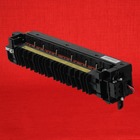
Kyocera KM-3040 Fuser Unit – 120 Volt (Genuine) – $169.95
from: Precision Roller
Notice : fusing assembly Corresponding Error Codes can cause the product not to work until the code is reset in Maintenance Mode. Here is a url to the directions for you to reset the code by means of the maintenance menu.
Kyocera KM-3040 Fuser Error Reset Procedure – 302K593060
Service Guide Guidance for the Kyocera KM-3040 C6120 Error Code
Unusually elevated fuser thermistor edge heat range
Fuser thermistor one is detected 230°C/446°F or greater for 40 ms.
1. Fitting defectiveness on fuser thermistor 1.
Inspect the mounting condition of the fuser thermistor 1. If any problem is found, correct it.
2. Defective fuser thermistor 1.
Replace the fuser thermistor 1.
3. Defective engine PWB.
Replace the engine PWB and verify for correct operation.
These particular fusers tend to be reasonably cheap. Like many components on the Kyocera equipment, many conditions its less costly to simply change out the complete part or maintenance kit. Therefore, when you’re experiencing difficulty] applying the fuser, I would be likely to just suggest saving efforts and money and obtain a complete replacement fuser assembly. Below, you will discover a url to the replacement instructions and also a link to order in your replacement fuser.
Kyocera KM-3040 Fuser Replacement Procedure
FUSER UNIT KYOCERA KM 2530 3035 3530 4030 4035 5035 Replacment
Fuser Unit KYOCERA KM2530 KM3035 KM3530 KM4030 KM4035 KM5035 KM4035 KM5035 / UTAX CD1025 CD1030 CD1035 CD1040 CD1050 / OLIVETTI DCopia 25 DCopia 35 DCopia 400, DCopia 500 DCopia 300.
Kyocera code c6000
Kyocera code c6020 Kyocera code c6050 code Kyocera KM1620 Kyocera KM1635 Kyocera KM1650 Kyocera KM2020 Kyocera KM2030 Kyocera KM2035 Kyocera KM2050 Kyocera KM2530 Kyocera KM2540 Kyocera…
The following table lists errors and maintenance messages that you can be dealt with by yourself. If
appears, turn off the printer, disconnect the power cord, and contact your service technician.
Call service.
If
Machine failure. Call service.
displayed, turn off the printer then turn it back on to see if the printer has recovered. If the printer has not recovered, turn off
the printer, disconnect the power cord, and contact your service representative or authorized service center.
Some errors cause the alarm to sound. To stop the alarm, press [Cancel].
Message
A machine
administrator right
is required.
Access denied.
You cannot login.
Access point was not
detected.
Account error.
Press [OK].
or Error occurred. Turn the main power switch off and on. is
Corrective Action
You can only change the settings selected when logged in as a user with
machine administrator privileges.
The Log in operation failed for the specified number of times so it is no longer
possible to attempt to log in. Contact a system administrator.
It was not possible to connect to the network with the optional wireless network
interface kit.
Check the settings of the wireless network interface.
For details, refer to Optional Network (Optional Network settings) on page 4-62.
This message is displayed when the Job Accounting function is enabled and an
attempt to specify job accounting settings or to register or delete an account
fails. To return the printer to the print-ready status, press [OK].
8-5
Troubleshooting
Machine failure.
Правила форума
Картинки и фотографии (если они нужны в сообщении) надо загружать только как вложения к своему сообщению (через кнопку Добавить файлы). Тогда картинки будут автоматически отображаться в сообщении.
-
Yuzorg98
- Сообщения: 29
- Стаж: 9 месяцев
Kyocera Ecosys P3150dn
Сообщение
Yuzorg98 » 03 апр 2023, 15:32
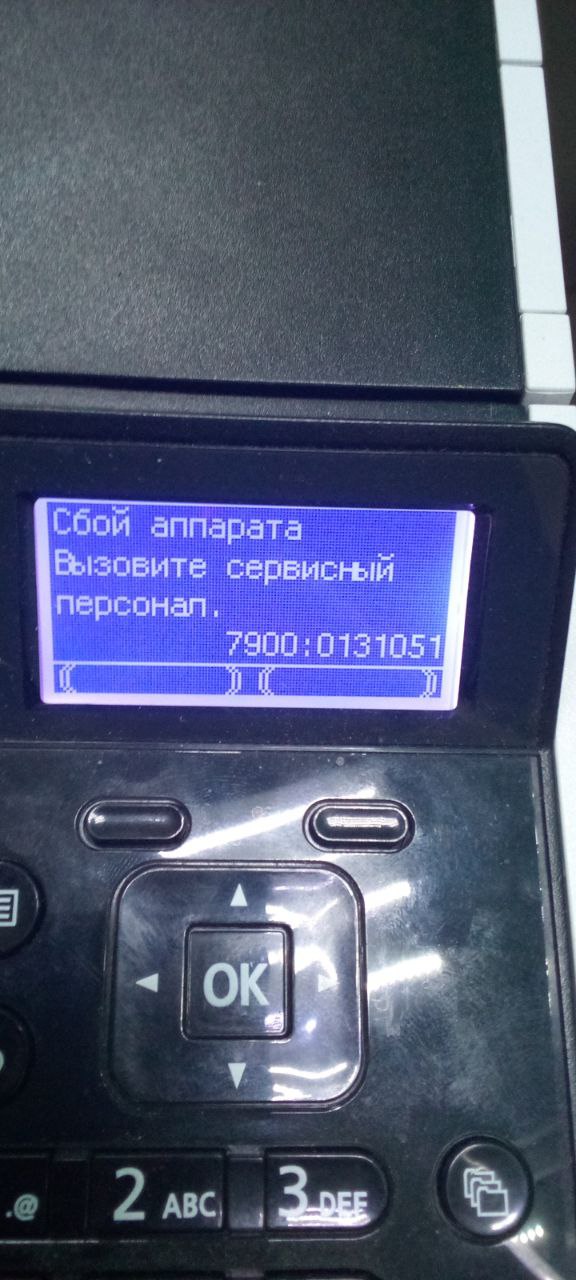
В общем начал выдавать ошибку как на фото
Включается,пишет замятие, вытаскиваю блок фотоузла ( он нормальный, считай новый) вместе с катриком, закрываю принтер и вылезает она.
Ставил с другого принтера фотоузел с катриком, та же ситуация.
Внутри ничего нет, никакой бумаги.
Печка вроде нормальная, только вал прижима малость скукожился.
В чём может быть проблема?
Перерыл весь инет и форумы, ничего не нашёл.
-
Yuzorg98
- Сообщения: 29
- Стаж: 9 месяцев
Kyocera Ecosys P3150dn
Сообщение
Yuzorg98 » 03 апр 2023, 15:47
стронций писал(а): ↑03 апр 2023, 15:44
Ну если дело не в переполненном бункере с отработкой и ДРАМом, то как вариант еще, это неисправна PWB-плата.
Где она находится?
Бункер который сборку я его почистил, он пустой, да и не сказать что был забит.
Что может быть с драмом?
-

pc-porta
- Сообщения: 753
- Стаж: 1 год 5 месяцев
- Благодарил (а): 16 раз
- Поблагодарили: 116 раз
-
Репутация:

Kyocera Ecosys P3150dn
Сообщение
pc-porta » 03 апр 2023, 15:49
Картинка не грузилась ….. вот и нету.
это ошибка инициализации блока DK-3150. Может контакт какой обломился на колодке ? или мусор какой в ней (та часть — которая в МФУ стоит) затёрся ?
-
Yuzorg98
- Сообщения: 29
- Стаж: 9 месяцев
Kyocera Ecosys P3150dn
Сообщение
Yuzorg98 » 03 апр 2023, 16:02
pc-porta писал(а): ↑03 апр 2023, 15:49
Картинка не грузилась ….. вот и нету.
это ошибка инициализации блока DK-3150. Может контакт какой обломился на колодке ? или мусор какой в ней (та часть — которая в МФУ стоит) затёрся ?

вроде всё целое
грязи никакой нет
Отправлено спустя 14 минут 31 секунду:
стронций писал(а): ↑03 апр 2023, 15:50
Плата PWB находиться, если смотреть спереди, по правую руку за пластиком.
Нашёл, вставил аналогичную плату, но там ошибка 6120, и она же вылезла на этом принтере
Перепрошивка его поможет? С ошибкой 7900?
-

стронций
- Сообщения: 341
- Стаж: 1 год 5 месяцев
- Благодарил (а): 12 раз
- Поблагодарили: 36 раз
-
Репутация:

Kyocera Ecosys P3150dn
Сообщение
стронций » 03 апр 2023, 16:25
Прошить в принципе можно, хуже то не будет. Надо заказать свежую версию прошивки и смотреть фаил-блокнот «History» который идет, почти, со всеми прошивками. Там можно уточнить все об исправлениях ошибок, и каких конкретно ошибок.
Ну я что то сомневаюсь что прошивка поможет.
-
стронций
- Сообщения: 341
- Стаж: 1 год 5 месяцев
- Благодарил (а): 12 раз
- Поблагодарили: 36 раз
-
Репутация:
Kyocera Ecosys P3150dn
Сообщение
стронций » 03 апр 2023, 16:38
Если печная ошибка возникла то надо печку первым делом вскрыть и осмотреть. Вероятность что придется менять блок печки целиком 100%.
Как я и писал ранее если и отремонтировать печку, то есть подложить кусочек термопленки туда то и туда то, то все чудным образом заработает… Ну заработать то заработает, но появиться другая проблема, это уже проверено как минимум на 3-х FK-3130(3300).
-
Yuzorg98
- Сообщения: 29
- Стаж: 9 месяцев
Kyocera Ecosys P3150dn
Сообщение
Yuzorg98 » 03 апр 2023, 17:45
стронций писал(а): ↑03 апр 2023, 16:38
Если печная ошибка возникла то надо печку первым делом вскрыть и осмотреть. Вероятность что придется менять блок печки целиком 100%.
Как я и писал ранее если и отремонтировать печку, то есть подложить кусочек термопленки туда то и туда то, то все чудным образом заработает… Ну заработать то заработает, но появиться другая проблема, это уже проверено как минимум на 3-х FK-3130(3300).
Прошивка не помогла
Так же ошибка 7900
-
pc-porta
- Сообщения: 753
- Стаж: 1 год 5 месяцев
- Благодарил (а): 16 раз
- Поблагодарили: 116 раз
-
Репутация:
Kyocera Ecosys P3150dn
Сообщение
pc-porta » 03 апр 2023, 17:51
ну — я тоже в сомнении …. но — факт : ошибки 7900 — это ошибка инициализации блока DK от 3100 до 3190
если есть желание — соберите франкенштейна : перекиньте плату PWB и термистр в печке
Последний раз редактировалось pc-porta 03 апр 2023, 17:54, всего редактировалось 1 раз.
-
Yuzorg98
- Сообщения: 29
- Стаж: 9 месяцев
Kyocera Ecosys P3150dn
Сообщение
Yuzorg98 » 03 апр 2023, 17:53
pc-porta писал(а): ↑03 апр 2023, 17:51
ну — я тоже в сомнении …. но — факт : ошибки 7900 — это ошибка инициализации блока DK от 3100 до 3190
Гугл на эту тему мне толком ничего говорил, видать я один такой с этой ошибкой
-
dviz
- Сообщения: 203
- Стаж: 1 год 5 месяцев
- Откуда: Ярославль
- Благодарил (а): 15 раз
- Поблагодарили: 25 раз
-
Репутация:

Kyocera Ecosys P3150dn
Сообщение
dviz » 03 апр 2023, 18:01
7900 — это либо плохой контакт с платой в драм-юните либо проблема с микрухой eeprom в на этой плате. Без драма аппарат естесствено будет выдавать эту ошибку.
Если показывает замятие — решайте проблему с замятием, а не с драмом.
-
- 6 Ответы
- 765 Просмотры
-
Последнее сообщение

13 янв 2022, 09:24
-
- 2 Ответы
- 497 Просмотры
-
Последнее сообщение
17 янв 2022, 16:23
-
- 13 Ответы
- 2789 Просмотры
-
Последнее сообщение

03 фев 2022, 15:54
-
- 6 Ответы
- 2874 Просмотры
-
Последнее сообщение

02 фев 2022, 11:07
-
- 3 Ответы
- 855 Просмотры
-
Последнее сообщение
03 фев 2022, 14:59



Японский производитель оргтехники Kyocera выпускает одни из самых качественных печатающих устройств на рынке, которые, в первую очередь, пользуются высоким спросом у бизнеса. А это уже говорит о многом!
На заметку! В отличие от частных покупателей, сильно подверженных рекламе и маркетинговым уловкам, большинство предпринимателей предпочитают вкладывать средства рационально.
Тем не менее, даже самая качественная оргтехника может давать сбои. Особенно, если за ней не следить!
Поэтому сегодня мы рассмотрим наиболее распространенные коды ошибок у популярных принтеров Kyocera FS-1020MFP, FS-1025MFP, FS-1030MFP, FS-1120MFP, FS-1125MFP, FS-1220MFP и прочих моделей, чтобы разобраться, какие неполадки можно устранить своими руками, а в каких случаях необходимо воспользоваться помощью специалистов.
- Сброс ошибок у принтеров Kyocera своими руками
- Устранение ошибок у принтеров Kyocera в сервисном центре
Под сбросом ошибок у принтеров Kyocera нужно понимать комплекс мероприятий, которые потенциально может осуществить опытный пользователь, чтобы восстановить работоспособность печатающих устройств без обращения в сервисный центр.
|
Ошибка № |
Причина |
Решение проблемы |
|
E-0001 |
В принтере установлен совместимый картридж или чип расходника был поврежден. | Проблема решается несколькими способами:
1. установка оригинального картриджа; 2. замена поврежденного чипа; 3. прошивка принтера – затем в печатающее устройство можно будет установить любой картридж неограниченное количество раз; 4. сброс ошибки – зажмите на несколько секунд кнопки «Режим» и «Сброс». |
|
E-0002 |
Регион используемого картриджа не соответствует характеристикам принтера. | Проблема решается несколькими способами:
1. установка соответствующего региону принтера картриджа; 2. замена чипа; 3. прошивка принтера. |
|
E-0003 |
Память печатающего устройства заполнена. | Распечатайте уже отсканированные документы или сбросьте операцию соответствующей кнопкой. |
|
E-0007 |
В картридже закончился тонер. | Замените картридж на новый оригинальный, совместимый или заправьте расходник. |
|
E-0008 |
Одна из крышек принтера не закрыта. | Захлопните заднюю и переднюю крышки принтера, ощутив характерный щелчок. |
|
E-0009 |
Лоток с отпечатками переполнен. | Извлеките распечатанные листы с бумагой, а затем возобновите печать кнопкой «Старт». |
|
E-0012 |
Память принтера заполнена. | Измените разрешение печати в меньшую сторону – до 600 dpi. |
|
E-0014 |
Установлена бумага такого формата, который принтер не поддерживает. | Замените бумагу листами совместимого формата.
Иногда функционал принтера может быть ограничен на софтверном уровне. Чтобы расширить диапазон форматов, мы рекомендуем обновить ПО печатающего устройства. |
|
E-0015 |
1. У принтера отсутствует питание.
2. Сетевой кабель не подключен. 3. На персональном компьютере отсутствует драйвер. |
Проверьте целостность сетевого кабеля.
Включите принтер. При необходимости установите драйвер. |
|
E-0018 |
Выбранный файл отсутствует в очереди на печать. | Сбросьте операцию, нажав на кнопку «Сброс». Затем выберите новый файл и продолжите печать. |
|
E-0019 |
Формат печати не поддерживается принтером. | Сбросьте операцию, нажав на кнопку «Сброс». |
|
J-0511 |
Бумагу зажевало. | Аккуратно извлеките остатки бумаги из корпуса принтера. |
|
PF |
Отсутствует бумага во входном лотке. | Установите бумагу во входной лоток и возобновите печать, нажав на кнопку «Старт». |
Устранение ошибок у принтеров Kyocera в сервисном центре
| Ошибка № |
Возможная причина |
|
0030 |
Неисправна PWB-плата. |
|
0100 |
Неисправна Flash-память или плата PWB. |
|
0120 |
Неисправна Flash-память. |
|
0190 |
Неисправна Flash-память или плата PWB. |
|
0630 |
Неисправна PWB-плата. |
|
2000 |
1. Неисправна PWB-плата;
2. неисправен соединительный кабель или нарушена целостность соединения контактов; 3. неисправен привод или его отдельные узлы. |
|
3100 |
1. Неисправен соединительный кабель или нарушена целостность соединения контактов;
2. неисправен датчик положения; 3. неисправен привод сканера; 4. неисправна PWB-плата. |
|
3300 |
1. Неисправен соединительный кабель или нарушена целостность соединения контактов;
2. неисправен датчик CIS; 3. неисправна PWB-плата. |
|
3500 |
Неисправна PWB-плата. |
|
4000 |
1. Неисправен соединительный кабель или нарушена целостность соединения контактов;
2. неисправен привод; 3. неисправна PWB-плата. |
|
4200 |
1. Неисправен соединительный кабель или нарушена целостность соединения контактов;
2. неисправна PWB-плата и отдельные компоненты. |
|
6000 |
1. Неисправен соединительный кабель или нарушена целостность соединения контактов;
2. неисправен термостат; 3. неисправен нагреватель фьюзера; 4. неисправна PWB-плата и отдельные компоненты. |
|
6020 |
1. Неисправна PWB-плата и отдельные компоненты;
2. выявлен дефект у термистора. |
|
6030 |
1. Неисправен соединительный кабель или нарушена целостность соединения контактов;
2. выявлен дефект у термистора; 3. неисправен термостат; 4. неисправна PWB-плата и отдельные компоненты. |
|
6400 |
1. Неисправен соединительный кабель или нарушена целостность соединения контактов;
2. неисправна PWB-плата и отдельные компоненты. |
|
F000 |
Неисправна PWB-плата и отдельные компоненты. |
|
F020 |
Неисправна PWB-плата. |
|
F040 |
Неисправна PWB-плата. |
|
F05D |
1. Неисправно программное обеспечение привода;
2. неисправна PWB-плата и отдельные компоненты. |
Попытались самостоятельно устранить ошибку на принтере Kyocera, но проблемы с печатью остались нерешенными? Сервисный центр МосТонер – круглосуточный бесплатный выезд мастера в пределах МКАД. Вы платите только за результат!