
проблема с МФУ Xerox WorkCentre 3045NI
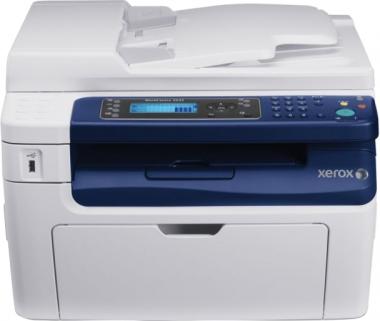
Не сканирует на компьютер через USB-кабель, а на флэшку (USB-порт) сканирует
Люди с такой же проблемой (5)
Решилось заменой кабеля на более толстый. озороц 8 октября 2019
Не видит компьютер, при попытке печати пишет: Встав. USB- носитель осус 30 октября 2015
у меня так же пишет, но распечатка идет без проблем, иногда сканирует иногда нет, иногда на юсб сканит иногда нет, раньше все было нормально, ничего не меняла в компе… глючит, наверное лучше удалить программу и заново записать АннАльбертовна 23 апреля 2015
Сканер пишет ошибка 026-751
не хочет сканировать через USB Вениамин-007 14 декабря 2012
Знаете, как решить эту проблему?
Поделитесь своим знанием!
Ваш способ решения:
Наиболее похожие проблемы из этого раздела

Пять лет устройство отлично проработало в учреждении, а после очередного ТО (делаем раз в год), внеплановой замены термопленки — он отказался печатать …
Компьютер выдаёт, что USB-порт не опознаёт объект, то есть принтер)

Добрый день. Помогите пожалуйста.
Принес с работы принтер «Самсунг 1210», установил все драйверы (с интернета). После всех загрузок, я вывожу …
Купил злосчастный HP LaserJet M1132 MFP, хотя в ДНС его рекламировали цена, качество, сначала он только к одному USB порту подошел другие его не видят…

при включении горит оранжевый индикатор и при перезапуске тоже, компьютер не видит его пишет отключен, шнур менял, другой usb порт пробовал.
Во время работы с аппаратом могут возникать проблемы, связанные с неисправностями «железа» или ПО. И если расходные материалы можно просто заменить, то с «мозгами» нужно разбираться. Поэтому, для экономии времени и удобства, ниже представлены возможные коды ошибок (FAULT ERROR CODE), которые показывают Xerox DocuColor DC 240/250/242/252/260 и WorkCentre WC 7655/7665/7675/7755/7765/7775 при неисправности, и их значение:
002-770 ERROR — RAP Insufficient HDD capacity while processing the job template within a job.
003-318 ERROR — RAP IIT software failure.
003-319 ERROR — RAP IIT Video Driver Detection Fail.
003-320 ERROR — RAP IIT-ESS Communication Fail 1.
003-321 ERROR — RAP IIT-ESS Communication Fail 2.
003-322 ERROR — RAP IIT-ESS Communication Fail 3.
003-323 ERROR — RAP IIT-ESS Communication Fail 4.
003-324 ERROR — RAP IIT-ESS Communication Fail 5.
003-325 ERROR — RAP IIT-ESS Communication Fail 6.
003-326 ERROR — RAP IIT-ESS Communication Fail 7.
003-327 ERROR — RAP IIT-ESS Communication Fail 8.
003-328 ERROR — RAP IIT-ESS Communication Fail 9.
003-329 ERROR — RAP IIT-ESS Communication Fail 10.
003-330 ERROR — RAP IIT-ESS Communication Fail 11.
003-331 ERROR — RAP IIT-ESS Communication Fail 12.
003-332 ERROR — RAP IIT-ESS Communication Fail 13.
003-333 ERROR — RAP IIT-ESS Communication Fail 14.
003-334 ERROR — RAP IIT-ESS Communication Fail 15.
003-335 ERROR — RAP IIT-ESS Communication Fail 16.
003-336 ERROR — RAP IIT-ESS Communication Fail 17.
003-337 ERROR — RAP IIT-ESS Communication Fail 18.
003-338 ERROR — RAP IIT-ESS Communication Fail 19.
003-339 ERROR — RAP IIT-ESS Communication Fail 20.
003-340 ERROR — RAP IIT-ESS Communication Fail 21.
003-341 ERROR — RAP IIT-ESS Communication Fail 22.
003-342 ERROR — RAP IIT-ESS Communication Fail 23.
003-343 ERROR — RAP IIT-ESS Communication Fail 24.
003-344 ERROR — RAP Power on hotline failure.
003-345 ERROR — RAP X PIO Unmatch Fail 1.
003-346 ERROR — RAP X PIO Unmatch Fail 2.
003-750 ERROR — RAP Book Duplex-Insufficient Docs.
003-751 ERROR — RAP Under PANTHER Capacity (Scan).
003-752 ERROR — RAP This status code is displayed if 600dpi cannot be scanned (DADF).
003-753 ERROR — RAP This status code is displayed if over 300dpi cannot be scanned (DADF).
003-754 ERROR — RAP S2X Recoverable Error.
003-755 ERROR — RAP S2X Command Error.
003-757 ERROR — RAP This status code is displayed if over 400dpi cannot be scanned (DADF).
003-760 ERROR — RAP Scan Settings Error.
003-761 ERROR — RAP Incorrect Paper Tray Size.
003-763 ERROR — RAP Adjustment Chart Not Found.
003-764 ERROR — RAP Adjustment Chart Not Found.
003-780 ERROR — RAP Scan Image Compression Error.
003-795 ERROR — RAP AMS Limit Error.
003-940 ERROR — RAP DAM Memory is insufficient.
003-942 ERROR — RAP Document Size Error.
003-944 ERROR — RAP Image Repeat Count Fail.
003-946 ERROR — RAP Copy Vertical/Horizontal Difference (APS).
003-947 ERROR — RAP Replaced Original Count Error.
003-948 ERROR — RAP Replaced Original Mismatch.
003-952 ERROR — RAP Return Documents Color mismatch.
003-955 ERROR — RAP Documents Size Exchange Error.
003-956 ERROR — RAP Documents Size Unknown Error.
003-963 ERROR — RAP No APS Object Tray.
003-965 ERROR — RAP ATS/APS No Paper. There is no paper in the trays that can be selected with APS.
003-966 ERROR — RAP AATS/APS No Destination Error.
003-968 ERROR — RAP Punch Position Error.
003-969 ERROR — RAP Punch Size Error.
003-972 ERROR — RAP Maximum Stored Page Over Flow.
003-973 ERROR — RAP Every Direction Difference.
003-974 ERROR — RAP Next Original Specification.
003-977 ERROR — RAP Document Miss Match (Multi Scan).
003-978 ERROR — RAP Color Document Mismatch (Multi Scan).
003-980 ERROR — RAP Staple Position Error.
003-981 ERROR — RAP Staple Size Error.
003-982 ERROR — RAP IITsc HDD Access Error.
005-121 ERROR — RAP DADF Feed Sensor ON Jam.
005-122 ERROR — RAP DADF Simplex/Side 1 Pre Reg Sensor ON Jam.
005-123 ERROR — RAP DADF Simplex/Side 1 Reg Sensor ON Jam.
005-124 ERROR — RAP DADF Lead Reg Sensor ON Jam.
005-125 ERROR — RAP DADF Reg Sensor OFF Jam.
005-126 ERROR — RAP DADF Out Sensor ON Jam.
005-127 ERROR — RAP DADF Out Sensor OFF Jam.
005-128 ERROR — RAP DADF Exit Sensor 1 ON Jam (Simplex Mode).
005-129 ERROR — RAP DADF Exit Sensor 1 OFF Jam (Simplex Mode).
005-130 ERROR — RAP DADF Invert Sensor ON Jam (Duplex Mode).
005-131 ERROR — RAP DADF Invert Sensor On Jam (Inverting).
005-132 ERROR — RAP DADF Invert SNR on Jam 2.
005-133 ERROR — RAP DADF Invert Sensor OFF Jam.
005-134 ERROR — RAP DADF Invert SNR off Jam (Inv).
005-135 ERROR — RAP DADF Pre Reg Sensor ON Jam (Invert).
005-136 ERROR — ERROR — RAP DADF Reg Sensor ON Jam (Invert).
005-137 ERROR — RAP DADF Exit Sensor 2 ON Jam.
005-138 ERROR — RAP DADF Exit Sensor 1 ON Jam.
005-139 ERROR — RAP DADF Invert SNR off Jam.
005-141 ERROR — RAP DADF Feed Sensor OFF Jam.
005-142 ERROR — RAP DADF Exit Sensor 1 OFF Jam (Duplex Mode).
005-143 ERROR — RAP DADF Exit Sensor 2 OFF Jam.
005-144 ERROR — RAP DADF Too First Pre Reg Sensor ON Jam.
005-145 ERROR — RAP DADF Reg Sensor Off Jam (Invert).
005-146 ERROR — RAP DADF Pre Reg Sensor Off Jam.
005-147 ERROR — RAP DADF Pre Reg Sensor Off Jam (Invert).
005-150 ERROR — RAP DADF Feed Sensor OFF Jam (Perforated Original Mode).
005-151 ERROR — RAP DADF Pre Reg Sensor OFF Jam (Perforated Original Mode).
005-152 ERROR — RAP DADF Reg Sensor OFF Jam (Perforated Original Mode).
005-153 ERROR — RAP DADF Reg Sensor OFF Jam (Perforated Original Mode).
005-154 ERROR — RAP DADF Out Sensor OFF Jam (Perforated Original Mode).
005-155 ERROR — RAP DADF Exit Sensor 1 OFF Jam (Perforated Original Mode) (Simplex).
005-156 ERROR — RAP DADF Exit Sensor 1 OFF Jam (Perforated Original Mode) (Duplex).
005-157 ERROR — RAP DADF Invert Sensor OFF Jam (Perforated Original Mode).
005-158 ERROR — RAP DADF Exit Sensor 2 OFF Jam (Perforated Original Mode).
005-160 ERROR — RAP DADF Tray Lift Up Fail (Document Set) (Within Job).
005-190 ERROR — RAP DADF Feed Motor Logic Jam.
005-194 ERROR — RAP Size Mismatch Jam on Slow Scan Mix Size.
005-195 ERROR — RAP Size Mismatch Jam on No Mix Size.
005-196 ERROR — RAP Size Mismatch Jam on No Mix Size.
005-197 ERROR — RAP Prohibit Combine Size Jam.
005-198 ERROR — RAP Too Short Size Jam.
005-199 ERROR — RAP Too Long Size Jam.
005-275 ERROR — RAP DADF RAM Fail.
005-280 ERROR — RAP DADF EEPROM Fail.
005-282 ERROR — RAP DADF Tray Lift Up Fail (No Document).
005-283 ERROR — RAP DADF Stack Height Sensor Logic Fail.
005-284 ERROR — RAP DADF APS Sensor Logic Fail.
005-285 ERROR — RAP DADF Nudger Lift Up Fail.
005-286 ERROR — RAP DADF Feed Out Sensor Fail.
005-303 ERROR — RAP DADF Tray Interlock is open.
005-304 ERROR — RAP Platen Interlock Open.
005-305 ERROR — RAP DADF Feeder Cover Interlock Open (Run).
005-306 ERROR — RAP DADF Tray Interlock Open (Run).
005-308 ERROR — RAP The DADF L/H Cover Interlock is open.
005-309 ERROR — RAP DADF L/H Cover Interlock Open (Run).
005-906 ERROR — RAP DADF Feed Sensor Static Jam.
005-907 ERROR — RAP DADF Pre Reg Sensor Static Jam.
005-908 ERROR — RAP DADF Reg Sensor Static Jam.
005-909 ERROR — RAP DADF Lead Reg Sensor Static Jam..
005-910 ERROR — RAP DADF Out Sensor Static Jam.
005-911 ERROR — RAP DADF Exit Sensor 1 Static Jam.
005-912 ERROR — RAP DADF Exit Sensor 2 Static Jam.
005-913 ERROR — RAP DADF Invert Sensor Static Jam.
005-914 ERROR — RAP DADF No. 1/2/3 APS Sensor Static Jam.
005-915 ERROR — RAP DADF No. 1 APS Sensor Static Jam.
005-916 ERROR — RAP DADF No. 2 APS Sensor Static Jam.
005-917 ERROR — RAP DADF No. 3 APS Sensor Static Jam.
005-918 ERROR — RAP DADF Invert Sensor 2 Static Jam.
005-919 ERROR — RAP DADF Tray Lift Up Fail (Document Set).
005-940 ERROR — RAP DADF No Original Fail.
005-941 ERROR — RAP DADF Not Enough Document.
005-942 ERROR — RAP DADF Tray Stack Over Fail.
010-311 ERROR — RAP Fuser Heat Roll STS-1 Disconnection Fail. It was detected that fuser heat roll STS-1 disconnected.
010-319 ERROR — RAP Fuser NC Sensor Differential Amp Fail.
010-320 ERROR — RAP Heat Roll Over Heat Fail.
010-321 ERROR — RAP Fuser Nip Fail.
010-322 ERROR — RAP Fuser NC Center Sensor Disconnection Fail. (Fuser Temperature Sensor Fail).
010-323 ERROR — RAP Fuser Rear Sensor Disconnection Fail. (Fuser Temperature Sensor Fail).
010-324 ERROR — RAP Fuser NVM Fail.
010-326 ERROR — RAP Wait Heat Roll Fuser On Time Fail.
010-327 ERROR — RAP Standby Heat Roll Fuser On Time Fail.
010-330 ERROR — RAP Fuser Motor Fail.
010-420 ERROR — RAP Fuser Assembly Life Near End.
010-421 ERROR — RAP Fuser Assembly Life End.
012-112 ERROR — RAP Finisher Interface Entrance Sensor ON.
012-113 ERROR — RAP Booklet In Sensor ON Jam.
012-114 ERROR — RAP Booklet In Sensor OFF Jam.
012-115 ERROR — RAP Booklet Folder Roll Exit Sensor ON Jam.
012-125 ERROR — RAP Gate Sensor ON JAM: Finisher.
012-132 ERROR — RAP Finisher Transport Entrance Sensor ON Jam (Long).
012-142 ERROR — RAP Buffer Path Sensor ON Jam A.
012-151 ERROR — RAP Compile Exit Sensor OFF Jam.
012-152 ERROR — RAP Compile Exit Sensor ON Jam A.
012-161 ERROR — RAP Set Eject Jam.
012-162 ERROR — RAP Finisher Interface EXIT. Sensor ON Jam.
012-171 ERROR — RAP Top Tray Exit Sensor ON Jam A.
012-172 ERROR — RAP Top Tray Exit Sensor OFF Jam A.
012-180 ERROR — RAP Booklet Folder Roll Exit Sensor OFF Jam.
012-211 ERROR — RAP Stacker Tray Fail.
012-212 ERROR — RAP Stacker Tray Upper Limit Fail.
012-213 ERROR — RAP Stacker Tray Lower Limit Fail.
012-221 ERROR — RAP Tamper Home Sensor ON Fail.
012-223 ERROR — RAP Tamper Home Sensor OFF Fail.
012-224 ERROR — RAP Rear Tamper Home Sensor OFF Fail.
012-225 ERROR — RAP Booklet Tamper F Home Sensor ON Fail.
012-226 ERROR — RAP Booklet Tamper F Home Sensor OFF Fail.
012-227 ERROR — RAP Booklet End Guide Home Sensor OFF Fail.
012-228 ERROR — RAP Booklet End Guide Home Sensor ON Fail.
012-229 ERROR — RAP Booklet Tamper R Home Sensor ON Fail.
012-230 ERROR — RAP Booklet Tamper R Home Sensor OFF Fail.
012-243 ERROR — RAP Booklet Knife Home Sensor ON Fail.
012-246 ERROR — RAP Booklet Stapler Fail.
012-247 ERROR — RAP Side Regi Sensor OFF Fail.
012-260 ERROR — RAP Eject Clamp Up Sensor ON Fail.
012-261 ERROR — RAP Booklet Knife Folding SNR Fail.
012-263 ERROR — RAP Finisher Rear Tamper Home Sensor ON.
012-264 ERROR — RAP Booklet Drawer Broken Fail.
012-265 ERROR — RAP Booklet Knife Home Sensor OFF Fail.
012-266 ERROR — RAP Booklet Compiler No Paper Sensor Fail.
012-270 ERROR — RAP Top Offset Home Sensor ON Fail: Finisher.
012-271 ERROR — RAP Top Offset Home Sensor OFF Fail: Finisher.
012-282 ERROR — RAP Eject Clamp Up Sensor OFF Fail.
012-283 ERROR — RAP Finisher Set Clamp Home Sensor ON Fail.
012-284 ERROR — RAP Finisher Set Clamp Home Sensor OFF Fail.
012-291 ERROR — RAP Stapler Fail.
012-295 ERROR — RAP Finisher Stapler Move Sensor On Fail.
012-296 ERROR — RAP Finisher Stapler Move Sensor OFF Fail.
012-300 ERROR — RAP Finisher Eject Cover Open (Compiler Cover).
012-302 ERROR — RAP Finisher Front Door Interlock Open.
012-307 ERROR — RAP Booklet Drawer Set Fail.
012-320 ERROR — RAP Punch Home Sensor ON Fail.
012-321 ERROR — RAP Punch Home Sensor OFF Fail.
012-322 ERROR — RAP Puncher Move Home Sensor OFF Fail.
012-323 ERROR — RAP Puncher Move Home Sensor On Fail.
012-325 ERROR — RAP Side Regi Home Sensor On Fail.
012-330 ERROR — RAP Decurler Cam Home Sensor OFF Fail.
012-332 ERROR — RAP Decurler Cam Home Sensor ON Fail.
012-334 ERROR — RAP Download Mode Fail.
012-335 ERROR — RAP Booklet Sub CPU Communication Fail.
012-900 ERROR — RAP Buffer Path Sensor Static Jam.
012-901 ERROR — RAP Finisher Paper Remains at H-Transport Entrance.
012-902 ERROR — RAP Finisher Paper Remains H-Transport Exit.
012-903 ERROR — RAP Compile Exit Sensor Static Jam.
012-905 ERROR — RAP Compile Tray No Paper Sensor Static Jam.
012-907 ERROR — RAP Top Tray Exit Sensor Static Jam.
012-920 ERROR — RAP Gate Sensor static JAM (to Top Tray) A: Finisher.
012-932 ERROR — RAP Gate SNR static JAM (to Stacker Tray) A.
012-934 ERROR — RAP Gate SNR static JAM (to Stacker Tray) C.
012-935 ERROR — RAP Finisher Paper Remains at Transport Entrance Sensor.
012-936 ERROR — RAP Paper Remain at Booklet In SNR A.
012-949 ERROR — RAP Finisher Punch DustBox Miss Set.
013-902 ERROR — RAP Booklet Compile No Paper Sensor Static Jam.
013-903 ERROR — RAP Booklet Folder Roll Exit Sensor Static Jam.
016-210 ERROR — RAP Software Option Fail (HDD Not Exist).
016-211 ERROR — RAP Software Option Fail (System Memory Low Volume).
016-212 ERROR — RAP SW Option Fail (Page Memory Low).
016-213 ERROR — RAP SW Option Fail (Printer CARD Not Exist).
016-215 ERROR — RAP SW Option Fail (JPEG Board Not Exist).
016-216 ERROR — RAP SW Option Fail (Ext Memory Not Exist).
016-217 ERROR — RAP SW Option Fail (Controller ROM not Printer kit).
016-218 ERROR — RAP Because PS Kit is not installed, XDOD functions cannot be fulfilled.
016-219 ERROR — RAP License is required (Printer Kit).
016-220 ERROR — RAP S2X Unrecoverable Error.
016-221 ERROR — RAP S2X Communication Error.
016-222 ERROR — RAP S2X Self-Diag Error.
016-223 ERROR — RAP SS2X SDRAM Error.
016-224 ERROR — RAP S2X PCI Reg Error.
016-225 ERROR — RAP S2X ROM CheckSum Error.
016-226 ERROR — RAP S2X IIT Connection Error.
016-227 ERROR — RAP S2X DDR Error.
016-228 ERROR — RAP S2X Image Processing Error.
016-229 ERROR — RAP SW Option Fail (FCW-UI Not Exist).
016-311 ERROR — RAP The scanner was not detected.
016-315 ERROR — RAP NIIT Interface Fail.
016-316 ERROR — RAP Page Memory Not Detected.
016-317 ERROR — RAP Page Memory Broken-Standard.
016-318 ERROR — RAP Page Memory Broken-Option.
016-320 ERROR — RAP A fatal error with doc conversion software was detected.
016-322 ERROR — RAP JBA Account Full.
016-450 ERROR — RAP SMB Host Name Duplicated.
016-454 ERROR — RAP DNS Renewal Failure of Dynamic.
016-455 ERROR — RAP SNTP Server Time Out.
016-456 ERROR — RAP SNTP Time Asynchronous.
016-503 ERROR — RAP SMTP Server Address Resolution Fail.
016-504 ERROR — RAP POP Server Address Resolution Fail.
016-505 ERROR — RAP POP Authentication Fail.
016-600 ERROR — RAP KO Authentication Locked.
016-601 ERROR — RAP Illegal Access Detection.
016-647 ERROR — RAP With APS selected or with APS set up, there were no trays loaded with paper sizes for Auto Paper Selection.
016-648 ERROR — RAP Job with Booklet selected was discontinued because it had a cover with an image, a divider, or a blank page.
016-701 ERROR — RAP Out of ART EX Memory.
016-702 ERROR — RAP Out of Page Buffer.
016-703 ERROR — RAP Email to Invalid Box.
016-704 ERROR — RAP Mailbox is Full.
016-705 ERROR — RAP Secure Print Fail.
016-706 ERROR — RAP Max. User Number Exceeded.
016-707 ERROR — RAP Sample Print Fail.
016-708 ERROR — RAP HD Full by Annotation/Watermark Image.
016-709 ERROR — RAP ART EX Command Error.
016-710 ERROR — RAP Delayed Print Fail.
016-711 ERROR — RAP Tried to send data whose size is over the system data upper limit.
016-712 ERROR — RAP Under PANTHER Capacity (I-Formatter).
016-713 ERROR — RAP Security Box Password Error.
016-714 ERROR — RAP Security Box is not Enabled.
016-716 ERROR — RAP TIFF Data Overflow.
016-718 ERROR — RAP Out of PCL6 Memory.
016-719 ERROR — RAP Out of PCL Memory.
016-720 ERROR — RAP PCL Command Error.
016-721 ERROR — RAP Other Error.
016-722 ERROR — RAP Job Cancel by Staple Position NG.
016-723 ERROR — RAP Job Cancel by Punch Position NG.
016-724 ERROR — RAP Complex Position Error of Staple and Punch.
016-726 ERROR — RAP PDL Auto Switch Fail.
016-728 ERROR — RAP Unsupported TIFF Data.
016-729 ERROR — RAP TIFF Data Size too Big.
016-730 ERROR — RAP Unsupported ART Command.
016-731 ERROR — RAP Invalid TIFF Data.
016-732 ERROR — RAP Form Not Registered.
016-733 ERROR — RAP Destination Address Resolution Error.
016-734 ERROR — RAP Simple Transmission report invocation error.
016-735 ERROR — RAP Updating Job Template.
016-736 ERROR — RAP Remote directory lock error. Lock directory creation failed.
016-737 ERROR — RAP Remote lock directory remove error.
016-738 ERROR — RAP PS Booklet Print Output Paper Size is illegal.
016-739 ERROR — RAP Mismatch between PS Booklet Doc and Output Paper.
016-740 ERROR — RAP PS Booklet Output Tray is incorrect.
016-746 ERROR — RAP Unsupported PDF File.
016-748 ERROR — RAP HD Full.
016-749 ERROR — RAP JCL Syntax Error.
016-751 ERROR — RAP PDF Error.
016-752 ERROR — RAP PDF Short of Memory.
016-753 ERROR — RAP PDF Password Mismatched.
016-754 ERROR — RAP PDF LZW Not Installed.
016-755 ERROR — RAP PDF Print Prohibited.
016-756 ERROR — RAP Auditron-Prohibit Service.
016-757 ERROR — RAP Auditron-Invalid User.
016-758 ERROR — RAP Auditron-Disabled Function.
016-759 ERROR — RAP Auditron-Reached Limit.
016-760 ERROR — RAP PS Decompose Failure.
016-761 ERROR — RAP FIFO Empty.
016-762 ERROR — RAP Print LANG Not Installed.
016-764 ERROR — RAP SMTP Server Connect Error.
016-765 ERROR — RAP SMTP Server HD Full.
016-766 ERROR — RAP SMTP Server File System Error.
016-767 ERROR — RAP Invalid E-mail Address.
016-768 ERROR — RAP Invalid Sender Address.
016-769 ERROR — RAP SMTP Server Unsupported DSN.
016-771 ERROR — RAP Scan Data Repository ERR.
016-772 ERROR — RAP Scan Data Repository ERR.
016-773 ERROR — RAP Invalid IP Address.
016-774 ERROR — RAP HD Full-Compression Convert.
016-775 ERROR — RAP HD Full-Image Convert.
016-776 ERROR — RAP Image Convert ERR.
016-777 ERROR — RAP HD Access ERR-Image Convert.
016-778 ERROR — RAP HD Full-Scan Image Convert.
016-779 ERROR — RAP Scan Image Conversion Error.
016-780 ERROR — RAP HD Access ERR-Image Convert.
016-781 ERROR — RAP Scan Server Connect ERR.
016-782 ERROR — RAP Scan Server Login ERR.
016-783 ERROR — RAP Invalid Server Path.
016-784 ERROR — RAP Server Write ERR.
016-785 ERROR — RAP Server HD Full.
016-786 ERROR — RAP HD Full-Scan Write ERR.
016-787 ERROR — RAP Invalid Server IP ADD.
016-788 ERROR — RAP Retrieve to Browser Failed.
016-789 ERROR — RAP HD Full-Job Memory.
016-791 ERROR — RAP File Retrieve Fail.
016-792 ERROR — RAP Specified Job Not Found.
016-793 ERROR — RAP MF I/O HD Full.
016-794 ERROR — RAP Media Reader: Media No Insert.
016-795 ERROR — RAP Media Reader: Format Error.
016-796 ERROR — RAP Document insert operation error.
016-797 ERROR — RAP Media Reader: Image File Read Error.
016-798 ERROR — RAP No Trust Marking Option.
016-799 ERROR — RAP Print Instruction Fail.
016-940 ERROR — RAP With Duplex Output selected, a size difference between side 1 and side 2 was detected.
016-941 ERROR — RAP With Booklet selected, mixed-in-size/orientation pages with images were detected.
016-942 ERROR — RAP After a duplexed page was deleted, a size difference between side 1 and side 2 was detected.
016-943 ERROR — RAP After a document or divider was inserted, a size difference between side 1 and side 2 was detected.
016-944 ERROR — RAP Documents were merged, including the cover with an image, or a document with a divider.
016-945 ERROR — RAP A document unavailable for duplex print was inserted after a document available for Duplex was inserted.
016-946 ERROR — RAP A document or a divider was inserted after the cover or divider page.
016-949 ERROR — RAP The user inserted a documnet different in size/orientation from the page to be processed.
016-981 ERROR — RAP A failure in access to HDD.
016-982 ERROR — RAP HDD Access Error 2.
016-985 ERROR — RAP Data Size Over Flow (Scan to Email).
024-340 ERROR — RAP IOT-ESS Communication Failure 1.
024-341 ERROR — RAP IOT-ESS Communication Failure 2.
024-342 ERROR — RAP IOT-ESS Communication Failure 3.
024-343 ERROR — RAP IOT-ESS Communication Failure 4.
024-345 ERROR — RAP IOT-ESS Communication Failure 5.
024-346 ERROR — RAP IOT-ESS Communication Failure 6.
024-347 ERROR — RAP IOT-ESS Communication Failure 7.
024-348 ERROR — RAP IOT-ESS Communication Failure 8.
024-349 ERROR — RAP IOT-ESS Communication Failure 9.
024-350 ERROR — RAP IOT-ESS Communication Failure 10.
024-351 ERROR — RAP IOT-ESS Communication Failure 11.
024-352 ERROR — RAP IOT-ESS Communication Failure 12.
024-353 ERROR — RAP IOT-ESS Communication Failure 13.
024-354 ERROR — RAP IOT-ESS Communication Failure 14.
024-355 ERROR — RAP IOT-ESS Communication Failure 15.
024-356 ERROR — RAP IOT-ESS Communication Failure 16.
024-357 ERROR — RAP IOT-ESS Communication Failure 17.
024-358 ERROR — RAP IOT-ESS Communication Failure 18.
024-359 ERROR — RAP IOT-ESS Communication Failure 19.
024-360 ERROR — RAP IOT-ESS Initialization Failure.
024-361 ERROR — RAP Invalid IOT PaperSizeGroup Information.
024-362 ERROR — RAP Page Sync Illegal Start.
024-363 ERROR — RAP Page Sync Illegal Stop.
024-364 ERROR — RAP DMA Transfer Failure.
024-365 ERROR — RAP Overflow on the Loop Back Write.
024-366 ERROR — RAP JBIG Library Other Failure.
024-367 ERROR — RAP Decompress Other Failure.
024-368 ERROR — RAP PCI Error.
024-370 ERROR — RAP Marker Code Detect Failure.
024-371 ERROR — RAP IOT-ESS Communication Failure 21.
024-372 ERROR — RAP IOT-ESS Communication Failure 22.
024-373 ERROR — RAP IOT-ESS Communication Failure 23.
024-374 ERROR — RAP Regi Con PLL Parameter Failure.
024-375 ERROR — RAP IOT-ESS Communication Failure 24.
024-600 ERROR — RAP Billing master counter repair.
024-601 ERROR — RAP Billing backup counter #1 repair.
024-602 ERROR — RAP Billing backup counter #2 repair.
024-603 ERROR — RAP SWKey master counter repair.
024-604 ERROR — RAP SWKey backup counter #1 repair.
024-605 ERROR — RAP SWKey backup counter #2 repair.
024-606 ERROR — RAP Production Number/Serial Number Failure.
024-746 ERROR — RAP Selected Paper Tray Parameter Mismatch.
024-747 ERROR — RAP Print Instruction Failure.
024-910 ERROR — RAP Tray 1 Size Mismatch.
024-911 ERROR — RAP Tray 2 Size Mismatch.
024-912 ERROR — RAP Tray 3 Size Mismatch.
024-913 ERROR — RAP Tray 4 Size Mismatch.
024-914 ERROR — RAP Tray 6 Size Mismatch.
024-915 ERROR — RAP Tray 7 Size Mismatch.
024-917 ERROR — RAP Stacker Tray Staple Set Over Count.
024-919 ERROR — RAP Face UP Tray Close.
024-920 ERROR — RAP Face Down Tray 1 Paper FULL.
024-922 ERROR — RAP Face Down Tray 2 Paper FULL.
024-923 ERROR — RAP Operation Yellow Toner Empty.
024-924 ERROR — RAP Operation Magenta Toner Empty.
024-925 ERROR — RAP Operation Cyan Toner Empty.
024-926 ERROR — RAP Punch Dust Box Missing Set.
024-927 ERROR — RAP Offset Catch Tray Full Stack.
024-930 ERROR — RAP Stacker Tray Full (Small Size Full).
024-934 ERROR — RAP Paper type mismatch.
024-935 ERROR — RAP Tray 1 Paper Mismatch.
024-936 ERROR — RAP Tray 2 Paper Mismatch.
024-937 ERROR — RAP Tray 3 Paper Mismatch.
024-938 ERROR — RAP OHP kind Mismatch at Tray 4 (Not White Frame OHP).
024-939 ERROR — RAP Transparency type mismatch (No white border).
024-940 ERROR — RAP Folder Tray Out of Place.
024-941 ERROR — RAP Folder Tray Full Stack.
024-942 ERROR — RAP Booklet Sheets Over Count.
024-943 ERROR — RAP Booklet Low Staple.
024-945 ERROR — RAP Booklet Full Stack.
024-946 ERROR — RAP Tray 1 Not In Position.
024-947 ERROR — RAP Tray 2 Not In Position.
024-948 ERROR — RAP Tray 3 Not In Position.
024-949 ERROR — RAP Tray 4 Not In Position.
024-950 ERROR — RAP Tray 1 No Paper.
024-951 ERROR — RAP Tray 2 No Paper.
024-952 ERROR — RAP Tray 3 No Paper.
024-953 ERROR — RAP Tray 4 No Paper.
024-954 ERROR — RAP MSI No Paper.
024-955 ERROR — RAP Tray 6 No Paper.
024-956 ERROR — RAP Tray 7 No Paper.
024-957 ERROR — RAP Interposer No Paper.
024-958 ERROR — RAP MSI Size Mismatch.
024-959 ERROR — RAP Tray 1 Paper Size Mismatch.
024-960 ERROR — RAP Tray 2 Paper Size Mismatch.
024-961 ERROR — RAP Tray 3 Paper Size Mismatch.
024-962 ERROR — RAP Tray 4 Paper Size Mismatch.
024-965 ERROR — RAP ATS/APS No Paper.
024-966 ERROR — RAP ATS/APS No Destination Error.
024-967 ERROR — RAP Different Width Mix Paper Detect (Staple Job).
024-968 ERROR — RAP Stapler/Punch Batting.
024-969 ERROR — RAP Different Width Mix Punch.
024-970 ERROR — RAP Tray 6 Not In Position.
024-971 ERROR — RAP Tray 7 Not In Position.
024-972 ERROR — RAP Tray 6 Paper Size Mismatch.
024-973 ERROR — RAP Tray 7 Paper Size Mismatch.
024-974 ERROR — RAP Interposer Tray Size Mismatch.
024-975 ERROR — RAP Booklet Sheets Over Count (Not Field Attachment).
024-976 ERROR — RAP Finisher Staple Status incorrect.
024-977 ERROR — RAP Stapler Feed Ready Failure.
024-978 ERROR — RAP Booklet Stapler incorrect.
024-979 ERROR — RAP Stapler Near Empty.
024-980 ERROR — RAP Finisher Stacker Tray Full.
024-981 ERROR — RAP Finisher Top Tray Full.
024-982 ERROR — RAP Stacker Lower Safety Warning.
024-983 ERROR — RAP Booklet Tray Full.
024-984 ERROR — RAP Booklet Low Staple F.
024-985 ERROR — RAP SMH Stop Check.
024-987 ERROR — RAP Envelope Folder Tray Full.
024-988 ERROR — RAP Envelope Folder Tray Set Failure.
024-989 ERROR — RAP Booklet Low Staple R.
024-990 ERROR — RAP Punch Dust Full.
025-596 ERROR — RAP Diag HDD Failure 1.
025-597 ERROR — RAP Diag HDD Failure 2.
027-452 ERROR — RAP Duplicate IP address.
027-500 ERROR — RAP SMTP Server Address Resolution Failure.
027-501 ERROR — RAP POP Server Address Resolution Failure.
027-502 ERROR — RAP POP Authentication Failure.
027-700 ERROR — RAP Media Failure.
027-701 ERROR — RAP Media Not Found.
027-702 ERROR — RAP Media Data Not Found / Not Supported.
027-703 ERROR — RAP Media Reader Failure / Disconnected.
027-706 ERROR — RAP Certificate not found.
027-707 ERROR — RAP Certificate expired.
027-708 ERROR — RAP Certificate untrusted.
027-709 ERROR — RAP Certificate revoked.
027-710 ERROR — RAP S/MIME mail was disabled.
027-711 ERROR — RAP S/MIME mail sender certificate not found.
027-712 ERROR — RAP S/MIME mail sender certificate not valid.
027-713 ERROR — RAP S/MIME mail was altered.
027-714 ERROR — RAP S/MIME mail sender impersonation.
027-715 ERROR — RAP S/MIME mail certificate not supported.
027-716 ERROR — RAP No-Signed mail receipt was rejected.
027-720 ERROR — RAP Ext Srv. Host Not Found. A server specified for a remote application was not found, or DNS resolution was not possible.
027-721 ERROR — RAP Ext Srv. Not Found.
027-722 ERROR — RAP Ext Srv. Timeout Failure.
027-723 ERROR — RAP Ext Srv. Authentication Failure.
027-724 ERROR — RAP Ext Srv. Access Failure.
027-725 ERROR — RAP Ext Srv. Operation Failure.
027-726 ERROR — RAP Ext Srv. Unknown State.
027-727 ERROR — RAP Ext Srv. Req Invalid Parameters.
027-728 ERROR — RAP Ext Srv. Required File Exceeded.
027-737 ERROR — RAP Template Server Read Error.
027-739 ERROR — RAP Invalid Template Server Path.
027-740 ERROR — RAP Template Server Login Error.
027-741 ERROR — RAP Template Server Connect Failure.
027-742 ERROR — RAP HD File System Full.
027-743 ERROR — RAP Template Server Install Error.
027-744 ERROR — RAP Template Server ADD Error.
027-745 ERROR — RAP Template Server ADD Error.
027-746 ERROR — RAP Job Template Pool Server Not Ready.
027-751 ERROR — RAP Job Template Analysis Error.
027-752 ERROR — RAP Must User un Inputting.
027-753 ERROR — RAP Job Flow Service Request Disabled.
027-760 ERROR — RAP XJT Command Failure.
027-770 ERROR — RAP PDL Error.
027-771 ERROR — RAP DFE Disk Full.
027-796 ERROR — RAP Email Not Printed.
027-797 ERROR — RAP Invalid Output Destination.
042-313 ERROR — RAP Rear Cooling Fan Failure.
042-320 ERROR — RAP Yellow Drum Motor Drive Failure.
042-321 ERROR — RAP Magenta Drum Motor Drive Failure.
042-322 ERROR — RAP Cyan Drum Motor Drive Failure.
042-323 ERROR — RAP Black Drum Motor Drive Failure.
042-324 ERROR — RAP IBT Drive Motor Failure.
042-325 ERROR — RAP Main Motor Failure.
042-326 ERROR — RAP Belt Home Position too long.
042-327 ERROR — RAP Belt Position Failure.
042-328 ERROR — RAP Belt Edge Sensor Failure.
042-330 ERROR — RAP Fuser Exhaust Fan Failure.
042-331 ERROR — RAP Blower Motor Fan Failure.
042-600 ERROR — RAP Belt Walk Failure.
042-601 ERROR — RAP Belt Edge Learn Failure.
042-602 ERROR — RAP Belt Edge Check Failure.
042-603 ERROR — RAP Suction Filter Life End Failure.
045-310 ERROR — RAP Image Ready NG.
045-311 ERROR — RAP Controller Comm Failure.
045-312 ERROR — RAP Driver Connect Failure.
047-210 ERROR — RAP OCT Offset Failure.
047-310 ERROR — RAP MCU-Finisher Communication Failure.
061-310 ERROR — RAP Clapper 1 Failure.
061-311 ERROR — RAP Clapper 2 Failure.
061-313 ERROR — RAP SOS Long Failure Magenta.
061-315 ERROR — RAP SOS Long Failure Black.
061-317 ERROR — RAP SOS Short Failure.
061-319 ERROR — RAP SOS Short Failure Black.
061-320 ERROR — RAP Polygon Motor Failure.
061-321 ERROR — RAP ROS Motor Failure.
You are here: Home / error code / Xerox WorkCentre 6015 error and solving error codes
– Compatible Printer model: Xerox WorkCentre 6015
– Xerox WorkCentre 6015 Error Codes with quick guides:
- Code:
- Description: System Restart An internal IP Board error occurred.
- Causes: • IP Board, PL7.1.9
- Troubleshooting Guides: 1 Check the connectors on the IP Board. Are the connections secure? Go to step 3. Securely reconnect the connectors, then go to step 2. 2 Does the error persist? Go to step 3. Complete. 3 Replace the IP Board. Does the error persist? Complete.
- Code: 005-121
- Description: ADF Jam
- Causes: • IP Board, PL7.1.9 • ADF Assembly, PL8.1.1 • ADF Cover, PL8.1.3 • ADF Separator Pad, PL8.
- Troubleshooting Guides: 1 Is the ADF closed against the document glass completely? Go to step 2. Close the ADF completely and go to step 2. 2 Does the error persist? Go to step 3. Complete. 3 Reseat P/J1, P/J6, and P/J16 on the IP Board. Does the error persist? Go to step 4. Complete. 4 Does the ADF feed the document? Go to step 5. Go to step 7. 5 Open the ADF Cover and check the document path. Is there foreign substance on the document path? Remove the foreign substance. Go to step 6. Go to step 7. 6 Does the error persist? Go to step 7. Complete. 7 Clean the ADF feed rollers. Do the feed rollers rotate smoothly? Go to step 8. Replace the ADF. 8 Replace the IP Board. Does the error persist? Replace the ADF Cover and ADF Separator Pad.
- Code: 005-301
- Description: ADF Cover Open
- Causes: • IP Board, PL7.1.9 • ADF Assembly, PL8.1.1
- Troubleshooting Guides: 1 Is the ADF Cover completely closed? Go to step 3. Close the ADF cover and go to step 2. 2 Does the error persist? Go to step 3. Complete. 3 Is the ADF Cover damaged? Replace the ADF Cover. Go to step 4. Go to step 5. 4 Does the error persist? Go to step 5. Complete. 5 Reseat P/J1, P/J6, and P/J16 on the IP Board. Does the error persist? Go to step 6. Complete. 6 Replace the ADF. Does the error persist? Replace the IP Board. Complete.
- Code: 007-340
- Description: Main Motor Failure Fuser Error
- Causes: • Main Drive Assembly, PL6.1.2 • Harness Assembly Main MOT, PL 6.1.7 • MCU Board, PL7.2.2
- Troubleshooting Guides: 1 Check these connections • MCU Board P/J16 • Main Drive Assembly P/J160 Are the connectors secure? Go to step 3. Secure the connectors and then go to step 2. 2 Does the error persist? Go to step 3. Complete. 3 Check the Main Drive Assembly for rotation. For the 6000B, see gDigital Output Test Proceduresh on page A-16, or for the 6015 MFPs, see gWorkCentre 6015 MFP Motor Test Proceduresh. Does the Main Drive Assembly function normally? Replace the MCU Board. Go to step 4. 4 Check the Main Drive Assembly for proper installation. Is the Main Drive Assembly installed correctly? Go to step 6. Reseat the Main Drive Assembly, and go to step 5. 5 Does the error persist? Go to step 6. Complete. 6 Checking the Harness Assembly Main MOT for continuity. Disconnect P/J16 from the MCU Board, and P/J160 from the Main Drive Assembly. Is each cable of P/J16 <=> P/J160 continuous? Go to step 7. Repair the harness. 7 Disconnect the P/J16 on the MCU Board. Are the voltages across ground to P/J6-2pin/P/J6-4 pin on the MCU Board approximately +24 VDC when the Interlock Switch is pushed? Replace the Main Drive Assembly. Replace the MCU Board.
- Code: 009-360 … 009-363
- Description: X CRU Life Over The indicated Toner Cartridge has reached end of life. • 009-360 to 009-363: Replace Toner Cartridge Now
- Causes: • Harn assy dckr, PL4.1.2 • MCU Board, PL7.2.2
- Troubleshooting Guides: 1 Reseat the appropriate Toner Cartridge. Does the error persist? Go to step 2. Complete. 2 Does the error persist when the power is turned off and on? Go to step 3. Complete. 3 Check P/J13 on the MCU Board. Is the connection secure? Go to step 5. Reconnect P/J13, then go to step 4. 4 Does the error persist? Go to step 5. Complete. 5 Disconnect P/J13 on the MCU Board, and inspect the harness. Is the harness damaged? Repair the harness, then go to step 6. Go to step 7. 6 Does the error persist? Go to step 7. Complete. 7 Replace the Toner Cartridge (C, M, Y, or K). Does the error persist? Replace the MCU Board, then go to step 4. Contact your designated field support for assistance.
- Code: 010-397
- Description: Fuser Error
- Causes: • Fuser, PL5.1.1 • MCU Board, PL7.2.2
- Troubleshooting Guides: 1 Reseat the Fuser and cycle system power. Does the error persist? Go to step 2. Complete. 2 Check these connections • MCU Board P/J26 and P/J18. • LVPS P/J201. Are the connectors secure? Go to step 3. Secure the connectors. 3 Check the Fuser harness. 1. Remove the Fuser. 2. Disconnect P/J26 and P/J18 from the MCU Board and P/J201 from the LVPS. Is the harness damaged? Repair the harness. Go to step 4. 4 Replace the Fuser. Does the error persist? Replace the MCU Board. Complete.
- Code: 016-315, 016-317
- Description: IP Memory Check Fail
- Causes: • IP Board, PL7.1.9 • MCU Board, PL7.2.2 • LED Driver Board, PL7.1.5
- Troubleshooting Guides: 1 Reseat all connectors on the IP Board and the MCU Board. Does the error persist? Go to step 2. Complete. 2 Replace the LED Driver Board. Does the error persist? Go to step 3. Complete. 3 Replace the IP Board. Does the error persist? Replace the MCU Board. Complete.
- Code: 016-323
- Description: Fax Checksum Error
- Causes: • IP Board, PL7.1.9 • MCU Board, PL7.2.2
- Troubleshooting Guides: 1 Reseat all connectors on the IP Board and the MCU Board. Does the error persist? Go to step 2. Complete. 2 Replace the IP Board. Does the error persist when the power is turned on? Replace the MCU Board. Complete.
- Code: 016-372
- Description: DRAM Memory Allocation Error
- Causes: • IP Board, PL7.1.9 • MCU Board, PL7.2.2
- Troubleshooting Guides: 1 Reseat all connectors on the IP Board and the MCU Board. Does the error persist? Go to step 2. Complete. 2 Replace the IP Board. Does the error persist when the power is turned on? Replace the MCU Board. Complete.
- Code: 016-500, 016-501, 016-502
- Description: Firmware Errors. The firmware download to the printer failed. • 016-500: Erase Flash Error • 016-501: Write Flash Error • 016-502: Verify Flash Error
- Causes: • IP Board, PL7.1.9 • MCU Board, PL7.2.2 • LED Driver Board, PL7.1.5
- Troubleshooting Guides: 1 Reseat all connectors on the IP Board and the MCU Board. Does the error persist? Go to step 2. Complete. 2 Replace the LED Driver Board. Does the error persist when the power is turned on? Go to step 3. Complete. 3 Replace the IP Board. Does the error persist when the power is turned on? Replace the MCU Board. Complete.
- Code: 016-503 … 016-507
- Description: E-mail Error An e-mail error is detected. • 016-503: SMTP Error • 016-504: POP Error • 016-506: SMTP Login Error • 016-507: SMTP Error
- Causes: • IP Board, PL7.1.9 • MCU Board, PL7.2.2
- Troubleshooting Guides: 1 Reseat all connectors on the IP Board and the MCU Board. Does the error persist? Go to step 2. Complete. 2 Replace the IP Board. Does the error persist when the power is turned on? Replace the MCU Board. Complete.
- Code: 016-718
- Description: Memory Overflow The print job size exceeded memory.
- Causes: • IP Board, PL7.1.9/PL7.1.16 • MCU Board, PL7.2.2
- Troubleshooting Guides: 1 Check the memory. Print the Configuration Page to determine the amount of memory installed. Is the print job too large? Divide the print job to fit installed memory. Go to step 2. 2 Reseat all connections on the IP Board. Does the error persist? Go to step 3. Complete. 3 Replace the IP Board. Does the error persist? Go to step 4. Complete. 4 Replace the MCU Board. Complete.

Solve Xerox WorkCentre 6015 Error codes
- Code: 016-719
- Description: Decode Error
- Causes: • IP Board, PL7.1.9 • MCU Board, PL7.2.2
- Troubleshooting Guides: 1 Reseat all connectors on the IP Board and the MCU Board. Does the error persist? Go to step 2. Complete. 2 Replace the IP Board. Does the error persist when the power is turned on? Replace the MCU Board. Complete.
- Code: 016-737 … 016-745
- Description: Download Errors The system firmware file is corrupt or communications to the printer failed. • 016-737: Download ID Error • 016-741: Download Range Error • 016-742: Download Header Error • 016-743: Download Checksum Error • 016-744: Download Format Error • 016-745: Download Protect Error
- Causes: • IP Board, PL7.1.9/7.1.16 • MCU Board, PL7.2.2
- Troubleshooting Guides: 1 Reseat all connectors on the IP Board and the MCU Board. Does the error persist? Go to step 2. Complete. 2 Replace the IP Board. Does the error persist? Replace the MCU Board, and then go to step 3. Complete. 3 Does the error persist? Contact your designated field support for assistance. Complete.
- Code: 016-749
- Description: PJL Request Error
- Causes: • IP Board, PL7.1.9/7.1.16 • MCU Board, PL7.2.2
- Troubleshooting Guides: 1 Reseat all connectors on the IP Board and the MCU Board. Does the error persist? Go to step 2. Complete. 2 Replace the IP Board. Does the error persist? Replace the MCU Board. Complete.
- Code: 016-764, 016-766, 016-767
- Description: E-mail Errors An e-mail error is detected. • 016-764: Connect Error • 016-766: SMTP Error • 016-767: E-mail Address Error
- Causes: • IP Board, PL7.1.9 • MCU Board, PL7.2.2
- Troubleshooting Guides: 1 Reseat all connectors on the IP Board and the MCU Board. Does the error persist? Go to step 2. Complete. 2 Replace the IP Board. Does the error persist when the power is turned on? Replace the MCU Board. Complete.
- Code: 016-791, 016-795, 016-797
- Description: USB Memory Removal Error USB memory is removed while memory reading job is being executed. • 016-791: USB Memory Removal Error • 016-795: File Format Error • 016-797: File Read Error
- Causes: • IP Board, PL7.1.9/PL7.1.16 • MCU Board, PL7.2.2
- Troubleshooting Guides: 1 Reseat all connections on the IP Board and MCU Board. Does the error persist? Go to step 2. Complete. 2 Replace the IP Board. Does the error persist? Go to step 3. Complete. 3 Replace the MCU Board. Complete.
- Code: 016-799
- Description: Invalid Job Invalid print job settings.
- Causes: • IP Board, PL7.1.9/PL7.1.16 • MCU Board, PL7.2.2
- Troubleshooting Guides: 1 Reseat all connections on the IP Board and MCU Board. Does the error persist? Go to step 2. Complete. 2 Replace the IP Board. Does the error persist? Go to step 3. Complete. 3 Replace the MCU Board. Complete.
- Code: 016-920
- Description: Wireless Error
- Causes: • IP Board, PL7.1.9B • MCU Board, PL7.2.2
- Troubleshooting Guides: 1 Reseat all connections on the IP Board and MCU Board. Does the error persist? Go to step 2. Complete. 2 Replace the IP Board. Does the error persist? Go to step 3. Complete. 3 Replace the MCU Board. Complete.
- Code: 016-930, 016-931
- Description: USB Host Error. An unsupported USB memory device was attached to the USB port. • 016-930: USB Host Full • 016-931: USB Host Error
- Causes:
- Troubleshooting Guides: Unplug the unsupported device.
- Code: 016-981
- Description: Collate Full The print job is too large.
- Causes: • IP Board, PL7.1.9 • MCU Board, PL7.2.2
- Troubleshooting Guides: 1 Reseat all connectors on the IP Board and the MCU Board. Does the error persist? Go to step 2. Complete. 2 Replace the IP Board. Does the error persist when the power is turned on? Replace the MCU Board. Complete.
- Code: 016-985, 017-970, 017-988
- Description: Mail Size Limits Error, PCScan Time Out, Memory Full. • 016-985: Mail Size Limits Error • 017-970: PCScan Time Out • 017-988: Memory Full
- Causes: • IP Board, PL7.1.9 • MCU Board, PL7.2.2
- Troubleshooting Guides: 1 Reseat all connectors on the IP Board and the MCU Board. Does the error persist? Go to step 2. Complete. 2 Replace the IP Board. Does the error persist when the power is turned on? Replace the MCU Board. Complete.
- Code: 017-980, 017-981
- Description: Report File Open/Close Error • 017-980: Report File Open/Close Error • 017-981: Report File Error
- Causes: • IP Board, PL7.1.9 • MCU Board, PL7.2.2
- Troubleshooting Guides: 1 Reseat all connectors on the IP Board and the MCU Board. Does the error persist? Go to step 2. Complete. 2 Replace the IP Board. Does the error persist when the power is turned on? Replace the MCU Board. Complete.
- Code: 017-990
- Description: Scanner Calibration Failure Calibration of the Scanner failed.
- Causes: • IP Board, PL7.1.9 • MCU Board, PL7.2.2 • Scanner, PL8.1.1
- Troubleshooting Guides: 1 Reseat all connectors on the IP Board and the MCU Board. Does the error persist? Go to step 2. Complete. 2 Replace the IP Board. Does the error persist? Replace the MCU Board, then go to step 3. Complete. 3 Does the error persist? Replace the Scanner. Complete.
- Code: 018-338
- Description: Wireless Error A wireless error is detected.
- Causes: • IP Board, PL7.1.9B • Wireless Harness, PL1.1.31 • Wireless Board Bracket, PL1.1.30
- Troubleshooting Guides: 1 Check the connections between the IP Board and the Wireless Board. Are P/J6601 and P/J6501 properly connected? Go to step 2. Reconnect the connections, then go to step 2. 2 Does the error persist? Go to step 3. Complete. 3 Disconnect P/J6601 on the IP Board, and P/J6501 on the Wireless Board. Is each cable of the Wireless Harness continuous? Go to step 4. Replace the Wireless Harness. 4 Replace the Wi-Fi Board. Does the error persist when the power is turned on? Replace the IP Board. Complete.
- Code: 024-340
- Description: A firmware error has occurred.
- Causes: • MCU Board, PL7.2.2
- Troubleshooting Guides: 1 Replace the MCU Board. Does the error persist? Perform the Electrical Noise check. Complete.
- Code: 024-360
- Description: Download Error MCU firmware download failure.
- Causes: • MCU Board, PL7.2.2
- Troubleshooting Guides: 1 Reseat all connections on the IP Board and MCU Board. Does the error persist? Go to step 2. Complete. 2 Replace the MCU Board. Does the error persist? Perform the Electrical Noise check. Contact your designated field support for assistance.
- Code: 024-371
- Description: MCU Comm Error Communication has failed between the MCU and IP Boards.
- Causes: • IP Board, PL7.1.9/7.1.16 • MCU Board, PL7.2.2
- Troubleshooting Guides: 1 Reseat the connectors on the IP and MCU Boards then cycle system power. Does the error persist? Go to step 2. Complete. 2 Check the Image Processor Harness continuity. Disconnect the IP Board P/J8 and the MCU Board P/J22. Is the harness damaged? Replace the harness. Go to step 3. 3 Replace the IP Board. Does the error persist? Replace the MCU Board. Complete.
- Code: 024-958
- Description: Paper Size Mismatch The size of paper in the Main Paper Tray, or Bypass Tray, does not match the specified print size.
- Causes: • Registration Sensor, PL2.3.5 • Harness Assembly RKN SNS, PL2.2.25 • MCU Board, PL7.2.2
- Troubleshooting Guides: 1 Check connectors P/J12 and P/J120 between the MCU Board and the Registration Sensor. Are the connections secure? Go to step 2. Securely reconnect the connectors, then go to step 2. 2 Does the error persist? Go to step 3. Complete. 3 Disconnect the MCU Board P/J12 and the Registration Sensor P/J120. Check the Harness Assembly RKN SNS for continuity. Is the harness damaged? Repair the harness. Go to step 4. 4 Disconnect the MCU Board P/J12. Is the voltage across ground and J12-1 +3.3 VDC? Replace the Registration Sensor. Replace the MCU Board.
- Code: 024-963
- Description: No Suitable Paper The Main Paper Tray, or Bypass Tray, has run out of paper, or the size (or type) of paper does not match the specified print size (or type).
- Causes: • Registration Sensor, PL2.3.5 • Harness Assembly RKN SNS, PL2.2.25 • MCU Board, PL7.2.2
- Troubleshooting Guides: 1 Check P/J12 on the MCU Board and P/J120 on the Registration Sensor. Are the connections secure? Go to step 2. Securely reconnect the connectors, then go to step 2. 2 Does the error persist? Go to step 3. Complete. 3 Disconnect the MCU Board P/J12 and the Registration Sensor P/J120. Check the Harness Assembly RKN SNS for continuity. Is the harness damaged? Repair the harness. Go to step 4. 4 Replace the IP Board. Does the error persist? Go to step 5. Complete. 5 Disconnect the MCU Board P/J12. Is the voltage across ground and J12-1 +3.3VDC? Replace the Registration Sensor. Replace the MCU Board.
- Code: 026-720, 026-721
- Description: USB Memory Full/USB Memory Write Error. A memory full error or USB memory write error occurred during a scan job. • 026-720: USB Memory Full • 026-721: USB Memory Write Error
- Causes: • IP Board, PL7.1.9 • MCU Board, PL7.2.2
- Troubleshooting Guides: 1 Check the connectors on the IP Board. Are the connections secure? Go to step 3. Securely reconnect the connectors, then go to step 2. 2 Does the error persist? Go to step 3. Complete. 3 Replace the IP Board. Does the error persist? Go to step 4. Complete. 4 Replace the MCU Board. Complete.
- Code: 026-722, 026-723
- Description: USB Memory Write Protect Error / File Path Limit Error A communication error occurred during a scan job. • 026-722: USB Memory Write Error • 026-723: File Path Limit Error
- Causes: • IP Board, PL7.1.9 • MCU Board, PL7.2.2
- Troubleshooting Guides: 1 Check the connectors on the IP Board. Are the connections secure? Go to step 3. Securely reconnect the connectors, then go to step 2. 2 Does the error persist? Go to step 3. Complete. 3 Replace the IP Board. Does the error persist? Go to step 4. Complete. 4 Replace the MCU Board. Complete.
- Code: 026-750, 026-751, 026-752
- Description: Scan Communication Fail A communication error occurred during a scan job.
- Causes: • IP Board, PL7.1.9 • MCU Board, PL7.2.2
- Troubleshooting Guides: 1 Check the connectors on the IP Board. Are the connections secure? Go to step 3. Securely reconnect the connectors, then go to step 2. 2 Does the error persist? Go to step 3. Complete. 3 Replace the IP Board. Does the error persist? Go to step 4. Complete. 4 Replace the MCU Board. Complete.
- Code: 027-446
- Description: IPv6 Duplicate Duplicate IPv6 addresses detected upon startup.
- Causes: • IP Board, PL7.1.9 • MCU Board, PL7.2.2
- Troubleshooting Guides: 1 Reseat the connectors on the IP and MCU Boards then cycle system power. Does the error persist? Go to step 2. Complete. 2 Replace the IP Board. Does the error persist when the power is turned off and on? Replace the MCU Board. Complete.
- Code: 027-452
- Description: IPv4 Duplicate Duplicate IPv4 addresses detected upon startup.
- Causes:
- Troubleshooting Guides: 1 At the printer’s Control Panel, press the Menu key. Using the Up Arrow, Down Arrow, and OK keys, navigate to Admin Menu > Network Settings >TCP/IP > IPv4 > Get Address. Is Get Address set to Panel? The printer is trying to use an address that is being used by another device on the network. Change the printer’s address. Another device is trying to use the printer’s address. Find the other device and resolve the problem by changing the other device’s address.
- Code: 031-521 … 031-558
- Description: SMB Error • 031-521: SMB Login Error • 031-526: SMB Name Resolve Error • 031-530: SMB Path Error • 031-533: SMB File Make Error • 031-534: SMB Folder Make Error • 031-535: SMB Delete File Error • 031-536: SMB Delete Folder Error • 031-537: SMB Disk Full Error • 031-556: SMB Write Error • 031-557: SMB File Duplication Error • 031-558: SMB Connect Error
- Causes: • IP Board, PL7.1.9 • MCU Board, PL7.2.2
- Troubleshooting Guides: 1 Reseat the connectors on the IP and MCU Boards then cycle system power. Does the error persist? Go to step 2. Complete. 2 Replace the IP Board. Does the error persist? Replace the MCU Board. Complete.
- Code: 031-529, 031-555
- Description: SMB Connection Error A SMB connection error occurred. • 031-529: SMB Login Failed • 031-555: SMB Connect Error
- Causes: • IP Board, PL7.1.9 • MCU Board, PL7.2.2
- Troubleshooting Guides: 1 Reseat the connectors on the IP and MCU Boards then cycle system power. Does the error persist? Go to step 2. Complete. 2 Replace the IP Board. Does the error persist? Replace the MCU Board. Complete.
- Code: 033-503, 033-513, 033-788
- Description: Memory Error • 033-503: Out of Memory • 033-513: Memory Full • 033-788: Communication Error
- Causes: • IP Board, PL7.1.9 • MCU Board, PL7.2.2
- Troubleshooting Guides: 1 Reseat the connectors on the IP and MCU Boards then cycle system power. Does the error persist? Go to step 2. Complete. 2 Replace the IP Board. Does the error persist? Replace the MCU Board. Complete.
- Code: 041-340
- Description: NVRAM Error
- Causes: • MCU Board, PL7.2.2
- Troubleshooting Guides: 1 Perform the Electrical Noise test. Does the error persist? Go to step 2. Complete. 2 Replace the MCU Board. Does the error persist when the power is turned on? Contact your designated field support for assistance. Complete.
- Code: 042-325
- Description: Motor Error The Main Drive Assembly has failed.
- Causes: • Main Drive Assembly, PL6.1.2 • Main Motor Harness, PL6.1.7 • MCU Board, PL7.2.2
- Troubleshooting Guides: 1 Check the connections between the MCU Board P/J16 and the Main Drive Assembly P/J160. Are the connections secure? Go to step 3. Reconnect the connectors, then go to step 2. 2 Does the error persist? Go to step 3. Complete. 3 Is the Main Drive Assembly installed correctly? Go to step 4. Reseat the Main Drive Assembly, then go to step 5. 4 Does the error persist when the power is turned off and on? Go to step 5. Complete. 5 Check the Main Drive harness continuity. Disconnect P/J16 from the MCU Board and P/J160 from the Main Drive Assembly to check continuity. Is the harness damaged? Repair the harness. Go to step 6. 6 Check the power to the Main Drive Assembly. Disconnect connector P/J16 on the MCU Board. Are the voltages across ground at P/J16-2 and P/J16-4 approximately +24 VDC when the Interlock Switch is closed? Replace the Main Drive Assembly. Replace the MCU Board.
- Code: 042-358
- Description: Fan Motor Failure Fan motor failure.
- Causes: • LVPS, PL 7.2.1 • Fan, PL 7.1.2 • MCU Board, PL7.2.2
- Troubleshooting Guides: 1 Check the connections between the FAN and LVPS. Is P/J205 on the LVPS securely connected? Go to step 2. Reconnect connector P/J205, then go to step 2. 2 Does the error persist? Go to step 3. Complete. 3 Disconnect P/J205 on the LVPS. Is the voltage across ground at P/J205-1 approximately +24 VDC when the Interlock Switch is pushed? Go to step 4. Replace the LVPS. 4 For the 6010N: Test the Fan (see “Using Phaser 6010N and WorkCentre 6015 MFP Service Diagnostics”). For the 6000: Test the Fan with the CE Diags Tool (see page A-16). Does the Fan function normally? Complete. Replace the MCU Board.
- Code: 042-372
- Description: Deve Mode Change Failure
- Causes: • Feed Solenoid, PL6.1.10 • Switching Sensor • Harness Assembly RKN SNS PL2.2.25/26 • Developer Drive Assembly, PL6.1.6 • MCU Board, PL7.2.2
- Troubleshooting Guides: 1 Check the P/J10 connector on the MCU Board. Is P/J10 connected correctly? Go to step 2. Reseat the connector. Go to step 2. 2 Does the error persist when the power is turned on? Go to step 3. Complete. 3 Test the Feed Solenoid. Enter diagnostic mode and select Engine Diag > Motor Test > K Mode Solenoid (see “Using Phaser 6010N and WorkCentre 6015 MFP Service Diagnostics”). You can also use the CE Diag Tool to perform this test. Does the Feed Solenoid function normally? Go to step 4. Replace the Feed Solenoid. 4 Check the connections between the MCU Board P/J12 and the Feed Sensor P/J122. Are the connections secure? Go to step 5. Reseat the connector. Go to step 5. 5 Does the error persist when the power is turned on? Go to step 6. Complete. 6 Disconnect the MCU Board P/J21 and the Registration Sensor P/J120. Check the Harness Assembly RKN SNS for continuity. Is the harness damaged? Repair the harness. Go to step 7. 7 Disconnect P/J12 on the MCU Board. Is the voltage across ground to P/J12-7 approximately +3.3 VDC? Replace the Developer Drive Assembly. Replace the MCU Board.
- Code: 061-370
- Description: LPH Failure
- Causes: • IP Board, PL7.1.9 • LED Driver Board, PL7.1.5
- Troubleshooting Guides: 1 Check the connectors at the LED Driver Board P/J2, 3, 4, and 5 and xerographics assembly P/J6, 7, 8, and 9. Are the connectors securely connected? Go to step 2. Reconnect the connectors. 2 Does the error persist when the power is turned on? Go to step 3. Complete. 3 Print the test pattern ASIC. Put the printer in diagnostic mode and select Test Print > Test Pattern ASIC. You can also print the test pattern from the CE Diag Tool. See “Digital Output Test Procedures” on page A-16. Is the image printed correctly? Replace the IP Board. Replace the LED Driver Board.
- Code: 062-321
- Description: Carriage Motor Error
- Causes: • IP Board, PL7.1.9 • MCU Board, PL7.2.2
- Troubleshooting Guides: 1 Reseat the connectors on the IP and MCU Boards then cycle system power. Does the error persist? Go to step 2. Complete. 2 Replace the IP Board. Does the error persist? Replace the MCU Board. Complete.
- Code: 062-322
- Description: Scanner Motor Error
- Causes: • IP Board, PL7.1.9 • MCU Board, PL7.2.2 • Scanner, PL8.1.1
- Troubleshooting Guides: 1 Reseat the connectors on the IP and MCU Boards then cycle system power. Does the error persist? Go to step 2. Complete. 2 Replace the IP Board. Does the error persist? Replace the MCU Board, then go to step 3. Complete. 3 Does the error persist? Replace the Scanner. Complete.
- Code: 062-360
- Description: System Restart An internal IP Board error occurred.
- Causes: • IP Board, PL7.1.9
- Troubleshooting Guides: 1 Check the connectors on the IP Board. Are the connections secure? Go to step 3. Securely reconnect the connectors, then go to step 2. 2 Does the error persist? Go to step 3. Complete. 3 Replace the IP Board. Does the error persist? Complete.
- Code: 062-790
- Description: Copy Limit Unable to continue due to copy limitation.
- Causes: • IP Board, PL7.1.9 • MCU Board, PL7.2.2
- Troubleshooting Guides: 1 Reseat the connectors on the IP and MCU Boards then cycle system power. Does the error persist? Go to step 2. Complete. 2 Replace the IP Board. Does the error persist? Replace the MCU Board. Complete.
- Code: 075-100
- Description: Misfeed Jam Paper jam was detected at the Main Paper Tray/Bypass Tray section of the printer.
- Causes: • Feed Roller, PL22.4 • Feed Solenoid, PL6.1.10 • Registration Sensor, PL2.3.5 • Main Drive Assembly, PL6.1.2 • Registration Clutch, PL2.3.7 • Harness Assembly RKN SNS, PL2.2.25 • Harness Assembly Dispense MOT, PL6.1.7 • MCU Board, PL7.2.2
- Troubleshooting Guides: 1 Are the Feed Roller and Separator Pad installed correctly? Does the Feed Roller rotate smoothly without causing fouling? Go to step 2. Replace the relevant part. 2 Check the connections between the MCU Board P/J12 and Registration Sensor P/J20. Are the connections secure? Go to step 3. Go to step 4. 3 Does the error persist? Go to step 4. Complete. 4 Enter diagnostic mode and run the Regi Sensor test (see page 4-11). You can also use CE Diag Tool to perform this test (see page A-9). Lift the Main Paper Tray Chute (PL3.3.3), does the number on the display change each time the Main Paper Tray Chute is lifted? Go to step 6. Go to step 5. 5 Disconnect the MCU Board P/J21 and the Registration Sensor P/J120. Check the Harness Assembly RKN SNS for continuity. Is the harness damaged? Go to step 6. Repair the harness. 6 Disconnect the MCU Board P/J12. Is the voltage across ground and P/J12-1 +3.3VDC? Replace the Registration Sensor. Replace the MCU Board. 7 Check the connections at MCU Board P/J16 and at the Main Drive Assembly P/J60. Are the connections secure? Go to step 9. Reconnect the connectors and then go to step 8. 8 Does the error persist? Go to step 9. Complete. 9 Enter diagnostic mode and run Main Motor on Full (see page 4-11). You can also use the CE Diag Tool to run this test (see page A-16). Does the Main Drive Assembly function correctly? Go to step 14. Go to step 10. 10 Is the Main Drive Assembly installed correctly? Go to step 12. Reseat the Main Drive Assembly, then go to step 11. 11 Does the error persist? Go to step 12. Complete. 12 Disconnect P/J16 from the MCU Board and P/J160 from the Main Drive Assembly. Check the continuity of the cable. Is the cable damaged? Repair the cable. Go to step 13. 13 Disconnect the MCU Board P/J16 and check that the voltages across ground at P/J16-2 and P/J16-4 are +24 VDC. Are the voltages correct? Replace the Main Drive Assembly. Replace the MCU Board. 14 Check the connector of P/J19 on the MCU Board. Is the connection secure? Go to step 16. Reconnect the connector, then go to step 15. 15 Does the error still occur when printing? Go to step 16. Complete. 16 Enter diagnostic mode and run the Feed SOLENOID test. You can also use the CE Diag Tool to run this test (see page A-16). Does the Feed Solenoid function correctly? Go to step 17. Replace the Feed Solenoid. 17 Check the connection at MCU Board P/J25. Is the connection secure? Go to step 19. Reconnect the connector and then go to step 18. 18 Does the error still occur when printing? Go to step 19. Complete. 19 Enter diagnostic mode and select Engine Diag > Motor Test > Regi Clutch. You can also use the CE Diag Tool to run this test (see page A-16). Does the Registration Clutch function correctly? Replace the MCU Board. Replace the Registration Clutch.
- Code: 075-921
- Description: Waiting for Continue Key to be Pressed After Reloading Paper The printer is in manual duplex mode waiting for user interaction.
- Causes: • IP Board, PL7.1.9 • MCU Board, PL7.2.2
- Troubleshooting Guides: 1 Reseat the connectors on the IP and MCU Boards then cycle system power. Does the error persist? Go to step 2. Complete. 2 Replace the IP Board. Does the error persist? Replace the MCU Board. Complete.
- Code: 077-100
- Description: Paper Remain at Regi Paper stuck in the registration section (or Main Paper Tray or Bypass Tray section) of the Printer was detected.
- Causes: • Registration Sensor, PL2.3.5 • Harness Assembly RKN SNS, PL2.2.25/26 • MCU Board, PL7.2.2
- Troubleshooting Guides: 1 Check connectors P/J12 and P/J120 between the MCU Board and the Registration Sensor. Are the connectors secure? Go to step 3. Reconnect the connectors, then go to step 2. 2 Does the error persist? Go to step 3. Complete. 3 Disconnect the MCU Board P/J21 and the Registration Sensor P/J120. Check the Harness Assembly RKN SNS for continuity. Is the harness damaged? Go to step 4. Repair the harness. 4 Disconnect the MCU Board P/J12. Is the voltage across ground and P/J12-1 +3.3VDC? Replace the Registration Sensor. Replace the MCU Board.
- Code: 077-104
- Description: Reg Off Jam The paper does not pass through the Registration Sensor within the specified time.
- Causes: • Registration Sensor, PL2.3.5 • Registration Clutch, PL2.3.7 • Harness Assembly RKN SNS, PL2.2.25/26 • Main Drive Assembly, PL6.1.2 • Harness Assembly Dispense MOT, PL6.1.7 • MCU Board, PL7.2.2
- Troubleshooting Guides: 1 Check the installation and operation of the Registration Roller and the Registration Pinch Roller Assembly. Are the Registration Roller and the Registration Pinch Roller Assembly installed properly? Go to step 2. Replace the relevant part, then go to step 2. 2 Check connectors P/J12 and P/J120 between the MCU Board and the Registration Sensor. Are the connectors secure? Go to step 3. Reconnect the connectors, then go to step 3. 3 Does the error still occur when printing? Go to step 4. Complete. 4 Enter diagnostic mode and run the Regi Sensor test (see page 4-11). You can also use the CE Diag Tool to run this test (see page A-9). Lift the Main Paper Tray Chute (PL3.3.3), does the number on the display increase by 1 each time the Main Paper Tray Chute is lifted? Replace the MCU Board. Go to step 5. 5 Disconnect the MCU Board P/J21 and the Registration Sensor P/J120. Check the Harness Assembly RKN SNS for continuity. Is the harness damaged? Go to step 6. Repair the harness. 6 Check that the voltage across ground on the MCU Board P/J12-1 is +3.3 VDC. Is the voltage correct? Replace the Registration Sensor. Replace the MCU Board. 7 Check connectors P/J16 and P/J160 between the MCU Board and the Main Drive Assembly. Are the connectors secure? Go to step 9. Reconnect the connectors, then go to step 8. 8 Does the error persist when printing? Go to step 9. Complete. 9 Enter diagnostic mode and run the Main Motor test (see page 4-11). You can also use the CE Diag Tool to run this test. (see page A-16). Does the Main Drive Assembly function normally? Go to step 14. Go to step 10. 10 Check the Main Drive Assembly for proper installation. Is the Main Drive Assembly installed correctly? Go to step 12. Reseat the Main Drive Assembly, then go to step 11. 11 Does the error still occur when printing? Go to step 12. Complete. 12 Disconnect P/J16 from the MCU Board and P/J160 from the Main Drive Assembly. Check the continuity of the cable. Is the cable damaged? Repair the cable. Go to step 13. 13 Check the MCU Board P/J25 for proper connection. Is P/J25 securely connected? Go to step 15. Reconnect the connector, then go to step 14. 14 Does the error persist? Go to step 15. Complete. 15 Disconnect P/J16 on the MCU Board. Are the voltages across ground at P/J16-2 and P/J16-4 approximately +24 VDC when the Interlock Switch is pushed? Replace the Main Drive Assembly, then go to step 16. Replace the MCU Board, then go to step 16. 16 Does the error persist when printing? Go to step 17. Complete. 17 Enter diagnostic mode and run the Regi Clutch test. You can also use the CE Diag Tool to run this test (see page A-16). Does the Registration Clutch function correctly? Replace the MCU Board. Replace the Registration Clutch.
- Code: 077-106
- Description: Exit On Jam The paper does not reach the Exit Sensor within the specified time.
- Causes: • Registration Sensor, PL2.3.5 • Registration Clutch, PL2.3.7 • Harness Assembly RKN SNS, PL2.2.25/26 • Main Drive Assembly, PL6.1.2 • Harness Assembly Main MOT, PL6.1.7 • MCU Board, PL7.2.2
- Troubleshooting Guides: 1 Check the installation and operation of the Registration Roller and the Registration Pinch Roller Assembly. Are the Registration Roller and the Registration Pinch Roller Assembly installed properly? Go to step 2. Reinstall/replac e the relevant part, then go to step 2. 2 Check connectors P/J12 and P/J120 between the MCU Board and the Registration Sensor. Are the connectors secure? Go to step 4. Reconnect the connectors, then go to step 3. 3 Does the error still occur when printing? Go to step 4. Complete. 4 Enter diagnostic mode and run the Regi Sensor test (see page 4-11). You can also use the CE Diag Tool to run this test (see page A-9). Lift the Main Paper Tray Chute (PL3.3.3), does the number on the display increase by 1 each time the Main Paper Tray Chute is lifted? Replace the MCU Board. Go to step 5. 5 Disconnect the MCU Board P/J12 and the Registration Sensor P/J120. Check the Harness Assembly RKN SNS for continuity. Is the harness damaged? Go to step 6. Repair the harness. 6 Check that the voltage across ground on the MCU Board P/J12-1 is +3.3 VDC. Is the voltage correct? Replace the Registration Sensor. Go to step 7. Replace the MCU Board. Go to step 7. 7 Does the error persist when printing? Go to step 8. Complete. 8 Check connectors P/J16 and P/J160 between the MCU Board and the Main Drive Assembly. Are the connectors secure? Go to step 9. Reconnect the connectors, then go to step 9. 9 Does the error persist when printing? Go to step 10. Complete. 10 Enter diagnostic mode and run the Main Motor test (see page 4-11). You can also use the CE Diag Tool to run this test (see page A-16). Does the Main Drive Assembly function normally? Go to step 15. Go to step 11. 11 Check the Main Drive Assembly for proper installation. Is the Main Drive Assembly installed correctly? Go to step 12. Reseat the Main Drive Assembly, then go to step 12. 12 Does the error still occur when printing? Go to step 13. Complete. 13 Disconnect P/J16 from the MCU Board and P/J160 from the Main Drive Assembly. Check the continuity of the cable. Is the cable damaged? Repair the cable. Go to step 14. 14 Check the MCU Board P/J25 for proper connection. Is P/J25 securely connected? Go to step 15. Reconnect the connector, then go to step 15. 15 Does the error persist when printing? Go to step 16. Complete. 16 Check the power to the Main Drive Assembly. Disconnect P/J16 on the MCU Board. Are the voltages across ground at P/J16-2 and P/J16-4 approximately +24 VDC when the Interlock Switch is engaged? Replace the Main Drive Assembly, and then go to step 17. Replace the MCU Board, and then go to step 17. 17 Does the error persist when printing? Go to step 18. Complete. 18 Enter diagnostic mode and run the Regi Clutch test. You can also use the CE Diag Tool to run this test (see page A-16). Does the Registration Clutch function correctly? Replace the MCU Board. Replace the Registration Clutch.
- Code: 077-108, 077-109
- Description: Exit Off Jam/Exit Off Early Jam The paper passed through the Exit Sensor earlier than the specified time, or did not pass through the Exit Sensor within the specified time.
- Causes: • Fuser, PL5.1.1 • MCU Board, PL7.2.2
- Troubleshooting Guides: 1 Check P/J18 on the MCU Board. Is P/J18 connected securely. Go to step 3. Reconnect P/J18, then go to step 2. 2 Does the error persist? Go to step 3. Complete. 3 Replace the Fuser. Warning: Allow the fuser to cool before replacement. Does the error persist? Replace the MCU Board. Complete.
- Code: 077-304
- Description: Rear Cover Open A Rear Cover Open error was detected.
- Causes: • Rear Door, PL1.1.6 • Interlock Switch, PL1.1.12 • LVPS, PL7.2.1 • MCU Board, PL7.2.2
- Troubleshooting Guides: 1 Visually inspect the Rear Door for damage. Is the Rear Door damaged? Replace the Rear Door (for Phaser 6000/6010, or page 8-24 for WorkCentre 6015 MFP). Go step 2. 2 Enter diagnostic mode and run the Cover Open Sensor test (see page 4-11). Does the number on the display increase by 1 each time the door is opened?. Go to step 4. Go to step 3. 3 Replace the Interlock Switch? Does the error persist? Go to step 4. Complete. 4 Replace the LVPS. Does the error still occur when printing? Replace the MCU Board. Complete.
- Code: 077-900
- Description: Exit Jam Paper remaining at the Exit section of the Printer was detected.
- Causes: • Fuser, PL5.1.1 • MCU Board, PL7.2.2
- Troubleshooting Guides: 1 Check connector P/J18 on the MCU Board. Is the connection secure? Go to step 3. Secure the connector, then go to step 2. 2 Does the error persist? Go to step 3. Complete. 3 Enter diagnostic mode and run the Exit Sensor test (see page 4-23). You can also use the CE Diag Tool to run this test (see page A-8). Does the number on the display change each time the actuator of the Exit Sensor is operated? Go to step 4. Replace the Fuser and go to step 4. 4 Does the error persist? Replace the MCU Board. Complete.
- Code: 077-901
- Description: Registration Jam Paper remaining at the registration section of the printer was detected.
- Causes: • Registration Sensor, PL2.3.5 • Harness Assembly RKN SNS, PL2.2.25 • MCU Board, PL7.2.2
- Troubleshooting Guides: 1 Check connectors P/J12 on the MCU Board and P/J120 on the Registration Sensor. Are the connections secure? Go to step 3. Secure the connectors, then go to step 2. 2 Does the error persist? Go to step 3. Complete. 3 Enter diagnostic mode and run the Regi Sensor test (see page 4-24). You can also use the CE Diag Tool to run this test (see page A-16). Lift the Main Paper Tray Chute (PL3.3.3). Does the Regi Sensor test pass? Replace the MCU Board then go to step 4. Go to step 5. 4 Does the error persist? Go to step 5. Complete. 5 Disconnect the MCU Board P/J12. Is the voltage across ground and J12-1 +3.3VDC? Replace the Registration Sensor. Replace the MCU Board.
- Code: 091-402
- Description: XERO Near Life The xerographics assembly is approaching end of life.
- Causes: • MCU Board, PL7.2.2
- Troubleshooting Guides: 1 Turn the printer off and then on. Does the error persist? Replace the MCU Board. Complete. 2 Does the error persist? Contact your designated field support for assistance. Complete.
- Code: 092-310, 092-910
- Description: Check Unit ADC Sensor This message indicates that the ADC Sensor needs cleaning. • 092-310: ADC Sensor Dustiness Pre Warning • 092-910: ADC Sensor Dustiness
- Causes: • MCU Board, PL7.2.2
- Troubleshooting Guides: 1 Disconnect P/J14 on the MCU Board. Is the voltage across ground at P/J14-1 and P/J14-9 on the MCU Board +5 VDC? Go to step 2. Replace the MCU Board, then go to step 2. 2 Does the error persist? Contact your designated field support for assistance. Complete.
- Code: 092-651
- Description: ADC Sensor Error An ADC Sensor error is detected.
- Causes: • MCU Board, PL7.2.2
- Troubleshooting Guides: 1 Clean the ADC sensor. Does the error persist when the power is turned on? Go to step 2. Complete. 2 Disconnect the harness at MCU Board P/J14 and at xerographics assembly P/J140, and check the harness for continuity. Is the harness continuous? Go to step 3. Repair the harness. 3 Replace the MCU Board. Does the error persist when the power is turned on? Contact your designated field support for assistance. Complete.
- Code: 092-661
- Description: ENV Sensor Error An error occurred while reading the Humidity Sensor.
- Causes: • MCU Board, PL7.2.2
- Troubleshooting Guides: 1 Replace the MCU Board. Does the error persist when the power is turned off and on? Contact your designated field support for assistance. Complete.
- Code: 093-423 … 093-426
- Description: X CRU Near Life A Low Toner Cartridge (C, M, Y, or K) state was detected. • 093-423: Y CRU Near Life • 093-424: M CRU Near Life • 093-425: C CRU Near Life • 093-426: X CRU Near Life
- Causes: • Harn assy dckr, PL4.1.2 • MCU Board, PL7.2.2
- Troubleshooting Guides: 1 Reseat the Toner Cartridge. Does the error persist? Go to step 2. Complete. 2 Check P/J13 on the MCU Board. Is the connector secure? Go to step 4. Reconnect P/J13, then go to step 3. 3 Does the error persist? Go to step 4. Complete. 4 Replace the MCU Board. Does the error persist? Contact your designated field support for assistance. Complete.
- Code: 093-919 … 093-922
- Description: X Toner Low Density. The printer detects low density of toner in the indicated Toner Cartridge. • 093-919: X Toner Low Density • 093-920: X Toner Low Density • 093-921: X Toner Low Density • 093-922: X Toner Low Density
- Causes: • MCU Board, PL7.2.2
- Troubleshooting Guides: 1 Clean the ADC sensor. Does the error persist? Go to step 2. Complete. 2 Check that MCU Board P/J14 is securely connected? Is the connection secure? Go to step 3. Reconnect P/J14, then go to step 3. 3 Does the error persist? Replace the MCU Board. Contact your designated field support for assistance.
- Code: 093-926, 093-960, 093-961, 093-962
- Description: CRUM ID Error, X CRU Detached An unsupported Toner Cartridge (C, M, Y, or K) is detected, or a No Toner Cartridge Installed state was detected. • 093-926: CRUM ID Error • 093-960: CRUM ID Error • 093-961: CRUM ID Error • 093-962: CRUM ID Error
- Causes: • MCU Board, PL7.2.2 • Harness Assembly DCKR, PL4.1.2
- Troubleshooting Guides: 1 Check that the Toner Cartridges installed in the printer are Xerox cartridges. Are the Toner Cartridges installed in the printer Xerox Toner Cartridges? Go to step 2. Complete. 2 Disconnect P/J13 on the MCU Board and unlace the harness. Inspect the harness for damage. Is the harness damaged? Repair the harness, then go to step 3. Go to step 3. 3 Does the error persist? Replace the MCU Board, then go to step 4. Complete. 4 Disconnect P/J13 on the PWBA MCU. Is the voltage across ground to P/J13-3 on the MCU Board approximately +3.3 VDC? Repair the Harness Assembly DCKR. Go to step 5. 5 Replace the Toner Cartridge (C, M, Y, or K). Does the error persist? Replace the MCU Board. Complete.
- Code: 093-930 … 093-933
- Description: X CRU Life Over The indicated Toner Cartridge has reached end of life. • 093-930 to 093-933: X CRU Life Over
- Causes: • Harn assy dckr, PL4.1.2 • MCU Board, PL7.2.2
- Troubleshooting Guides: 1 Reseat the appropriate Toner Cartridge. Does the error persist? Go to step 2. Complete. 2 Does the error persist when the power is turned off and on? Go to step 3. Complete. 3 Check P/J13 on the MCU Board. Is the connection secure? Go to step 5. Reconnect P/J13, then go to step 4. 4 Does the error persist? Go to step 5. Complete. 5 Disconnect P/J13 on the MCU Board, and inspect the harness. Is the harness damaged? Repair the harness, then go to step 6. Go to step 7. 6 Does the error persist? Go to step 7. Complete. 7 Replace the Toner Cartridge (C, M, Y, or K). Does the error persist? Replace the MCU Board, then go to step 4. Contact your designated field support for assistance.
- Code: 093-950, 093-951, 093-952, 093-925
- Description: X Toner Comm Fail Toner CRUM (CMYK) communication error is detected. • 093-950 • 093-951 • 093-952 • 093-925
- Causes: • Harn assy dckr, PL4.1.2 • MCU Board, PL7.2.2
- Troubleshooting Guides: 1 Reseat the Toner Cartridge. Does the error persist? Go to step 2. Complete. 2 Check the connection at MCU Board P/J13. Is the connection secure? Go to step 3. Reconnect P/J13, then go to step 3. 3 Does the error persist? Go to step 4. Complete. 4 Disconnect P/J13 on the MCU Board and unlace the harness. Inspect the harness for damage. Is the harness damaged? Repair the harness, then go to step 5. Go to step 6. 5 Does the error persist? Go to step 6. Complete. 6 Replace the Toner Cartridge (C, M, Y, or K). Does the error persist? Replace the MCU Board, then go to step 7. Complete. 7 Does the error persist? Contact your designated field support for assistance. Complete.
- Code: 093-970 … 093-973
- Description: CRUM ID Error, X CRU Detached An unsupported Toner Cartridge (C, M, Y, or K) is detected, or a No Toner Cartridge Installed state was detected. • 093-970: X CRU Detached • 093-971: X CRU Detached • 093-972: X CRU Detached • 093-973: X CRU Detached
- Causes: • MCU Board, PL7.2.2 • Harness Assembly DCKR, PL4.1.2
- Troubleshooting Guides: 1 Check that the Toner Cartridges installed in the printer are Xerox cartridges. Are the Toner Cartridges installed in the printer Xerox Toner Cartridges? Go to step 2. Complete. 2 Disconnect P/J13 on the MCU Board and unlace the harness. Inspect the harness for damage. Is the harness damaged? Repair the harness, then go to step 3. Go to step 3. 3 Does the error persist? Replace the MCU Board, then go to step 4. Complete. 4 Disconnect P/J13 on the PWBA MCU. Is the voltage across ground to P/J13-3 on the MCU Board approximately +3.3 VDC? Repair the Harness Assembly DCKR. Go to step 5. 5 Replace the Toner Cartridge (C, M, Y, or K). Does the error persist? Replace the MCU Board. Complete.
- Code: 093-974
- Description: Insert Print Cartridge An unsupported Toner Cartridge (C, M, Y, or K) is detected, or a No Toner Cartridge Installed state was detected.
- Causes: • MCU Board, PL7.2.2 • Harn assy dckr, PL4.1.2
- Troubleshooting Guides: 1 Open the Toner Door and check that the Toner Cartridges have been fully installed. Does the error persist? Go to step 2. Complete. 2 Reseat the Toner Cartridges. Does the error persist? Go to step 3. Complete. 3 Disconnect P/J13 on the MCU Board and unlace the harness. Inspect the harness for damage. Is the harness damaged? Repair the harness, then go to step 4. Go to step 4. 4 Does the error persist? Replace the MCU Board. Contact your designated field support for assistance.
- Code: 116-210, 116-395
- Description: System USB Port Error System USB port error is detected.
- Causes: • IP Board, PL7.1.9 • MCU Board, PL7.2.2
- Troubleshooting Guides: 1 Reseat the connectors on the IP and MCU Boards then turn the printer back on. Does the error persist? Go to step 2. Complete. 2 Replace the IP Board. Does the error persist? Replace the MCU Board. Complete.
- Code: 116-314, 116-350, 16-351, 116-352
- Description: ESS Error Fatal on board network error. • 116-314: MAC Address Error • 116-350: Network Error • 116-351: Network Error • 116-352: Network Error
- Causes: • IP Board, PL7.1.9 • MCU Board, PL7.2.2
- Troubleshooting Guides: 1 Reseat the connectors on the IP and MCU Boards then cycle system power. Does the error persist? Go to step 2. Complete. 2 Replace the IP Board. Does the error persist? Replace the MCU Board. Complete.
- Code: 116-315, 116-317, 116-324, 116-326, 116-343
- Description: Firmware Errors. The firmware download to the printer failed. • 116-315: RAM Error • 116-317: Controller Error • 116-324: Controller Error • 116-326: NVRAM Error • 116-343: ASIC Error
- Causes: • IP Board, PL7.1.9 • MCU Board, PL7.2.2 • LED Driver Board, PL7.1.5
- Troubleshooting Guides: 1 Reseat all connectors on the IP Board and the MCU Board. Does the error persist? Go to step 2. Complete. 2 Replace the LED Driver Board. Does the error persist when the power is turned on? Go to step 3. Complete. 3 Replace the IP Board. Does the error persist when the power is turned on? Replace the MCU Board. Complete.
- Code: 116-325
- Description: Checksum Error Checksum error for Fax parameter is detected. • 116-325: Controller Error
- Causes: • IP Board, PL7.1.9 • MCU Board, PL7.2.2
- Troubleshooting Guides: 1 Reseat all connectors on the IP Board and the MCU Board. Does the error persist? Go to step 2. Complete. 2 Replace the IP Board. Does the error persist when the power is turned on? Replace the MCU Board. Complete.
- Code: 116-335
- Description: NVRAM Checksum Error Checksum is not right when NVRAM initialized.
- Causes: • IP Board, PL7.1.9/7.1.16 • MCU Board, PL7.2.2
- Troubleshooting Guides: 1 Reseat all connectors on the IP Board and the MCU Board. Does the error persist? Go to step 2. Complete. 2 Replace the IP Board. Does the error persist? Replace the MCU Board, and then go to step 3. Complete. 3 Does the error persist? Contact your designated field support for assistance. Complete.
- Code: 116-355
- Description: On Board Network Fatal Error Fatal on board network error.
- Causes: • IP Board, PL7.1.9 • MCU Board, PL7.2.2
- Troubleshooting Guides: 1 Reseat the connectors on the IP and MCU Boards then cycle system power. Does the error persist? Go to step 2. Complete. 2 Replace the IP Board. Does the error persist? Replace the MCU Board. Complete.
- Code: 117-331 … 117-366
- Description: System Restart An internal IP Board error occurred.
- Causes: • IP Board, PL7.1.9
- Troubleshooting Guides: 1 Check the connectors on the IP Board. Are the connections secure? Go to step 3. Securely reconnect the connectors, then go to step 2. 2 Does the error persist? Go to step 3. Complete. 3 Replace the IP Board. Does the error persist? Complete.
- Code: 124-333
- Description: ASIC Failure ASIC Failure.
- Causes: • LED Driver Board, PL7.1.5 • LED/MCU Cable, PL7.1.6 • MCU Board, PL7.2.2
- Troubleshooting Guides: 1 Check connectors P/J23 and P/J1 on the MCU Board and LED Driver Board. Are the connections secure? Go to step 3. Reconnect the connectors P/J23 and P/J1, and then go to step 2. 2 Does the error persist? Go to step 3. Complete. 3 Disconnect the MCU Board P/J23 and the LED Driver Board P/J1, and check the LED/MCU Cable continuity. Is the cable damaged? Replace the LED/MCU Cable. Go to step 4. 4 Replace the LED Driver Board. Does the error persist? Replace the MCU Board. Complete.
- Code: 134-211
- Description: Fax Board Modem Error A Fax Board error is detected.
- Causes: • IP Board, PL7.1.9 • Fax Board, PL7.1.22 • Fax Harness. PL7.1.22 • MCU Board, PL7.2.2
- Troubleshooting Guides: 1 Disconnect the Fax Harness at P/J2 on the IP Board and the corresponding P/J on the Fax Board. Check the Fax Harness for continuity. Is the cable continuos? Go to step 3. Replace the Fax Harness, then go to step 2. 2 Does the error persist? Go to step 3. Complete. 3 Replace the IP Board. Does the error persist? Replace the MCU Board. Complete.
- Code: 191-310
- Description: XERO Life Over The xerographics assembly is at end of life.
- Causes:
- Troubleshooting Guides: • Cycle printer power. • If the problem persists, the printer is at the end of life and should be replaced.
- Code: 193-700
- Description: Custom Toner Mode The printer is in custom toner mode.
- Causes: • IP Board, PL7.1.9 • MCU Board, PL7.2.2
- Troubleshooting Guides: 1 Loosen the screws on the IP Board, then retighten the screws to reseat the board. Check that all the connectors on the IP Board are secure. Does the problem persist? Go to step 2. Complete. 2 Replace the IP Board. Does the error persist? Replace the MCU Board. Complete.
– Get more error code list with quick guide to fix printer product, click here
– About get help with reseting Epson inkpad or others, click here
– Get more information about Epson XP 15000 troubleshooting, click here
Xerox printer reset software introduction:
Notes before resetting Xerox printer:
– Identify accurate version, serial and crum of Xerox printer.
– How to get Xerox printer model info: Click Here
– Before you continue with the reprogramming of the firmware, please make sure that the device is installed on your computer.
– It is very important that under no circumstances should you remove the chip from the cartridge while reprogramming the firmware. After you have succesfully reprogrammed the printer, remove the chip from the cartridge and store it somewhere safely (the chip – a key). In all cartridges which you are going to use in the printer, the chip has to be either removed or sealed. If you have accidently inserted a new cartridge without removing the chip, the device will be blocked. In order to unblock it, you can use the stored chip as a key which help you to unblock the printer.
– And make sure that any other devices (except mouse and keyboard), which are connected to your computer via USB or LPT ports are disconnected. It’s preferable that the computer is connected to the “UPS” (uninterruptible power source) device, because if during the reprogramming process the electricity source has any interruptions, then the reprogramming will be carried out with an error, which makes the device unable to work.
– This firmware will be installed directly to your printer. Before opening firmare link make sure that printer is turned on and connected to your computer and printer drivers are installed correctly.
Be aware that with the reprogramming of the firmware the manufacturer’s warranty goes lost!!
How To Run Firmware Fix Xerox printer
1. Connect the printer to the computer and turn it on.
2. Wait until the printer is ready for work.
3. Drag and drop *.hd to usbprns2.exe file.

4. The reprogramming process starts automatically.
5. Wait until the printer reprograms (10-20 minute) and restarts.
6. After that the reprogramming process is finished, restart the printer.
– Fix Xerox B205 Toner Empty Error, click here
Contact us to get support with Xerox WorkCentre 6015 Error case
Telegram: https://t.me/hyperaktiv
Facebook: https://www.facebook.com/dngnm/
Or click here to get more ways.
Во время работы с аппаратом могут возникать проблемы, связанные с неисправностями «железа» или ПО. И если расходные материалы можно просто заменить, то с «мозгами» нужно разбираться. Поэтому, для экономии времени и удобства, ниже представлены возможные коды ошибок (FAULT ERROR CODE), которые показывают Xerox DocuColor DC 240/250/242/252/260 и WorkCentre WC 7655/7665/7675/7755/7765/7775 при неисправности, и их значение:
002-770 ERROR — RAP Insufficient HDD capacity while processing the job template within a job.
003-318 ERROR — RAP IIT software failure.
003-319 ERROR — RAP IIT Video Driver Detection Fail.
003-320 ERROR — RAP IIT-ESS Communication Fail 1.
003-321 ERROR — RAP IIT-ESS Communication Fail 2.
003-322 ERROR — RAP IIT-ESS Communication Fail 3.
003-323 ERROR — RAP IIT-ESS Communication Fail 4.
003-324 ERROR — RAP IIT-ESS Communication Fail 5.
003-325 ERROR — RAP IIT-ESS Communication Fail 6.
003-326 ERROR — RAP IIT-ESS Communication Fail 7.
003-327 ERROR — RAP IIT-ESS Communication Fail 8.
003-328 ERROR — RAP IIT-ESS Communication Fail 9.
003-329 ERROR — RAP IIT-ESS Communication Fail 10.
003-330 ERROR — RAP IIT-ESS Communication Fail 11.
003-331 ERROR — RAP IIT-ESS Communication Fail 12.
003-332 ERROR — RAP IIT-ESS Communication Fail 13.
003-333 ERROR — RAP IIT-ESS Communication Fail 14.
003-334 ERROR — RAP IIT-ESS Communication Fail 15.
003-335 ERROR — RAP IIT-ESS Communication Fail 16.
003-336 ERROR — RAP IIT-ESS Communication Fail 17.
003-337 ERROR — RAP IIT-ESS Communication Fail 18.
003-338 ERROR — RAP IIT-ESS Communication Fail 19.
003-339 ERROR — RAP IIT-ESS Communication Fail 20.
003-340 ERROR — RAP IIT-ESS Communication Fail 21.
003-341 ERROR — RAP IIT-ESS Communication Fail 22.
003-342 ERROR — RAP IIT-ESS Communication Fail 23.
003-343 ERROR — RAP IIT-ESS Communication Fail 24.
003-344 ERROR — RAP Power on hotline failure.
003-345 ERROR — RAP X PIO Unmatch Fail 1.
003-346 ERROR — RAP X PIO Unmatch Fail 2.
003-750 ERROR — RAP Book Duplex-Insufficient Docs.
003-751 ERROR — RAP Under PANTHER Capacity (Scan).
003-752 ERROR — RAP This status code is displayed if 600dpi cannot be scanned (DADF).
003-753 ERROR — RAP This status code is displayed if over 300dpi cannot be scanned (DADF).
003-754 ERROR — RAP S2X Recoverable Error.
003-755 ERROR — RAP S2X Command Error.
003-757 ERROR — RAP This status code is displayed if over 400dpi cannot be scanned (DADF).
003-760 ERROR — RAP Scan Settings Error.
003-761 ERROR — RAP Incorrect Paper Tray Size.
003-763 ERROR — RAP Adjustment Chart Not Found.
003-764 ERROR — RAP Adjustment Chart Not Found.
003-780 ERROR — RAP Scan Image Compression Error.
003-795 ERROR — RAP AMS Limit Error.
003-940 ERROR — RAP DAM Memory is insufficient.
003-942 ERROR — RAP Document Size Error.
003-944 ERROR — RAP Image Repeat Count Fail.
003-946 ERROR — RAP Copy Vertical/Horizontal Difference (APS).
003-947 ERROR — RAP Replaced Original Count Error.
003-948 ERROR — RAP Replaced Original Mismatch.
003-952 ERROR — RAP Return Documents Color mismatch.
003-955 ERROR — RAP Documents Size Exchange Error.
003-956 ERROR — RAP Documents Size Unknown Error.
003-963 ERROR — RAP No APS Object Tray.
003-965 ERROR — RAP ATS/APS No Paper. There is no paper in the trays that can be selected with APS.
003-966 ERROR — RAP AATS/APS No Destination Error.
003-968 ERROR — RAP Punch Position Error.
003-969 ERROR — RAP Punch Size Error.
003-972 ERROR — RAP Maximum Stored Page Over Flow.
003-973 ERROR — RAP Every Direction Difference.
003-974 ERROR — RAP Next Original Specification.
003-977 ERROR — RAP Document Miss Match (Multi Scan).
003-978 ERROR — RAP Color Document Mismatch (Multi Scan).
003-980 ERROR — RAP Staple Position Error.
003-981 ERROR — RAP Staple Size Error.
003-982 ERROR — RAP IITsc HDD Access Error.
005-121 ERROR — RAP DADF Feed Sensor ON Jam.
005-122 ERROR — RAP DADF Simplex/Side 1 Pre Reg Sensor ON Jam.
005-123 ERROR — RAP DADF Simplex/Side 1 Reg Sensor ON Jam.
005-124 ERROR — RAP DADF Lead Reg Sensor ON Jam.
005-125 ERROR — RAP DADF Reg Sensor OFF Jam.
005-126 ERROR — RAP DADF Out Sensor ON Jam.
005-127 ERROR — RAP DADF Out Sensor OFF Jam.
005-128 ERROR — RAP DADF Exit Sensor 1 ON Jam (Simplex Mode).
005-129 ERROR — RAP DADF Exit Sensor 1 OFF Jam (Simplex Mode).
005-130 ERROR — RAP DADF Invert Sensor ON Jam (Duplex Mode).
005-131 ERROR — RAP DADF Invert Sensor On Jam (Inverting).
005-132 ERROR — RAP DADF Invert SNR on Jam 2.
005-133 ERROR — RAP DADF Invert Sensor OFF Jam.
005-134 ERROR — RAP DADF Invert SNR off Jam (Inv).
005-135 ERROR — RAP DADF Pre Reg Sensor ON Jam (Invert).
005-136 ERROR — ERROR — RAP DADF Reg Sensor ON Jam (Invert).
005-137 ERROR — RAP DADF Exit Sensor 2 ON Jam.
005-138 ERROR — RAP DADF Exit Sensor 1 ON Jam.
005-139 ERROR — RAP DADF Invert SNR off Jam.
005-141 ERROR — RAP DADF Feed Sensor OFF Jam.
005-142 ERROR — RAP DADF Exit Sensor 1 OFF Jam (Duplex Mode).
005-143 ERROR — RAP DADF Exit Sensor 2 OFF Jam.
005-144 ERROR — RAP DADF Too First Pre Reg Sensor ON Jam.
005-145 ERROR — RAP DADF Reg Sensor Off Jam (Invert).
005-146 ERROR — RAP DADF Pre Reg Sensor Off Jam.
005-147 ERROR — RAP DADF Pre Reg Sensor Off Jam (Invert).
005-150 ERROR — RAP DADF Feed Sensor OFF Jam (Perforated Original Mode).
005-151 ERROR — RAP DADF Pre Reg Sensor OFF Jam (Perforated Original Mode).
005-152 ERROR — RAP DADF Reg Sensor OFF Jam (Perforated Original Mode).
005-153 ERROR — RAP DADF Reg Sensor OFF Jam (Perforated Original Mode).
005-154 ERROR — RAP DADF Out Sensor OFF Jam (Perforated Original Mode).
005-155 ERROR — RAP DADF Exit Sensor 1 OFF Jam (Perforated Original Mode) (Simplex).
005-156 ERROR — RAP DADF Exit Sensor 1 OFF Jam (Perforated Original Mode) (Duplex).
005-157 ERROR — RAP DADF Invert Sensor OFF Jam (Perforated Original Mode).
005-158 ERROR — RAP DADF Exit Sensor 2 OFF Jam (Perforated Original Mode).
005-160 ERROR — RAP DADF Tray Lift Up Fail (Document Set) (Within Job).
005-190 ERROR — RAP DADF Feed Motor Logic Jam.
005-194 ERROR — RAP Size Mismatch Jam on Slow Scan Mix Size.
005-195 ERROR — RAP Size Mismatch Jam on No Mix Size.
005-196 ERROR — RAP Size Mismatch Jam on No Mix Size.
005-197 ERROR — RAP Prohibit Combine Size Jam.
005-198 ERROR — RAP Too Short Size Jam.
005-199 ERROR — RAP Too Long Size Jam.
005-275 ERROR — RAP DADF RAM Fail.
005-280 ERROR — RAP DADF EEPROM Fail.
005-282 ERROR — RAP DADF Tray Lift Up Fail (No Document).
005-283 ERROR — RAP DADF Stack Height Sensor Logic Fail.
005-284 ERROR — RAP DADF APS Sensor Logic Fail.
005-285 ERROR — RAP DADF Nudger Lift Up Fail.
005-286 ERROR — RAP DADF Feed Out Sensor Fail.
005-303 ERROR — RAP DADF Tray Interlock is open.
005-304 ERROR — RAP Platen Interlock Open.
005-305 ERROR — RAP DADF Feeder Cover Interlock Open (Run).
005-306 ERROR — RAP DADF Tray Interlock Open (Run).
005-308 ERROR — RAP The DADF L/H Cover Interlock is open.
005-309 ERROR — RAP DADF L/H Cover Interlock Open (Run).
005-906 ERROR — RAP DADF Feed Sensor Static Jam.
005-907 ERROR — RAP DADF Pre Reg Sensor Static Jam.
005-908 ERROR — RAP DADF Reg Sensor Static Jam.
005-909 ERROR — RAP DADF Lead Reg Sensor Static Jam..
005-910 ERROR — RAP DADF Out Sensor Static Jam.
005-911 ERROR — RAP DADF Exit Sensor 1 Static Jam.
005-912 ERROR — RAP DADF Exit Sensor 2 Static Jam.
005-913 ERROR — RAP DADF Invert Sensor Static Jam.
005-914 ERROR — RAP DADF No. 1/2/3 APS Sensor Static Jam.
005-915 ERROR — RAP DADF No. 1 APS Sensor Static Jam.
005-916 ERROR — RAP DADF No. 2 APS Sensor Static Jam.
005-917 ERROR — RAP DADF No. 3 APS Sensor Static Jam.
005-918 ERROR — RAP DADF Invert Sensor 2 Static Jam.
005-919 ERROR — RAP DADF Tray Lift Up Fail (Document Set).
005-940 ERROR — RAP DADF No Original Fail.
005-941 ERROR — RAP DADF Not Enough Document.
005-942 ERROR — RAP DADF Tray Stack Over Fail.
010-311 ERROR — RAP Fuser Heat Roll STS-1 Disconnection Fail. It was detected that fuser heat roll STS-1 disconnected.
010-319 ERROR — RAP Fuser NC Sensor Differential Amp Fail.
010-320 ERROR — RAP Heat Roll Over Heat Fail.
010-321 ERROR — RAP Fuser Nip Fail.
010-322 ERROR — RAP Fuser NC Center Sensor Disconnection Fail. (Fuser Temperature Sensor Fail).
010-323 ERROR — RAP Fuser Rear Sensor Disconnection Fail. (Fuser Temperature Sensor Fail).
010-324 ERROR — RAP Fuser NVM Fail.
010-326 ERROR — RAP Wait Heat Roll Fuser On Time Fail.
010-327 ERROR — RAP Standby Heat Roll Fuser On Time Fail.
010-330 ERROR — RAP Fuser Motor Fail.
010-420 ERROR — RAP Fuser Assembly Life Near End.
010-421 ERROR — RAP Fuser Assembly Life End.
012-112 ERROR — RAP Finisher Interface Entrance Sensor ON.
012-113 ERROR — RAP Booklet In Sensor ON Jam.
012-114 ERROR — RAP Booklet In Sensor OFF Jam.
012-115 ERROR — RAP Booklet Folder Roll Exit Sensor ON Jam.
012-125 ERROR — RAP Gate Sensor ON JAM: Finisher.
012-132 ERROR — RAP Finisher Transport Entrance Sensor ON Jam (Long).
012-142 ERROR — RAP Buffer Path Sensor ON Jam A.
012-151 ERROR — RAP Compile Exit Sensor OFF Jam.
012-152 ERROR — RAP Compile Exit Sensor ON Jam A.
012-161 ERROR — RAP Set Eject Jam.
012-162 ERROR — RAP Finisher Interface EXIT. Sensor ON Jam.
012-171 ERROR — RAP Top Tray Exit Sensor ON Jam A.
012-172 ERROR — RAP Top Tray Exit Sensor OFF Jam A.
012-180 ERROR — RAP Booklet Folder Roll Exit Sensor OFF Jam.
012-211 ERROR — RAP Stacker Tray Fail.
012-212 ERROR — RAP Stacker Tray Upper Limit Fail.
012-213 ERROR — RAP Stacker Tray Lower Limit Fail.
012-221 ERROR — RAP Tamper Home Sensor ON Fail.
012-223 ERROR — RAP Tamper Home Sensor OFF Fail.
012-224 ERROR — RAP Rear Tamper Home Sensor OFF Fail.
012-225 ERROR — RAP Booklet Tamper F Home Sensor ON Fail.
012-226 ERROR — RAP Booklet Tamper F Home Sensor OFF Fail.
012-227 ERROR — RAP Booklet End Guide Home Sensor OFF Fail.
012-228 ERROR — RAP Booklet End Guide Home Sensor ON Fail.
012-229 ERROR — RAP Booklet Tamper R Home Sensor ON Fail.
012-230 ERROR — RAP Booklet Tamper R Home Sensor OFF Fail.
012-243 ERROR — RAP Booklet Knife Home Sensor ON Fail.
012-246 ERROR — RAP Booklet Stapler Fail.
012-247 ERROR — RAP Side Regi Sensor OFF Fail.
012-260 ERROR — RAP Eject Clamp Up Sensor ON Fail.
012-261 ERROR — RAP Booklet Knife Folding SNR Fail.
012-263 ERROR — RAP Finisher Rear Tamper Home Sensor ON.
012-264 ERROR — RAP Booklet Drawer Broken Fail.
012-265 ERROR — RAP Booklet Knife Home Sensor OFF Fail.
012-266 ERROR — RAP Booklet Compiler No Paper Sensor Fail.
012-270 ERROR — RAP Top Offset Home Sensor ON Fail: Finisher.
012-271 ERROR — RAP Top Offset Home Sensor OFF Fail: Finisher.
012-282 ERROR — RAP Eject Clamp Up Sensor OFF Fail.
012-283 ERROR — RAP Finisher Set Clamp Home Sensor ON Fail.
012-284 ERROR — RAP Finisher Set Clamp Home Sensor OFF Fail.
012-291 ERROR — RAP Stapler Fail.
012-295 ERROR — RAP Finisher Stapler Move Sensor On Fail.
012-296 ERROR — RAP Finisher Stapler Move Sensor OFF Fail.
012-300 ERROR — RAP Finisher Eject Cover Open (Compiler Cover).
012-302 ERROR — RAP Finisher Front Door Interlock Open.
012-307 ERROR — RAP Booklet Drawer Set Fail.
012-320 ERROR — RAP Punch Home Sensor ON Fail.
012-321 ERROR — RAP Punch Home Sensor OFF Fail.
012-322 ERROR — RAP Puncher Move Home Sensor OFF Fail.
012-323 ERROR — RAP Puncher Move Home Sensor On Fail.
012-325 ERROR — RAP Side Regi Home Sensor On Fail.
012-330 ERROR — RAP Decurler Cam Home Sensor OFF Fail.
012-332 ERROR — RAP Decurler Cam Home Sensor ON Fail.
012-334 ERROR — RAP Download Mode Fail.
012-335 ERROR — RAP Booklet Sub CPU Communication Fail.
012-900 ERROR — RAP Buffer Path Sensor Static Jam.
012-901 ERROR — RAP Finisher Paper Remains at H-Transport Entrance.
012-902 ERROR — RAP Finisher Paper Remains H-Transport Exit.
012-903 ERROR — RAP Compile Exit Sensor Static Jam.
012-905 ERROR — RAP Compile Tray No Paper Sensor Static Jam.
012-907 ERROR — RAP Top Tray Exit Sensor Static Jam.
012-920 ERROR — RAP Gate Sensor static JAM (to Top Tray) A: Finisher.
012-932 ERROR — RAP Gate SNR static JAM (to Stacker Tray) A.
012-934 ERROR — RAP Gate SNR static JAM (to Stacker Tray) C.
012-935 ERROR — RAP Finisher Paper Remains at Transport Entrance Sensor.
012-936 ERROR — RAP Paper Remain at Booklet In SNR A.
012-949 ERROR — RAP Finisher Punch DustBox Miss Set.
013-902 ERROR — RAP Booklet Compile No Paper Sensor Static Jam.
013-903 ERROR — RAP Booklet Folder Roll Exit Sensor Static Jam.
016-210 ERROR — RAP Software Option Fail (HDD Not Exist).
016-211 ERROR — RAP Software Option Fail (System Memory Low Volume).
016-212 ERROR — RAP SW Option Fail (Page Memory Low).
016-213 ERROR — RAP SW Option Fail (Printer CARD Not Exist).
016-215 ERROR — RAP SW Option Fail (JPEG Board Not Exist).
016-216 ERROR — RAP SW Option Fail (Ext Memory Not Exist).
016-217 ERROR — RAP SW Option Fail (Controller ROM not Printer kit).
016-218 ERROR — RAP Because PS Kit is not installed, XDOD functions cannot be fulfilled.
016-219 ERROR — RAP License is required (Printer Kit).
016-220 ERROR — RAP S2X Unrecoverable Error.
016-221 ERROR — RAP S2X Communication Error.
016-222 ERROR — RAP S2X Self-Diag Error.
016-223 ERROR — RAP SS2X SDRAM Error.
016-224 ERROR — RAP S2X PCI Reg Error.
016-225 ERROR — RAP S2X ROM CheckSum Error.
016-226 ERROR — RAP S2X IIT Connection Error.
016-227 ERROR — RAP S2X DDR Error.
016-228 ERROR — RAP S2X Image Processing Error.
016-229 ERROR — RAP SW Option Fail (FCW-UI Not Exist).
016-311 ERROR — RAP The scanner was not detected.
016-315 ERROR — RAP NIIT Interface Fail.
016-316 ERROR — RAP Page Memory Not Detected.
016-317 ERROR — RAP Page Memory Broken-Standard.
016-318 ERROR — RAP Page Memory Broken-Option.
016-320 ERROR — RAP A fatal error with doc conversion software was detected.
016-322 ERROR — RAP JBA Account Full.
016-450 ERROR — RAP SMB Host Name Duplicated.
016-454 ERROR — RAP DNS Renewal Failure of Dynamic.
016-455 ERROR — RAP SNTP Server Time Out.
016-456 ERROR — RAP SNTP Time Asynchronous.
016-503 ERROR — RAP SMTP Server Address Resolution Fail.
016-504 ERROR — RAP POP Server Address Resolution Fail.
016-505 ERROR — RAP POP Authentication Fail.
016-600 ERROR — RAP KO Authentication Locked.
016-601 ERROR — RAP Illegal Access Detection.
016-647 ERROR — RAP With APS selected or with APS set up, there were no trays loaded with paper sizes for Auto Paper Selection.
016-648 ERROR — RAP Job with Booklet selected was discontinued because it had a cover with an image, a divider, or a blank page.
016-701 ERROR — RAP Out of ART EX Memory.
016-702 ERROR — RAP Out of Page Buffer.
016-703 ERROR — RAP Email to Invalid Box.
016-704 ERROR — RAP Mailbox is Full.
016-705 ERROR — RAP Secure Print Fail.
016-706 ERROR — RAP Max. User Number Exceeded.
016-707 ERROR — RAP Sample Print Fail.
016-708 ERROR — RAP HD Full by Annotation/Watermark Image.
016-709 ERROR — RAP ART EX Command Error.
016-710 ERROR — RAP Delayed Print Fail.
016-711 ERROR — RAP Tried to send data whose size is over the system data upper limit.
016-712 ERROR — RAP Under PANTHER Capacity (I-Formatter).
016-713 ERROR — RAP Security Box Password Error.
016-714 ERROR — RAP Security Box is not Enabled.
016-716 ERROR — RAP TIFF Data Overflow.
016-718 ERROR — RAP Out of PCL6 Memory.
016-719 ERROR — RAP Out of PCL Memory.
016-720 ERROR — RAP PCL Command Error.
016-721 ERROR — RAP Other Error.
016-722 ERROR — RAP Job Cancel by Staple Position NG.
016-723 ERROR — RAP Job Cancel by Punch Position NG.
016-724 ERROR — RAP Complex Position Error of Staple and Punch.
016-726 ERROR — RAP PDL Auto Switch Fail.
016-728 ERROR — RAP Unsupported TIFF Data.
016-729 ERROR — RAP TIFF Data Size too Big.
016-730 ERROR — RAP Unsupported ART Command.
016-731 ERROR — RAP Invalid TIFF Data.
016-732 ERROR — RAP Form Not Registered.
016-733 ERROR — RAP Destination Address Resolution Error.
016-734 ERROR — RAP Simple Transmission report invocation error.
016-735 ERROR — RAP Updating Job Template.
016-736 ERROR — RAP Remote directory lock error. Lock directory creation failed.
016-737 ERROR — RAP Remote lock directory remove error.
016-738 ERROR — RAP PS Booklet Print Output Paper Size is illegal.
016-739 ERROR — RAP Mismatch between PS Booklet Doc and Output Paper.
016-740 ERROR — RAP PS Booklet Output Tray is incorrect.
016-746 ERROR — RAP Unsupported PDF File.
016-748 ERROR — RAP HD Full.
016-749 ERROR — RAP JCL Syntax Error.
016-751 ERROR — RAP PDF Error.
016-752 ERROR — RAP PDF Short of Memory.
016-753 ERROR — RAP PDF Password Mismatched.
016-754 ERROR — RAP PDF LZW Not Installed.
016-755 ERROR — RAP PDF Print Prohibited.
016-756 ERROR — RAP Auditron-Prohibit Service.
016-757 ERROR — RAP Auditron-Invalid User.
016-758 ERROR — RAP Auditron-Disabled Function.
016-759 ERROR — RAP Auditron-Reached Limit.
016-760 ERROR — RAP PS Decompose Failure.
016-761 ERROR — RAP FIFO Empty.
016-762 ERROR — RAP Print LANG Not Installed.
016-764 ERROR — RAP SMTP Server Connect Error.
016-765 ERROR — RAP SMTP Server HD Full.
016-766 ERROR — RAP SMTP Server File System Error.
016-767 ERROR — RAP Invalid E-mail Address.
016-768 ERROR — RAP Invalid Sender Address.
016-769 ERROR — RAP SMTP Server Unsupported DSN.
016-771 ERROR — RAP Scan Data Repository ERR.
016-772 ERROR — RAP Scan Data Repository ERR.
016-773 ERROR — RAP Invalid IP Address.
016-774 ERROR — RAP HD Full-Compression Convert.
016-775 ERROR — RAP HD Full-Image Convert.
016-776 ERROR — RAP Image Convert ERR.
016-777 ERROR — RAP HD Access ERR-Image Convert.
016-778 ERROR — RAP HD Full-Scan Image Convert.
016-779 ERROR — RAP Scan Image Conversion Error.
016-780 ERROR — RAP HD Access ERR-Image Convert.
016-781 ERROR — RAP Scan Server Connect ERR.
016-782 ERROR — RAP Scan Server Login ERR.
016-783 ERROR — RAP Invalid Server Path.
016-784 ERROR — RAP Server Write ERR.
016-785 ERROR — RAP Server HD Full.
016-786 ERROR — RAP HD Full-Scan Write ERR.
016-787 ERROR — RAP Invalid Server IP ADD.
016-788 ERROR — RAP Retrieve to Browser Failed.
016-789 ERROR — RAP HD Full-Job Memory.
016-791 ERROR — RAP File Retrieve Fail.
016-792 ERROR — RAP Specified Job Not Found.
016-793 ERROR — RAP MF I/O HD Full.
016-794 ERROR — RAP Media Reader: Media No Insert.
016-795 ERROR — RAP Media Reader: Format Error.
016-796 ERROR — RAP Document insert operation error.
016-797 ERROR — RAP Media Reader: Image File Read Error.
016-798 ERROR — RAP No Trust Marking Option.
016-799 ERROR — RAP Print Instruction Fail.
016-940 ERROR — RAP With Duplex Output selected, a size difference between side 1 and side 2 was detected.
016-941 ERROR — RAP With Booklet selected, mixed-in-size/orientation pages with images were detected.
016-942 ERROR — RAP After a duplexed page was deleted, a size difference between side 1 and side 2 was detected.
016-943 ERROR — RAP After a document or divider was inserted, a size difference between side 1 and side 2 was detected.
016-944 ERROR — RAP Documents were merged, including the cover with an image, or a document with a divider.
016-945 ERROR — RAP A document unavailable for duplex print was inserted after a document available for Duplex was inserted.
016-946 ERROR — RAP A document or a divider was inserted after the cover or divider page.
016-949 ERROR — RAP The user inserted a documnet different in size/orientation from the page to be processed.
016-981 ERROR — RAP A failure in access to HDD.
016-982 ERROR — RAP HDD Access Error 2.
016-985 ERROR — RAP Data Size Over Flow (Scan to Email).
024-340 ERROR — RAP IOT-ESS Communication Failure 1.
024-341 ERROR — RAP IOT-ESS Communication Failure 2.
024-342 ERROR — RAP IOT-ESS Communication Failure 3.
024-343 ERROR — RAP IOT-ESS Communication Failure 4.
024-345 ERROR — RAP IOT-ESS Communication Failure 5.
024-346 ERROR — RAP IOT-ESS Communication Failure 6.
024-347 ERROR — RAP IOT-ESS Communication Failure 7.
024-348 ERROR — RAP IOT-ESS Communication Failure 8.
024-349 ERROR — RAP IOT-ESS Communication Failure 9.
024-350 ERROR — RAP IOT-ESS Communication Failure 10.
024-351 ERROR — RAP IOT-ESS Communication Failure 11.
024-352 ERROR — RAP IOT-ESS Communication Failure 12.
024-353 ERROR — RAP IOT-ESS Communication Failure 13.
024-354 ERROR — RAP IOT-ESS Communication Failure 14.
024-355 ERROR — RAP IOT-ESS Communication Failure 15.
024-356 ERROR — RAP IOT-ESS Communication Failure 16.
024-357 ERROR — RAP IOT-ESS Communication Failure 17.
024-358 ERROR — RAP IOT-ESS Communication Failure 18.
024-359 ERROR — RAP IOT-ESS Communication Failure 19.
024-360 ERROR — RAP IOT-ESS Initialization Failure.
024-361 ERROR — RAP Invalid IOT PaperSizeGroup Information.
024-362 ERROR — RAP Page Sync Illegal Start.
024-363 ERROR — RAP Page Sync Illegal Stop.
024-364 ERROR — RAP DMA Transfer Failure.
024-365 ERROR — RAP Overflow on the Loop Back Write.
024-366 ERROR — RAP JBIG Library Other Failure.
024-367 ERROR — RAP Decompress Other Failure.
024-368 ERROR — RAP PCI Error.
024-370 ERROR — RAP Marker Code Detect Failure.
024-371 ERROR — RAP IOT-ESS Communication Failure 21.
024-372 ERROR — RAP IOT-ESS Communication Failure 22.
024-373 ERROR — RAP IOT-ESS Communication Failure 23.
024-374 ERROR — RAP Regi Con PLL Parameter Failure.
024-375 ERROR — RAP IOT-ESS Communication Failure 24.
024-600 ERROR — RAP Billing master counter repair.
024-601 ERROR — RAP Billing backup counter #1 repair.
024-602 ERROR — RAP Billing backup counter #2 repair.
024-603 ERROR — RAP SWKey master counter repair.
024-604 ERROR — RAP SWKey backup counter #1 repair.
024-605 ERROR — RAP SWKey backup counter #2 repair.
024-606 ERROR — RAP Production Number/Serial Number Failure.
024-746 ERROR — RAP Selected Paper Tray Parameter Mismatch.
024-747 ERROR — RAP Print Instruction Failure.
024-910 ERROR — RAP Tray 1 Size Mismatch.
024-911 ERROR — RAP Tray 2 Size Mismatch.
024-912 ERROR — RAP Tray 3 Size Mismatch.
024-913 ERROR — RAP Tray 4 Size Mismatch.
024-914 ERROR — RAP Tray 6 Size Mismatch.
024-915 ERROR — RAP Tray 7 Size Mismatch.
024-917 ERROR — RAP Stacker Tray Staple Set Over Count.
024-919 ERROR — RAP Face UP Tray Close.
024-920 ERROR — RAP Face Down Tray 1 Paper FULL.
024-922 ERROR — RAP Face Down Tray 2 Paper FULL.
024-923 ERROR — RAP Operation Yellow Toner Empty.
024-924 ERROR — RAP Operation Magenta Toner Empty.
024-925 ERROR — RAP Operation Cyan Toner Empty.
024-926 ERROR — RAP Punch Dust Box Missing Set.
024-927 ERROR — RAP Offset Catch Tray Full Stack.
024-930 ERROR — RAP Stacker Tray Full (Small Size Full).
024-934 ERROR — RAP Paper type mismatch.
024-935 ERROR — RAP Tray 1 Paper Mismatch.
024-936 ERROR — RAP Tray 2 Paper Mismatch.
024-937 ERROR — RAP Tray 3 Paper Mismatch.
024-938 ERROR — RAP OHP kind Mismatch at Tray 4 (Not White Frame OHP).
024-939 ERROR — RAP Transparency type mismatch (No white border).
024-940 ERROR — RAP Folder Tray Out of Place.
024-941 ERROR — RAP Folder Tray Full Stack.
024-942 ERROR — RAP Booklet Sheets Over Count.
024-943 ERROR — RAP Booklet Low Staple.
024-945 ERROR — RAP Booklet Full Stack.
024-946 ERROR — RAP Tray 1 Not In Position.
024-947 ERROR — RAP Tray 2 Not In Position.
024-948 ERROR — RAP Tray 3 Not In Position.
024-949 ERROR — RAP Tray 4 Not In Position.
024-950 ERROR — RAP Tray 1 No Paper.
024-951 ERROR — RAP Tray 2 No Paper.
024-952 ERROR — RAP Tray 3 No Paper.
024-953 ERROR — RAP Tray 4 No Paper.
024-954 ERROR — RAP MSI No Paper.
024-955 ERROR — RAP Tray 6 No Paper.
024-956 ERROR — RAP Tray 7 No Paper.
024-957 ERROR — RAP Interposer No Paper.
024-958 ERROR — RAP MSI Size Mismatch.
024-959 ERROR — RAP Tray 1 Paper Size Mismatch.
024-960 ERROR — RAP Tray 2 Paper Size Mismatch.
024-961 ERROR — RAP Tray 3 Paper Size Mismatch.
024-962 ERROR — RAP Tray 4 Paper Size Mismatch.
024-965 ERROR — RAP ATS/APS No Paper.
024-966 ERROR — RAP ATS/APS No Destination Error.
024-967 ERROR — RAP Different Width Mix Paper Detect (Staple Job).
024-968 ERROR — RAP Stapler/Punch Batting.
024-969 ERROR — RAP Different Width Mix Punch.
024-970 ERROR — RAP Tray 6 Not In Position.
024-971 ERROR — RAP Tray 7 Not In Position.
024-972 ERROR — RAP Tray 6 Paper Size Mismatch.
024-973 ERROR — RAP Tray 7 Paper Size Mismatch.
024-974 ERROR — RAP Interposer Tray Size Mismatch.
024-975 ERROR — RAP Booklet Sheets Over Count (Not Field Attachment).
024-976 ERROR — RAP Finisher Staple Status incorrect.
024-977 ERROR — RAP Stapler Feed Ready Failure.
024-978 ERROR — RAP Booklet Stapler incorrect.
024-979 ERROR — RAP Stapler Near Empty.
024-980 ERROR — RAP Finisher Stacker Tray Full.
024-981 ERROR — RAP Finisher Top Tray Full.
024-982 ERROR — RAP Stacker Lower Safety Warning.
024-983 ERROR — RAP Booklet Tray Full.
024-984 ERROR — RAP Booklet Low Staple F.
024-985 ERROR — RAP SMH Stop Check.
024-987 ERROR — RAP Envelope Folder Tray Full.
024-988 ERROR — RAP Envelope Folder Tray Set Failure.
024-989 ERROR — RAP Booklet Low Staple R.
024-990 ERROR — RAP Punch Dust Full.
025-596 ERROR — RAP Diag HDD Failure 1.
025-597 ERROR — RAP Diag HDD Failure 2.
027-452 ERROR — RAP Duplicate IP address.
027-500 ERROR — RAP SMTP Server Address Resolution Failure.
027-501 ERROR — RAP POP Server Address Resolution Failure.
027-502 ERROR — RAP POP Authentication Failure.
027-700 ERROR — RAP Media Failure.
027-701 ERROR — RAP Media Not Found.
027-702 ERROR — RAP Media Data Not Found / Not Supported.
027-703 ERROR — RAP Media Reader Failure / Disconnected.
027-706 ERROR — RAP Certificate not found.
027-707 ERROR — RAP Certificate expired.
027-708 ERROR — RAP Certificate untrusted.
027-709 ERROR — RAP Certificate revoked.
027-710 ERROR — RAP S/MIME mail was disabled.
027-711 ERROR — RAP S/MIME mail sender certificate not found.
027-712 ERROR — RAP S/MIME mail sender certificate not valid.
027-713 ERROR — RAP S/MIME mail was altered.
027-714 ERROR — RAP S/MIME mail sender impersonation.
027-715 ERROR — RAP S/MIME mail certificate not supported.
027-716 ERROR — RAP No-Signed mail receipt was rejected.
027-720 ERROR — RAP Ext Srv. Host Not Found. A server specified for a remote application was not found, or DNS resolution was not possible.
027-721 ERROR — RAP Ext Srv. Not Found.
027-722 ERROR — RAP Ext Srv. Timeout Failure.
027-723 ERROR — RAP Ext Srv. Authentication Failure.
027-724 ERROR — RAP Ext Srv. Access Failure.
027-725 ERROR — RAP Ext Srv. Operation Failure.
027-726 ERROR — RAP Ext Srv. Unknown State.
027-727 ERROR — RAP Ext Srv. Req Invalid Parameters.
027-728 ERROR — RAP Ext Srv. Required File Exceeded.
027-737 ERROR — RAP Template Server Read Error.
027-739 ERROR — RAP Invalid Template Server Path.
027-740 ERROR — RAP Template Server Login Error.
027-741 ERROR — RAP Template Server Connect Failure.
027-742 ERROR — RAP HD File System Full.
027-743 ERROR — RAP Template Server Install Error.
027-744 ERROR — RAP Template Server ADD Error.
027-745 ERROR — RAP Template Server ADD Error.
027-746 ERROR — RAP Job Template Pool Server Not Ready.
027-751 ERROR — RAP Job Template Analysis Error.
027-752 ERROR — RAP Must User un Inputting.
027-753 ERROR — RAP Job Flow Service Request Disabled.
027-760 ERROR — RAP XJT Command Failure.
027-770 ERROR — RAP PDL Error.
027-771 ERROR — RAP DFE Disk Full.
027-796 ERROR — RAP Email Not Printed.
027-797 ERROR — RAP Invalid Output Destination.
042-313 ERROR — RAP Rear Cooling Fan Failure.
042-320 ERROR — RAP Yellow Drum Motor Drive Failure.
042-321 ERROR — RAP Magenta Drum Motor Drive Failure.
042-322 ERROR — RAP Cyan Drum Motor Drive Failure.
042-323 ERROR — RAP Black Drum Motor Drive Failure.
042-324 ERROR — RAP IBT Drive Motor Failure.
042-325 ERROR — RAP Main Motor Failure.
042-326 ERROR — RAP Belt Home Position too long.
042-327 ERROR — RAP Belt Position Failure.
042-328 ERROR — RAP Belt Edge Sensor Failure.
042-330 ERROR — RAP Fuser Exhaust Fan Failure.
042-331 ERROR — RAP Blower Motor Fan Failure.
042-600 ERROR — RAP Belt Walk Failure.
042-601 ERROR — RAP Belt Edge Learn Failure.
042-602 ERROR — RAP Belt Edge Check Failure.
042-603 ERROR — RAP Suction Filter Life End Failure.
045-310 ERROR — RAP Image Ready NG.
045-311 ERROR — RAP Controller Comm Failure.
045-312 ERROR — RAP Driver Connect Failure.
047-210 ERROR — RAP OCT Offset Failure.
047-310 ERROR — RAP MCU-Finisher Communication Failure.
061-310 ERROR — RAP Clapper 1 Failure.
061-311 ERROR — RAP Clapper 2 Failure.
061-313 ERROR — RAP SOS Long Failure Magenta.
061-315 ERROR — RAP SOS Long Failure Black.
061-317 ERROR — RAP SOS Short Failure.
061-319 ERROR — RAP SOS Short Failure Black.
061-320 ERROR — RAP Polygon Motor Failure.
061-321 ERROR — RAP ROS Motor Failure.
Job. Media Access Error (during job). An attempt to access media has failed for some reason.
Procedure
Perform the following in order:
1.
Check that the media exists where scanned documents will be sent.
2.
Check that the PC can access the media where scanned documents will be sent.
3.
Check that a file can be created in a specified storage.
Status Indicator RAPs
026-721, 026-722
026-722 Media Format Fail RAP
Job. Media Not Formatted error. The Media is not formatted.
NOTE: Unsupported Formats are included (during job).
Procedure
Check that the media where scanned documents will be sent is formatted.
07/2011
2-442
BUS Updated 12/2011
Initial Issue
WorkCentre 5335 Family Service Documentation