- Error description
- Short error description in the response
- Example of an error message
If an error occurs, the request processing stops, and the server returns an HTTP response code that identifies the error. In addition to the code, the response contains a short error description.
The error message is returned in the format specified in the request URL after the method name or in the Accept HTTP header.
The error description is passed in the error parameter. This parameter contains the error code (the code parameter) and a short error description (the message parameter).
|
Code |
Name |
Explanation |
|---|---|---|
|
200 |
OK |
The request is successfully completed. |
|
206 |
Partial Content |
The request is partially completed. |
|
400 |
Bad Request |
The request is invalid. |
|
401 |
Unauthorized |
The request doesn’t include authorization data. |
|
403 |
Forbidden |
Incorrect authorization data is specified in the request, or access to the requested resource is denied. |
|
404 |
Not Found |
The requested resource isn’t found. |
|
405 |
Method Not Allowed |
The requested method isn’t supported for the specified resource. |
|
415 |
Unsupported Media Type |
The requested content type isn’t supported by the method. |
|
420 |
Enhance Your Calm |
The resource access restriction is exceeded. |
|
500 |
Internal Server Error |
Internal server error. Try calling the method after a while. If the error persists, contact the Yandex.Market support service. |
|
503 |
Service Unavailable |
The server is temporarily unavailable due to high load. Try calling the method after a while. |
-
For the
400 Bad Requesterror:Description
Explanation
Possible solution
Collection of field must not be emptyThe parameter must not be empty.
Specify at least one element for the parameter.
Invalid status: 'status'Invalid status is specified.
Check if the sent status is correct for order filtering by status.
JSON: {message}The JSON data format contains an error.
Check if the data passed in the request body has the correct JSON format.
Missing fieldThe required parameter isn’t specified.
Specify a value for the required parameter.
The request is too bigThe HTTP request size limit is exceeded.
Cut the request size by reducing the amount of the sent data.
Too long time period. Maximum is 'maxPeriod' daysThe specified date range is too large. Maximum range — maxPeriod.
Reduce the date range to filter orders by date.
Unexpected character 'character': expected a valid value 'values'Invalid character.
Check the request body encoding. The required encoding is UTF-8.
Unexpected end of contentThe request body ends unexpectedly.
Check if the data passed in the request body has the correct format.
Value / length of field (value) must be between min and max [exclusively]The parameter value (length) must be between the min and max values and not equal to them.
Check if the parameter value is correct.
Value / length of field (value) must be greater / less than [or equal to] limitThe parameter value (length) must be equal to or greater than (less than) the specified limit value.
Check if the parameter value is correct.
Value of field has too high scale: 'price'The accuracy of the parameter is set too high.
Set the parameter values with less precision.
Value of field must match the pattern: 'regExp'The parameter value must match the regular expression.
Check if the parameter value is correct.
XML: {message}The XML data format contains an error.
Check if the data passed in the request body has the correct XML format.
Other short descriptions that can be found in messages about this error are provided in the descriptions of the corresponding resources.
-
For the
401 Unauthorizederror:Description
Explanation
Possible solution
Unsupported authorization type specified in Authorization headerAuthorization type passed in the Authorization HTTP header isn’t supported.
Check if the authorization data is correct.
Authorization header has invalid syntaxThe Authorization HTTP header format is incorrect.
Check if the authorization data is correct.
OAuth credentials are not specifiedThe request doesn’t include authorization data.
Check that the authorization data is correct.
OAuth token is not specifiedThe request doesn’t include the authorization token (the oauth_token parameter).
Check if the authorization data is correct.
OAuth client id is not specifiedThe request doesn’t include the application ID (the oauth_client_id parameter).
Check if the authorization data is correct.
-
For the
403 Forbiddenerror:Description
Explanation
Possible solution
Access deniedAccess to the specified resource is prohibited.
Check if the resource is specified correctly, and if the authorized user login has access to it.
Access to API denied for the client / campaignThe client or store isn’t allowed to access the Yandex.Market Partner API.
Agency clients should contact their agency about getting access to the Yandex.Market Partner API.
Client id is invalidThe specified application ID (the oauth_client_id parameter) is invalid.
Check if the authorization data is correct. If they are correct, get a new app ID, repeat the request with the new authorization data.
Scope is invalidThe specified authorization token (the oauth_token parameter) doesn’t have the necessary set of rights.
Get a new authorization token, mention the right to use the Yandex.Market Partner API when you receive it, and repeat the request with the new authorization data.
Token is invalidThe specified authorization token (parameter oauth_token) is invalid.
Check if the authorization data is correct. If they are correct, get a new authorization token, repeat the request with the new authorization data.
User account is disabledThe user account for which the specified authorization token was issued is blocked.
Contact the Yandex.Market support service.
-
For the
404 Not Founderror:Description
Explanation
Possible solution
Feed not found: 'feedId'The price list specified in the request isn’t found.
Check if the sent price list ID is correct.
Login not found: 'login'The username specified in the request isn’t found.
Check if the sent username is correct.
Model not found: 'modelId'The model specified in the request isn’t found.
Check if the model ID you are passing is correct.
-
For the
405 Method Not Allowederror:Description
Explanation
Possible solution
Request method 'method' not supportedThe requested HTTP method isn’t supported.
Check the methods supported by the resource. You can find the list of methods in the Requests reference section.
-
For the
415 Unsupported Media Typeerror:Description
Explanation
Possible solution
Content type 'content-type' not supportedThe requested content type isn’t supported.
Pass one of the supported content types.
Missing Content-TypeThe content type isn’t specified.
Pass the content type.
Unknown content-type: 'content-type'The requested content type is unknown.
Pass one of the supported content types.
-
For the
420 Enhance Your Calmerror:Description
Explanation
Possible solution
Hit rate limit of 'N' parallel requestsExceeded the global limit on the number of simultaneous requests to the Yandex.Market Partner API.
Reduce the number of concurrent requests to the partner API within a single store or partner to N requests.
Hit rate limit of 'N' requests per 'period' for resource 'R'The resource restriction for the N number of requests to the R resource over the period for the same store or partner is exceeded.
The time until which the limit applies is specified in the X-RateLimit-Resource-Until header. You can use of the resource after the specified time.
-
For the
503 Service Unavailableerror:Description
Explanation
Possible solution
Service temporarily unavailable. Please, try again laterThe server is temporarily unavailable due to high load.
Try repeating the request after a while.
Request example:
GET /v2/campaigns.xml HTTP/1.1
Host: api.partner.market.yandex.ru
Accept: */*
Authorization: OAuth oauth_token=,oauth_client_id=b12320932d4e401ab6e1ba43d553d433
Response example:
<response>
  <errors>
    <error code="UNAUTHORIZED" message="OAuth token is not specified"/>
  </errors>
  <error code="401">
    <message>OAuth token is not specified</message>
  </error>
</response>
Request example:
GET /v2/campaigns.json HTTP/1.1
Host: api.partner.market.yandex.ru
Accept: */*
Authorization: OAuth oauth_token=,oauth_client_id=b12320932d4e401ab6e1ba43d553d433
Response example:
{
  "errors":
  [
    {
      "code": "UNAUTHORIZED",
      "message": "OAuth token is not specified"
    }
  ],
  "error":
  {
    "code": 401,
    "message": "OAuth token is not specified"
  }
} 
Ошибка invalid request error description security error (неверный запрос, ошибка безопасности) возникает преимущественно в Google Chrome при попытке авторизоваться, залогиниться на сайте через сервис авторизации Вконтакте.
Страница редиректа: https://oauth.vk.com/authorize?client_id=ID
Страница ошибки: http://oauth.vk.com/error?err=2
Проблема связна с устаревшей сессией, которая хранится в Google Chrome. Решение проблемы разработчики API VK не предоставили, но как показывает практика, избавиться от ошибки можно перелогинившись.
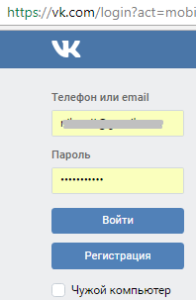
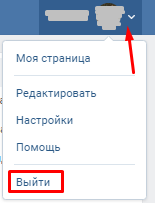
Перейдите на сайт vk.com, а затем выполните выход.
Появится страница авторизации пользователя. Введите ваш логинпароль.

Теперь можно снова переходить на сайт с авторизацией через соц сети и повторить вход.
Если вы нашли другое решение ошибки {"error":"invalid_request","error_description":"Security Error"}, просив вас сообщить об этом в комментариях.
В сегодняшней статье мы рассмотрим с вами ошибку {«error»:»invalid_request»,»error_description»:»Security Error»}, которая наводит на многих пользователей шок, в первую очередь, благодаря своей ужасной длине.
Возникает данная ошибка всякий раз, когда кто-то попытается выполнить авторизацию с помощью социальной сети ВКонтакте где-нибудь на другом веб-ресурсе, а таких сейчас ужасно много. Причем, стоит заметить, ошибка эта прежде всего возникает у пользователей браузера Google Chrome, впрочем, и на других браузерах ее появление также возможно.
Причина ошибки {«error»:»invalid_request»,»error_description»:»Security Error»} – выполненный ранее вход в учетную запись ВК. По крайней мере, так утверждает сама техническая поддержка ВКонтакте. И, как показала практика, это действительно так.
Если вы и сами повстречались с ошибкой {«error»:»invalid_request»,»error_description»:»Security Error»}, то вам нужно сделать следующее:
- выйдите из свой учетной записи ВК в браузере;
- затем снова войдите в нее;
- далее переходим на нужный вам сайт и проводим авторизацию с помощью ВК – проблема решена.
Как видите, ошибка {«error»:»invalid_request»,»error_description»:»Security Error»} решается буквально за пару-тройку минут, после чего вы можете заходить на любые веб-ресурсы в сети через учетку ВКонтакте. Мы надеемся, что данный материал помог вам устранить проблему.
На чтение 3 мин. Просмотров 538 Опубликовано 15.12.2019
Ошибка invalid request error description security error (неверный запрос, ошибка безопасности) возникает преимущественно в Google Chrome при попытке авторизоваться, залогиниться на сайте через сервис авторизации Вконтакте.
Страница редиректа: https://oauth.vk.com/authorize?client_ >
Страница ошибки: http://oauth.vk.com/error?err=2
Проблема связна с устаревшей сессией, которая хранится в Google Chrome. Решение проблемы разработчики API VK не предоставили, но как показывает практика, избавиться от ошибки можно перелогинившись.
Перейдите на сайт vk.com, а затем выполните выход.
Появится страница авторизации пользователя. Введите ваш логинпароль.
Теперь можно снова переходить на сайт с авторизацией через соц сети и повторить вход.
Если вы нашли другое решение ошибки <«error»:»invalid_request»,»error_description»:»Security Error»>, просив вас сообщить об этом в комментариях.
У многих пользователей при попытке выполнить вход на сторонних через контакт выскакивает ошибка invalid_request error_description security error. Зачастую данная проблема появляется у пользователей браузера Google Chrome. Разработчики своих сайтов и приложений устанавливая на свои порталы систему авторизации через социальные сети, так же могут столкнуться с этой проблемой. В браузере ошибка может выглядеть следующим образом: «<«error»:»invalid_request», «error_description»:»Security Error»>». Причина ошибки кроется в устаревшей сессии веб браузера. Выполнив вход один раз мы часто нажимаем «Сохранить пароль». Сейчас отпала даже надобность вводить пароль заново, «В контакте» запоминает нашу сессию и сразу загружает нашу страницу облегчая жизнь. Если долгое время не выходить со своей страницы, это и приводит к вышеописанной ошибке.
Как исправить invalid_request error_description security erro
Для того что бы выполнить вход на стороннем сайте следуйте инструкции.
- Очищаем кеш браузера.
- Переходим с компьютера на свою страницу в контакте.
- Нажимаем на свою иконку в правом верхнем углу и затем кнопку «Выйти».
- Выполняем заново вход набрав свой логин и пароль.
- Авторизуемся через контакт на нужном сайте.
Техническая поддержка дает такой же ответ:
Здравствуйте, Пользователь! Ошибка возникает часто, если у вас устаревшая сессия. Нужно просто перезайти на сайт в браузерной компьютерной версии. С уважением, Агент.
Что удивительно данная ошибка со входом существует в контакте примерно с 2012 года, служба поддержки рекомендует нам запастись терпением и ждать, а пока пользуемся способом описанным выше и радуемся жизни. Если у вас есть еще интересные вопросы по социальным сетям или темы, которые вы хотите осветить, пишите вопросы и предложения в комментарии.
При авторизации на сайте и портале через социальную сеть Вконтакте https://vk.com появляется ошибка:

2. Выйти из учетной записи Вконтакте через кнопку «Выйти»:
3. Заново войти в свою учетную запись аналогично п.1
После чего можете входить на сайт или портал через сеть Вконтакте, ошибка должна устраниться.