Exchange Server errors 451, 452, and 471 are unrelated but common errors that are caused due to issues on the Exchange Server or its database. However, they result in the same problem – emails not received through MS Outlook.
In this article, we’ll discuss the causes of errors 451, 452, and 471, and the solutions to resolve them.
Reasons for Exchange Server Error 451
When a user sends an email through MS Outlook, the email client first connects to Edge Transport Server. The Edge Transport Server of the sender links to the Edge Transport Server at the recipient’s end through the Internet and transmits the email. The following figure depicts the Email Relay Environment.
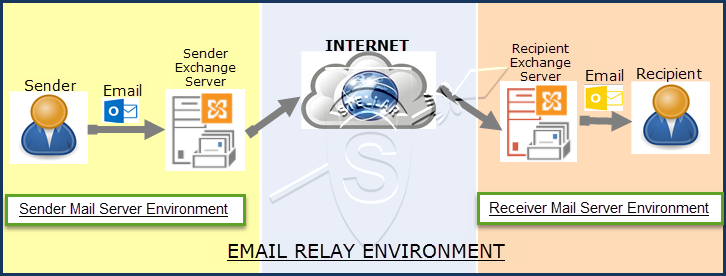
Error 451 is encountered when the Email Relay Environment is affected due to temporary Exchange Server issues, such as mail limit exceeded, DNS errors, unreachable mail servers, etc. It may also occur due to discrepancies on Sender Exchange or Receiver Exchange Server. Below is an example of the error message.
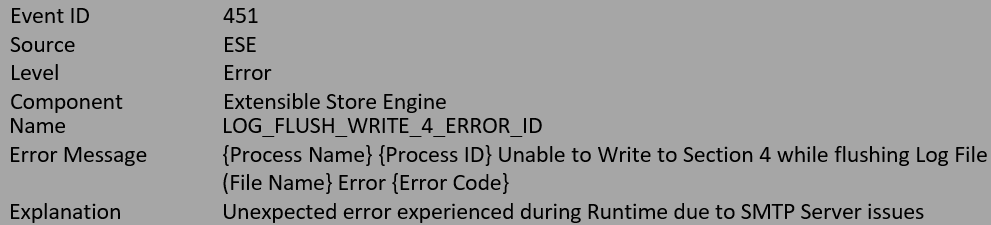
To resolve error 451, you need to thoroughly examine the error message and the email logs based on the error message encountered. The steps are as follows:
Error 451: You Have Exceeded Your Messaging Limits
To combat abuse or spamming on the mail server, most servers limit the number of connections allowed for any email account. Once the user exceeds this connection limit, it results in error 451.
“451 Requested action aborted: This mail account has sent too many messages in a short amount of time. Please try later.”
Error 451: Temporary Server Error. Please try again later
The error is a result of DNS issues on the sender server, due to which the sender is unable to establish connectivity. This may happen due to the following reasons:
- Improper configuration of MX Records for the domain.
- Incorrect routing of emails as a result of local server resolver issues.
Solutions to Fix Exchange Server Error 451
Below are a few solutions that you may follow to resolve Exchange Server error 451.
- Increase connection limit in Mail Server. Enhance the “smtp_accept_max_per_host” configuration limit.
- Limit the number of emails for every user on the Mail Server. Edit the values for individual email accounts and increase the threshold for particular users who need to send more emails.
- Set the MX Records as local mail servers.
- Resolve the MX Record query and verify that the primary mail server priority is set as 0, and MX resolves to the correct server.
- Check the port numbers for DNS and SMTP. They should be 53 and 25, respectively. Also, ensure the firewall is not blocking these ports.
- Check that the SMTP connection is using the telnet.
Reasons for Exchange Server Error 452
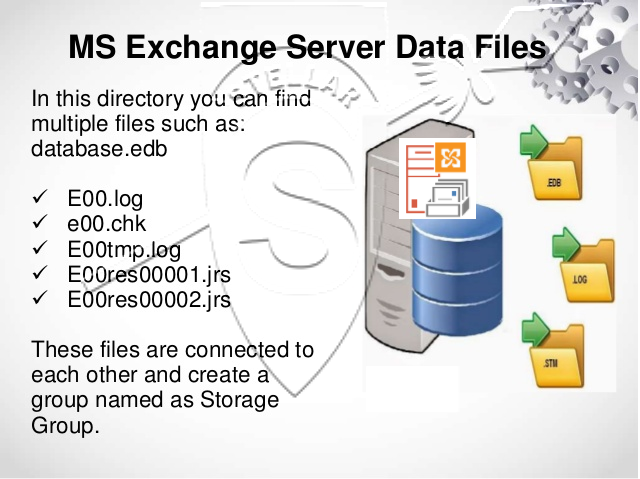
Exchange Server database consists of EDB files, Log files, Check Point files (.chk), and STM files. When the Exchange database file (.edb), Log files, and STM files connect and are consistent, their connection group is formed which is known as the Storage Group.
The following image depicts the MS Exchange Server database files.
Exchange Server error 452 occurs during Exchange Database Recovery. The error can result in a delay of Online Database Recovery due to a missing Log file in the temporary folder. The complete error message that appears looks like this:

The error 452 usually occurs due to one or more of the following reasons:
- The temporary location specified by the backup program does not contain the required Log files.
- Missing Log files.
If you try the Eseutil /r command on the database for repair or recovery, you may further encounter the error 454 indicating that the restore is not possible due to missing log files.
Solutions to Resolve Exchange Server Error 452
Usually, Exchange Database Recovery error 452 occurs due to missing log files. To resolve error 452, you can apply the following solutions:
- Take a backup of the data and ensure there is at least 1 GB of space available on the disk.
- Navigate to the C:Program FilesMicrosoftExchange ServerBin location and run the EdgeTransport.exe.config with Notepad.
- In the Notepad, look for the key= “EnableResourceMonitoring” value=” true” and set the value to False. Save it and retry.
- Verify if the Log files are stored at their original location. If not, move them back to their original location. You can also restore the required Log files from backup, and specify these files in the Event Message.
- After successful relocation and restoration, run the Eseutil command — Eseutil /cc or Eseutil/cc /t to determine a different location for the Logs. Mount the Exchange database after moving the Logs.
- Alternately, restore the complete Exchange database from backup and run the command Isinteg -fix by utilizing ‘Move Mailbox to move the data to the new blank database.’
- If the Exchange Server error 452 persists, then look for an advanced Exchange recovery tool for Exchange database repair.
Reasons for Exchange Server Error 471
Exchange Administrators define the storage space on the database based on the organizational requirement due to which the Exchange Server database has pre-defined space. Admins also define the anti-spam rules by the Content Filtering Policies of the organization.
The following image depicts the MS Exchange Anti-spam filtering.
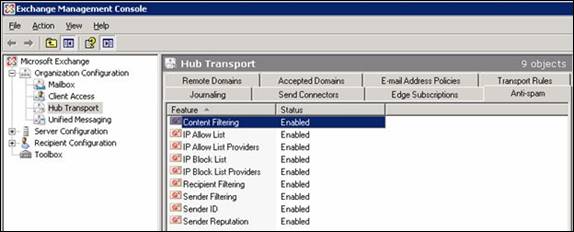
Sometimes, the Exchange Server encounters rollback operation issues on the database, as specified in the event description, and is unable to take future updates. In such a case, there is rejection in rollback operations and the server experiences Exchange Server error 471. If the problem is not resolved, there are no updates possible on the Exchange database. This may happen due to one or more of the following reasons:
- Permission issues on Exchange Server database.
- Lack of space.
- Disk I/O error.
- Problem with Local Anti-spam Filter.
The error message is flashed as:
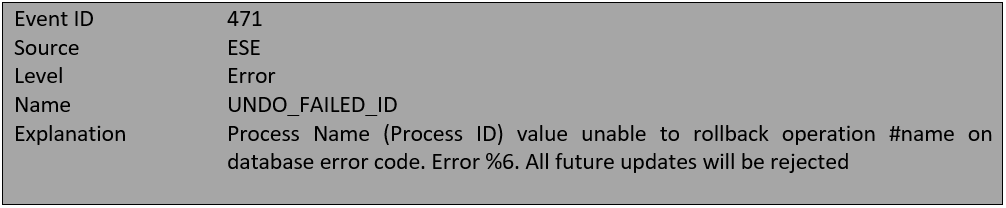
Following are the different error codes that can lead to error 471:
- Error -510 (0xfffffe02)JET_errLogWriteFail
An attempt to write the Log file and database fails, leading to the error 471. Possible causes: Permission issues, space problems.
- Error -1022(0xfffffc02)JET_errDiskIO
The Disk I/O issue stops the Exchange Server to access the requested page in the database. Possible Cause: Disk I/O Error.
- Error on the mail server
This may happen due to an issue on the mail server, often caused by conflicting local anti-spam filter permissions.
Solutions to Resolve Exchange Server Error 471
If error 471 is reported on your server, apply the following solutions to fix it.
- Run the command – chkdsk /f /r.
- Disable the outgoing antispam filter from the server. In case you’re using remote mail exchange, contact the SMTP service provider or server administrators.
- Run the antivirus or antimalware tool to remove the malicious files.
Conclusion
Encountering errors, such as 451, 452, or 471, on the Exchange Server is one of the most significant nightmares for an administrator. These errors can lead to an unresponsive database and downtimes. We have shared some possible solutions that you may apply to rectify the errors and bring the Exchange mailbox database and the server back to their normal state. However, if these solutions fail, use an Exchange recovery software such as Stellar Repair for Exchange to reduce the downtime and rescue servers from unwanted disasters. The software can help you extract and save the mailboxes from corrupt or inaccessible database (.edb) files to PST format. You may also export the recovered mailboxes directly to Office 365 tenant or another healthy live Exchange database in a few clicks.
The error can be caused by an attempt to send more than 60 emails per minute or emails with more than 60 concurrent recipients (copies and blind carbon copies are also counted).
If more than 60 letters were sent per minute, you should configure the sending of mail so that this limit is not exceeded.
If an error occurs when trying to send a message with a large number of recipients, you must reduce the number of recipients so that it does not exceed 60 and try sending again. To send individual emails to more than 60 concurrent recipients, you can use WebMail.
When trying to send a letter with a large number of recipients through an email client, situations may arise when, after an attempt to send and an error occurs, the letter is saved in this email client in the sending queue (for example, in the folder «Outgoing») and the mail client periodically tries to send it again, which leads to the regular repetition of the error. In this case, you need to find a mail client that works from the IP mentioned in the error text, where this letter was saved, and either remove it from the sending queue, or reduce the number of recipients in it.
If many mail clients from the same IP connect to the mailboxes and it is difficult to determine the required mail client, you can change mailbox password… This will disconnect all active connections and disconnect all mail clients from the mailbox. Attention! After this operation, you will need to manually specify a new password in all required mail clients.
Unfortunately no. Our server records only the external IP address of the sender. It is technically impossible from our side to record who exactly the attempts to send are performed by.
Alas, this is impossible, since the limits are not set for specific mailboxes or hosting accounts, but for the mail service as a whole.
День добрый!
У меня Exchange 2010 отправляет почту через СМАРТхост — IIS SMTP — далее в инет.
Задача такая:
Требуется еженедельно отправлять рассылку на все почтовые ящики другого домена — порядка 150 шт. Почта домена на Яндексе.
Я создал отдельный OU в нем контакты в адресами эл. почты. Создал динамическую группу рассылки нацеленную на OU.
Отправляю письмо на группу — получаю НДР: Почтовая система настроена на ограничение числа получателей, которым может быть отправлено одно сообщение.
Отправьте сообщение несколько раз меньшему числу получателей. <smtp2.5-55.ru #4.5.3 smtp;452 4.5.3 Error: too many recipients>
Нашел в Яндексе: Если в отчете содержится строка «Error: too many recipients», у вашего письма слишком большое количество отправителей: более 35 адресов в полях
Кому, Копия и Скрытая копия. Отредактируйте список отправителей и повторите попытку.
Понятно что в письме количество адресов в rcpt to: слишком большое для Яндекса…
Вопрос: Как его уменьшить? Разделить группу на части — чет не вариант…
Извиняйте за глупый вопрос. Сидел думал… Ничего путевого в голову не приходит.  Пятница что ли?
| Код | Описание |
|---|---|
| 1XX | |
| 101 | The server is unable to connect |
| 111 | Connection refused or inability to open an SMTP stream |
| 2XX | |
| 211 | System status message or help reply |
| 214 | A response to the HELP command |
| 220 | The server is ready |
| 221 | The server is closing its transmission channel, It can come with side messages like «Goodbye» or «Closing connection» |
| 250 | Its typical side message is «Requested mail action okay completed»: meaning that the server has transmitted a message |
| 251 | «User not local will forward»: the recipient’s account is not on the present server, so it will be relayed to another |
| 252 | The server cannot verify the user, but it will try to deliver the message anyway |
| 3XX | |
| 354 | The side message can be very cryptic («Start mail input end .»), It’s the typical response to the DATA command |
| 4XX | |
| 420 | «Timeout connection problem»: there have been issues during the message transfer |
| 421 | The service is unavailable due to a connection problem: it may refer to an exceeded limit of simultaneous connections, or a more general temporary problem |
| 422 | The recipient’s mailbox has exceeded its storage limit |
| 431 | Not enough space on the disk, or an «out of memory» condition due to a file overload |
| 432 | Typical side-message: «The recipient’s Exchange Server incoming mail queue has been stopped» |
| 441 | The recipient’s server is not responding |
| 442 | The connection was dropped during the transmission |
| 446 | The maximum hop count was exceeded for the message: an internal loop has occurred |
| 447 | Your outgoing message timed out because of issues concerning the incoming server |
| 449 | A routing error |
| 450 | «Requested action not taken – The user’s mailbox is unavailable», The mailbox has been corrupted or placed on an offline server, or your email hasn’t been accepted for IP problems or blacklisting |
| 451 | «Requested action aborted – Local error in processing», Your ISP’s server or the server that got a first relay from yours has encountered a connection problem |
| 452 | Too many emails sent or too many recipients: more in general, a server storage limit exceeded |
| 471 | An error of your mail server, often due to an issue of the local anti-spam filter |
| 5XX | |
| 500 | A syntax error: the server couldn’t recognize the command |
| 501 | Another syntax error, not in the command but in its parameters or arguments |
| 502 | The command is not implemented |
| 503 | The server has encountered a bad sequence of commands, or it requires an authentication |
| 504 | A command parameter is not implemented, Bad email address, Bad email address, A DNS error: the host server for the recipient’s domain name cannot be found |
| 513 | «Address type is incorrect»: another problem concerning address misspelling, In few cases, however, it’s related to an authentication issue |
| 523 | The total size of your mailing exceeds the recipient server’s limits |
| 530 | Normally, an authentication problem, But sometimes it’s about the recipient’s server blacklisting yours, or an invalid email address |
| 541 | The recipient address rejected your message: normally, it’s an error caused by an anti-spam filter |
| 550 | It usually defines a non-existent email address on the remote side |
| 551 | «User not local or invalid address – Relay denied», Meaning, if both your address and the recipient’s are not locally hosted by the server, a relay can be interrupted, 552 «Requested mail actions aborted – Exceeded storage allocation»: simply put, the recipient’s mailbox has exceeded its limits |
| 553 | «Requested action not taken – Mailbox name invalid», That is, there’s an incorrect email address into the recipients line |
| 554 | This means that the transaction has failed, It’s a permanent error and the server will not try to send the message again. |
550 5.1.1 Recipient address rejected: User unknown in virtual alias table
This is the bounce back message that is received by the sender from our server if the destination email address does not exist.
The same error message is received if the recipient has a mail loop. That is, if the recipient has set a forward to another email address and that email address is forwarded back to the original one. In this case, you need to remove the loop in order to receive the emails.
If there is a forward set for an account, and an email is sent to that account, if for some reason the forwarded email is not sent, the original sender may get the above error.
For example, abc@domain.com if forwarded to abc@dom.com, if a third user xyz@dom2.com emails to abc@domain.com, he may get the above error if the forwarded email is bounced.
550 5.1.1 Protocol error
This error code ideally suggests that the sender has used SMTP protocol instead of ESMTP, thus the outbound mail of the sender was rejected. In short, the sending client doesn’t properly communicate and makes errors in the SMTP protocol.
550 5.3.2 Service currently unavailable
The error code 5.3.2 usually means that the system is not accepting network messages. We would thus need to look outside Exchange for a connectivity problem.
The error code ideally occurs ideally for two reasons which are listed below:
-
The sending IP is blacklisted at an RBL or blacklist monitoring site. (You may verify the same by inputting the IP via this link: http://mxtoolbox.com/blacklists.aspx )
-
There is a temporary block on the IP on our Inbound server due to multiple mails from this IP. Feel free to contact our support desk for more information and regarding de-listing the same.
554 5.7.1 Service unavailable; Client host X.X.X.X blocked using zen.spamhaus.org
This is the error message that is received of the IP address of the sender is listed at zen.spamhaus.org
For further details, please check http://www.spamhaus.org/zen
OR check http://www.spamhaus.org/query/bl?ip= and contact zen.spamhaus.org to get the IP De-listed.
550 5.7.1 : Helo command rejected: You aren’t localhost
550 5.7.1 : Helo command rejected: You aren’t localhost.localdomain.
550 5.7.1 : Helo command rejected: You are not me
Our servers do not accept SMTP HELO command as HELO localhost or HELO localhost.localdomain or HELO . We accept HELO from a valid Domain Name or your computer name which is other than your domain name. Please check with your ISP or Mail administrator for this issue.
554 5.7.1 : Relay access denied
There are couple of reasons for this error while sending an email
Please contact support.
551 5.7.1 The message was rejected due to classification as Virus,Spam or high bulk ratio
This is a bounce back message that you receive when an email is classified as spam while sending out. If you feel that a genuine email is rejected as spam, you need to send the same email with the full headers and the content to our support team. That email in question will be reviewed manually.
530 5.7.0 Recipient address rejected: Authentication Required
This error comes when your sending mails to remote domain without using smtp authentication.
550 5.4.5 Recipient address rejected: Hourly domain sending quota exceeded
This is the error message that you get if your domain name exceeds the hourly quota set for the domain name. Here, the term ‘hour’ refers to the last 60 minutes.
550 5.4.6 Recipient address rejected: Hourly sending quota exceeded
This is the error message that you get if the user (that particular email address) exceeds the hourly quota set. Here, the term ‘hour’ refers to the last 60 minutes.
553 5.7.1 Sender address rejected: not owned by user user@domain.com
This is the error message that is received when you are trying to send an email as a different user.
554 5.7.1 : Recipient address rejected: USER IS SUSPENDED
This error comes if user is suspended in Control Panel.
522 5.7.1 : Recipient address rejected: Requested mail action aborted: exceeded storage allocation
This error comes if the user is overquota.
554 5.7.1 : Sender address rejected: Access denied
This error comes when the sender address is blocked on our server. Generally this is done if spam has originated from this user.
450 4.1.8 : Sender address rejected: Domain not found
Our inbound servers require that the hostname for the sender server should have valid MX or A records in order to accept emails from it. You need to contact the sending server’s email admin to add valid DNS records for his server.
450 4.7.1 Client host rejected: cannot find your reverse hostname
Our inbound servers require reverse hostname for the sender server to be present in order to accept the email. You need to contact the reverse hostname’s email admin to add the rDNS to into his server.
450 4.7.1 : Recipient address rejected: Policy Rejection- Quota Exceeded
This error comes from our incoming mail server if user is receiving excessive amounts of mails.
450 4.7.1 Recipient address rejected: Access denied
This occurs when the recipient address is invalid. i.e., not in form of user@domainname OR if the Recipient address is blocked on server.
451 4.3.5 Server configuration problem — try again later
451 4.7.1 Service unavailable — try again later;
This error most likely occurs if there is a configration error with our servers. If you encounter any of the above messages, please contact our support with the details.
452 4.5.3 Error: too many recipients
The error message is encountered when the user is exceeding the limit of more than 50 recipients in an email. The list of recipients is inclusive of To,Cc and Bcc. If you encounter the above error, reduce the number of recipients in the email and try again.
Сайт rtfm.wiki использует cookies и трекинг посещений. Продолжая использовать этот сайт, вы соглашаетесь с сохранением файлов cookie на вашем компьютере. Если вы не согласны покиньте сайт или включите Adblock 😎 Что такое cookies? 🍪
The author voluntarily contributed this tutorial as a part of Pepipost Write to Contribute program.
Introduction
SMTP (Simple mail transfer protocol) is used to send emails across the network with the help of MTA (Mail transfer agent). On Basis the response from the client’s server SMTP returns a particular error code. These response codes might be one of the five standard classes.
Status Codes
Status code is differentiated into five categories as follows :
- 1xx returns informational code ie. your request is received successfully and sent for further processing.
- 2xx returns success code ie. your request is understood and accepted.
- 3xx returns redirection code ie. your request needs few actions to be taken so that request is completely accepted.
- 4xx returns clients error code ie. your request is incorrect might be syntax issue or contains an issue that can’t be fulfilled.
- 5xx returns server error code ie. your request was valid but the server failed to process due to internal error on the server.
Enhanced Status Codes Registry
Informative Status Code
|
Code |
Description |
|---|---|
|
101 |
Unable to connect to server |
|
111 |
Connection refused |
Success Status Code : whenever a positive delivery code is returned from DSN
|
Code |
Description |
|---|---|
|
200 |
System status message |
|
214 |
A response to the HELP command |
|
220 |
The server is ready |
|
221 |
The mail communication channel is getting closed |
|
250 |
Requested mail action okay completed |
|
251 |
mail will be forwarded because server was not able to find user on local |
|
252 |
Cannot verify the user, but it will try to deliver the message anyway |
Redirection Status Code
|
Code |
Description |
|---|---|
|
354 |
Start adding mail input |
Persistent transient failure Status Code
|
420 |
Timeout connection problem |
|---|---|
|
421 |
Service is unavailable due to a connection problem |
|
422 |
The recipient’s mailbox has exceeded its storage limit |
|
431 |
Not enough space on the disk |
|
432 |
Recipient’s incoming mail queue has been stopped |
|
441 |
The recipient’s server is not responding |
|
442 |
The connection was dropped during the transmission |
|
446 |
The maximum hop count was exceeded for the message |
|
447 |
Message timed out because of issues concerning the incoming server |
|
449 |
Routing error |
|
450 |
User’s mailbox is unavailable |
|
451 |
Aborted – Local error in processing |
|
452 |
Too many emails sent or too many recipients |
|
471 |
An error of your mail server |
Server Permanent Error Codes
|
Code |
Description |
|---|---|
|
500 |
Syntax error |
|
501 |
Syntax error in parameters or arguments |
|
503 |
Bad sequence of commands, or requires authentication |
|
504 |
Command parameter is not implemented |
|
510 / 511 |
Bad email address |
|
512 |
Host server for the recipient’s domain name cannot be found in DNS |
|
513 |
Address type is incorrect |
|
523 |
Size of your mail exceeds the server limits |
|
530 |
Authentication problem |
|
541 |
The recipient address rejected your message |
|
550 |
Non-existent email address |
|
551 |
User not local or invalid address – relay denied |
|
552 |
Exceeded storage allocation |
|
553 |
Mailbox name invalid |
|
554 |
Transaction has failed |
Diving deep with extented code description
2xx detailed
This is Success status which indicates that there is a positive response from the server which might have more information when the response has it respected subcodes (2XX X.X.X) and response.
250 2.1.5 Destination address valid or 250 2.1.5 Recipient OK
This should be treated as a positive remark for delivery. Since the status code response represents that the email address you are trying to reach is valid.
221 Service closing transmission channel
If there is an issue with authentication this status code response is received from the server. it can be an incorrect password or username or you might be trying the connect to the wrong mail server. you can check your SMTP access is enabled or not for sending email from your email id or try changing the authentication method.
If you are confident with your username and password and still getting the error try using SSL/TLS.
250 2.3.0 Other or undefined mail system status
This can be considered as a positive response because this status code response indicates recipient’s MX as successfully received your email but has reverted with null response.
250 2.3.6 Requested priority was changed
The email has been accepted for delivery but the delivery priority was changed. the new priroty will available after the status code besides the response.
220 2.5.0 Requested mail action okay completed
This is success status which indicates your email has been successfully delivered at recipient’s end without any issue.
4xx detailed
This status code are temporary blockage for your emails delivery which should retry sending those emails automatically. This blockage might be due to unusual traffic patterns from sending server IP address, emails having characteristics of spam or recipients MX is too busy accepting emails.
421 4.7.0 [TS01] Messages from x.x.x.x temporarily deferred due to user complaints — 4.16.55.1
This status code errors when user raises complaints for the emails which has been sent from our mail server.
421 4.7.0 [TS02] Messages from x.x.x.x … deferred due to excessive user complaints — 4.16.56.1
This status code errors when user raises complaints for the emails which has been sent from our mail servers on a shared IP.
421 4.7.1 [TS03] All messages from x.x.x.x permanently deferred
This status code indicates that high volume of mails has been sent from your IP. ie, bulk emailing. Don’t send email if you are receiving this status code
check for email subscription list and make sure you are sending emails to user who as subsribed.
421 Message temporarily deferred — [numeric code]
This status code response indicates your emails are postponed due to low connectivity percentage to MTA, Bad tokens within the message or unusal traffic of emails having PDF files in it.
421 Resources temporarily unavailable. Please try again later
The recipient’s MX is too busy. Try to resend those emails after few mintues
451 Message temporarily deferred — [numeric code]
This Status code is due to excessive traffic or IP data query failure.
5xx detailed
|
Error/Status Code |
Description |
|---|---|
|
5.0.0 Address does not exist |
Email id invalid or does not exists |
|
5.1.0 Other address status |
A problem occurred during the delivery of this message to this email address. |
|
5.1.1 Bad destination mailbox address |
Specified from address or domain mailbox does not exists (anything after ‘@’). |
|
5.1.2 Bad destination system address |
Address does not exists or not able to accept mails |
|
5.1.3 Bad destination mailbox address syntax |
Invalid or corrupted character in email address |
|
5.1.4 Destination mailbox address ambiguous |
Check your spelling of email address and resend |
|
5.1.5 Destination mailbox address invalid |
Mail address may be invailid or may have spelling mistakes. |
|
5.1.6 Mailbox has moved |
Mailbox may be moved to new location |
|
5.1.7 Bad sender’s mailbox address syntax |
Sender’s address is invalid syntactically |
|
5.1.8 Bad sender’s system address |
Sender’s system in the address does not exist or is incapable of accepting. |
|
5.2.0 Other or undefined mailbox status |
This error is usually return for which it has class (ie. 1xx,2xx,3xx,4xx,5xx). |
|
5.2.1 Mailbox disabled, not accepting messages |
Some changes need to made mandatory for resending mail |
|
5.2.2 Mailbox full |
Try increasing your emailbox space capacity |
|
5.2.3 Message length exceeds administrative limit. |
The Size of your email has exceeded its limit try removing unwanted text. |
|
5.2.4 Mailing list expansion problem |
mailbox saves your email address to whom you are sending or receiving emails, there is problem saving that email addresses. |
|
5.3.0 Other or undefined mail system status |
Mail has been accepted normally |
|
5.3.1 Mail system full |
mail system at client’s is not able accept emails |
|
5.3.2 System not accepting network messages |
you need to whitelist the email address through your administrator it has been blocked. |
|
5.3.3 System not capable of selected features |
|
|
5.3.4 Message too big for system |
Message character limit has exceeded |
|
5.4.0 Other or undefined network or routing status |
Mail accepted routing status is not available |
|
5.4.1 No answer from host |
Configuration issue at recipient’s server. you can send again once the issue is resolved at recipient’s end |
|
5.4.2 Bad connection |
unable to connected or delay in connection |
|
5.4.3 Routing server failure |
Error is generated by the sender’s server, you need to contact your ISP/ESP. |
|
5.4.4 Unable to route |
When emailid or hosts provided is invalid. |
|
5.4.5 Network congestion |
Multiple connection on single channel. |
|
5.4.6 Routing loop detected |
Sending message to same PMTA from you have sent. |
|
5.4.7 Delivery time expired |
Mail is queued for 2-3 days after that it is removed by returning above messagae |
|
5.5.0 Other or undefined protocol status |
Something went wrong with protocol while delivering mail which can be well expressed with other status code. |
|
5.5.1 Invalid command |
out of sequence or unsupported command used while sending mail |
|
5.5.2 Syntax error |
unable to interprete the command due wrong syntax or it is unrecognized. |
|
5.5.3 Too many recipients |
Number of recipient is greater than the amount of recipient deliver by protocol |
|
5.5.4 Invalid command arguments |
the arguments were out of range or represented unrecognized features |
|
5.5.5 Wrong protocol version |
protocol version is mis-match which can’t be solved at one go. |
|
5.6.0 Other or undefined media error |
Issue with content of the message which cannot be delivered. |
|
5.6.1 Media not supported |
Media is not supported by protocol or the system who is going to formard the mail. |
|
5.6.2 Conversion required and prohibited |
Message should be converted before it is send/delivery else it will be not delivered. |
|
5.6.3 Conversion required but not supported |
Message must be converted in order to be forwared but partically it is not possible. |
|
5.6.4 Conversion with loss performed |
This is Warning to the sender that While conversion data may be lost. |
|
5.6.5 Conversion failed |
Message conversion was unsuccessful |
|
5.7.0 Other or undefined security status |
Something went wrong while validating authentication which can be expressed with other status code. |
|
5.7.1 Delivery not authorized, message refused |
Authentication was not successful due to which email was not sent. |
|
5.7.2 Mailing list expansion prohibited |
Sending mail is not allowed to particular recipient. |
|
5.7.3 Security conversion required but not possible |
Conversion was required to send mail securely which is not possible. |
|
5.7.4 Security features not supported |
Authentication not supported at delivery end. |
|
5.7.5 Cryptographic failure |
Unable to decrypt the message because the key was wrong or invalid. |
|
5.7.6 Cryptographic algorithm not supported |
Unable to decrypt the message because alogrithm was not supported. |
|
5.7.7 Message integrity failure |
The message is corrupted or altered |
Stages where error codes are possible
Below is an simple example for sending email using telnet and you can check the response code after every command.
[[email protected]_wifi ~]$ telnet smtp.pepipost.com 587
Trying 138.197.56.58...
#-----------CONNECTION ESTABLISHMENT---------
Connected to smtp.pepipost.com.
Escape character is '^]'.
220 ESMTP SMTPNY-LB2 Ready
#-----------EHLO or HELO---------------
EHLO pepipost.com
250-smtpbny-lb2.pepipost.com
250-PIPELINING
250-SIZE 50000000
250-VRFY
250-ETRN
250-STARTTLS
250-AUTH PLAIN LOGIN
250-AUTH=PLAIN LOGIN
250-ENHANCEDSTATUSCODES
250-8BITMIME
250 DSN
#------------MAIL-----------------
mail from: [email protected]
250 2.1.0 Ok [success output]
#------------RCPT-----------------
# rcpt to: [email protected]
250 2.1.5 Ok [success output]
#------------DATA-----------------
# data # type this to pass input of email body
354 End data with <CR><LF>.<CR><LF> [success output ]
This is test mail from your local host server #mail body
. # dot(.) for completing the mail body
#------------NOOP-----------------
250 2.0.0 Ok: queued as E2R572042D75 [success output]
quit # quit from the telnet command prompt
#-----------QUIT------------------
221 2.0.0 Bye
Connection closed by foreign host.
I have segregated the above example in below structure where you can easily understand the status code.
   CONNECTION ESTABLISHMENT
      S: 220
      E: 554
   EHLO or HELO
      S: 250
      E: 504, 550
   MAIL
      S: 250
      E: 552, 451, 452, 550, 553, 503
   RCPT
      S: 250, 251 (but see section 3.4 for discussion of 251 and 551)
      E: 550, 551, 552, 553, 450, 451, 452, 503, 550
   DATA
      I: 354 -> data -> S: 250
                        E: 552, 554, 451, 452
      E: 451, 554, 503
   RSET
      S: 250
   VRFY
      S: 250, 251, 252
      E: 550, 551, 553, 502, 504
   EXPN
      S: 250, 252
      E: 550, 500, 502, 504
   HELP
      S: 211, 214
      E: 502, 504
   NOOP
      S: 250
   QUIT
      S: 221
Grade My Email
Check your spam now?
Netcorecloud’s toolkit is the solution to all your email problems.