
2018/06/10
Марат
15
0
html |
Иногда, бывает такое, что достаточно нехватки закрывающего тега либо наоборот лишний тег просочился, то ваша страница превращается в что-то непонятное и кривое!
Об оишибке синтаксиса в html
- Что такое Ошибка синтаксиса html
- Исключение ошибок синтаксиса на вашем сайте
- Как найти синтаксическую ошибку в коде html
- Бесплатный совет -> о синтаксических ошибках
Что такое Ошибка синтаксиса html
Предполагается, что синтаксис в html — это строгий синтаксис! Вообще, по идее браузер сам должен достроить дерево html(Честно признаюсь, что никогда не задумывался над всеми этими механизмами!), если не хватает какого-то из тегов! Но… кривизна все равно вылазит… знаю по собственному сайту! Как только вот прямо здесь я вставлю открывающийся тег -> div весь правый сайд бар улетит в футер… 
смайлы
Единственное и главное правило не создавать ошибки синтаксиса в html — писать правильный код!
Так…
Что же такое Ошибка синтаксиса html
Ошибка синтаксиса html — это нарушение правильной структуры каркаса html дерева, от которой визуальное представление сайта на мониторе выглядит не так, как оно задумывалось!
Исключение ошибок синтаксиса на вашем сайте
Для того, чтобы исключить появление ошибок синтаксиса на вашем сайте вам потребуется всего-то правильно сделать html + каркас сайта — да это звучит банально ничего умнее я не придумал, потому, что это азы! И без этого вы просто обречены каждый раз мучаться с ошибками синтаксиса в html!
Да я буду много сейчас говорить банальностей и эти банальности нужно делать, как ходить на работу, любить своих родителей и своих детей и т.д. можно продолжать до бесконечности!
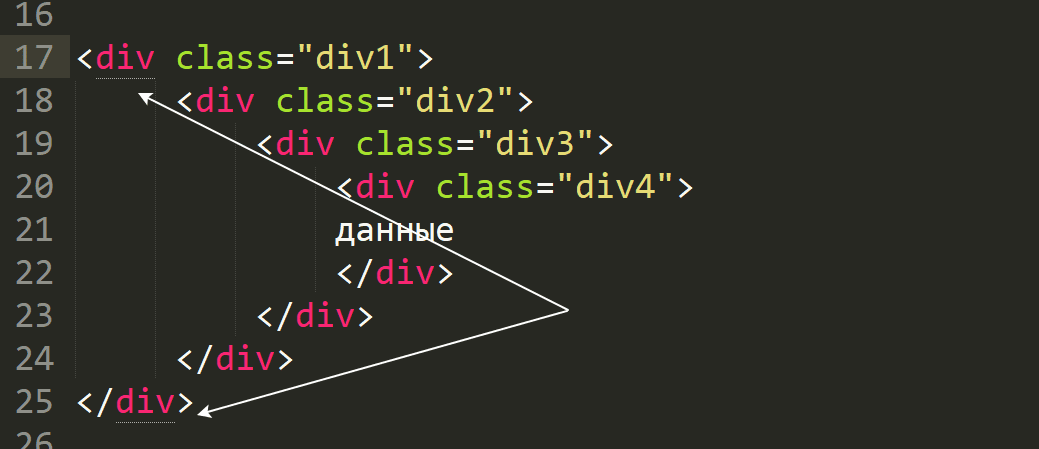
Создавайте структуру сайта именно деревом, когда вложенный тег отодвигается на шаг вправо.
<div class=»div1″>
<div class=»div2″>
<div class=»div3″>
<div class=»div4″>
данные
</div>
</div>
</div>
</div>
Старайтесь делать код html простым(краткость сестра таланта), чтобы его можно было понять! Избегайте применять по поводу и без повода лишние теги!
Делайте ваш код html блоками, например блок menu -> блок futer
Добавляете описание в началу блока и и к концу блока:
<!— menu —>
здесь menu
<!— /menu —>
<!— futer —>
здесь futer
<!— /futer —>
Как найти синтаксическую ошибку в коде html
К сожалению, в html в отличии к примеру от php не указывается на какой строке ошибка! Но нам все равно от этого не легче и нам нужно
найти синтаксическую ошибку в коде html — как это сделать!?
Как я уже говорил, у вас должен быть html каркас создан по неким правилам, которые я немного озвучил выше!
Как раньше я искал синтаксическую ошибку в коде html!? Брал файл, в котором, есть основные блоки… удаляем блок меню… загружаем на сервер… смотрим пропала ошибка синтаксическая или нет… если пропала, то ошибка в блоке меню. Если нет, то меню возвращаем на место! Но и не забываем, что может быть сразу несколько ошибок…
Если в меню синтаксическая ошибка. не найдена идем в тело страницы… далее футер…и далее сайд бар… никто, ничего умнее еще не придумал…
Нашлась ошибка в блоке? … разбираем блок построчно! До тех пор, пока не найдем синтаксическую ошибку html!
Есть еще возможность проверять код в программах о которых вы знаете редакторы кода… Sublime + Notepad(не нравятся эти -> открываем поисковик ищем редактор кода…), открываем код html в этой программе и проверяем по тегам… если мы поставим мышку на один из тегов, то второй тег будет подсвечен аналогично, в sublime — это полоса снизу…
Нажмите, чтобы открыть в новом окне.
Бесплатный совет -> о синтаксических ошибках
Как я уже говорил и повторюсь! Делайте html код блоками!
Чем меньше тегов, тем лучше!
Длинный код, вас должен напрягать! Чем длиннее код, тем возможностей появления синтаксических ошибок и не только, возрастает!
Если у вас html и php перемешан и находится в разных файлах, то найти ошибку вообще будет сложно! Выделяйте html код в отдельный файл
Это… какие-то совсем простые советы, но я их говорю не просто так, а потому, что делаю это давно и у меня уже есть какие-то свои наработки и правила, которым я следую!
Выработайте свои правила и придерживайтесь их и у Вас больше никогда не будет синтаксических ошибок в html!
Не благодарите, но ссылкой можете поделиться!
COMMENTS+
BBcode
Remember those treehouses that we had as children and how the wood would wear, tear, and eventually collapse because we just would not stop jumping around inside it?
Well that’s kind of like HTML. This markup language is like the wood to your coding project. If it’s invalid, your solution will collapse.
Now don’t fret. In this article, I’ll give you some tips to help you make sure that your HTML is error-free as you build your coding solution.


Before you go and start investigating for unclean code like Sherlock Holmes (the Benedict Cumberbatch version to be exact 😉), let’s briefly meet some examples of syntax that can ruin your HTML file:
- Improper nesting of HTML elements
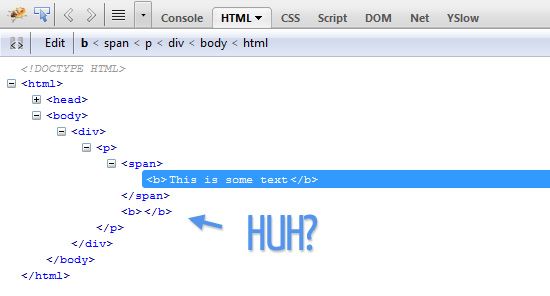
2. Deprecated HTML tags
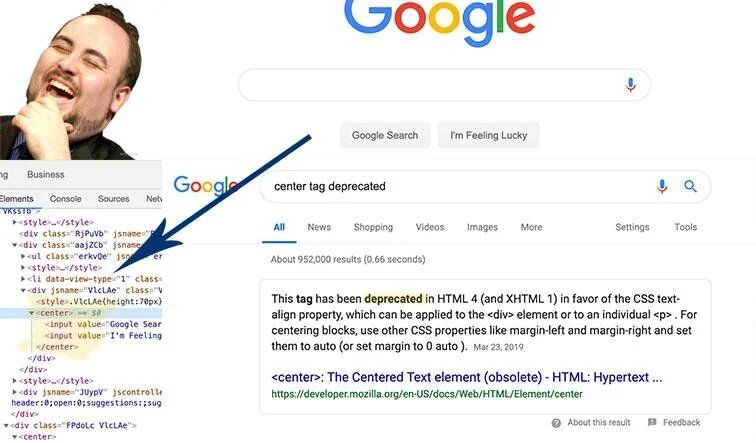
3. Missing tags
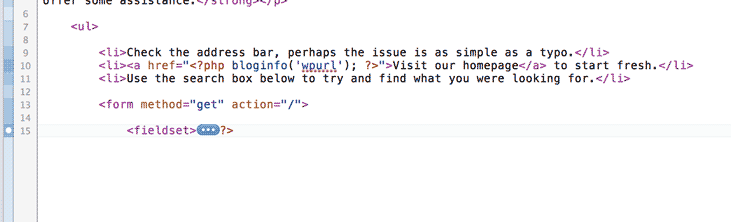
Now that you’ve met the culprits, let’s figure out how to catch them before they mess up your HTML file and destroy your coding project.

Improper Nesting of HTML Elements
To briefly review, nesting occurs when an HTML element is inside another HTML element.
<p>Coded by <a class="profile-link" href="<https://github.com/CBID2>" target="_blank"><em>Christine Belzie</em></a></p>
Now a nested element becomes evil – I mean improperly nested – when you place an HTML element inside the wrong area of the other element, like this:
<a class="profile-link" href="<https://github.com/CBID2>" target="_blank"><em>Christine Belzie<p>Coded by </p></em></a>
The code above would be considered invalid because the <p> tag is not related to the <a> tag and the <p> tag is not related to <em> tag. As a result, you get an unorganized paragraph.
To replace the improperly nested element, I highly recommend doing what I like to call the Sandwich Model. It entails stacking the head and closing tags of styling HTML elements within the primary tags, kind of like how you stack up all your toppings and fillings between two slices of your favorite bread.
<bread> <topping> </topping> <filling> </filling> </bread>Now if you think improperly nested tags were evil, wait until you see the next villain.

Deprecated HTML Tags
Simply put, deprecated HTML tags are basically when you use HTML elements that the tech industry has decided should no longer be used. Here’s an example:
<center>
  <figcaption id="img-caption">Rihanna performs on stage in San Siro Stadium for Anti World Tour 2016. </figcaption>
</center>
In the code snippet above, I used the <center> tag, Now, will the code snippet above fulfill its task? Of course. See the output below:
But it’s considered invalid since it is no longer used, which can cause your project to not function in the best way possible.
It’s like wearing like wearing platform shoes from the 70s when everyone else is wearing Yeezy’s, Sketchers, or Converse.
The best way to fix deprecated HTML tags is to refer to websites, blogs, and other sources to stay updated on the latest versions of the code. Let’s give the snippet I mentioned a makeover:
<figcaption id="img-caption">Rihanna performs on stage in San Siro Stadium for Anti World Tour 2016. </figcaption>
figcaption{
	max-width:100%;
	  height: auto;
	display:flex;
	justify-content: center;
	 font-family: 'Montserrat', sans-serif;

  }
To center the <figcaption> element, I used the CSS Flexbox method: «justify-content» and viola:
See how pretty the snippet looks now? When your code looks good, your project operates well, too. To stay updated on HTML, MDN, in my opinion, is a great source because they always let the readers know when certain tags are out of date.
Now hold on, we’re not out of the woods yet, there’s still one more invalid syntax that we have to meet.

Missing Closing Tags
You know how you use to scoff and roll your eyes whenever your writing instructor took points from your essay for having a few misspelled words or a missing period? Well, they were on to something – because the same idea applies to your HTML file.
A common issue you might run into is missing closing tags. Let’s see what that looks like.
<div class="user-info">
<h3 id="user-name">Victor Crest<span class="age">26</span></h3>
If one of your code lines is like the code snippet above, your HTML file will break, causing your project to not look so great like in the output below:
Think of it like a missing tire in your car (or whatever vehicle you use to transport yourself). Without it, you would be driving like this:
To fix this error, I highly recommend using the sandwich method that I mentioned before.
<div class="user-info">
<h3 id="user-name">Victor Crest<span class="age">26</span></h3>
</div>
As you can see in the code above, we’ve added our closing <div> tag, causing the snippet to now look like this:
See how improved the code looks now? Remember, think of a line of code like a sandwich. When one slice of bread (or in this case, a closing tag) is missing, your masterpiece falls apart, leaving you angry, sad, and sometimes hungry.

Wrapping Up
There you have it! Three common types of invalid syntax to look out for in your HTML file.
Remember, this file is the foundation of your coding projects, so Happy HTML file = Happy project! 😊

Credits
- Ben Mckenzie Fox GIF by Gotham
- Can’t Touch This High Heels GIF by BrownSugarApp
- Closing Tag image from «How to Easily Find Missing Closing Tags in HTML (with Coda 2)» article on Clicks Nathan
- Dwight Office Tv GIF by The Office
- Driving Michael Richards GIF by Seinfield GIFs
- Fox Tv Fire GIF by Bob’s Burgers
- Oh Yeah Yes GIF by Mauro Gatti
- Ren And Stimpy Reaction GIF by Giphy
- Sad Nft GIF by Pudgy Penguins
- Screenshot of Google from the «Why does Google use the deprecated HTML tag still?»discussion forum on Reddit
- Screenshot of improper nested tag from «How is the DOM Affected by Improperly Nested HTML Elements?» article by Louis Lazrus on Impressive Webs
Learn to code for free. freeCodeCamp’s open source curriculum has helped more than 40,000 people get jobs as developers. Get started
Ошибки в коде — это несоответствия правилам и синтаксису языка HTML, использование некорректных или недопустимых тегов, атрибутов или значений. Ошибки приводят к неправильному отображению элементов, снижению производительности и доступности сайта.
Что нужно, чтобы писать код правильно и не допускать ошибок? Знать самые распространённые ошибки и не совершать их.
Вложенный тег закрывается позже родительского
<section>
  <p>Пример текста на сайте.</section>
</p>
В этом примере элемент <p> закрывается после <section>, хотя является вложенным. Это может привести к проблемам в отображении элементов. Такая ошибка повторяется из-за невнимательности и некорректной структуры HTML-документа. Если вы будете следить за вложенностью, то не ошибётесь, где должен закрываться вложенный тег, а где — его родитель.
Правильный способ вложения этих элементов:
<section>
  <p>Пример текста на сайте.</p>
</section>
Пример корректного написания кода, где видна вложенность и шансов совершить ошибку меньше:
<ul class="user-menu">
  <li>
    <a href="#">Закладки</a>
  </li>
  <li>
    <a href="#">Корзина</a>
  </li>
  <li>
    <a href="#">Оформить заказ</a>
  </li>
</ul>
Нет закрывающего тега
<section class="advantages">
  <h2>Что выделяет нас среди конкурентов?</h2>
  <ul class="advantages-list">
    <li>Используем только природные материалы</li>
    <li>Ежедневные отчёты о ходе работ</li>
    <li>Сами соберём мебель для вас</li>
    <li>Бесплатное гарантийное обслуживание в течение 10 лет</li>
</section>
В примере у списка отсутствует закрывающий тег — </ul>. В этом случае список и все его элементы отразятся некорректно. Будьте внимательны, такие мелкие ошибки могут принести много неприятностей.
Правильный вариант:
<section class="advantages">
  <h2>Что выделяет нас среди конкурентов?</h2>
  <ul class="advantages-list">
    <li>Используем только природные материалы</li>
    <li>Ежедневные отчёты о ходе работ</li>
    <li>Сами соберём мебель для вас</li>
    <li>Бесплатное гарантийное обслуживание в течение 10 лет</li>
  </ul>
</section>
Повторяются идентификаторы
<form action="https://echo.htmlacademy.ru" method="post">
  <table>
    <tr>
      <td>
        <label for="login-field">Ваш логин</label>
      </td>
      <td>
        <input type="text" id="login-field" name="login">
      </td>
    </tr>
  ...

<form action="https://echo.htmlacademy.ru" method="post">
  <table>
    <tr>
      <td>
        <label for="login-field">Ваш пароль</label>
      </td>
      <td>
        <input type="text" id="login-field" name="password">
      </td>
    </tr>
Тег id — это идентификатор, который связывает определённое поле ввода input с текстом подписи. В каждой форме должен быть свой уникальный id, чтобы формой можно было пользоваться и отправлять данные на сервер.
У пароля из примера выше должен быть свой уникальный id:
<form action="https://echo.htmlacademy.ru" method="post">
  <table>
    <tr>
      <td>
        <label for="password-field">Ваш пароль</label>
      </td>
      <td>
        <input type="text" id="password-field" name="password">
      </td>
    </tr>
Неправильное использование семантических тегов
<section class="products">
    <h2>Курс для фронтендеров</h2>
    …
    <div>Купить курс</div>
  </section>
Здесь <div> ошибочно используется вместо кнопки <button>.
Тег <div> — это универсальный контейнер без собственного значения. Он используется, когда нужно разметить некрупный элемент вёрстки или отдельный фрагмент с текстом. Его использование не создаст кнопку, которая может открыть другую страницу или форму для записи.
Кнопка <button> отвечает за выполнение определённой функции: добавить в корзину, купить, отправить, проголосовать и другие.
<section class="products">
  <h2>Курс для фронтендеров</h2>
    …
  <button class="button">
    Купить курс
  </button>
</section>
👉🏼 Правило для определения <div>:
Если перед вами раздел, которому сложно найти определение, получается что-то наподобие «новости и фотогалерея» или «правая колонка» — можно разметить как <div>.
Семантические теги <header>, <main>, <footer> предназначены для выделения основных структурных блоков на странице сайта, а теги <nav>, <section>, <article>, <aside> — для разметки крупных смысловых разделов. Все теги должны быть использованы в соответствии со своим назначением.
- Что такое семантическая вёрстка и зачем она нужна
- Как сделать кнопку в HTML
Отсутствие атрибута alt для изображений img
<img src="image/logo.png" width="200" height="100">
Атрибут alt задаёт альтернативный текст, описывающий картинку для пользователей, у которых изображение очень долго загружается или вообще недоступно. Также alt помогает сайтам оставаться доступными, например, для категории пользователей, которая не имеет возможности видеть картинки.
<img src="image/logo.png" alt="Логотип" width="200" height="100">
6 простых правил хорошего alt-текста
Определение уровня заголовка по размеру текста на макете
<main>
  <h1>Мы — молодая креативная компания</h1>
  <section class="products">
    <h2>Обувь и аксессуары</h2>
    …
  </section>
  <section class="about">
    <h2>Мы надёжные партнёры и поставщики</h2>
    …
  </section>
  <section class="companies">
    <h2>Уже много лет мы сотрудничаем с самыми крупными производителями</h2>
    …
  </section>
</main>
Не весь крупный текст — заголовки. Основная роль заголовка — резюмирующая, он сжато передаёт содержание последующего текста. Прочитав заголовок, пользователь должен легко понять, чему посвящён раздел. Также не все заголовки видимые на странице сайта, они могут быть прописаны в разметке и скрыты, так как их задача — помогать структурировать страницу.
<main>
  <h1>Интернет магазин «Фактура»</h1>
  <section class="products">
    <h2>Товары</h2>
    …
  </section>
  <section class="about">
    <h2>О нас</h2>
    …
  </section>
  <section class="companies">
    <h2>Производители</h2>
    …
  </section>
</main>
Также неверно обозначать заголовок не специальными тегами h1-h6, а использовать выделение текста тегами <b> или <strong>.
Включать в main то, что повторяется на других страницах
Это может быть навигация, копирайты и так далее.
<body>
    <h1>Интернет магазин «Фактура»</h1>
  <main>
    <nav class="user-nav">
      <ul class="user-menu">
        <li>
          <a href="https://htmlacademy.ru/blog">Меню</a>
        </li>
        <li>
          <a href="https://htmlacademy.ru/blog">Корзина</a>
        </li>
        <li>
          <a href="https://htmlacademy.ru/blog">Оформить заказ</a>
        </li>
      </ul>
    </nav>
    <section class="about">
      <h2>О нас</h2>
      …
    </section>
  </main>
  <footer class="main-footer">
      <!-- Подвал сайта -->
  </footer>
</body>
Тег <main> выделяет основное содержание страницы, которое не повторяется на других страницах. И на странице используется один тег <main>. Если навигация одинаковая на всех страницах сайта, то лучше размещать её в <header>.
Неверное обозначение комментариев
Если комментарий неправильно разметить, то он будет виден на странице.
<-- Это комментарий -->
Комментарии начинаются последовательностью <!--, например:
<!-- Это комментарий -->
Не использовать <li> для элементов списка
<ul class="user-menu">
  <div>
    <a href="https://htmlacademy.ru">Закладки</a>
  </div>
  <div>
    <a href="https://htmlacademy.ru">Корзина</a>
  </div>
  <div>
    <a href="https://htmlacademy.ru">Оформить заказ</a>
  </div>
</ul>
Непосредственно в теге <ul> могут находиться только теги <li>, которые обозначают элементы или пункты списка. Пунктов может быть неограниченное количество, но не менее одного.
<ul class="user-menu">
  <li>
    <a href="https://htmlacademy.ru">Закладки</a>
  </li>
  <li>
    <a href="https://htmlacademy.ru">Корзина</a>
  </li>
  <li>
    <a href="https://htmlacademy.ru">Оформить заказ</a>
  </li>
</ul>
Материалы по теме
- Как проверить валидность HTML-разметки
- Как сделать картинку ссылкой
- Флексы для начинающих
- Шаблон HTML-формы
«Доктайп» — журнал о фронтенде. Читайте, слушайте и учитесь с нами.
ТелеграмПодкастБесплатные учебники
It’s very easy to validate online a HTML DOM structure:
You code has the following issues:
Content Occurs After End Of Body (At line 39, column 1)
Discarding Unexpected <html> (At line 40, column 2)
<meta> Lacks "content" Attribute (At line 41, column 1)
Content Occurs After End Of Body (At line 41, column 1)
<meta> Isn't Allowed In <body> Elements (At line 41, column 1)
Content Occurs After End Of Body (At line 43, column 2)
<title> Isn't Allowed In <body> Elements (At line 43, column 2)
Content Occurs After End Of Body (At line 46, column 2)
Content Occurs After End Of Body (At line 49, column 1)
Content Occurs After End Of Body (At line 60, column 1)
Content Occurs After End Of Body (At line 66, column 1)
Content Occurs After End Of Body (At line 69, column 1)
Content Occurs After End Of Body (At line 80, column 1)
Discarding Unexpected </html> (At line 86, column -3)
You can use several online HTML validator to check this like W3C Markup Validation Service or other tools like this one.
So in your specific case, you have a closing html tag on line 39, that is the first error we can see and the classic
Content Occurs After End Of Body (At line 39, column 1)
and so on.
As W3C validator points out, this first error is marked as FATAL, no way to parse the structure over:
Fatal Error: Cannot recover after last error. Any further errors will be ignored.
The most common problem for web developers while developing a web page is getting random errors like some functions not working, interface issues or the lack of cross-browser compatibility. After hours of coding, getting these errors can be frustrating. So developers must debug HTML and properly resolve the errors to focus on web development.
This guide covers how to debug your HTML and a quick way to find & fix errors.
Introduction to HTML
HTML is the core language of web development and is the most popular. It is used by 97.4% of all websites available on the internet. Today, billions of people are actively visiting websites and making purchases along with a user-friendly customer experience. So it becomes essential for developers to keep the website user-friendly, adhere to responsive design, and be error-free.
HTML has kept evolving over the years and added new features and elements, including better structure, in-built compatibility, storage capability, and many more features that make the HTML-based website more powerful and preferred.
Why is Debugging HTML important?
Whenever HTML comes with new features and elements, developers also need to update their knowledge. Now, it is very common to get errors while writing the HTML codes for a web page. It may get unexpected errors like functions not working, interface issues, or not supporting cross-browser compatibility. Debugging plays an important role for developers to prevent all these errors from the HTML code.
By debugging the HTML codes, developers can identify the errors and resolve them to build an HTML website error-free according to World Wide Web Consortium (W3C) formal guidelines and structure. That’s why developers always prefer to debug their HTML codes to save their efforts & eliminate bugs/errors before they may cause any significant issues.
Some Common HTML Errors
Syntax errors
One of the most common errors developers face in HTML is syntax errors. A developer can make mistakes while writing hundreds of lines of HTML codes that can cause issues like functions not working, programs not working, or showing different results. Usually, these are common syntax errors because of small typos or closed tags left by the developer. So it’s important to check the HTML codes in a validation tool to find such bugs or errors and resolve them faster.
Outlining elements
Outlining elements is a complex & time-consuming process for developers that sometimes cause errors in HTML codes. Developers must resolve the issue to make the website interface mobile-friendly and interactive. Instead of writing CSS, many Chrome extensions are available to outline the elements that save developers both time & effort.
Turning off styles
For developers, it’s difficult to find a particular element style error by CSS. These errors are not easily recognized among hundreds of lines of HTML codes and can cause an issue later. So it’s essential to identify whether a CSS is applied on the element or is overridden by the default CSS.
In such a case, developers can use the in-built browser developer console to showcase the properties of CSS applied on each selected element. It helps developers to find whether CSS is applied on the element or overridden with another.
Display type
Every unique element in a web page has its display type, whether flex, block, inline-block, or many more. For developers, it’s hard to identify any element display type until their HTML codes follow the W3C guidelines.
To prevent errors and identify each display type, developers should write HTML codes according to formal W3C guidelines & standards.
Cross-browser Compatibility issues
Device-browser fragmentation is a hard-hitting issue in the testing ecosystem!
In today’s world, where billions of people are using smartphones and tablets, the demand for mobile-friendly websites is increasing. Sometimes HTML websites can face cross-browser compatibility issues where a website does not perform similarly on each device and this is an essential error that needs to be resolved.
Making your HTML5 code cross-browser compatible is also key to overcoming browser inconsistencies and ensuring a seamless experience across the different versions of various browsers.
Whether you’re testing HTML code in browser or finding HTML elements, BrowserStack is a one-stop testing platform for debugging and compatibility testing on 3000+ real devices and browsers. Let’s follow it up with the steps for debugging and more.
Debugging HTML Errors with BrowserStack Live
With the help of BrowserStack Live, testers can test their website functionalities in different conditions & browsers (like Chrome, Safari, Firefox, and Microsoft Edge) to debug HTML code, detect bugs and get detailed bug/error reports.
You can find bugs/errors on your website in just 4 simple steps
Step 1- Sign in to your BrowserStack account and go to Products – Live.
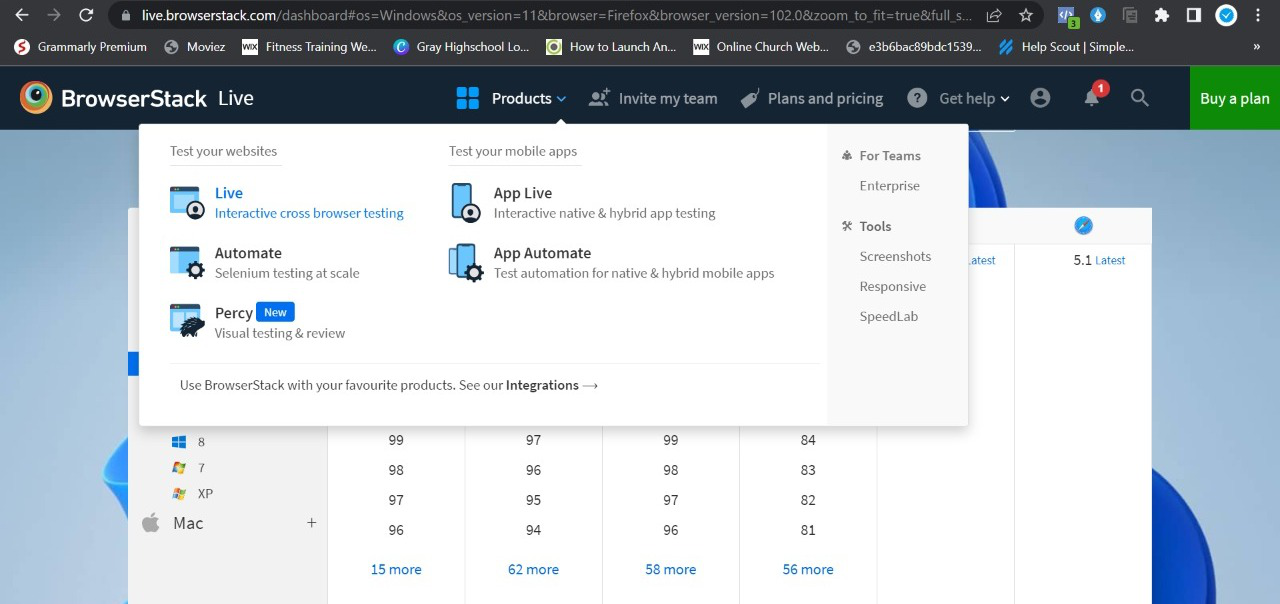
Step 2 – Select the OS & Browser from the list of available operating systems and browsers
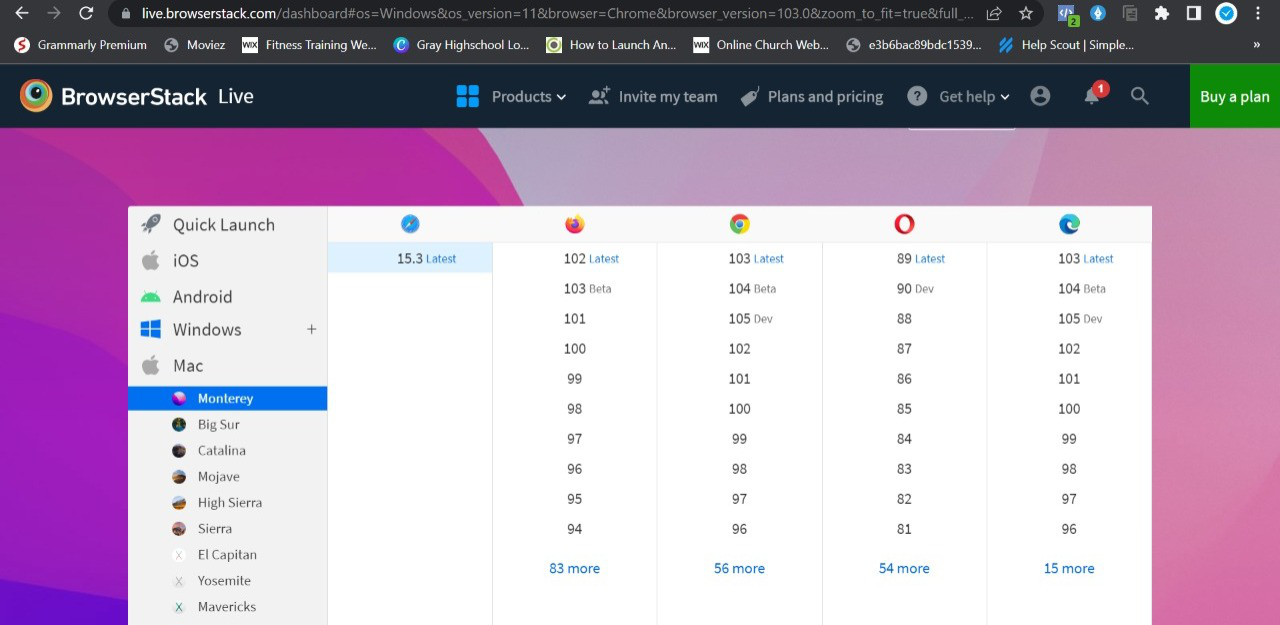
Step 3 – Insert your website URL and start testing its functions.
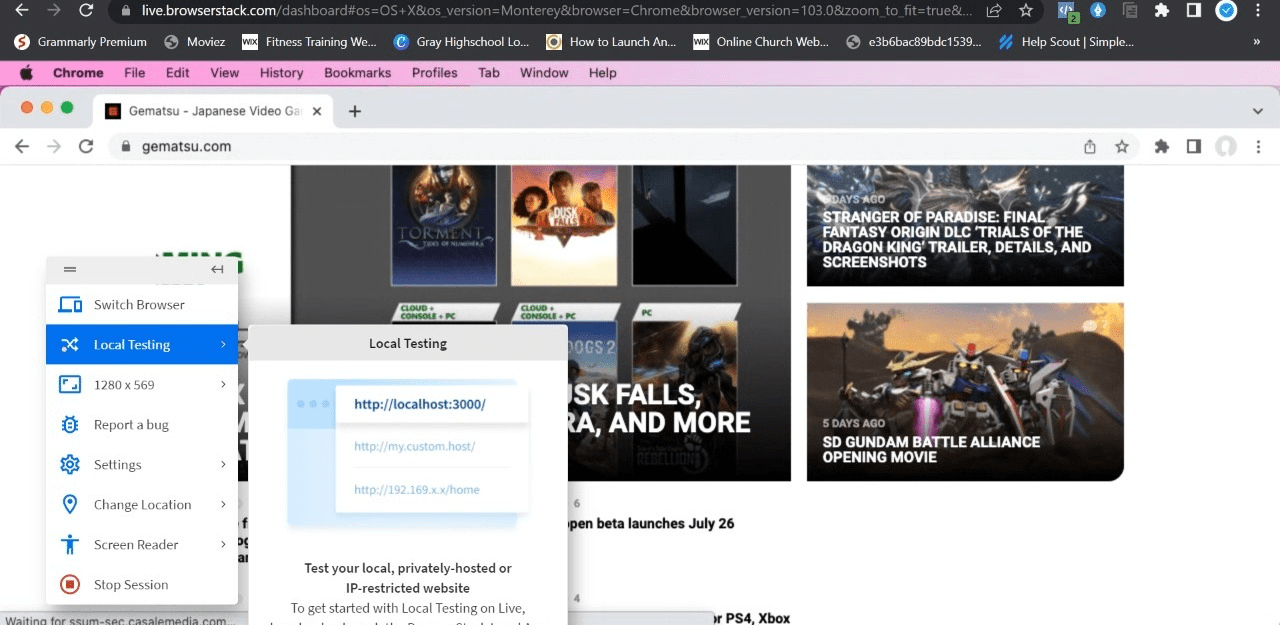
Step 4 – Get your detailed test report
By following these step-by-step processes, testers can easily identify – how to fix HTML errors on any website.
There are a lot more testing and debugging covered within the BrowserStack infrastructure, including
- Geolocation Testing: It’s mainly used to understand the website performance for different geographical locations as per your business requirements in different regions.
- Detailed bug reporting: While conducting cross-browser compatibility testing, get a detailed report of errors/bugs found on the website.
- Responsive testing: It’s used to identify the website screen resolution support on different devices.
- Local testing: Local testing is a type of testing where testers test the website as an end user’s environment.
- Network throttling: This type of testing identify the website performance on different network bandwidths
To sum up, QA testers and developers are advised to debug their HTML to identify and fix HTML errors. However, do note that you can get faster results without compromising on the accuracy and solve any HTML errors before users do by testing software in real user conditions.
Debug HTML with BrowserStack Live