
Если при попытке залогиниться в Zimbra webmail начало ругаться «network error», то скорее всего кто-то еще с вашего IP адреса (актуально для офисов) несколько раз подряд залогинился неправильно, либо, что менее вероятно, кто-то или что-то сделало 30 запросов на вебсервер zimbra за секунду.
Проверить догадку можно в логе /opt/zimbra/log/mailbox.log:
INFO  [qtp509886383-44962:http://10.117.231.45:80/service/soap/AuthRequest] [name=sales@example.com;ip=10.117.231.45;ua=zclient/8.6.0_GA_1153;] SoapEngine - handler exception
INFO  [qtp509886383-44962:http://10.117.231.45:80/service/soap/AuthRequest] [name=sales@example.com;ip=10.117.231.45;ua=zclient/8.6.0_GA_1153;] soap - AuthRequest elapsed=3
INFO  [qtp509886383-44966:http://127.0.0.1:80/service/soap/AuthRequest] [name=sales@example.com;oip=1.2.3.4;ua=zclient/8.6.0_GA_1153;] SoapEngine - handler exception
INFO  [qtp509886383-44966:http://127.0.0.1:80/service/soap/AuthRequest] [name=sales@example.com;oip=1.2.3.4;ua=zclient/8.6.0_GA_1153;] soap - AuthRequest elapsed=3
WARN  [qtp509886383-44965:https://10.117.231.45:443/?loginOp=relogin&username=sales@example.com] [] webclient - auth credentials have expired
INFO  [qtp509886383-44966:http://127.0.0.1:80/service/soap/AuthRequest] [name=sales@example.com;oip=1.2.3.4;ua=zclient/8.6.0_GA_1153;] SoapEngine - handler exception: authentication failed for [sales@example.com], invalid password
INFO  [qtp509886383-44966:http://127.0.0.1:80/service/soap/AuthRequest] [name=sales@example.com;oip=1.2.3.4;ua=zclient/8.6.0_GA_1153;] soap - AuthRequest elapsed=4
INFO  [qtp509886383-44962:http://127.0.0.1:80/service/soap/AuthRequest] [] misc - Access to IP 1.2.3.4suspended, for repeated failed login.
INFO  [qtp509886383-44965:http://127.0.0.1:80/service/soap/AuthRequest] [] misc - Access to IP 1.2.3.4suspended, for repeated failed login.
Чтобы решить эту проблему достаточно добавить офисный IP (например 1.2.3.4) в whitelist и перезагрузить mailboxd:
# su - zimbra
$ zmprov mcf +zimbraHttpThrottleSafeIPs 1.2.3.4
$ zmmailboxdctl restart
Более подробно описано тут: https://wiki.zimbra.com/wiki/DoSFilter.
Contents
- 1 Network service error after changing size related attributes
- 1.1 Problem
- 1.2 Analysis
- 1.3 Solution
- 1.4 Next
Problem
- Not able to login to admin and webclient after changing value of any attribute which exceeding the max allowed size (i.e 1000MB).
- Such as zimbraFileUploadMaxSize, zimbraMailContentMaxSize, zimbraMtaMaxMessageSize etc
Such changes usually get neglected and users start facing login issues as follows.

While investigating, the admin may notice the following log entries which are constantly appearing in /opt/zimbra/log/mailbox.log
022-04-27 20:53:19,281 WARN  [qtp195615004-782:https://xxx.xxx.xxx.xxx/] [] webclient - system failure: ,: Service Unavailable
com.zimbra.common.service.ServiceException: system failure: error while proxying request to target server: Service Unavailable
ExceptionId:qtp195615004-782:https://xxx.xxx.xxx.xxx/:1651072999281:2a0061c1a4fb9afe
Code:service.FAILURE at com.zimbra.common.service.ServiceException.FAILURE(ServiceException.java:288)
And, following entries from /opt/zimbra/log/nginx.log
2022/04/27 21:37:58 [error] 211623#0: *5 zm lookup: lookup handler  xxx.xxx.xxx.xxx:7072 sent error response: 503 Service Unavailable while SSL handshaking to lookup handler, client: aaa.aaa.aaa.aaa, server: mail.example.tld, request: "POST /service/soap/NoOpRequest HTTP/1.1", host: " xxx.xxx.xxx.xxx", referrer: "https:// xxx.xxx.xxx.xxx/#8"
2022/04/27 21:37:58 [warn] 211623#0: *5 zmauth: an error occurs during zm lookup: , fall back to IPHASH to get the upstream route while SSL handshaking to lookup handler, client: aaa.aaa.aaa.aaa, server: mail.exampl.tld, request: "POST /service/soap/NoOpRequest HTTP/1.1", host: " xxx.xxx.xxx.xxx", referrer: "https:// xxx.xxx.xxx.xxx/#8"
Analysis
- If the issue is unknown, start thinking of all the changes done on the server recently and revert all the changes one-by-one and check which change was affecting the server.(if the changes were done from the CLI, checking bash history will help quickly.)
- If various changes are done from the admin panel but not sure which were they, execute the below command and check all Size related attributes and check whether the size of any attribute is showing exceptionally high.
su - zimbra
zmprov -l gacf | grep -i size
zmprov -l gs `zmhostname` | grep -i size
- Also, search for the below kind of error in the /opt/zimbra/log/mailbox.log, there will be only one entry of this hence it is possible it may get overlooked while analysing the log file. (instead of zimbraFileUploadMaxSize there could be any attribute hence don’t search using the keyword zimbraFileUploadMaxSize)
com.zimbra.cs.account.AccountServiceException: zimbraFileUploadMaxSize must be a valid long:
at com.zimbra.cs.account.AccountServiceException.INVALID_ATTR_VALUE(AccountServiceException.java:212)
Once find the root cause do the following
Solution
- Verify the existing value on zimbraFileUploadMaxSize.
zmprov -l gcf zimbraFileUploadMaxSize
- Now change the value to the allowed limit as follows (Example: let’s set it to 21MB) and restart mailbox services.
zmprov -l mcf zimbraFileUploadMaxSize 2147483647
zmmailboxdctl restart
Next
- If the above doesn’t resolve the issue, NE customers can raise a case with Zimbra support and provide the following details while submitting the case.
- Log files from the below location (if having a multi-server environment, provide the logs from the respective servers)
- -/opt/zimbra/log/mailbox.log
- -/opt/zimbra/log/ngnx.log
- An output of the following commands.
su - zimbra
zmprov -l gacf
zmprov -l gs `zmhostname`
zmlocalconfig
zmcontrol -v
Above are quite basic details, that are required to start an investigation on the initial level at least, further, the support engineer may ask for more details If needed.
Submitted by: Amol Mistry
После увеличения количества пользователей Zimbra появились жалобы, что при входе в веб интерфейс появляется «Ошибка сети». Эта проблема связана с работой встроенного в Zimbra 8.0 и старше метода защиты от DoS
Пользователи начали жаловаться, что периодически при попытке входа возникает «Ошибка сети». Анализ логов выявил следующее сообщение:
2016-04-12 09:22:30,489 INFO [qtp509886383-3765:http://127.0.0.1:80/service/soap/AuthRequest] [] misc - Access to IP 1.2.3.4 suspended, for repeated failed login.
Выяснилось, что это срабатывает встроенная, начиная с версии 8.0 защита от DoS. Настройка осуществляется с помощью нескольких параметров:
- zimbraHttpDosFilterDelayMillis — задержка, которая применяется ко всем запросам выше лимита, прежде чем они будут рассмотрены. В миллисекундах. Возможны варианты в виде значения от -1,0,1 и более. Где -1 — отклонять запросы сразу. 0 — не выставлять задержку, 1 и более — задержка в мс. По-умолчанию -1.
- zimbraHttpDosFilterMaxRequestsPerSec — Лимит количества запросов в секунду. По-умолчснию 30
- zimbraHttpThrottleSafeIPs — белый список IP, с которых запросы не проверяются на их количество.
Решение проблемы кроется в подкручивании этих ручек до комфортных значений и последующего перезапуска mailbox сервиса (zmmailboxdctl restart)
Однако, есть нюансы, если у Вас так называемая «Multi server» кофигурация, то есть несколько mailbox серверов за proxy.
Что бы все это дело работало, необходимо для начала сделать так, что бы mailbox знали о реальных IP, с которых приходят запросы. По-умолчанию в логах отображается IP proxy.
Это, конечно, логично, но пока я обратил внимание на IP адрес запроса в логах чуть крутилку DoS фильтра не сломал…
Для этого проверяю текущее значение параметра zimbraMailTrustedIP:
$ zmprov gcf zimbraMailTrustedIP
Добавляю IP zimbra-proxy
$ zmprov mcf +zimbraMailTrustedIP 10.202.1.31
выполняю на всех mailbox серверах:
$ zmmailboxdctl restart
После этого в логах будут реальные IP и политики DoS будут применяться к ним и все будет работать как задумано.
Ошибка сети
DNMit, 20/01/2014 — 08:09
Добрый день.
Прошу помощи в решении недавно возникшей проблемы в ZIMBRA.
Пользователи работают с почтой через web интерфейс, навтроена адресная книга LDAP.
C недавнего времени стала часто появляться ошибка «Ошика сети», вот что в деталях :
method: [unknown]
msg: system failure: ldap search failed
code: service.FAILURE
и так далее…
Быть может кто то сталкивался с подобной проблемой или подскажет куда копать?
Обновил ZIMBRA до последнего релиза 8.06 не помогло.
Новые пользователи

Сейчас на сайте
Сейчас на сайте 0 пользователей и 0 гостей.
0
3
Добрый день коллеги, возникла проблема с доступом к веб интерфейсу zimbra 8.6.0. Создал топик на оф. сайте но что то там не отвечают.
Ссылка:
https://forums.zimbra.org/viewtopic.php?f=15&t=61966#p276194
(извиняюсь что здесь не описываю проблему полностью как там)
тут просто не очень удобно размещать лог.
Почта по IMAP работает, через оутлук, а к web клиенту не хочет подключаться, выдает ошибку.
Debug message: auth credentials have expired
An exception:
com.zimbra.common.soap.SoapFaultException: auth credentials have expired
ExceptionId:qtp509886383-139:https://192.168.0.4:8443/service/soap/CreateWaitSetRequest:1494401874887:990b7f4e44716f41:SoapEngine266
Code:service.AUTH_EXPIRED
гуглил, но решения не нашел. Пишут:
Since zmprov and zmmailbox (with the -z/--zadmin option) have access to authenticate as admin, they should (at least have the option to) automatically re-authenticate when the admin auth token lifetime has passed.Не понял, что имеется ввиду под этой фразой «Срок службы администратора аутентификации маркера прошло», как это можно посмотреть или изменить?
/SOLVED ISSUE /Solved Zimbra Web Client A Network Service Error has Occured
-
June 15, 2016 -
Rio Prayoga -
SOLVED ISSUE -
2 Comments
Issue
User tidak dapat login via Zimbra Web Client dan mendapatkan error “A Network Service Error has Occured” seperti gambar berikut.
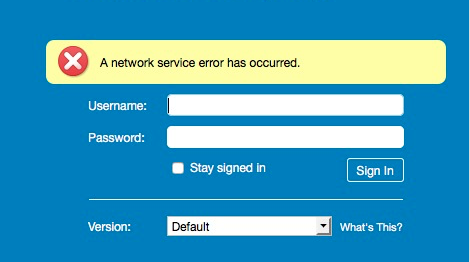
Issue ini terjadi setelah proses upgrade versi zimbra dari 8.0.9 ke 8.6. Dan issue ini pun bisa di bilang rada aneh. Pada saat error terjadi, dicoba lagi beberapa menit, misalkan 5 menit, user tersebut berhasil login. Dan berselang sekitar 30 menit sampai 1 jam, issue tersebut terjadi lagi.
Analisa
Cek log mailbox.log terdapat info log seperti berikut.
|
2016—06—15 08:18:38,477 INFO [qtp509886383—10137:http://127.0.0.1:80/service/soap/AuthRequest] [] misc — Access to IP 10.3.129.185suspended, for repeated failed login. 2016—06—15 08:18:41,676 INFO [qtp509886383—10137:http://127.0.0.1:80/service/soap/AuthRequest] [] misc — Access to IP 10.3.129.185suspended, for repeated failed login. 2016—06—15 08:18:57,173 INFO [qtp509886383—10147:http://127.0.0.1:80/service/soap/AuthRequest] [] misc — Access to IP 10.3.129.185suspended, for repeated failed login. 2016—06—15 08:24:42,929 INFO [qtp509886383—10178:http://127.0.0.1:80/service/soap/AuthRequest] [] misc — Access to IP 10.3.129.185suspended, for repeated failed login. 2016—06—15 08:25:17,087 INFO [qtp509886383—10211:http://127.0.0.1:80/service/soap/AuthRequest] [] misc — Access to IP 10.3.129.185suspended, for repeated failed login. 2016—06—15 08:25:20,918 INFO [qtp509886383—10185:http://127.0.0.1:80/service/soap/AuthRequest] [] misc — Access to IP 10.3.129.185suspended, for repeated failed login. 2016—06—15 08:25:26,236 INFO [qtp509886383—10211:http://127.0.0.1:80/service/soap/AuthRequest] [] misc — Access to IP 10.3.129.185suspended, for repeated failed login. 2016—06—15 08:25:36,301 INFO [qtp509886383—10215:http://127.0.0.1:80/service/soap/AuthRequest] [] misc — Access to IP 10.3.129.185suspended, for repeated failed login. 2016—06—15 08:25:40,283 INFO [qtp509886383—10207:http://127.0.0.1:80/service/soap/AuthRequest] [] misc — Access to IP 10.3.129.185suspended, for repeated failed login. 2016—06—15 08:26:03,676 INFO [qtp509886383—10216:http://127.0.0.1:80/service/soap/AuthRequest] [] misc — Access to IP 10.3.129.185suspended, for repeated failed login. 2016—06—15 08:26:36,992 INFO [qtp509886383—10220:http://127.0.0.1:80/service/soap/AuthRequest] [] misc — Access to IP 10.3.129.185suspended, for repeated failed login. 2016—06—15 08:26:44,257 INFO [qtp509886383—10220:http://127.0.0.1:80/service/soap/AuthRequest] [] misc — Access to IP 10.3.129.185suspended, for repeated failed login. 2016—06—15 08:27:16,855 INFO [qtp509886383—10222:http://127.0.0.1:80/service/soap/AuthRequest] [] misc — Access to IP 10.3.129.185suspended, for repeated failed login. |
10.3.129.185 dan 10.3.129.186 adalah IP Proxy Server Zimbra.
Setelah ditelusuri, ternyata dimulainya versi 8.5 dan seterusnya terdapat fitur terbaru untuk mencegah IP berbahaya yang mencoba serangan brute force. Bahkan IP ter-blacklist dikarenakan beberapa user memasukkan password dengan salah beberapa kali. Jika IP tersebut sudah ter-blacklist, maka akan berpengaruh pada seluruh user yang menyebabkan issue ini terjadi.
Resolution
Tambahkan IP server Proxy & Mailbox pada daftar IP bersih pada server mailbox.
|
zmprov mcf +zimbraHttpThrottleSafeIPs 10.3.129.185 zmprov mcf +zimbraHttpThrottleSafeIPs 10.3.129.186 zmprov mcf +zimbraHttpThrottleSafeIPs 10.3.129.189 zmprov mcf +zimbraHttpThrottleSafeIPs 10.3.129.190 zmprov ms `zmhostname` +zimbraHttpThrottleSafeIPs 10.3.129.185 zmprov ms `zmhostname` +zimbraHttpThrottleSafeIPs 10.3.129.186 zmprov ms `zmhostname` +zimbraHttpThrottleSafeIPs 10.3.129.189 zmprov ms `zmhostname` +zimbraHttpThrottleSafeIPs 10.3.129.190 zmmailboxdctl restart |
Bagi Kamu Yang Ingin Mendapatkan Penawaran Incident Support atau Local Support Untuk Perusahaan/Institusi Kamu Saat Ini. Silahkan klik dibawah ini dan tuliskan pesan di layanan chat yang tersedia
Zimbra Support
About The Author

Rio Prayoga
Pendiri dan Penulis Aktif ilmuzimbra.com.
Related Articles
-
Solved – InnoDB: Index “i_conv_id” is marked as corrupted
-
Tips – Menghilangkan ***UNCHECKED*** Pada Subject Email
-
Tips Memperbaiki Memcached Amplification Attack Zimbra
-
Solved Unreasonable Virtual Alias Maps Map Expansion Size
-
Solved Server Status Pada Admin Console Terlihat Server Localhost Dengan Service Down
Comments
-
 Septiano Patricio da Costa August 13, 2018 at 2:03 pm
 saya lupa dengan pasword zimbra saya bagaimana saya bisa menghakses kembali
-
Rio Prayoga Article Author
August 13, 2018 at 2:07 pmHalo Septiano,
Apakah anda admin zimbra nya ? atau hanya sebatas user ?
Terimakasih.
-
 Septiano Patricio da Costa August 13, 2018 at 2:03 pm
  Rio Prayoga
 Leave a Reply
This site uses Akismet to reduce spam. Learn how your comment data is processed.
-
massimo
- Posts: 4
- Joined: Tue May 03, 2016 7:52 am
[SOLVED] zimbra web client is not working
Hi to all.
I just installed zimbra (version 8.6.0 on centos 64) for the first time and is working.
I would like to use the webmail client but is not working, browse this urls give me ERR_CONNECTION_REFUSED (admin is working):
https://ipserver
https://ipserver/mail
https://ipserver/zimbra/mail
this tasks are running:
amavis Running
antispam Running
antivirus Running
dnscache Running
ldap Running
logger Running
mailbox Running
memcached Running
mta Running
opendkim Running
service webapp Running
snmp Running
spell Running
stats Running
zimbra webapp Running
zimbraAdmin webapp Running
zimlet webapp Running
zmconfigd Running
Last edited by massimo on Tue May 03, 2016 1:02 pm, edited 1 time in total.
-

DualBoot
- Elite member

- Posts: 1326
- Joined: Mon Apr 18, 2016 8:18 pm
- Location: France — Earth
- ZCS/ZD Version: ZCS FLOSS — 8.8.15 Mutli servers
- Contact:


Re: zimbra web client is not working
Postby DualBoot » Tue May 03, 2016 12:06 pm
FireWall ?
Give a pic of the error.
And look in the log.
The Guy — DualBoot
PostMaster — WikiMaster — SysAdmin
«Free Your Mind. Think Open Source»
april.org
Zetalliance Member — zetalliance.org
-
massimo
- Posts: 4
- Joined: Tue May 03, 2016 7:52 am
[SOLVED] zimbra web client is not working
Postby massimo » Tue May 03, 2016 12:25 pm
Solved thank you was on port 8443.
-
vieira.fa
- Posts: 2
- Joined: Tue Jan 23, 2018 11:36 pm
Re: [SOLVED] zimbra web client is not working
Postby vieira.fa » Tue Jan 23, 2018 11:40 pm
Boa Noite
Estou com este mesmo problema informado neste forum, liberei no firewall a porta 8443, agora gostaria de saber onde e configurado a URL cliente para associa o PREAUTH para o mode #1
fico no aguardo
Obrigado
Return to “Users”
Who is online
Users browsing this forum: No registered users and 4 guests
By default Zimbra uses DoSFilter Throttling Mechanism to avoid large number of request over a short period of time. So if the Zimbra server see requests more than safe amount from an specific IP address / user that will be throttled and the user may face the “A network service error has occurred” error.
This feature is available in 8.5+ to prevent a malicious IP from trying brute force attacks.
For ZCS 8.7 or above
zmprov mcf zimbraHttpThrottleSafeIPs 10.1.1.2/32 zimbraHttpThrottleSafeIPs 192.168.9.0/24
or to append to an existing list of multi-valued zimbraHttpThrottleSafeIPs
zmprov mcf +zimbraHttpThrottleSafeIPs 10.1.1.2/32
zmprov mcf +zimbraHttpThrottleSafeIPs 192.168.9.0/24
For ZCS 8.6, 8.5 or previous
zmprov mcf zimbraHttpThrottleSafeIPs 10.1.1.2 zimbraHttpThrottleSafeIPs 192.168.9.5
or to append to an existing list of multi-valued zimbraHttpThrottleSafeIPs
zmprov mcf +zimbraHttpThrottleSafeIPs 10.1.1.2
zmprov mcf +zimbraHttpThrottleSafeIPs 10.1.1.50
zmprov mcf +zimbraHttpThrottleSafeIPs 192.168.9.5
zmprov mcf +zimbraHttpThrottleSafeIPs 192.168.9.6
Mailbox server restart is required when modifying these attributes.
zmmailboxdctl restart
Check these links below for more parameters on blocking
https://wiki.zimbra.com/wiki/DoSFilter
https://wiki.zimbra.com/wiki/Users_get_%27Network_service_error%27,_and_mailbox.log_shows_%27Access_to_IP_x.x.x.x_suspended,_for_repeated_failed_login%27
This entry was posted in Zimbra. Bookmark the permalink.
Приветствую. есть почта zimbra v8.6. до этого момента все работало прекрасно. Не знаю что случилось на выходных, но утром при отправке файла (именно при вложении файла) ошибку выдает: «критично, ошибка при отправке файла». пустое сообщение отправляет без проблем, даже отправляет небольшие файлы до 20Кб. Максимальная отправка файла 20480 Кб стоит. А если попытаться отправить ранее принятые файлы вы 20Кб, то следующая ошибка:
method: [unknown]
msg: system failure: IOExecption
code: service.FAILURE
detail: soap:Receiver
trace: qtp509886383-2219:https://0.0.0.0:443/service/soap/SendMsgRequest:1558968019103:82e34a8dd072ab7e
request:
Body: {
SendMsgRequest: {
_jsns: «urn:zimbraMail»,
m: {
attach: {
mp: [
// [0]:
{
mid: «13400»,
part: «2»
}
]
},
e: [
// [0]:
{
a: «user3@domain.kg»,
p: «user3»,
t: «t»
},
// [1]:
{
a: «user1@domain.kg»,
p: «пользователь1»,
t: «f»
}
],
idnt: «29b90c12-d0ea-4324-a357-adca51676437»,
irt: {
_content: «<000001d511fa$8d6377a0$a82a66e0$@domain.kg>»
},
mp: [
// [0]:
{
ct: «multipart/alternative»,
mp: [
// [0]:
{
content: {
_content: «
От: «пользователь2» <user2@domain.kg>
Кому: «user1» <user1@domain.kg>
Отправленные: Пятница, 24 Май 2019 г 12:33:08
»
},
ct: «text/plain»
},
// [1]:
{
content: {
_content: «<html><body><div style=„font-family: arial, helvetica, sans-serif; font-size: 12pt; color: ф#000000“><div><br></div><div><br></div><hr id=„zwchr“ data-marker=»__DIVIDER__«><div data-marker=»__HEADERS__«><b>От: </b>„Пользоваетль2“ <user@domain.kg><br><b>Кому: </b>„user1“ <user1@domain.kg><br><b>Отправленные: </b>Пятница, 24 Май 2019 г 12:33:08<br></div><br><div data-marker=»__QUOTED_TEXT__«><style><!—
@font-face
{font-family:Calibri;
panose-1:2 15 5 2 2 2 4 3 2 4;}
p.MsoNormal, li.MsoNormal, div.MsoNormal
{margin:0cm;
margin-bottom:.0001pt;
font-size:11.0pt;
font-family:„Calibri“,„sans-serif“;
mso-fareast-language:EN-US;}
a:link, span.MsoHyperlink
{mso-style-priority:99;
color:blue;
text-decoration:underline;}
a:visited, span.MsoHyperlinkFollowed
{mso-style-priority:99;
color:purple;
text-decoration:underline;}
span.EmailStyle17
{mso-style-type:personal-compose;
font-family:„Calibri“,„sans-serif“;
color:windowtext;}
.MsoChpDefault
{mso-style-type:export-only;
font-family:„Calibri“,„sans-serif“;
mso-fareast-language:EN-US;}
@page WordSection1
{size:612.0pt 792.0pt;
margin:2.0cm 42.5pt 2.0cm 3.0cm;}
div.WordSection1
{page:WordSection1;}
—></style><div class=„WordSection1“><p class=„MsoNormal“> </p></div><br></div></div></body></html>»
},
ct: «text/html»
}
]
}
],
origid: «13400»,
rt: «w»,
su: {
_content: «Fwd:»
}
},
suid: 1558970392895
}
},
Header: {
context: {
_jsns: «urn:zimbra»,
account: {
_content: «user1@domain.kg»,
by: «name»
},
authToken: «(removed)»,
csrfToken: «0_80e024842bed11b8326697d6acf7e70408c35dfe»,
notify: {
seq: 16
},
session: {
_content: 11934,
id: 11934
},
userAgent: {
name: «ZimbraWebClient — GC72 (Win)»,
version: «8.6.0_GA_1153»
}
}
}
в понедельник с утра на 3 почтовиках под зимброй сначала отвалились вебморды. При заходе в режиме AJAX. Вернее после ввода логина пароля у юзеров дальше ничего не происходило.Но админская веб консоль работала. Белый экран как говориться. Можно было зайти в режиме HTML но обратил внимание что не было «картинок» названий пунктов меню. Я так понимаю они подгружаются из вне. После обеда заработали вебморды. Но при попытке аттачмента на данный момент…пишет «error uploading file». Все работали на версиях 8.6.0 und 8.7.0. open source. Но при этом почта через почтовые клиенты типа Thunderbird пахала и аттачи нормально приклеивались (и пашет сейчас).
Вопрос…в каких логах зимбры смотреть ? Там их такая туча. В «обычных»(mail.log,error_mail,zimbra.log..etc.) никаких алярмов по поводу AJAX не пишет.
На одном пришлось тупо переставить Зимбру на свежую с сохранением почты и хешей паролей (есть хорошие скрипты).
-
Вопрос заданболее трёх лет назад
-
357 просмотров
This is my experience with Zimbra who cannot upload a file from webmail. Some guidelines obtained from Zimbra Forums, Lorenzo Milesi Blog and my instinct 🙂
Previously, the Zimbra webmail stuck after user login. And the solution has been written here: https://imanudin.net/2019/05/27/solved-zimbra-webmail-stuck-after-login/. But some of the visitors this blog still getting problem after performing a solution from that article. So, I tried to examine the problem more deeply and looking for a solution from the Zimbra forum and others.
And this is what I do :
– Remove authorized_keys and update SSH Key
su - zimbra

rm /opt/zimbra/.ssh/authorized_keys

zmsshkeygen

zmupdateauthkeys
– Stop Zimbra service
zmcontrol stop
Stopping Zimbra service to ensure that no service is running as a Zimbra user. If there are still services running as Zimbra user, the service can be suspected
– Check crontab
When I check Zimbra crontab, I found this line
*/30 * * * * /opt/zimbra/log/zmswatcher
*/60 * * * * /opt/zimbra/lib/zmcheckexpiredcerts
Sometimes, I get cbstat service. The file is not part of cbpolicyd. You can find cbstat from /opt/zimbra/cbpolicyd/bin/. You cannot remove the line from crontab before stopping the script. Please follow the next instruction below
– Check PID and do not give access permission
You will found pid at /tmp folder. In my case, I found zmcheckexpiredcerts.pid and cbstat.pid. Change the permission of the PID file. Perform below command as ROOT
cd /tmp/

chmod a-rwx zmcheckexpiredcerts.pid cbstat.pid

chmod a-rwx /opt/zimbra/log/zmswatcher

chmod a-rwx /opt/zimbra/lib/zmcheckexpiredcerts
– Check the running script and kill
ps ax | grep -i zmswatch

ps ax | grep -i zmcheckexpiredcerts

ps ax | grep -i cbstat
You will find scripts that run like this and kill PID
16873 ?        Sl     0:17 /opt/zimbra/log/zmswatch
16533 ?        S      0:00 /opt/zimbra/cbpolicyd/bin/cbstat
kill -9 16873 16533
– Check the files that have been infected to upload malware
grep -R '(request.getParameter.' /opt/zimbra/mailboxd

grep -R '(request.getParameter.' /opt/zimbra/jetty

grep -R "if.*equals(" /opt/zimbra/mailboxd

grep -R "if.*equals(" /opt/zimbra/jetty
You will get an infected file like this :

Delete infected files that are recognized by the grep command. You can check deeper with strange lines between if and equals
if ( "XXXXxx8I9_Q6ATeWB5DuB_v_OT4EKtyD7tmCXxxxx" .equals
grep -R "XXXXxx8I9_Q6ATeWB5DuB_v_OT4EKtyD7tmCXxxxx" /opt/zimbra/mailboxd
Sometimes, strange lines infect the login.jsp file. Please backup first before you delete it. Or you can replace login.jsp file from another Zimbra that use the same version
– Please make sure there are no processes running as Zimbra users.
Perform this command to check
top U zimbra
– Remove Script
If all infected files have been deleted. You can delete the script that was running before
rm /opt/zimbra/log/zmswatch

rm /opt/zimbra/cbpolicyd/bin/cbstat

rm /opt/zimbra/lib/zmcheckexpiredcerts
– Recreate crontab using this guidance: https://wiki.zimbra.com/wiki/Step_to_rebuilt_crontab_file_of_zimbra_user
– Change permission upload folder
chown zimbra.zimbra /opt/zimbra/data/tmp

chown zimbra.zimbra /opt/zimbra/data/tmp/upload

chmod 777 /opt/zimbra/data/tmp

chmod 750 /opt/zimbra/data/tmp/upload
– Download and install Zimbra patch (if any)
The permanent solution is to migrate your Zimbra server to a new one. You can follow the guidelines made by Zimbra here: https://wiki.zimbra.com/wiki/Steps_To_Rebuild_ZCS_Server
If you need professional services, do not hesitate to contact me 🙂
Good luck 🙂
Checked the console…getting some depreciation warnings and XML parsing errors. Perhaps upgrade to 8.7.11 is overdue. The 401 errors are strange, auth/access works in reverse….
Synchronous XMLHttpRequest on the main thread is deprecated because of its detrimental effects to the end user's experience. For more help http://xhr.spec.whatwg.org/
domain:1642
------------------------------------- Loading package: MailCore
domain:2261:1
------------------------------------- Loading package: ContactsCore
domain:2261:1
------------------------------------- Loading package: Startup2

XML Parsing Error: syntax error
Location: https://domain/service/extension/dav_download/
Line Number 1, Column 1:
dav_download:1:1
unreachable code after return statement
[Learn More]
%20line%201767%20%3E%20eval:6025
Source map error: request failed with status 401
Resource URL: https://domain/service/zimlet/_dev/tk_barrydegraaff_owncloud_zimlet/markdown/purify.js?v=161025050454&language=en&country=GB&debug=1
Source Map URL: purify.js.map
[Learn More]
Source map error: request failed with status 401
Resource URL: https://domain/service/zimlet/_dev/tk_barrydegraaff_owncloud_zimlet//ViewerJS/video-js/video.js
Source Map URL: video.js.map
[Learn More]
XML Parsing Error: syntax error
Location: https://domain/service/extension/dav_download/
Line Number 1, Column 1: